What Is SEO? A Beginner’s Guide to Search Engine Optimization
Learn what SEO means, how Google Search works, and how to improve your website's visibility through content, technical SEO and practical beginner strategies.
On this page
SEO helps the right people discover your website through search engines. This guide explains how Google finds pages, what makes content valuable, and how beginners can improve organic search visibility by making useful content easier to discover.
1. What Is SEO?
SEO stands for Search Engine Optimization. In simple terms, it means improving your website and its content so search engines can discover, understand, and show relevant pages to people looking for what you offer. Its main goal is better visibility in organic search results; listings that are not paid advertisements.
No matter what your niche is, if you have a website, you want it to be found by your intended readers, customers, or audience. Whether you publish a personal blog, run an online store, or offer local or professional services, you want to reach the people interested in what you provide. SEO helps make your website more discoverable to that intended audience.
Suppose you run a website that reviews laptops and publish an article called Best Laptops for College Students. When someone searches Google for “best laptops for college students,” you would like that article to appear among the useful results. SEO improves your opportunity to compete for that visibility.
The central idea is simple: Google’s search systems aim to present results that best satisfy a searcher’s query. Your first task is to create genuinely useful, accurate, and original content that deserves to be found. SEO then helps Google’s automated systems find the page, understand what it covers, and assess its relevance to a search. It can also improve usability and help you earn references from other websites.
Google SEO cannot guarantee a first-place ranking. It is an ongoing effort to make valuable content easier to find and evaluate, not a way to disguise poor content.
2. Why Is SEO Important?
SEO can connect your website with people who are already searching for relevant answers, services, or products.
Imagine a college student seeking laptop buying advice. If your comparison genuinely helps them understand price, weight, battery life, and software requirements, appearing in a relevant search can bring the article to precisely the person who needs it.
For example, SEO can help your website in three ways:
- Relevant visitors. People arrive while actively searching for something related to your website, although not every search signals a purchase.
- Potentially lasting visibility. A useful, current page may attract organic visits for months or years, though rankings and demand can change.
- Broader opportunities. Readers may explore other articles, enquire about services, subscribe to updates, or become customers.
SEO versus paid search
Paid search advertisements buy sponsored placements. Organic SEO aims to earn visibility without paying for each organic click. SEO itself is not necessarily free: good research, writing, technical maintenance, and professional assistance require time or money. Paid campaigns can bring traffic relatively quickly; organic visibility generally takes longer and is never guaranteed.
What is a SERP?
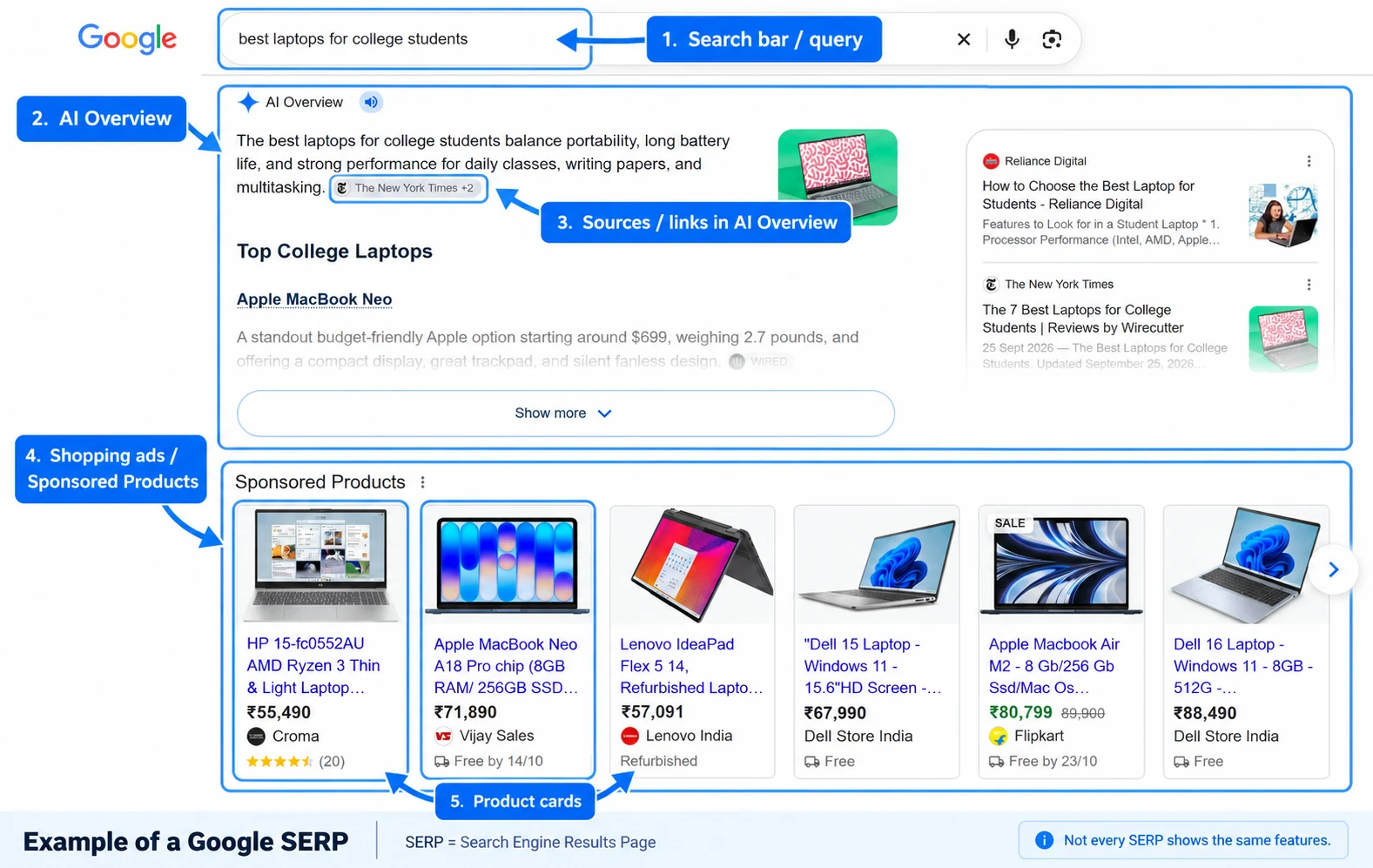
SERP means Search Engine Results Page: the page a search engine displays after a search. Search Google for “best laptops for college students,” and the resulting page is a SERP.
Depending on the query, a SERP can contain organic results (unpaid listings), sponsored results (ads), featured snippets (prominent extracts), AI Overviews (AI-generated summaries with supporting links), and features such as images, videos, shopping results, or local maps. Not every search shows every feature.
For website owners, SEO can influence visibility in organic listings and some other search features. This is why a ranking position does not by itself tell you how many clicks a page will receive.
3. How Do Search Engines Work?
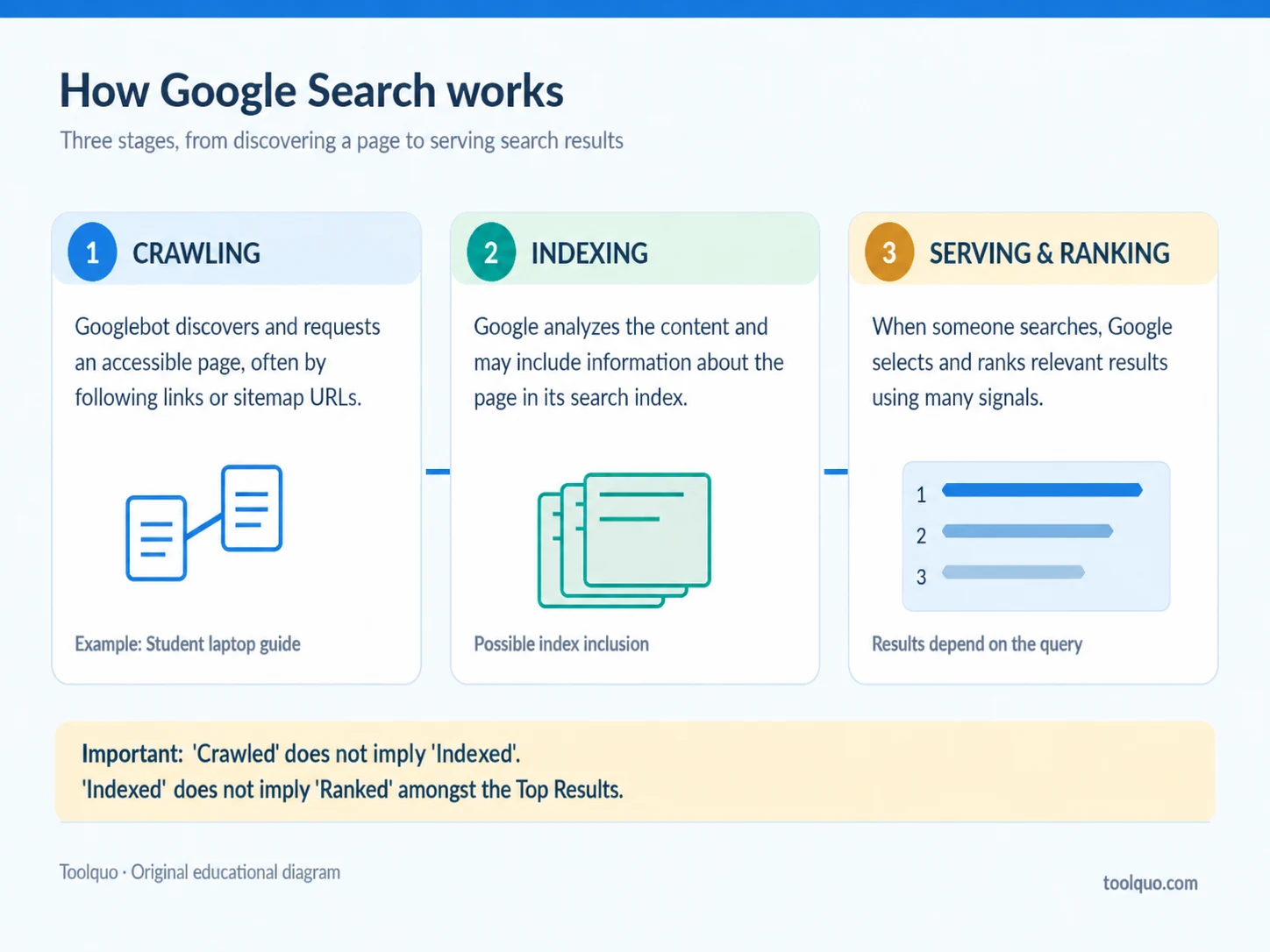
To understand how SEO works, first understand how Google Search processes pages. It has three broad stages: crawling, indexing, and serving search results. These stages are related, but they perform different jobs.
Crawling: discovering and retrieving a page
Technical definition: Crawling is the automated process of discovering URLs and requesting their content. Google uses software called crawlers or bots, including Googlebot, to visit accessible pages.
In everyday terms: Publishing your laptop article is like putting a new book on a shelf nobody has checked yet. Google first needs to find the book and open it. Googlebot may discover your article by following a link from your homepage, a link on another website, or a URL listed in your sitemap. A sitemap is a file identifying URLs you want search engines to know about. Submitting one helps discovery; it does not guarantee crawling or indexing.
Indexing: understanding and cataloguing a page
Technical definition: Indexing is Google’s process of analyzing retrieved content and, when appropriate, storing information about it in its searchable index.
In everyday terms: A library must catalogue a book before it can reliably show it to readers seeking a particular topic. Google likewise processes the laptop article’s text, headings, images, and other signals. It may recognize that the article compares student laptops and discusses battery life, portability, and cost. Google may then include information about the page in its index, a large database used for search.
Important: A page can be crawled without being indexed. And indexing does not mean it will rank prominently. Google may decline to index a page for several reasons, including duplication or indexing restrictions.
Serving and ranking: selecting results for a query
When someone searches “best laptops for college students,” Google’s systems select relevant information from its index and decide which results to display. Relevance, helpfulness, reliability, and the query’s context can all matter. Results may differ by wording, location, device, and other factors.
Remember the sequence: Crawling → Indexing → Serving results. A discovery problem, an indexing problem, and a page that ranks poorly are not the same issue and may require different solutions. SEO helps address those different stages while keeping the reader’s needs at the centre.
Source: Google: How Search Works
4. What Helps a Website Rank Higher on Google?
Google uses multiple systems and signals rather than one public checklist or fixed score. We can nevertheless identify principles worth acting on.
4.1 Helpful content and search intent
Consider two articles about student laptops. One lists ten models and reproduces their specifications. Another accurately explains suitability for different courses, budgets, battery needs, and trade-offs. The second may serve readers better; especially if its comparisons are backed by evidence.
Search intent means the reason behind a query. “What is RAM?” calls for an explanation; “best laptops under $700” calls for a comparison; “MacBook Air price” may call for current purchasing information. The content format should match the query. For example, a shopping category page may fit a purchasing search better than a long educational article.
Google SEO applies to far more than blog posts. A shop’s category page may best satisfy a shopping query, a service page may fit a local enquiry, and a detailed guide may answer a research question. Choose the page type that suits the searcher’s need.
4.2 Originality, experience, and trust
Originality need not mean discovering a wholly new subject. It can mean testing something yourself, explaining a hard topic with unusual clarity, comparing evidence carefully, or supplying a transparent methodology. An independently measured laptop battery test could offer more value than a list copied from manufacturers’ specifications.
Google discusses quality through E-E-A-T; Experience, Expertise, Authoritativeness, and Trustworthiness. E-E-A-T is not one numerical ranking factor. The practical lesson is to be accurate, show readers where claims come from, be transparent about tests, and avoid pretending to have firsthand experience you do not have.
4.3 Building credibility within a niche
A single good article is a start. A library of complementary, high-quality pages can help readers recognize your website as a useful resource in its field.
Our laptop website might add How Much RAM Do Students Need?, Best Laptops for Engineering Students, Laptop Battery Life Explained, and Common Laptop Buying Mistakes. Each should answer a distinct question. Relevant internal links let readers explore them and help search engines discover their relationships. Over time, useful research may earn recommendations and editorial backlinks.
SEO professionals often call this topical authority. It describes depth and reputation within a subject, not a public Google score based on article quantity. Ten excellent pages may be more useful than a hundred repetitive ones. Build a genuinely valuable collection, not simply a bigger article count.
4.4 Links, technical accessibility, and usability
A backlink is a link from another website to yours. A university linking to your student-laptop guide because it finds the research helpful could introduce readers and provide a relevant reference. Manufactured links are not equivalent to genuine editorial citations.
Likewise, helpful content must be accessible. A page excluded from indexing may not appear in search; a slow, cluttered mobile page may frustrate readers. No single speed score or optimization trick compensates for poor relevance and content quality.
5. What Are the Main Types of SEO?
SEO involves three main areas: on-page SEO, technical SEO, and off-page SEO. Local SEO is an additional specialization for location-based searches. These areas overlap, but each has a different purpose.
5.1 On-page SEO: improving each page’s usefulness and clarity
For a beginner-friendly walkthrough with a real WordPress example, see our on-page SEO guide.
Keyword research. Identify the queries your audience uses. For student laptops these may include “best laptop for college,” “budget laptop for programming,” or “lightweight laptop with long battery life.” Keyword tools can estimate demand and competition, but search volume is not a promise of visits.
Keyword gap analysis. Compare your site’s relevant search visibility with competitors’. If competing sites have good pages for “laptops for architecture students” and yours has no suitable answer, you may have found an opportunity. Check whether the topic fits your audience before creating another page.
Search intent and content quality. Decide whether the user needs an explanation, comparison, product category, or service page. Then deliver an accurate, genuinely helpful answer with evidence and useful details.
Strategic keyword usage. Once you choose a main topic, use its primary phrase naturally where it helps; in a descriptive title, main heading, early explanation, and relevant section headings. Include related terms where they belong. There is no universal ideal keyword density; repeating phrases mechanically is not useful.
Title and meta description. An HTML title element describes the page and may influence Google’s clickable result title. A meta description is suggested summary text that Google may use in a search snippet; Google can choose different text. Write both clearly and accurately. The meta description is not a direct Google ranking factor.
Headings and structure. H1, H2, and H3 headings organize the page so visitors can scan its sections. A laptop guide might use “Best Budget Options,” “Battery Life,” and “How to Choose.” Descriptive structure matters more than squeezing the same keyword into every heading.
URLs. A readable address such as example.com/best-laptops-for-students/ communicates more than an arbitrary code. Avoid changing established URLs merely to insert keywords unless you have a sound reason and appropriate redirects.
Internal links. Link from your laptop comparison to a relevant RAM guide when it helps the reader. Clear anchor text explains the destination. Do not force links to unrelated articles or create several near-identical pages only to link them together.
Images and updates. Use meaningful images, appropriate descriptive alt text, and efficient file sizes. Update recommendations when models, prices, evidence, or reader needs change; changing the displayed date without substantive improvements is not an SEO strategy.
5.2 Technical SEO: making the site accessible to search engines
Technical SEO concerns how search engines discover, retrieve, interpret, and index a website.
Crawling and indexing controls. A robots.txt file provides instructions about which URLs compliant crawlers may request. A noindex directive tells supporting search engines not to include a page in their indexes.
These two controls serve different purposes:
- robots.txt controls crawler access to URLs.
- noindex controls whether a page should be included in search indexes (when the instruction can be seen by the crawler).
Blocking crawling does not necessarily prevent a URL from appearing in search results. Google usually needs to crawl a page to see its noindex instruction. A page may deliberately be marked noindex, for example when it is not intended for search visibility; applying it to a page you do want indexed would prevent normal visibility.
XML sitemaps. A sitemap helps search engines discover important URLs. It does not guarantee indexing or rankings.
Canonical URLs and duplicates. A canonical URL is the preferred main address for a page when similar content is accessible through multiple URLs. For example, the same article may load at a normal URL and at another URL containing tracking parameters. A canonical tag indicates which version you prefer Google to treat as primary. Google treats this as a signal, not an absolute command.
Broken links and redirects. A broken link leads to a missing or inaccessible page. Check and fix important broken links so visitors and crawlers can reach the intended content. For example, if you change your laptop buying guide’s URL, use a suitable permanent redirect (often a 301 redirect) to send people and search engines from the old address to the new one. Avoid irrelevant redirect destinations and excessive redirect chains.
Speed and Core Web Vitals. Loading performance, responsiveness, and visual stability affect the experience of visiting a page. Google provides Core Web Vitals to help measure these aspects. A good score is useful, not a guarantee of rankings.
Mobile usability. Pages should be readable, navigable, and functional on small screens. Google primarily uses mobile content for indexing, so essential content should be available there.
Structured data. Machine-readable markup can describe an article, product, recipe, or other supported content type. Valid markup can help Google understand a page and make certain result enhancements possible; it does not guarantee rich-result display.
Technical SEO removes obstacles. It cannot make weak content useful on its own.
5.3 Off-page SEO: earning references and reputation beyond your website
A backlink is a link from another domain to yours. Relevant editorial links can help people discover your work and may provide signals about its importance or context. Their meaning depends on relevance, source, and how the link was obtained; not simply the total count.
How can you earn them? Publish original studies, trustworthy data, unusual comparisons, educational diagrams, or other resources that people have a reason to cite. Our hypothetical laptop site might test battery life under consistent conditions, publish the methodology, and share the findings with technology writers. Useful research does not automatically receive links; outreach and discoverability can help.
What about mentions? Brand mentions and participation in relevant professional communities can introduce audiences and build a human reputation. Do not assume every unlinked mention directly improves Google rankings.
Avoid buying links intended to manipulate rankings, excessive link exchanges, and artificial link networks. These can violate Google’s spam policies. Legitimate advertising and sponsorship have their own appropriate link qualifications.
5.4 Local SEO: visibility for location-based searches
Someone searching “laptop repair shop near me” wants a nearby service, not a general buying guide. Local businesses can benefit from accurate business information, relevant location and service pages, a suitable Google Business Profile, and genuine customer reviews.
6. How to Do SEO: A Beginner’s Roadmap
The SEO basics become easier to apply when you follow a clear sequence. If you’re wondering how to improve SEO on Google, start with the steps below rather than trying to master every technique at once.
Step 1: Define your audience. Decide whom you help and what questions they ask. For a student-laptop website, begin with students’ budgets, courses, and everyday requirements.
Step 2: Find relevant search opportunities. Research potential keywords and competitor gaps, but judge each by relevance, search intent, demand, and your ability to produce something valuable.
Step 3: Plan the right page. Check the current search results. Does the topic call for a guide, a comparison, or a product category? Group closely related queries that can be answered well by the same page.
Step 4: Publish useful, original content. Explain the trade-offs, support factual claims, and distinguish your own testing from information sourced elsewhere.
Step 5: Optimize the page and its access. Write a useful title, organize headings, use keywords naturally, add relevant links and image descriptions, and check that important pages can be accessed and indexed. Make the page work well on mobile.
Step 6: Connect and promote it appropriately. Link to related pages on your own site. Share genuinely useful resources with relevant audiences or publications where appropriate; do not manufacture backlinks.
Step 7: Measure and improve. Set up Google Search Console, review relevant queries, clicks, impressions, and indexing information, and revise pages when new evidence or reader needs justify it.
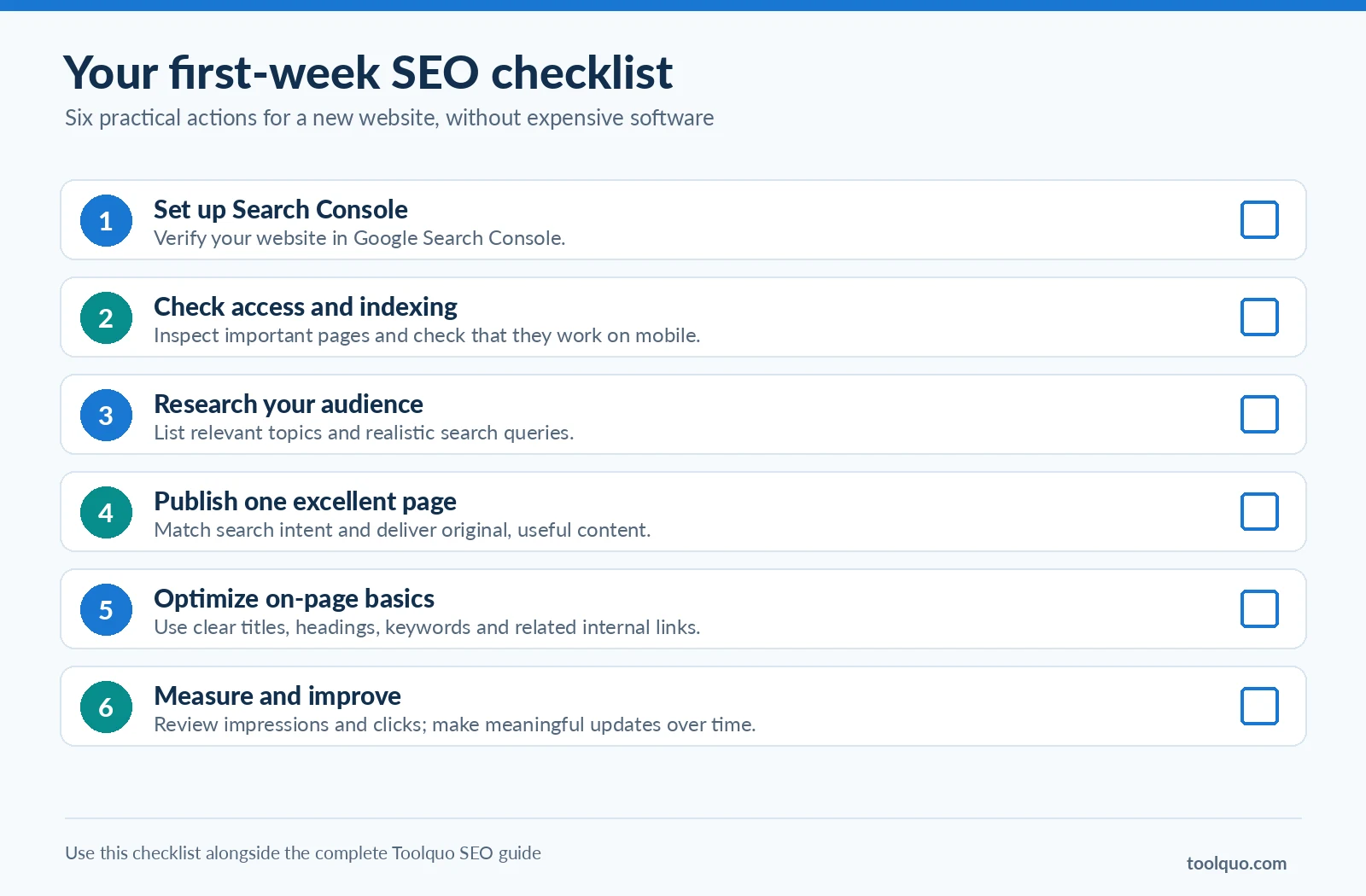
SEO for beginners: a first-week checklist
- Verify your website in Google Search Console.
- Check whether your important pages are eligible for indexing and accessible on mobile. You can inspect important URLs using the URL Inspection tool in Google Search Console and test the pages on your own phone.
- Make a short list of useful topics and realistic search queries for your audience.
- Choose one topic with clear intent and publish or substantially improve one excellent page.
- Add descriptive headings, natural keywords, and relevant internal links.
- Check your results over time; do not expect instant rankings.
What should you prioritize first?
- Allow important pages to be accessed and indexed ; Beginner priority: Essential; Why: A blocked or excluded page cannot compete normally in Google Search
- Create genuinely helpful, original content ; Beginner priority: Essential; Why: Gives readers a reason to choose your page
- Target relevant, achievable queries ; Beginner priority: High; Why: Helps spend effort where you can serve real needs
- Use clear titles, headings, and internal links ; Beginner priority: High; Why: Supports clarity, navigation, and discovery
- Fix serious technical or mobile problems ; Beginner priority: High when present; Why: Removes real usability or access obstacles
- Earn relevant backlinks ; Beginner priority: Ongoing; Why: Builds discovery and genuine references
- Buy an all-in-one paid SEO subscription ; Beginner priority: Optional; Why: Useful only when it solves a practical limitation
7. Smart SEO Strategies: Find Better Opportunities
Knowing what SEO involves is different from knowing where to spend limited time. For a newer site, choosing good opportunities often matters more than attempting every advanced technique.
7.1 Look for valuable, realistically competitive keywords
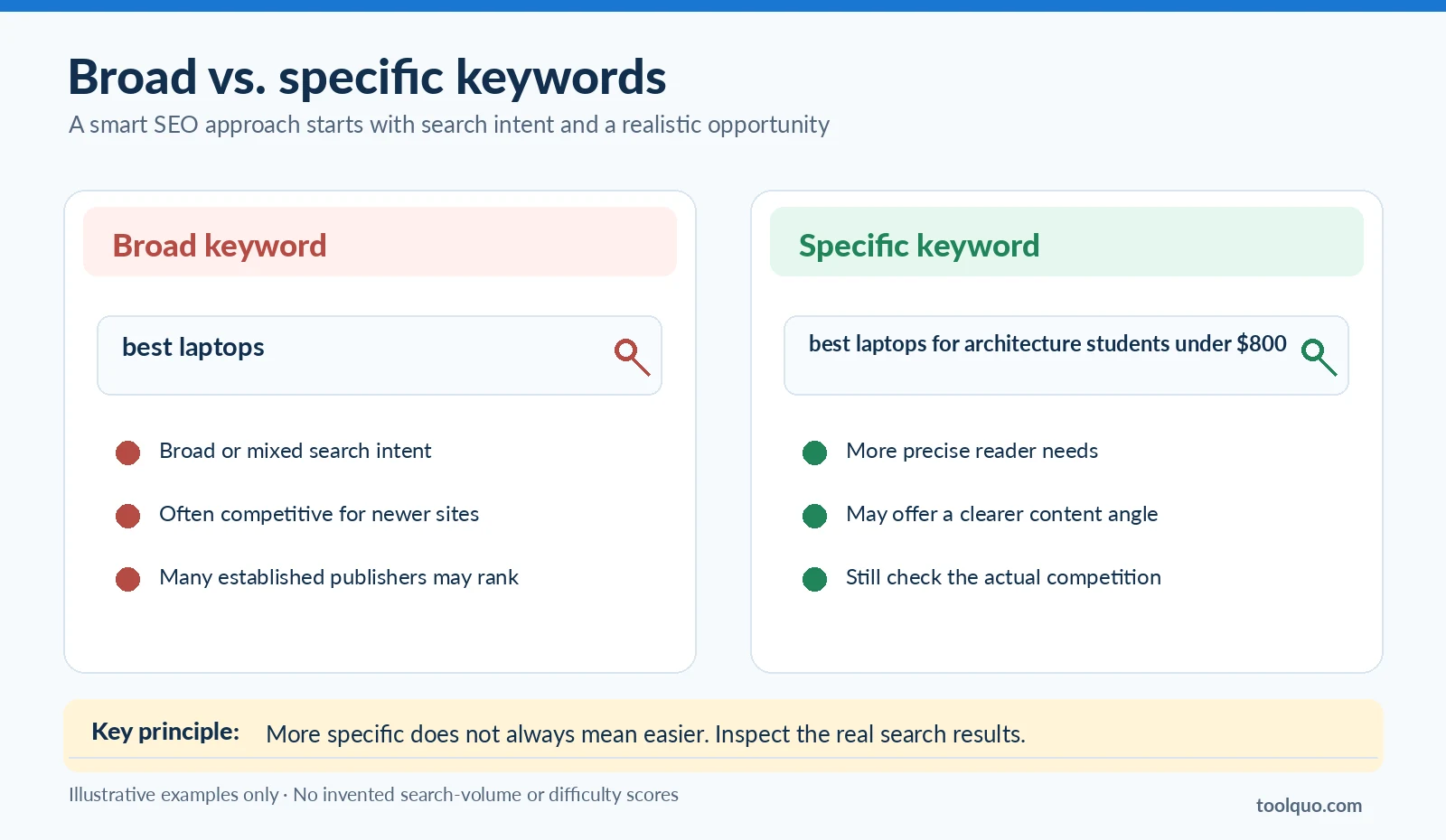
A broad search such as “best laptops” can be intensely competitive. A more specific query such as “lightweight laptops for architecture students under $800” may represent a clearer need and potentially a more approachable topic.
Specific searches are often called long-tail keywords, though a longer phrase is not automatically easier. Evaluate relevance, real search demand, the quality of existing results, and your ability to add something better. Keyword-difficulty scores from Semrush, Ahrefs, or SE Ranking are estimates generated by their own methods; not Google’s ranking formula or a guarantee of success.
7.2 Study the actual results, not just a difficulty score
Search the target phrase. What type of pages already appear? Do they cover the topic convincingly? Is the information out of date? Are important questions left unanswered? Can your own experience, comparison, or data serve the reader better?
For example, if existing student-laptop guides ignore software compatibility for architecture students, a carefully researched guide addressing that need could offer a genuinely useful angle. But do not assume weak-looking pages automatically make a query easy; competition is more complicated than one score.
7.3 Find content and keyword gaps
Use Google suggestions, related searches, reader questions, and competitor research to spot subjects your website does not address well. A keyword gap is a relevant query where a competing site has visibility that yours lacks or where your page underperforms. A content gap is a useful question or angle existing pages fail to answer adequately. Both can inform new or improved content.
7.4 Map related keywords to the right page
Do not automatically write one article for every keyword variation. “Best laptops for students” and “top laptops for college students” may need one strong comparison page because they imply nearly the same task. “Best laptops for architecture students” could justify a separate guide if the user’s needs and recommendations differ substantially.
Practical test: If the same page could satisfy both searches comprehensively, group them. If the searcher needs meaningfully different information, consider a distinct page. This helps avoid thin, overlapping articles.
7.5 Improve pages already showing potential
For example, Google Search Console may reveal that an existing page receives relevant impressions but few clicks. Investigate its position, title, query fit, freshness, and whether it answers the full question. Sometimes updating a page with meaningful information is a better use of effort than publishing another similar article.
Do not add unrelated topics merely because a query appears in a report. A new page may be more appropriate when search intent differs substantially.
7.6 Build linked topic depth and original assets
Several excellent, connected pages can help readers use your website as a resource. A unique test, downloadable comparison, helpful diagram, or original dataset can also make an article more worth referencing. Such assets take work; create them when they offer real reader value, not just as bait for links.
A useful rule: choose topics that matter to your audience, where you can deliver better information and where competition is realistic for your resources. Good SEO strategy is choosing worthwhile work, not collecting shortcuts.
8. How Do You Measure SEO Performance?
A ranking improvement is not the same thing as a useful result for your website. Start with Google Search Console, which reports your verified property’s performance in Google Search.
- Impressions: Recorded appearances of your search listings under Google’s reporting rules. Impressions are not the same as unique people who saw your result.
- Clicks: Recorded clicks from Google Search to your site.
- Click-through rate (CTR): Clicks divided by impressions, multiplied by 100. For example, 40 clicks from 1,000 impressions = 4% CTR.
- Average position: An average of your site’s topmost result for the impressions and dimensions in the report. It is not a fixed position for every search.
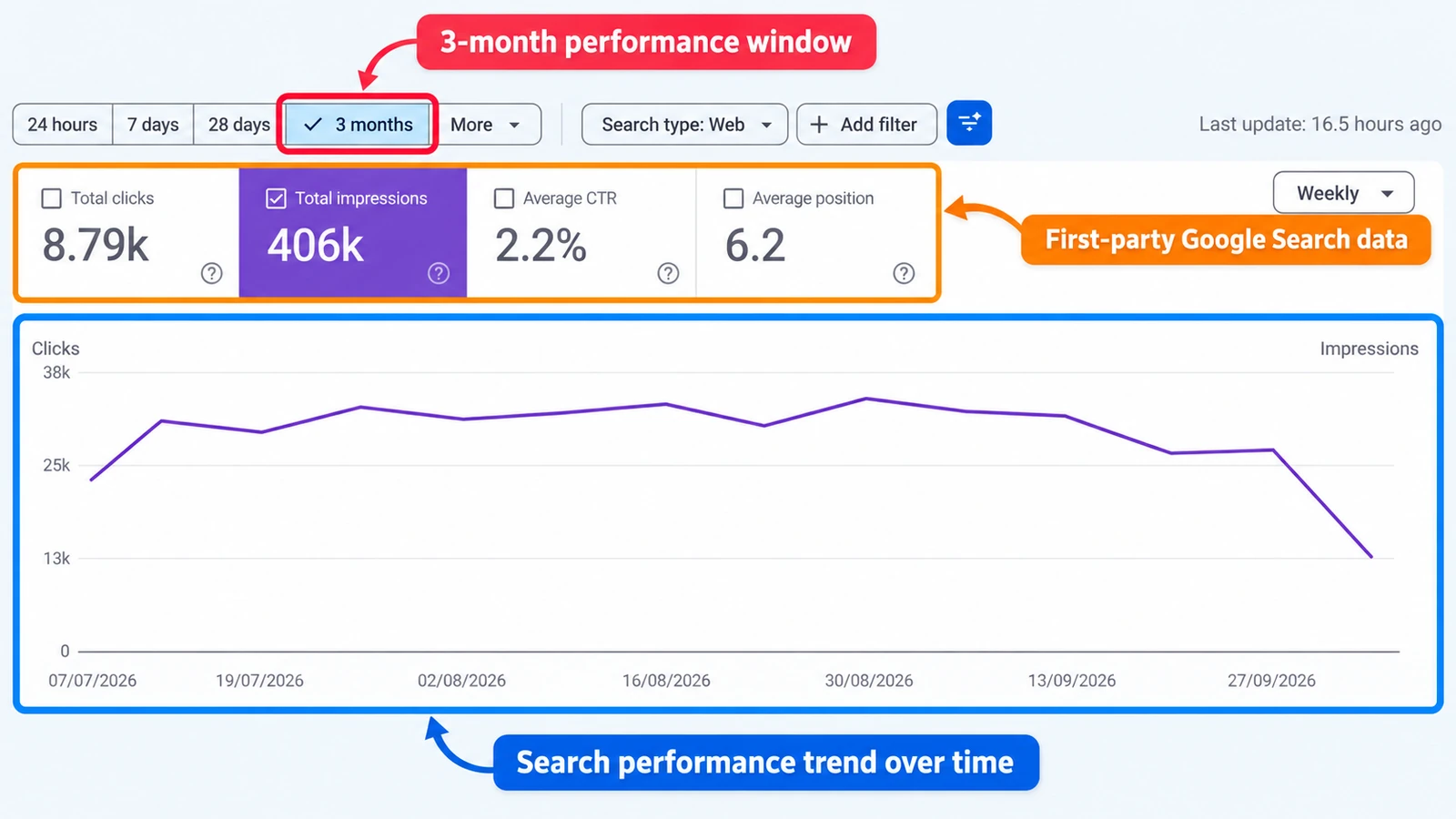
Look for patterns across several metrics. An article with almost no impressions may have an indexing, search-demand, or relevance problem. Impressions without clicks may reflect ranking position, the attractiveness of the result, or the layout of the SERP. Relevant visits with poor outcomes might mean the content does not fully meet expectations. These are starting hypotheses, not automatic diagnoses.
Search Console explains search visibility. A website analytics tool such as Google Analytics can help you understand what people do after reaching your pages; what they read, where they navigate, or whether they complete important actions. Review enough time to see meaningful trends, especially for a new website.
Source: Google: Search Console Performance report
9. Which SEO Tools Do Beginners Actually Need?
You can begin with free tools. Choose software for the problem it solves, not the length of its feature list.
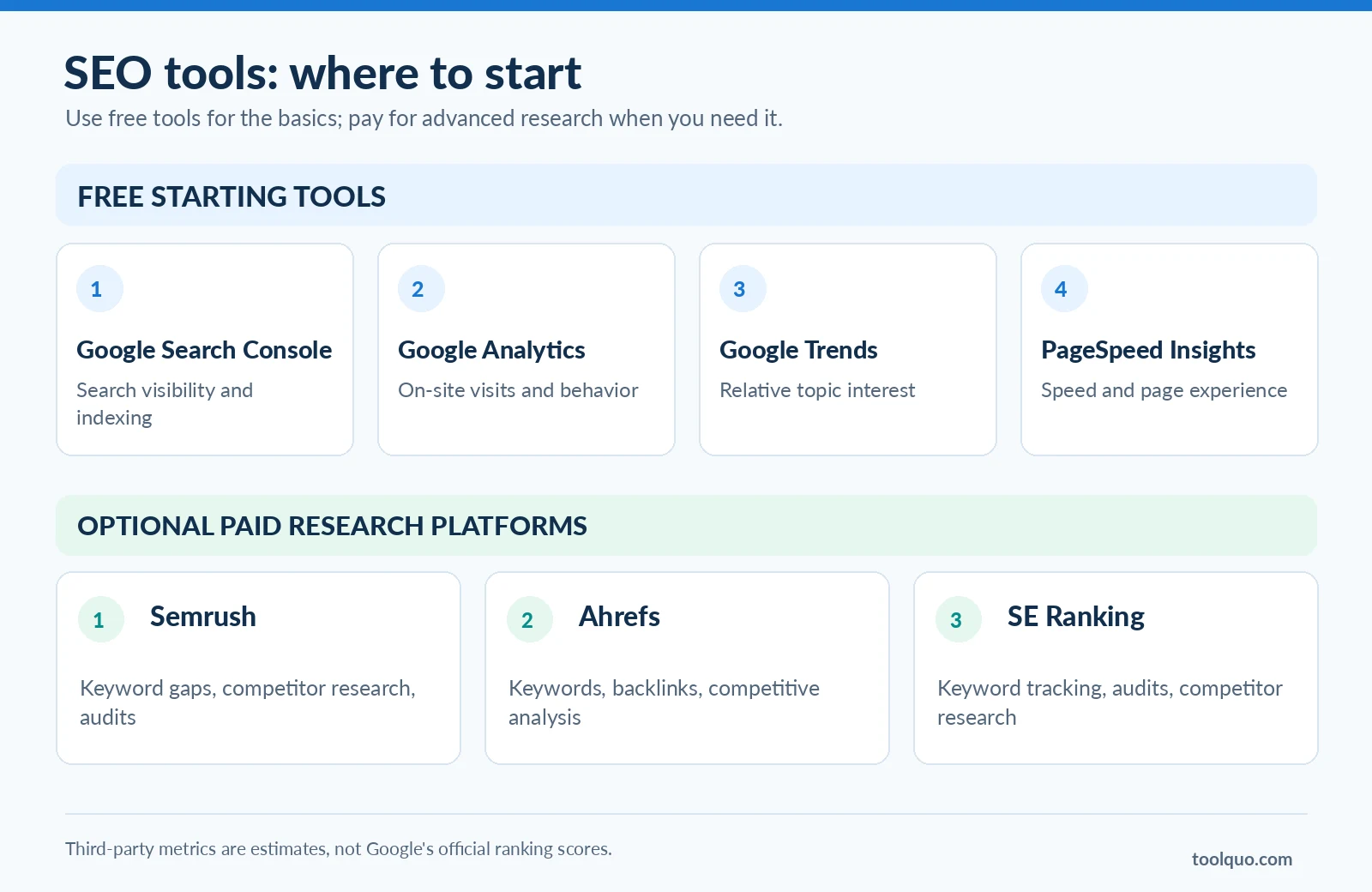
- Google Search Console . What it helps you do: Check your own site’s Google queries, clicks, impressions, and indexing; Important limitation: Does not provide a full competitor research database
- Google Analytics . What it helps you do: Understand visits and on-site behavior; Important limitation: Does not replace Search Console’s own-search data
- Google Trends . What it helps you do: Explore relative search interest and seasonality; Important limitation: Does not give standard monthly keyword volumes
- PageSpeed Insights . What it helps you do: Diagnose loading performance and Core Web Vitals; Important limitation: Not an overall SEO quality or ranking score
- WordPress SEO plugin. What it helps you do: Edit SEO titles and descriptions, check articles and manage sitemaps. Our Yoast SEO review shows these features in a real WordPress editor. Important limitation: Plugin recommendations are checklists, not Google’s judgment of content quality.
- Semrush / Ahrefs / SE Ranking ; What it helps you do: Research competitors, estimated demand, keyword gaps, rankings, backlinks, and audits (feature availability varies); Important limitation: Proprietary estimates and subscription limits; not Google’s internal metrics
If you’re starting a small website, begin with Search Console and the free tools that address your immediate needs. Paid platforms become more useful when researching many keywords, studying competitors at scale, tracking numerous queries, or auditing a large site.
For a comparison by use case, read Toolquo's Best SEO Tools guide. A deeper product review is useful when you are ready to choose paid software; not before you understand the task.
10. Common SEO Mistakes to Avoid
Writing for rankings rather than readers. Targeting a popular query is not enough if your page adds no useful insight. Build an article worth finding.
Keyword stuffing. Repeating “best student laptops” awkwardly across every sentence will not make weak content better. Use the phrase where it belongs and write naturally.
Creating near-duplicate pages. Separate articles for “best laptops for students” and “top college laptops” may serve the same intent. Consider one strong page, plus distinct pages for genuinely different questions. Overlap is not automatically harmful, but needless duplication wastes effort.
Ignoring indexing and mobile usability. Check whether important pages are accessible, eligible for indexing, and usable on phones. Do not assume that publication means indexing.
Buying manipulative links. Links intended to pass ranking credit in exchange for payment, artificial networks, and excessive reciprocal linking can violate Google’s spam rules. Editorial references earned for real usefulness are different.
Treating SEO software scores as Google’s grades. A plugin score, keyword-difficulty metric, or proprietary “authority” number can help flag issues but cannot guarantee Google rankings. In our hands-on Rank Math review, we explain why some checklist warnings needed editorial judgment even when the article already worked well for readers. Our Rank Math SEO score guide shows how to interpret those checks without chasing 100/100.
Expecting immediate results. Search engines need time to discover and process changes, and competitive rankings develop unpredictably. Measure trends rather than declaring an article unsuccessful after a few days.
Publishing endlessly without maintaining existing pages. Improve outdated information, broken links, unclear explanations, and pages that no longer answer their intended queries. Meaningful updates beat cosmetic date changes.
11. Does SEO Still Matter in the Age of AI Search?
Yes, though search behavior is changing. Google’s AI Overviews and AI Mode can synthesize answers and provide links to relevant resources. AI assistants and search experiences such as ChatGPT, Google Gemini, and Claude may also help people explore topics, though their web-search and citation capabilities vary by product and mode. Some users will visit source websites; others may obtain an answer without clicking through.
For example, someone may ask which laptop suits a $700 budget, eight-hour battery requirement, and occasional programming work; rather than typing a shorter keyword phrase. Clear, well-supported, original explanations can be useful across both traditional search and AI-powered experiences.
You may hear terms such as AEO (Answer Engine Optimization) or GEO (Generative Engine Optimization). Treat claims of secret techniques cautiously. Google’s published guidance says established SEO fundamentals remain relevant to its AI search features; no special AI-specific markup is required to appear in AI Overviews or AI Mode. Eligible pages still need to meet Google’s normal Search requirements, and inclusion is not guaranteed.
The sensible approach remains to publish accurate, differentiated content, make important information accessible in text, connect related pages, and use credible evidence. Monitor new search experiences without abandoning the fundamentals.
Source: Google Search Central: AI features
12. Frequently Asked Questions About SEO
How long does SEO take to work?
There is no fixed timeline. Some changes can become visible in days or weeks; others take months, and not every change produces a ranking improvement. Competition, the site’s condition, and the quality of the work all matter.
Can I do SEO myself?
Yes. A beginner can learn basic keyword research, useful content creation, titles, headings, internal links, Search Console, and common technical checks. Complex sites or difficult technical issues may justify professional support.
Is SEO free?
Organic rankings are not paid placements, but SEO takes time. Content creation, testing, maintenance, tools, and expert services may have costs. You can start without buying an all-in-one paid platform.
Can a new website rank on Google?
Yes. It may be harder to compete with established publishers for broad terms, so a new website can start with specific topics where it offers valuable information and a realistic chance of being useful.
Do I need backlinks to rank?
There is no universal minimum number of links. Relevant editorial links can help discovery and credibility, but content relevance, technical accessibility, and many other signals also matter.
Can AI-assisted content rank?
Google does not automatically exclude a page because AI helped create it. What matters is its quality, usefulness, reliability, and compliance with Search policies. Mass-producing low-value content to manipulate rankings is a different matter. Verify all factual claims and never imply firsthand testing that did not occur.
How often should I update content?
When useful information changes or evidence shows a meaningful improvement is needed. A laptop buying guide may need frequent product updates; an evergreen concept guide may not. Do not refresh dates just to make pages look new.
Conclusion: Create Something Worth Finding
Search engines aim to connect people with relevant, useful information. The best starting point for SEO is to understand your audience and publish material that genuinely helps them. Then make it accessible, clear, and well connected; measure the results; and improve the content where evidence warrants it.
Over time, a trustworthy collection of related pages can help your website become a recognized resource in its niche. Create something worth finding. Use SEO to help the right people find it.
About the author
Nikhil Bhardwaj
Founder & Editor, Toolquo
Nikhil leads Toolquo’s editorial direction, focusing on practical software research, transparent comparisons, and clear buying decisions.
View author profile →Keep exploring
Related guides
November 3, 2026
Yoast SEO Sitemap: How to Find, Configure and Fix Errors (2027)
Find your Yoast SEO sitemap, choose which URLs belong in it, submit it to Google Search…
November 1, 2026
How to Use Yoast SEO: Complete Beginner’s Guide (2027)
Learn how to install and configure Yoast SEO, choose WordPress SEO settings, optimize a post, and…

October 29, 2026
Yoast SEO Review (2027): How Good Is It, and Is Premium Worth It?
Our hands-on Yoast SEO review explores Free features, Premium pricing, strengths, limitations, and whether upgrading is…