Yoast SEO Review (2027): How Good Is It, and Is Premium Worth It?
Our hands-on Yoast SEO review explores Free features, Premium pricing, strengths, limitations, and whether upgrading is worthwhile for WordPress users.
On this page
Yoast SEO is designed to simplify everyday WordPress SEO tasks, from writing search titles and descriptions to checking readability and generating XML sitemaps. But how useful are its recommendations in practice? And is Yoast SEO Premium worth paying for?
For this hands-on Yoast SEO review, we tested Yoast Free on ToolQuo, examined its on-page and technical features, and compared the paid options with Yoast’s official product information. We did not purchase or independently test Premium, so our firsthand findings concern the Free version.
1. What Is Yoast SEO? On-Page and Technical SEO Explained
Yoast SEO is a WordPress SEO plugin that helps you edit SEO titles and meta descriptions, review content with keyphrase and readability checks, and manage technical settings such as XML sitemaps, indexing and structured data. It supports your SEO work; it does not guarantee rankings.
Search engine optimization (SEO) is the work of making your website accessible, understandable and useful to people searching for information. It is often divided into three overlapping areas:
On-page SEO concerns the individual pages you publish: their content, titles, headings, internal links and how clearly they address a searcher’s question. For example, a guide about choosing a water purifier should explain the different types, relevant costs and situations in which each option makes sense. A clear title and logical headings help readers navigate that explanation.
Off-page SEO concerns signals and activity beyond your own website, such as relevant websites linking to your useful guide or other people mentioning your brand. Yoast cannot create high-quality backlinks or make another site recommend you. Those tasks require content worth referencing and genuine relationships with other publishers.
Technical SEO concerns how the website works for search engines: whether important pages can be crawled and indexed, how duplicate URLs are handled, and whether machine-readable data describes pages correctly. For example, an XML sitemap can help Googlebot, Google’s web crawler, discover your URLs. It cannot force Google to index them.
Yoast mainly helps with on-page SEO and technical SEO. It combines tools for editing your content’s search information with controls for the website’s underlying SEO settings. Think of it as a checklist and control panel, not a substitute for a good writer, a technical specialist in every situation, or a search-engine ranking algorithm.
A checklist can notice that you forgot a meta description. It cannot know whether your financial advice is accurate, your product comparison is fair, or your article is the most helpful result for a particular question. Apply a recommendation when it improves the content or presentation for real visitors, not simply because a colored indicator changes to green.
For a more detailed foundation, our What Is SEO? beginner guide explains crawling, indexing and rankings, while our Off-Page SEO guide explores backlinks and other activities beyond a website.
2. Yoast SEO Review: Our Quick Verdict
The value is not that Yoast tells Google your article deserves to rank. Its value is that it helps you catch things you might otherwise miss and handles several technical tasks that would be inconvenient to implement manually.
The main limitation is that its content assessments are based on rules rather than an expert understanding of your subject. A clear article can fail a minor check, while a shallow article can satisfy many checks. Premium offers further conveniences, especially related-keyphrase analysis, automated internal linking, redirects and AI-assisted bulk metadata. Whether those are worth paying for depends on how much work they save on your particular site.
3. Yoast SEO Features at a Glance
Here is a quick reference before we explain each feature in detail. The categories show the problem each tool helps solve, not merely the menu where it appears.
Focus keyphrase and SEO analysis: check whether the main topic is reflected in selected article elements. Readability: identify potentially hard-to-read text. Search appearance: write SEO titles and meta descriptions. Internal linking and cornerstone settings: organize related content.
XML sitemaps: list important URLs for crawlers. Indexing and canonical controls: communicate which pages should appear in search and which URL is preferred. Schema: describe pages and publishers with structured data. Breadcrumb support: represent a page’s place in the site hierarchy.
Bulk Editor: update search and certain social text across multiple pages. Premium redirects: manage traffic from old URLs to new ones. External integrations: connect to other SEO services. llms.txt: generate a text file intended for some AI-related workflows.
The rest of this review examines these features through examples, their practical benefits, the limitations we found, and whether Free is sufficient. For instructions about which exact buttons to click, see our How to Use Yoast SEO beginner’s guide rather than treating this review as a complete setup manual.
4. Setting Up Yoast SEO: What Beginners Need to Decide
Most questions in Yoast’s initial setup are self-explanatory. Two choices deserve closer attention: whether your website represents a person or an organization, and which kinds of pages you want search engines to show in search results.
For example, a freelance writer’s portfolio may represent a Person, while a company website represents an Organization. A useful travel-category page could deserve a place in search results, whereas an almost-empty tag archive may not. A multi-author publication may need author archives; a small single-author blog may not.
For the exact setup steps, screenshots and guidance on choosing these settings for different types of websites, see our How to Use Yoast SEO beginner’s guide.
5. On-Page SEO with Yoast: Improving Individual Articles
On-page SEO means improving the content and presentation of an individual webpage so that visitors can understand and use it. For example, a laptop-buying guide should have a clear title, useful explanations, well-organized headings and links to relevant supporting articles. Yoast helps you check several of these elements, but it cannot tell whether the advice itself is complete, accurate or genuinely useful.
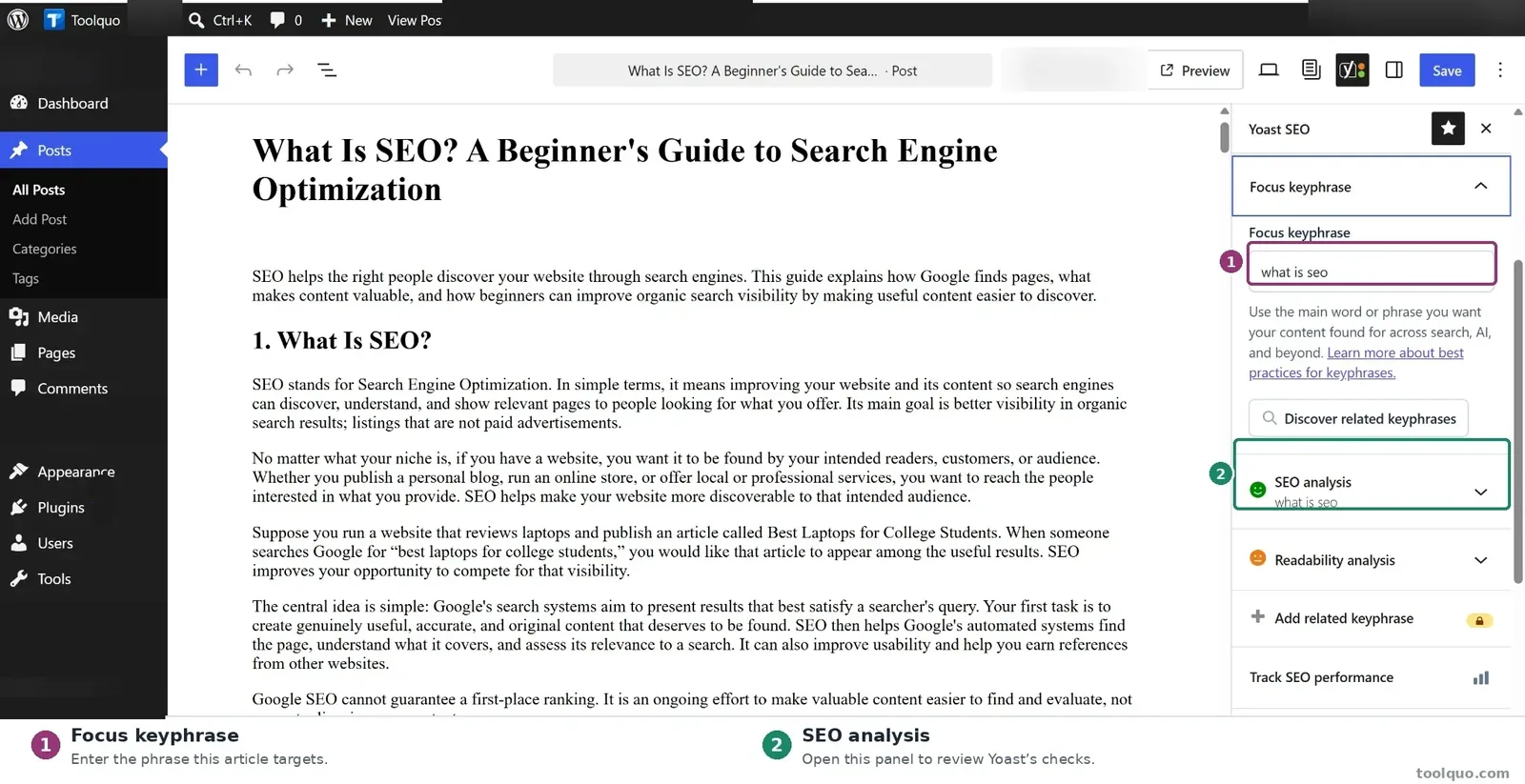
5.1 Focus Keyphrase and SEO Analysis: Use the Checklist Intelligently
Suppose you have written a guide to choosing an affordable laptop for college. You select “best laptop for students” as a focus keyphrase. Yoast checks whether that expression, or an appropriate form of it, is reflected in elements such as the SEO title, introduction and content.
A title such as “A Few Gadgets I Like” would not clearly communicate the article’s purpose. “Best Laptops for College Students: What to Consider” is more useful. This is a recommendation worth considering because it helps the searcher recognize the page.
What the checks can help with:
- Identifying whether the subject is communicated consistently.
- Noticing a missing SEO title or meta description.
- Reminding you to check links and images.
- Encouraging you to reconsider sections that do not support the article’s stated purpose.
What they cannot do:
- Confirm that laptop specifications and recommendations are accurate.
- Determine whether comparison tables or examples actually help the buyer decide.
- Establish whether the article is more helpful than competing pages.
- Predict Google rankings or traffic.
Our testing suggests that Yoast’s SEO analysis is useful for identifying missing information, but its assessment depends on how you configure the article. We tested the feature on ToolQuo’s published What Is SEO? guide to see whether it would recognize the article’s existing strengths and highlight anything we had overlooked.
At first, the focus keyphrase field was empty, so Yoast could not assess the article against a clearly stated target search phrase and displayed numerous warnings. After we entered “what is seo” and saved an appropriate meta description, many warnings disappeared. The final analysis reported 16 good results and one improvement relating to image alt attributes. Importantly, these changes did not require a major rewrite of the article itself.
See our Yoast SEO score explanation and original test for the screenshots, scoring calculation and advice on which warnings deserve attention.
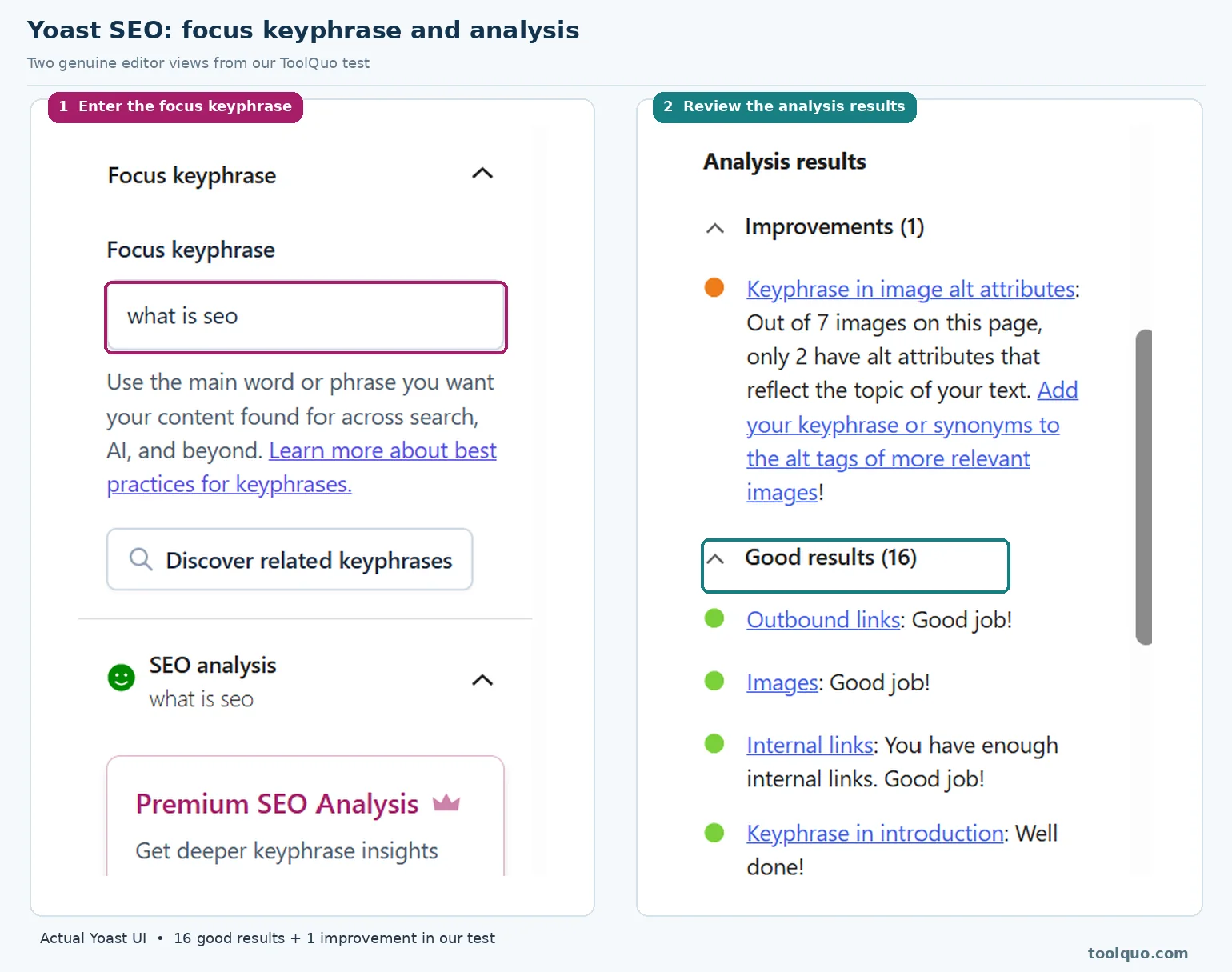
What should a beginner learn from this? Before assuming that a warning means your content is poor, check whether you have entered the information Yoast needs to perform the assessment. Then examine the remaining suggestions individually. A better description or genuinely useful image alt text may improve the page; mechanically adding more keywords may not.
For example, if an image shows a screenshot of Google Search Console, descriptive alt text should explain that screenshot. Stuffing the target phrase into every image description would not improve accessibility. Treat each warning as an invitation to review something, not as an order.
Our assessment: This is a useful free checklist for beginners, provided it is applied with editorial judgment. Our On-Page SEO guide explains titles, headings and content optimization more broadly. The Rank Math SEO Score Explained article examines the danger of treating tool scores as quality measurements.
5.2 Readability Analysis: When the Suggestions Help
A reader who is choosing a washing machine does not want to decipher a paragraph containing fifteen specifications, three warranties and four exceptions in one sentence. Clear structure matters, and Yoast tries to spot patterns that can make writing difficult.
Sentence length: If a sentence attempts to explain installation, power consumption, noise levels and pricing at once, consider dividing it. But a sentence should not be shortened merely to hit a fixed percentage.
Paragraph length: A tax-filing tutorial is easier to follow when each step has its own paragraph. A short literary or explanatory passage does not require artificial breaks.
Passive voice: “Submit the form by Friday” is direct. Yet “The form must be submitted by Friday” is also perfectly understandable. Passive voice is not automatically bad; use whichever form best serves the sentence.
Transition words: “First, preheat the oven. Next, mix the ingredients. Finally, bake for 20 minutes” explains sequence. Adding “however” or “therefore” unnecessarily to increase a ratio would make the recipe worse.
Headings: A long destination guide benefits from sections about transport, accommodation and attractions. A short note does not need a heading every few lines.
Our test showed that Yoast’s readability checks can point out writing patterns worth reviewing, but its percentages do not tell you whether readers actually understand an article. We applied the analysis to ToolQuo’s What Is SEO? guide, and Yoast reported that 26% of its sentences contained transition words.
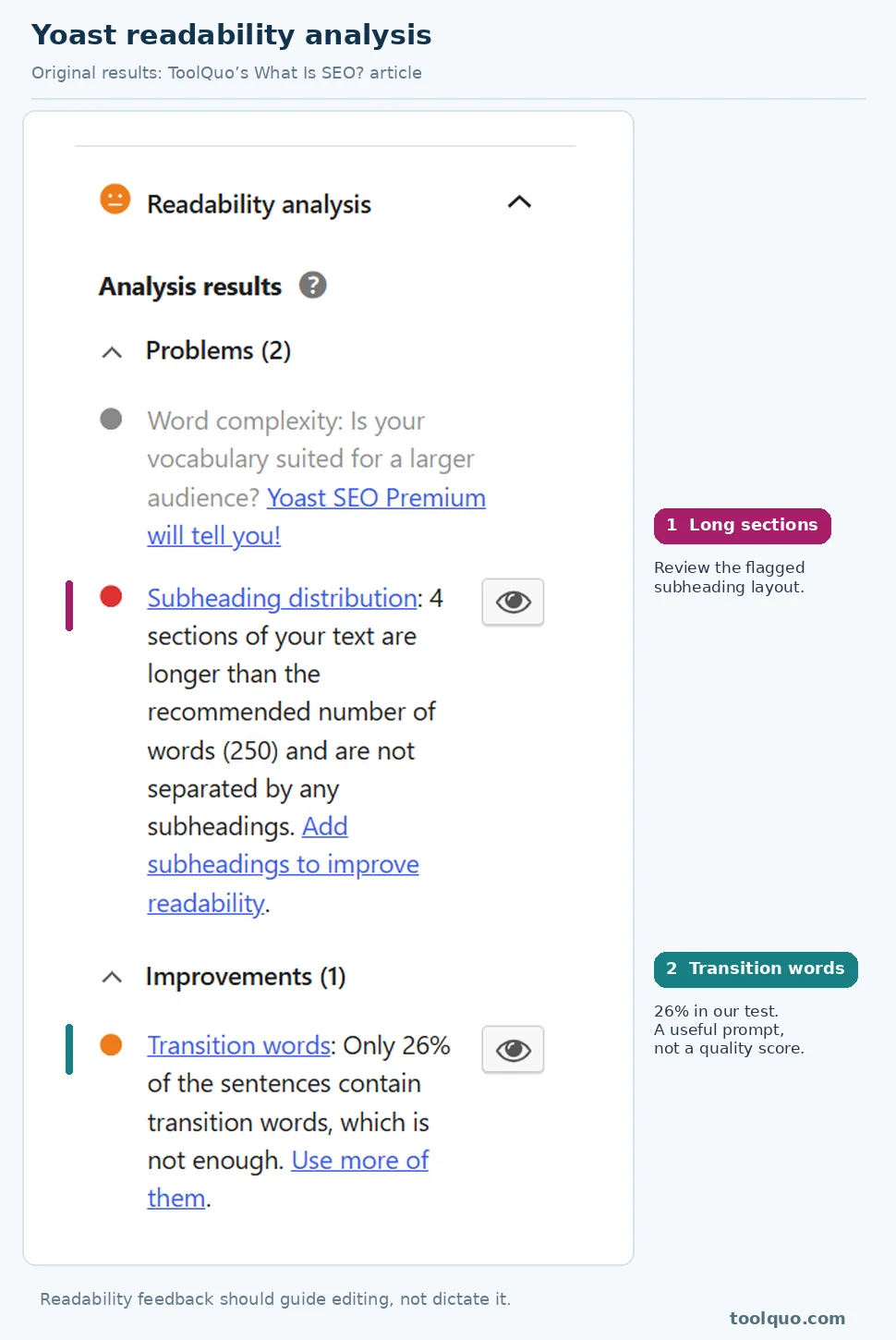
For example, words such as “however,” “therefore” and “next” can help readers follow a comparison or sequence. But a percentage cannot reveal whether those words were used well. Yoast also changed one of its subheading recommendations when we marked the article as cornerstone content, even though the article itself had not become clearer or harder to read. That shows the assessment depends partly on the rules Yoast applies.
The eye-shaped icon beside certain readability warnings is designed to highlight the relevant sentences or passages inside the WordPress article editor. For example, if Yoast flags long sentences, the icon should help you locate them in the article; it is not a button for saving a recommendation to revisit later. We clicked this icon during testing but did not see the expected highlighting. Yoast’s documentation notes that highlighting can be unavailable with some editor views, blocks or page builders. We therefore report this as an observation from our test, not a general failure of the feature. Even without highlighting, you can review the warning and examine the relevant text yourself.
Our assessment: Yoast readability prompts are best used during a final editing pass. If a recommended change improves comprehension, take it. If it creates unnatural English, ignore it. A useful review should teach this distinction rather than declare that every red indicator is a problem.
5.3 SEO Titles, Meta Descriptions and Search Previews
When someone sees your page in Google Search, its title and short description often help them decide whether to click. Yoast lets a website owner enter a proposed SEO title and meta description separately for each WordPress post or page. For example, a shop can describe its bicycle-repair page differently from its new-bicycle sales page, rather than relying on one generic description across the website.
The visible heading of a page is not necessarily its SEO title. A cooking blog may display “Our Family’s Favourite Breakfast,” but use the clearer search title “Easy Pancake Recipe: Fluffy Pancakes in 20 Minutes.” The search title should accurately match the page and tell prospective visitors what they will find.
A meta description is a short proposed summary of a page. For a bicycle repair shop, “Bicycle servicing in Jaipur. Learn about brake repairs, tune-ups, turnaround times and booking” explains the service far better than “Best cycle shop cheapest repair bike shop bike service.”
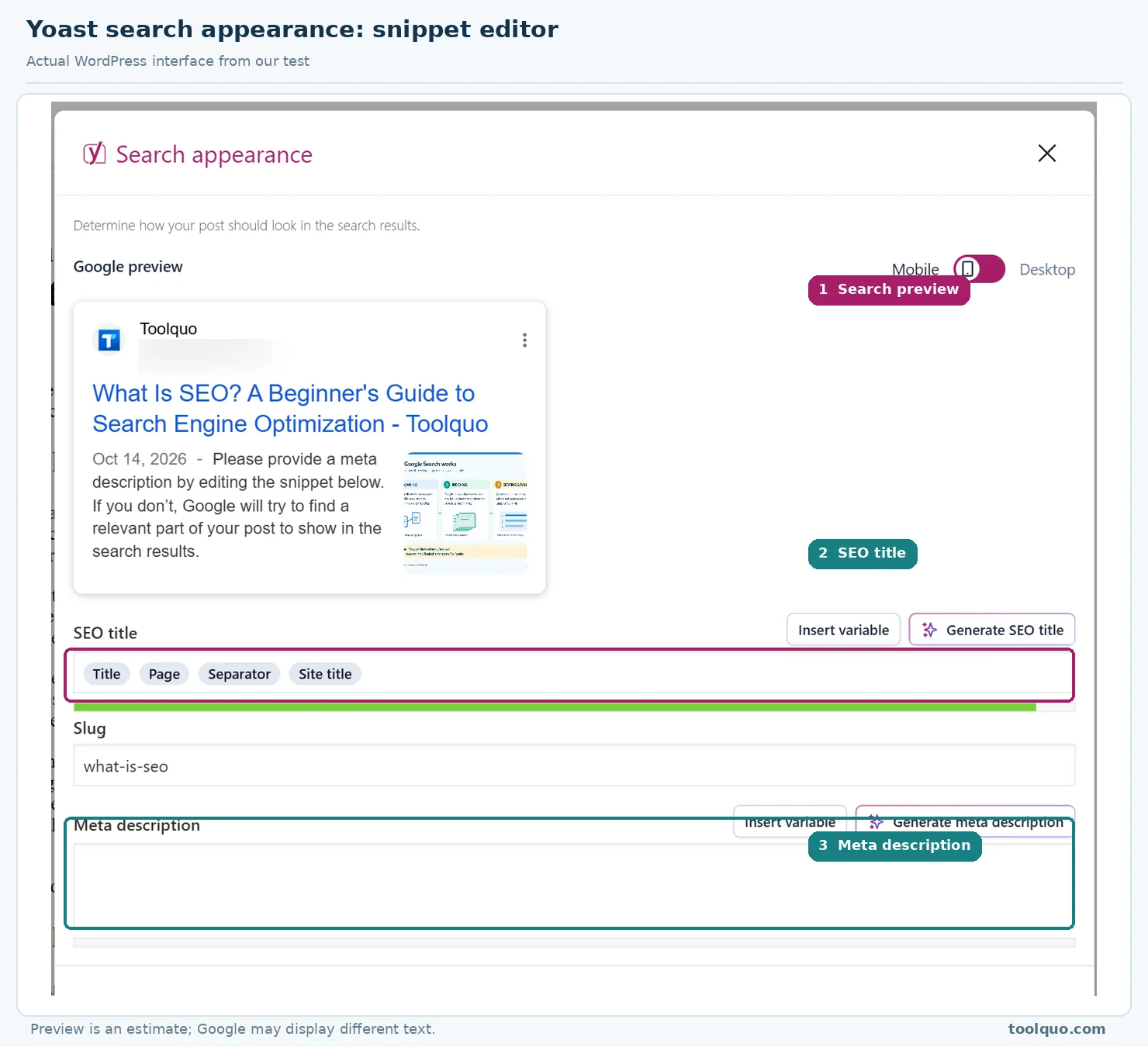
Yoast’s snippet editor lets you enter the SEO title and meta description for an individual article or page and shows a rough preview for desktop and mobile search results. The preview is useful for checking whether your proposed wording is clear and may be cut off. However, it is not a guarantee of what Google will display: Google can create a different title link or search snippet from the page’s content when its systems consider that more relevant to a particular search.
A useful workflow is to write the article first, then ask: What is this page actually about? What makes it relevant? Which wording would help the intended visitor recognize it in search? The best description is accurate and inviting, not stuffed with variations of a focus keyphrase.
We changed the meta description on our ToolQuo test article and verified its presence in the page’s HTML source after saving. That confirms that our installation output the metadata, although it cannot guarantee that Google will show the same words.
Our assessment: Yoast Free’s snippet editor is genuinely useful because it makes SEO titles and meta descriptions easy to write, review and save. The limitation is that Yoast cannot decide which wording will persuade the right searcher to click, and Google may show a different title or description for a particular query. To deal with that limitation, write a clear and accurate summary of the page, check the saved metadata, and use the search queries and performance information in Google Search Console to judge whether further refinement is worthwhile.
5.4 Internal Links, Cornerstone Pages and Breadcrumbs
An internal link connects one page on your website to another. Consider a beginner’s guide to photography. It may mention aperture, exposure and lenses. Rather than forcing the reader to learn everything from one enormous article, the guide can point to separate detailed explanations of each topic.
A natural link might say: “If you are unsure why your subject appears blurry, start with our beginner’s guide to shutter speed.” That gives a reason to click. A list of twenty unrelated “recommended posts” would be less useful.
Internal links also help search engines discover pages and understand relationships among topics. They are especially important when a site has many older articles that might otherwise be hard to reach. However, adding links merely to raise a number is no more useful than stuffing extra keywords into a paragraph.
What does Yoast do? In Free, you can add ordinary links with WordPress and identify particular articles as cornerstone content. Cornerstone content means a foundational page that deserves careful maintenance and links from relevant supporting content. For a fitness blog, a broad beginner’s exercise guide could be a cornerstone page, with more specific posts on stretching or strength training linking to it.
Yoast Premium lists automated internal-link suggestions. Such suggestions may save editorial time when the content library grows large, but a human should still judge whether every suggested link is relevant. We did not personally test the Premium suggestion feature.
Breadcrumbs solve a different problem: they show a page’s place in the site hierarchy, such as Home > Guides > Photography > Shutter Speed. Yoast has settings related to breadcrumbs and can output breadcrumb structured data. But the visible trail on your website may come from the WordPress theme rather than Yoast. ToolQuo already displayed theme breadcrumbs during our test, so we do not attribute that navigation to the plugin.
Our assessment: Site structure is important, but smaller sites can handle links deliberately and manually. Premium’s linking convenience becomes a more plausible expense for publishers who maintain hundreds of interconnected articles.
6. Technical SEO with Yoast: Helping Search Engines Access and Understand Pages
Technical SEO deals with the systems behind your pages. Readers may not see an XML sitemap, canonical tag or JSON-LD code, but search engines and other automated tools can use that information to understand the site. Yoast makes many technical settings accessible through WordPress, though it does not replace a careful technical audit.
6.1 XML Sitemaps: Making Important URLs Easier to Discover
Imagine a library with thousands of books. Visitors might eventually find each title by walking along the shelves, but a catalogue provides a much more organized list. An XML sitemap is a catalogue of website URLs in a format search engines can process.
Yoast can generate sitemaps automatically for the content types you have configured. In our test, the sitemap index contained separate entries for posts, pages and categories. The post sitemap listed expected articles.
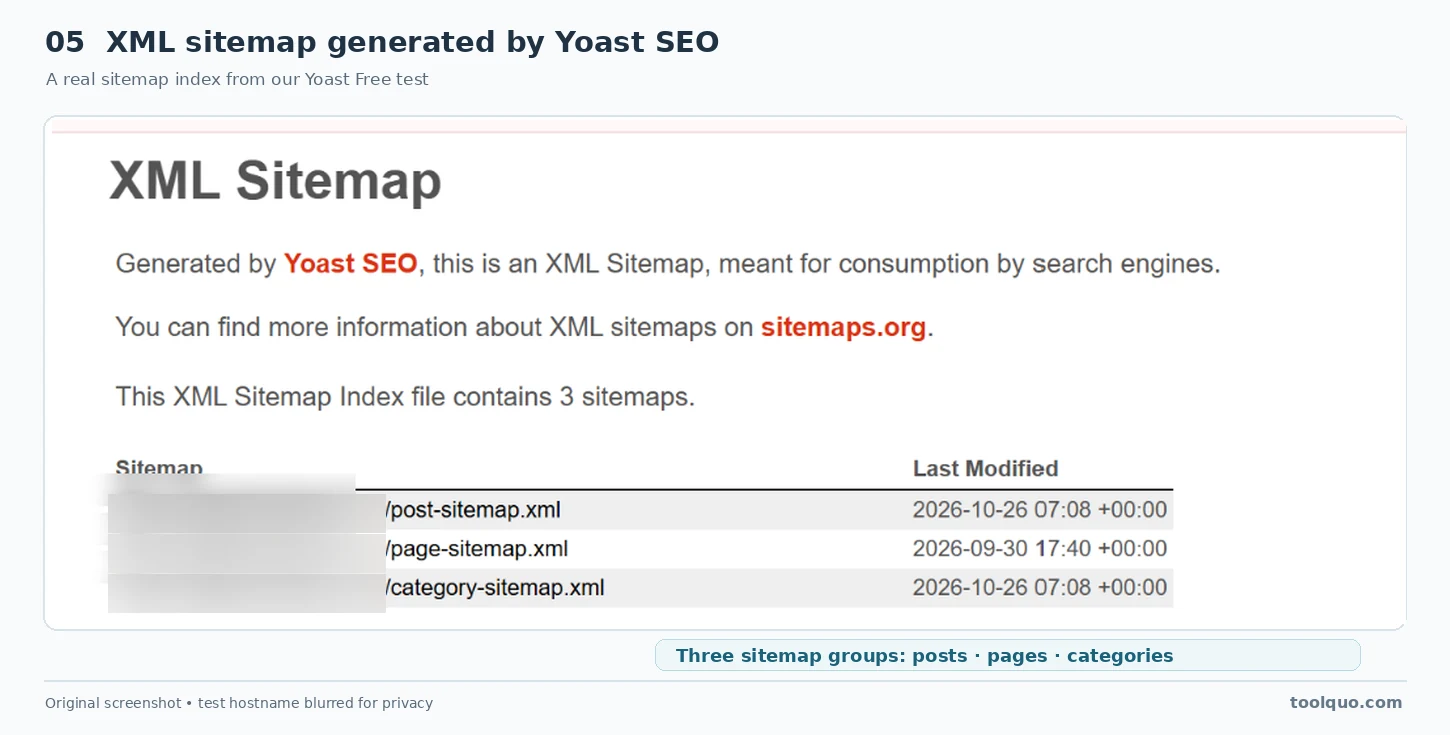
This is helpful because a growing WordPress site can create hundreds or thousands of URLs. A sitemap gives crawlers another way to discover those URLs, especially when the site publishes new content or changes its structure.
For beginners, three practical habits matter: keep your important content linked from other relevant pages, check that the sitemap includes the intended content types, and use Google Search Console to understand indexing status. Yoast supplies the sitemap; Search Console is where you can investigate what Google reports.
Our assessment: A core technical feature that most beginners should appreciate because it saves manual work. It is useful, but not a ranking shortcut.
6.2 Indexing, Canonical URLs and Crawl Optimization
WordPress can create more URLs than a website owner realizes. Alongside regular posts and pages, it may create author collections, tag archives, internal search results and versions of URLs containing parameters. Some are useful to visitors; others may be repetitive.
Index and noindex are important SEO terms. When Google indexes a page, it adds the page to its search index, making it eligible to appear in Google Search. A noindex instruction tells search engines that support the rule not to include that page in their search results, provided their crawler can access and read the instruction.
For example, an online shop may have an order-confirmation page that customers see after purchasing. That page is useful to the buyer but usually adds little value as a standalone search result. The owner can therefore set it to noindex. By contrast, the shop’s main “Buy Running Shoes” page is intended to attract customers through search and should ordinarily remain indexable. Yoast provides settings for these instructions, but the website owner should understand which option suits each page before applying it.
Canonical URL: Imagine an online store shows the same shoes at /shoes/blue-running-shoes/ and /sale/blue-running-shoes/ because of its navigation setup. A canonical signal indicates which version the publisher regards as preferred. This helps search engines interpret duplicate or very similar pages, but Google can still choose its own canonical URL. It is not a substitute for designing a clear site structure.
Crawl optimization: Search-engine bots request URLs and resources from websites. Unnecessary feeds, internal search URLs or poorly controlled parameters can sometimes generate a large amount of low-value crawling. Yoast provides controls related to such issues. Those controls are not an invitation to disable everything: certain feeds and URLs can serve genuine site functions.
Archive controls: WordPress can automatically create collections of posts by author, date, category or tag. Some deserve to appear in search; others may add little value. For example, a thoughtfully organized “Vegetarian Recipes” category could help new visitors discover useful posts, while an almost-empty tag archive might merely repeat content available elsewhere. You can leave the useful category indexable and consider noindex for the thin archive. The decision should follow the value of each page, not a blanket rule that every archive must be indexed or excluded.
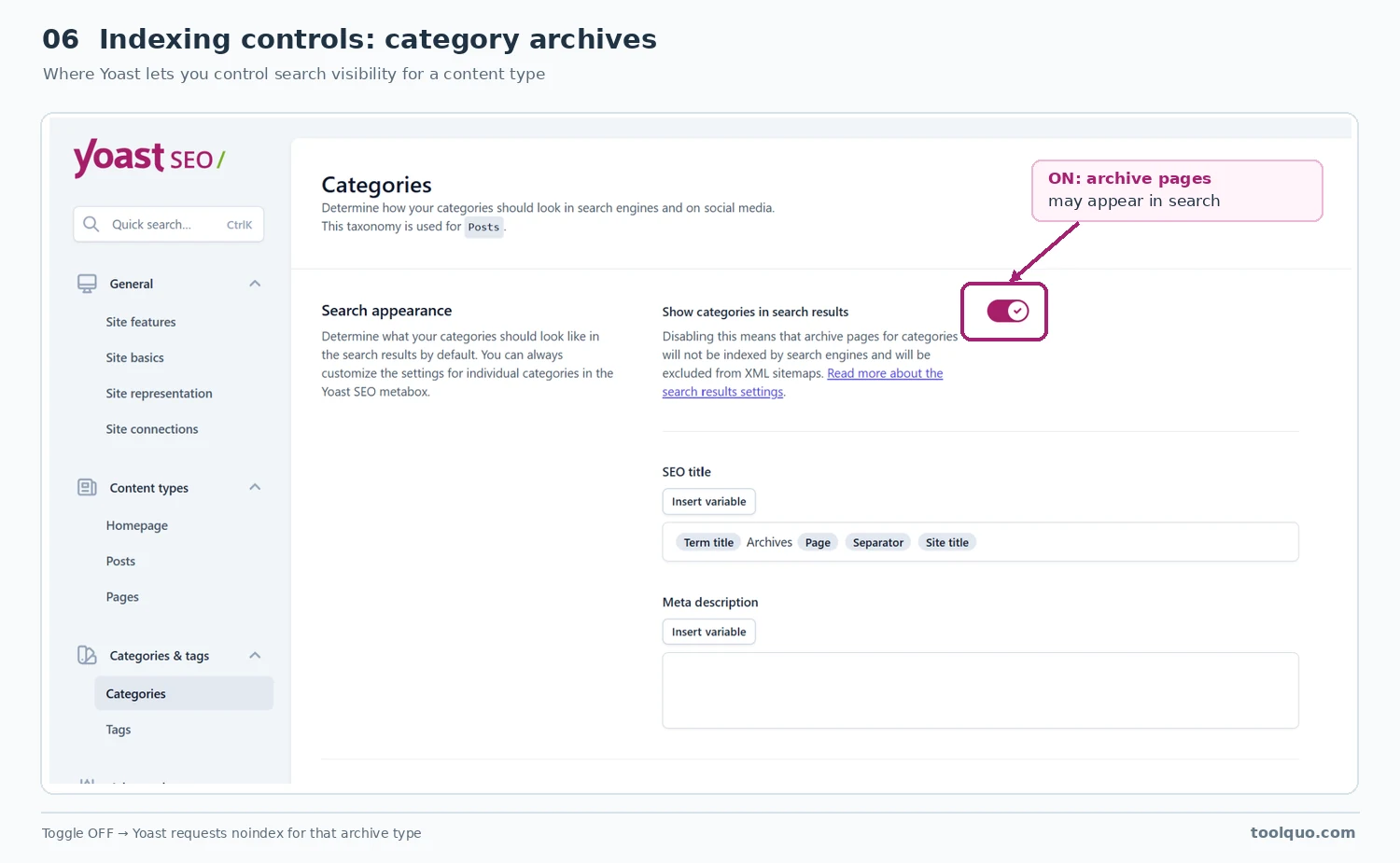
We examined Yoast’s crawl and archive settings on ToolQuo, but did not independently enable and verify every control. That distinction matters because a menu option existing is not the same as proving its real-world effect.
Our assessment: Yoast offers meaningful technical SEO convenience, especially for owners who do not write code. The risk is that a beginner may use sophisticated settings without understanding them. Our planned Technical SEO guide will explain crawling, indexing and canonicalization with more examples.
6.3 Schema Markup: Describing Pages to Search Engines
A person visiting a blog can usually recognize that a page is an article, see the author name and understand that the website belongs to a publisher. Search engines can interpret visible information too, but structured data provides a more explicit machine-readable description.
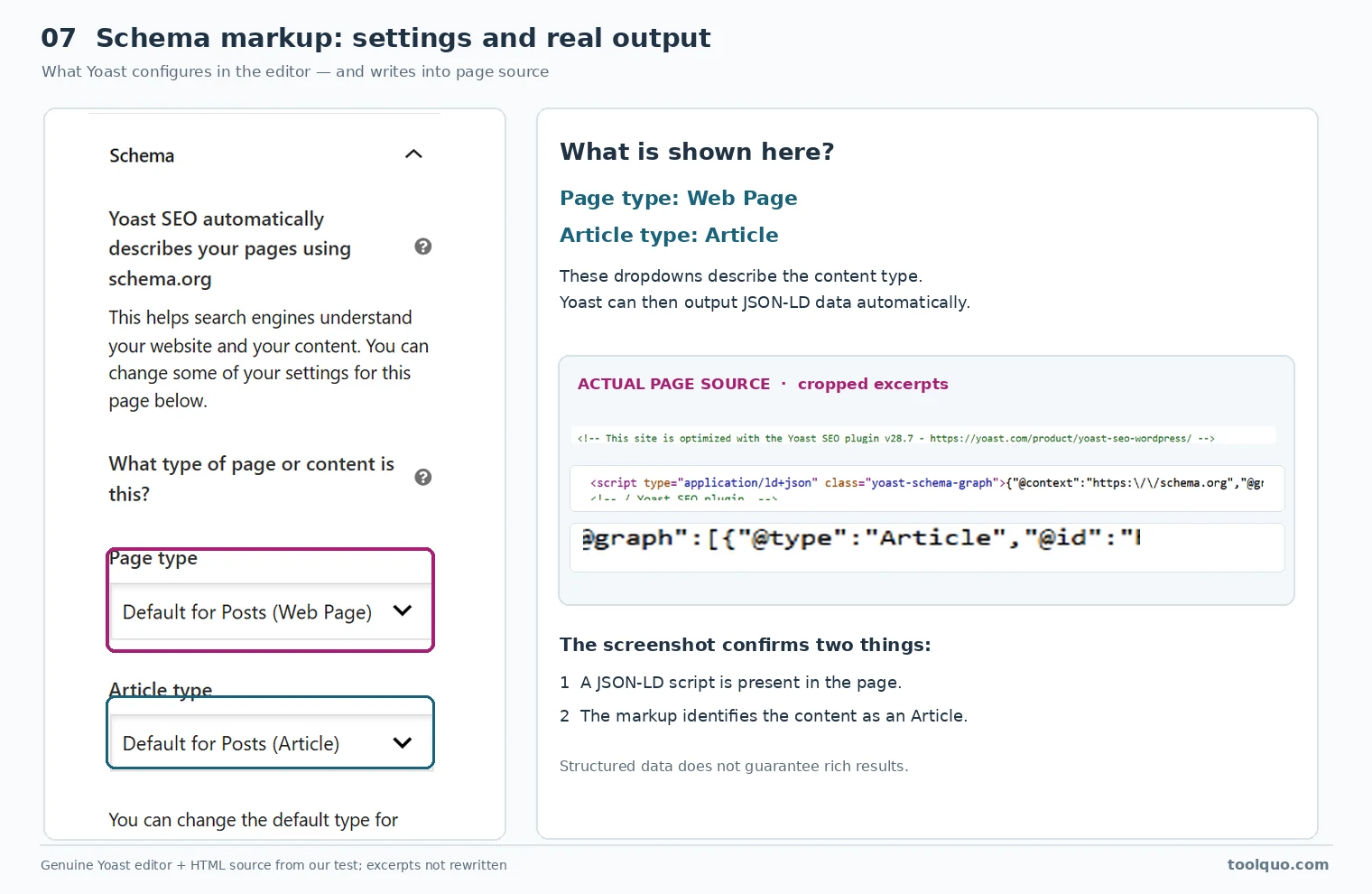
For example, structured data can identify a page as an Article, the site as a WebSite, its publisher as an Organization and an image as an ImageObject. A common way to place this information on a page is through JSON-LD, a format that appears in source code but not as a paragraph to ordinary visitors.
On ToolQuo’s What Is SEO? article, Yoast generated seven connected schema objects: Article, WebPage, ImageObject, BreadcrumbList, WebSite, Organization and Person. For a beginner, the practical benefit is straightforward: Yoast generates these machine-readable descriptions automatically. That saves you from manually writing and maintaining schema code for common page types.
Yoast’s FAQ and How-to blocks deserve separate attention because they do more than add ordinary text. The FAQ block provides a way to enter questions and answers and automatically adds FAQPage structured data. The How-to block helps organize step-by-step instructions and adds HowTo structured data. For example, a page answering common questions about a course can use the FAQ block, while a tutorial explaining how to install a plugin can use the How-to block. That is useful for beginners who want structured content without writing JSON-LD code.
We tested both blocks in a draft and confirmed that the corresponding structured data appeared in the page source. The important distinction is between producing the markup and earning a special Google search appearance. Google discontinued How-to rich results in 2023 and FAQ rich results in May 2026 (see Google’s How-to announcement and its Search Central updates). The blocks may still help organize content and describe it to machines, but they should not be used with an expectation of those retired Google rich-result formats.
A beginner should therefore ask two separate questions: Is the structured information an accurate description of this content? And does the search engine currently support the special presentation I am hoping for? Yoast can help answer the implementation question, but it cannot guarantee a result.
Our assessment: Useful default structured-data support in Free. Do not install schema solely because a plugin or another website promises “rich results.” Check current Google documentation and the actual published page.
7. Managing a Growing Website: Bulk Editing, Performance and Redirects
A beginner may manage only a handful of articles. A publisher with hundreds of pages faces a different challenge: updating many search titles, maintaining older links and deciding which pages need attention. The next features matter increasingly as a site grows.
7.1 The Bulk Editor: Saving Time Without Sacrificing Quality
Suppose you run an online store with 70 category pages. You notice that many of their SEO titles are generic, such as “Category – Our Website,” and several descriptions are blank. Opening every page individually to correct metadata would be tedious.
Yoast’s Bulk Editor provides a consolidated interface for editing selected search metadata. In our test of the free plugin, we edited the meta description of an unpublished test draft under Search appearance, saved the change and saw the updated value in the editor.
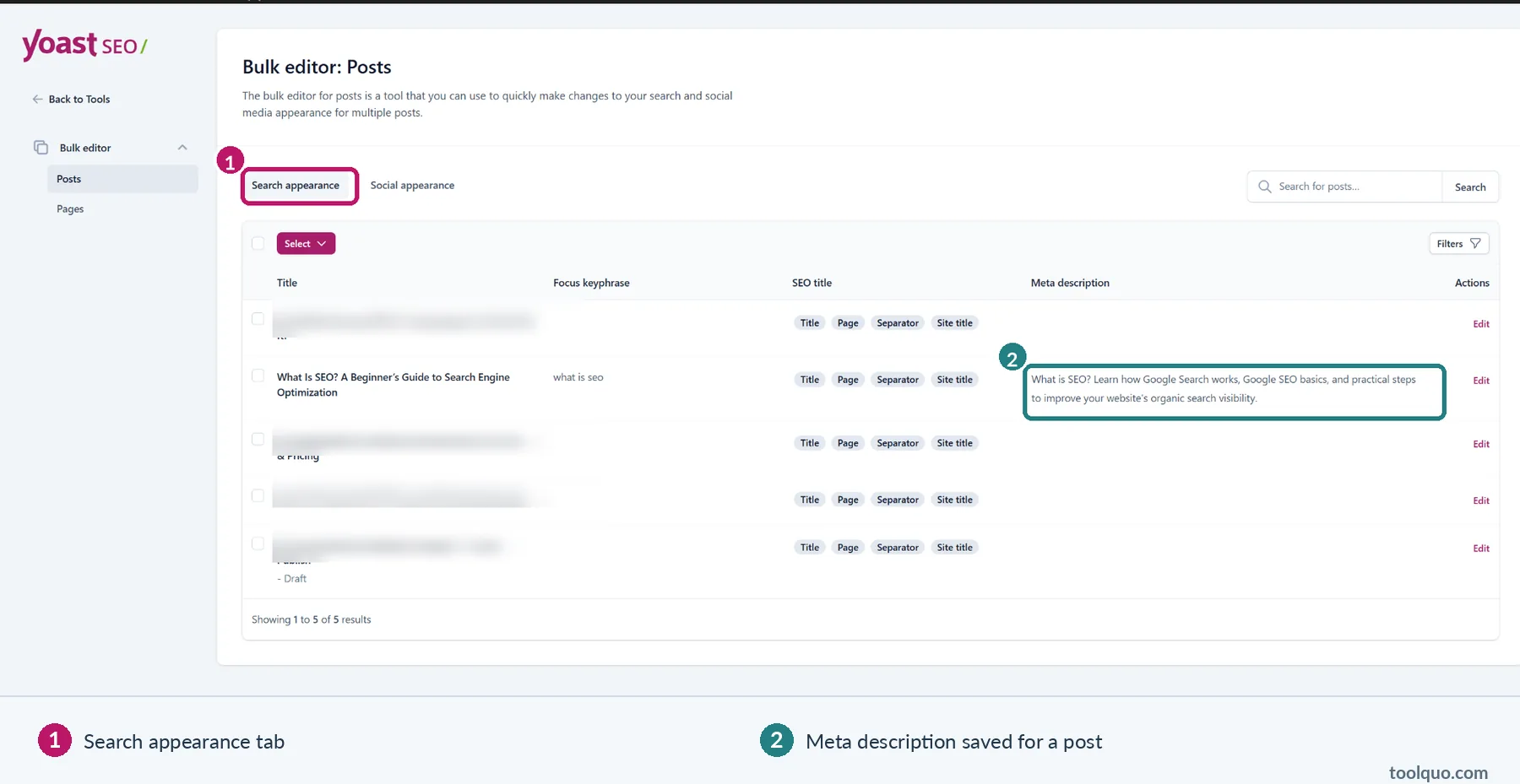
Our test also showed that Yoast Free’s Bulk Editor can save a separate social title and description for a post. We entered both values through its Social appearance area and confirmed that they remained saved. In practical terms, a website owner can prepare wording for social sharing without buying Premium solely for those text fields. This should not be confused with Premium’s separate social-preview options, and we did not test how the unpublished draft appeared on individual social platforms.
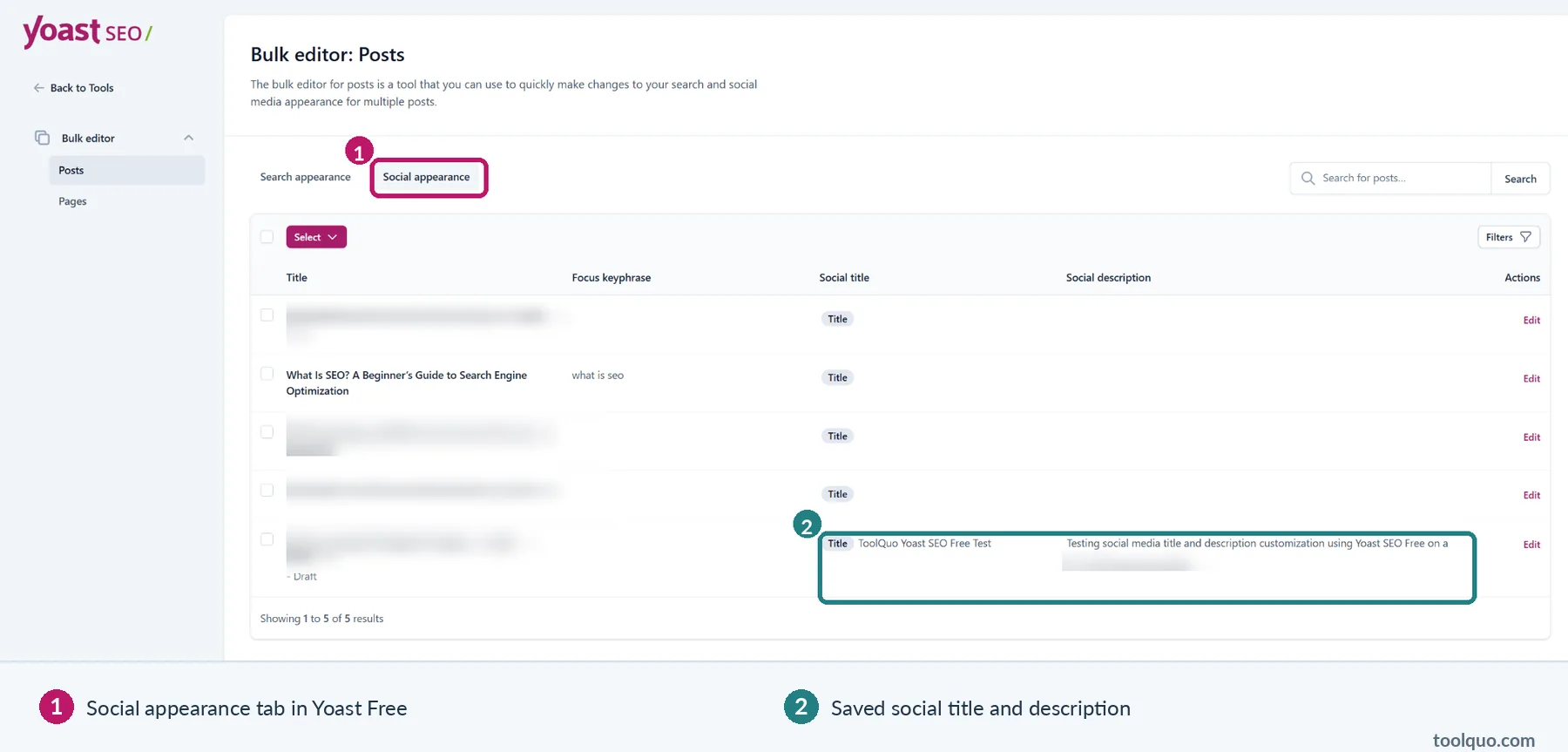
What is social metadata? When a page is shared on a social platform, the platform may use special page metadata to decide which title, description or image to show. For example, a gardening article might benefit from a more conversational sharing title than its standard SEO title. Saving social metadata is not the same as independently verifying exactly what Facebook or LinkedIn will display.
Bulk editing is best for a known maintenance task, not for generating the same text across dozens of unrelated pages. An article about running shoes deserves a different description from one about hiking boots.
Our assessment: A genuinely practical Free capability, particularly for a growing site. The limitation is that editing fields at scale still requires individual editorial judgment. We did not test every social platform’s final preview.
7.2 Measuring Results and Fixing Common Problems
A green Yoast analysis result does not tell you whether people found your article on Google. For that, you need search performance data.
Imagine you publish “How to Choose a Water Purifier” and, after several weeks, Google Search Console shows many impressions for “water purifier for hard water” but few clicks. That tells you something about actual search visibility and user behavior. You might investigate whether your title accurately addresses the question, whether the content covers hard water, and what competing results provide.
Yoast’s own editor indicators cannot answer these questions. In our Free testing, Discover Related Keyphrases led toward Semrush login, while a performance-tracking interface offered Wincher integration. Those are links to other services, not proof that every analytical function is available within the free plugin.
Another common maintenance task is a redirect. If you change /old-service/ to /new-service/, people arriving through an old bookmark should ideally reach an appropriate replacement page instead of a broken link. Redirects are especially important for stores that discontinue products or publishers that merge outdated articles.
Yoast’s integrated redirect manager is a Premium feature according to its current documentation. But paying for Yoast is not the only possible way to create redirects: another suitable plugin or server-level configuration may be appropriate. If you rarely change URLs, you may not need an integrated manager. If you reorganize pages every week, the convenience may have genuine value.
Our assessment: Use independent performance tools to judge results. Consider Premium maintenance features when they save actual time or prevent recurring site problems, not because you expect the subscription itself to improve rankings.
8. Yoast and AI Search: Is llms.txt Useful?
As AI assistants and AI-generated search summaries become more common, website owners naturally wonder how to make their pages easier for these systems to find and understand.
Yoast includes an llms.txt generator. An llms.txt file is a text-based document intended to point certain AI-related tools toward selected site information. You can think of it as a reading list posted outside a library. The list may be helpful to a visitor who chooses to read it; it does not force anyone to enter the library or recommend its books.
We enabled Yoast’s llms.txt generator, inspected the file it produced, and compared automatic and manual content selection. This showed us how a site owner can choose the information included in the file. We also noticed some escaped punctuation in the output, which is worth checking when reviewing the generated text.
Our test confirms that the llms.txt generator can produce a file, but it does not tell us whether AI services will use it or whether it will increase mentions of the website. Those outcomes would need separate evidence. For now, it is best viewed as an optional way to present site information, rather than an established route to better AI search visibility.
Our assessment: Interesting to inspect and potentially useful in particular workflows, but it should not be sold to beginners as an AI-ranking solution. Clear site organization, helpful content and accessible pages remain the fundamentals.
9. Yoast SEO Free vs Premium: Which Features Are Worth Paying For?
A helpful Yoast SEO Free vs Premium comparison is not “Which plan has more features?” but “Which additional jobs could I complete, or complete faster, if I paid?”
Here is a task-based comparison. Free features described as tested were checked in our ToolQuo installation; Premium details are based on Yoast’s official product information.
| Task | Yoast Free | What Premium adds |
|---|---|---|
| Optimize an article | Enter a focus keyphrase; review SEO and readability checks; edit title and description | Additional related-keyphrase and content workflow features |
| Make important pages discoverable | XML sitemaps and basic search appearance/index controls | Core essentials remain available in Free |
| Describe pages to search engines | Core JSON-LD structured data generated automatically | Additional specialist and advanced capabilities may be useful for particular websites |
| Organize internal links | Add links manually; mark cornerstone articles | Automated internal-link suggestions |
| Change many search descriptions | Bulk Editor, tested in Free | Premium’s AI-assisted bulk suggestions can draft metadata for editorial approval |
| Customize social metadata | Free Bulk Editor saved social titles/descriptions in our test | Premium offers dedicated social previews and further customization |
| Manage renamed or deleted URLs | Use another redirect tool or server configuration | Integrated redirect manager |
| Understand actual Google results | Use Search Console and optional external integrations | A Premium subscription does not replace performance evidence |
| Get product support | Public help materials and community options | Premium support included under vendor terms |
| Explore AI discovery | Free llms.txt generation | Other Premium AI-related tools; benefits depend on use case |
Three practical examples: who benefits from Premium?
A university student has launched a blog with twelve articles about personal finance. The main challenges are selecting useful topics, explaining them responsibly, writing helpful titles and getting pages discovered. Free is probably the sensible starting point. Internal-link automation for twelve posts is not a pressing need.
A recipe blogger manages five hundred posts and frequently revises categories or combines older recipes. Finding relevant older articles and managing URL changes may become tedious. Premium may save recurring time, although the owner should compare its annual cost with the price and convenience of alternative tools.
A local home-repair business publishes only a few service pages. It may gain more from improving accurate service descriptions, location details and contact information than from paying for a long list of advanced editorial features. Some bundled specialist tools could be useful, but the decision should follow the business’s actual requirements.
Our view: Free versus Premium is mainly a question of workflow and scale, not whether you care about SEO. Free already handles many essentials.
10. Yoast SEO Premium Pricing: Does the Annual Cost Make Sense?
Yoast SEO Premium is sold as a recurring annual product. During our October 2026 review, the official US page displayed $118.80 per year excluding VAT for one site or domain. Pricing, location-based currency, taxes, bundles, support terms and promotions can change. Always check the vendor’s current page before purchasing.
At the time of review, Yoast described a package that includes its Premium plugin and specialist Local SEO, Video SEO and News SEO tools, along with other benefits. Those extras matter only if you will actually use them. A personal diary blog gets little practical value from news-publisher functionality simply because it is included.
A sensible way to assess price is to estimate the work saved. Suppose your website undergoes multiple URL changes each month and you currently spend time managing redirects through separate processes. A built-in tool may be worthwhile. If you rarely change a URL, the same feature may have negligible value.
Similarly, an editor working across hundreds of articles may appreciate internal-link suggestions. A beginner publishing one post per week can usually add a handful of thoughtful links manually.
Do not assume that buying Premium makes content rank better. You are paying for capabilities and convenience. If those do not solve a real problem, keeping the free version is a defensible choice.
Price and features checked against Yoast’s official Premium product page (October 2026).
11. Who Should Use Free, Upgrade, or Choose an Alternative?
Choose Yoast Free if you are a new blogger, a small business owner or a content creator who needs a clear set of SEO basics. It is particularly suitable if you value reminders about titles, descriptions, links and readability but are willing to use human judgment when the tool’s advice feels mechanical.
Consider Premium if you manage a large content library, frequently change URLs, want suggestions for internal linking, need vendor support or can make genuine use of the additional specialist products. Write down the exact features you would use before you pay.
Compare alternatives if another WordPress plugin offers a specific capability you require under a more suitable plan. For instance, you may want different free technical controls, an integrated 404 monitor, or another interface for schema and search analysis. A direct comparison should examine matching tasks, not feature counts alone.
Our published Rank Math review offers a separate assessment of that plugin. We also plan a dedicated Yoast SEO Free vs Rank Math Free comparison, where we can discuss equivalent tasks side by side without making this Yoast review unnecessarily long.
12. Yoast SEO Pros and Cons: What Our Testing Found
What impressed us in practical use:
- The SEO checks became useful once we supplied the intended focus keyphrase. On our What Is SEO? article, the final assessment showed 16 good results and one suggestion about image alt text. For a beginner, this provides a manageable list of points to review rather than a vague instruction to improve SEO.
- The snippet editor made it simple to customize each page’s proposed search title and description. We saved a meta description and verified that it appeared in the page’s HTML source, demonstrating that the setting produced real metadata rather than merely changing a score.
- Yoast handled essential technical outputs without manual coding. Our sitemap included the expected posts, pages and categories, while our test article contained a connected schema graph describing the page, website and publisher. These are practical time-savers, even though they do not guarantee indexing or rich results.
- The free Bulk Editor was more useful than we initially expected. It saved both search metadata and separate social titles and descriptions. That matters for publishers maintaining many articles and means these basic editing tasks do not require Premium.
- Important sitewide controls were available in one place. A beginner could review archives, indexing preferences and search appearance settings through WordPress instead of editing technical files. The benefit is easier access, provided those settings are chosen carefully.
Limitations that could affect your choice:
- The focus-keyphrase analysis can encourage unnecessary repetition if followed mechanically. For example, adding “best laptop for students” to every heading may satisfy a phrase check while making the article less natural. Use the warning to check clarity, not to set a keyword-repetition target.
- Readability scores simplify complex editorial decisions. We observed Yoast measuring transition words and applying different subheading guidance to cornerstone content. Such checks can highlight possible problems, but only the writer can judge whether changing a sentence would actually help the reader.
- Indexing and crawl controls still require SEO understanding. A wrong noindex choice could keep an important service page out of search. Yoast makes the switch accessible, but does not automatically know which pages your business should want indexed.
- Two conveniences that growing websites may need—automatic internal-link suggestions and the built-in redirect manager—are Premium features. If you regularly reorganize URLs or maintain hundreds of articles, Free may require more manual work or another plugin.
- Free and Premium capabilities are not always obvious from a single screen. Some social options were shown as Premium-restricted, yet we could still save social titles and descriptions through the free Bulk Editor. Website owners may need to inspect the available workflows before deciding which limitations truly affect them.
- Yoast’s green indicators are not performance reports. In our tests, keyword discovery and performance options led toward external services such as Semrush and Wincher. To judge actual search impressions, clicks and indexing, you still need independent data such as Google Search Console.
Overall, Yoast Free’s strongest case is that it makes everyday SEO tasks easier to manage and exposes useful technical controls. Its weakest point is not a lack of basic features, but the risk that beginners will treat checklist results as a judgment of content quality. The best way to use it is to follow recommendations selectively and pay for Premium only when its additional tools solve a recurring problem.
13. Alternatives: What About Rank Math and Other SEO Plugins?
Rank Math is a natural alternative because it also helps WordPress owners manage on-page and technical SEO. The experience and free/paid feature boundary differ, so a meaningful comparison needs to start with tasks: writing an article, changing a title, creating redirects, managing schema or monitoring problems.
For a website owner who is happy with Yoast Free, switching plugins solely because someone else obtained a higher score in Rank Math is unlikely to be a good reason. Plugin scores reflect different internal checklists, not a universal ranking benchmark.
Other WordPress plugins, including All in One SEO and SEOPress, may suit different site needs. We have not tested every competitor to the same depth, so we will not award a category-wide winner based on incomplete evidence.
If your question is specifically “Yoast Free or Rank Math Free?”, our planned dedicated comparison is the right next step. If your question is “Which WordPress SEO plugin should I install?”, a broader Best WordPress SEO Plugins guide will cover that decision.
14. Final Verdict: Is Yoast SEO Worth It in 2027?
Yes. Yoast SEO Free gives WordPress beginners useful SEO tools and a visible checklist for tasks they might otherwise overlook. It can help them write clearer search titles, avoid missing technical essentials, organize site information and maintain metadata more efficiently.
Its value is greatest when users understand both what it checks and what it cannot know. A plugin may tell you that your gardening article uses a phrase in the title. It cannot tell you whether the advice will keep the plants alive. It may flag a long paragraph, but it cannot decide whether shortening it would lose an important explanation. Those decisions remain yours.
Start with Free unless you already need a Premium-only workflow. Improve the actual quality of your pages, keep them accessible to search engines, link related content naturally and evaluate outcomes using real search data. Upgrade when an identifiable feature saves enough time or effort to justify its price.
15. Frequently Asked Questions
Is Yoast SEO Free enough for beginners?
Usually. It includes core metadata editing, content checks, sitemaps and many technical settings. Beginners may gain more from learning the meaning of those tools than from paying immediately.
Does getting green lights improve Google rankings?
Not automatically. A green indicator means certain plugin checks are satisfied. Google evaluates many other qualities of the page and website.
Does the focus keyphrase field tell Google what to rank me for?
No. It tells Yoast which phrase to assess. Search engines interpret the published content independently.
Will Yoast’s sitemap make Google index my posts?
No. It helps discovery but cannot require indexing. Use Google Search Console when investigating indexing status.
Can I write a meta description without Premium?
Yes. SEO title and description editing are available in Free. We also used the free Bulk Editor to save search and social descriptions.
Can I use Yoast and Rank Math together?
Running two full SEO plugins on a production site can cause overlapping metadata and settings. Plan a migration rather than activating both without understanding how their outputs interact.
Does Yoast’s schema guarantee rich results?
No. The plugin can generate structured data, but Google determines whether particular rich-result formats are supported and whether a page is eligible.
Does llms.txt guarantee visibility in AI search?
No. Creating a file does not guarantee that an AI system will read it, cite the website or send visitors.
When does Premium make sense?
Most clearly when a feature such as built-in redirects, linking suggestions or vendor support solves a repeated problem you already face.
Should I use Yoast or Rank Math?
Identify your most important tasks and compare what the free versions actually provide. Our dedicated comparison will examine the two tools side by side.
16. How We Tested Yoast SEO
We tested Yoast SEO Free version 28.7 on ToolQuo in October 2026. Our principal test page was the published What Is SEO? article. We used a separate test installation to examine Yoast without changing the SEO plugin on ToolQuo’s live website.
We tested focus-keyphrase checks, SEO and readability assessments, snippet editing and saved metadata, XML sitemap generation, schema output, FAQ/How-to block markup, breadcrumb and archive settings, llms.txt generation, selected crawl settings and the Bulk Editor. We verified saved values or source-code output where those were the point of the experiment.
We did not purchase Yoast Premium, measure changes in ranking attributable to the plugin, test the behavior of every advanced setting, or independently confirm every platform-specific social preview. Premium claims are identified as official vendor information, not firsthand results.
About the author
Nikhil Bhardwaj
Founder & Editor, Toolquo
Nikhil leads Toolquo’s editorial direction, focusing on practical software research, transparent comparisons, and clear buying decisions.
View author profile →Keep exploring
Related guides
November 1, 2026
How to Use Yoast SEO: Complete Beginner’s Guide (2027)
Learn how to install and configure Yoast SEO, choose WordPress SEO settings, optimize a post, and…
October 23, 2026
Off-Page SEO: A Practical Guide to Backlinks, Link Building and Website Authority
Learn off-page SEO from scratch, including quality backlinks, eight proven strategies, free competitor research in Bing…
October 20, 2026
How to Use Rank Math SEO in WordPress: Complete Setup Guide (2027)
Learn how to install and set up Rank Math SEO, choose WordPress settings and modules, optimize…