On-Page SEO Explained: A Practical Beginner’s Guide
Learn how to do on-page SEO with beginner-friendly examples, practical improvements, a real WordPress case study and a useful checklist.
On this page
How can you help a useful webpage appear in Google Search? On-page SEO brings together two complementary tasks: writing content that answers readers’ questions and presenting it so search engines can understand its subject. Neither is a shortcut to the top of Google, and repeating a keyword is not a substitute for a useful article.
In this guide, we will improve an imaginary gardening post step by step. We will then look at an actual page we improved using Rank Math on WordPress, including one result that shows why SEO plugin scores need to be interpreted carefully.
What Is On-Page SEO?
On-page SEO means improving elements of an individual webpage that you control. These include its content, SEO title, meta description, headings, URL, images and links. A clear page helps readers understand what they will find and helps search engines interpret its topic. Google’s SEO Starter Guide likewise emphasises useful content, descriptive titles, well-organised text and relevant links.
Suppose you run a gardening blog. A post called “Tomato Plants” could be about buying plants, caring for them or growing them in pots. “How to Grow Tomatoes in Pots: A Beginner’s Guide” makes a clearer promise. The article itself must then deliver on that promise.
On-page SEO is only part of SEO. Technical SEO covers matters such as crawling and indexing, while off-page SEO includes signals from outside the website, such as links from other sites. Our guide to what SEO is explains how these parts fit together.
The following steps cover the main on-page improvements you can make before publishing or when revising an existing article.
Step 1: Match Search Intent and Choose Your Keywords
Find out what someone wants from the search
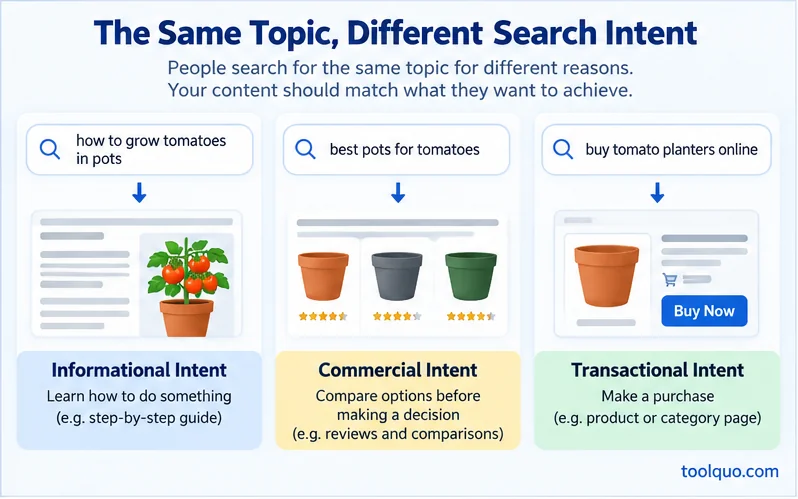
Search intent is the purpose behind a query. Someone searching “how to grow tomatoes in pots” probably wants instructions. “Best pots for tomato plants” suggests a comparison, while “buy tomato planters online” suggests shopping. The subject overlaps, but the useful answer changes.
Before drafting, search for your intended topic and inspect a few helpful results. Are people being shown tutorials, definitions, comparisons or product pages? This is a clue about the format your page should use, not permission to copy competitors’ wording.
Can one article answer several kinds of searches?
Yes, when the questions belong together. A growing guide can explain pot size, soil and watering because they are all part of growing tomatoes. But detailed reviews of twenty planters may deserve a separate comparison page. Give each page a main purpose, answer related follow-up questions, and link to a more specialised article when useful.
Select primary and secondary keywords
A primary keyword names the page’s central topic. For our example it could be “how to grow tomatoes in pots.” Secondary terms might include “tomato pot size” and “watering tomatoes in containers.” They help identify related questions to answer, but you should not force every variation into the headings.
Use the main phrase in a natural, descriptive title and early explanation, then choose supporting terms where they fit. There is no universal keyword-density target. A keyword gap is a relevant search your competitors’ pages appear for but yours does not. If several useful gardening guides explain drainage and your page does not, first ask whether your readers need that information. A future guide on keyword research for a new website will cover how to find and evaluate these opportunities systematically.
Step 2: Improve the SEO Title, Description, URL and Headings
Write a title and description that accurately set expectations
Compare “Tomatoes | Tomato Tips | Best Tomatoes” with “How to Grow Tomatoes in Pots: A Beginner’s Guide.” The second is specific and tells people what they will learn. Your SEO title is the text you propose for the search-result title link, although Google may generate a different title.
A meta description summarises the page for prospective searchers. An example is: “Learn how to grow tomatoes in pots, from choosing containers and soil to caring for your plants.” Write for someone deciding whether the result is relevant. Google may use a passage from the page instead of your supplied description. To see how these fields are edited inside WordPress, our hands-on Yoast SEO review includes the actual snippet editor and explains what its preview can and cannot tell you.
Make the URL readable too. /grow-tomatoes-in-pots/ tells readers more than /article-17-final/. Avoid changing an established URL merely for a shorter keyword-friendly slug. Old bookmarks and external links can then lead to a 404 error unless you arrange a suitable redirect and update your internal links.
Use H1, H2 and H3 as a clear outline
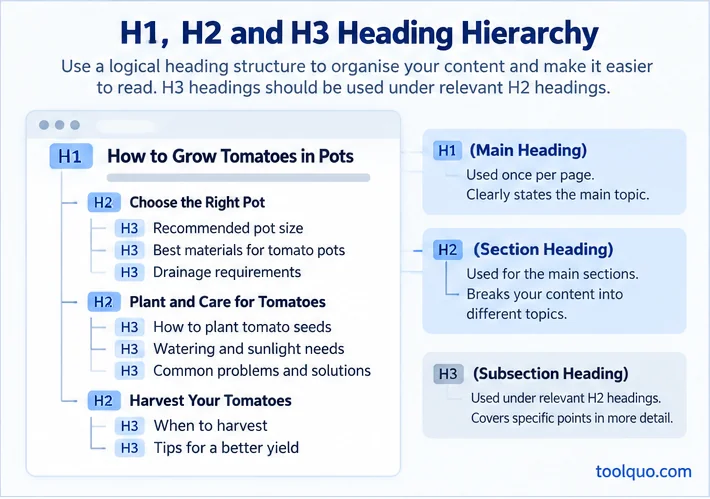
The H1 names the page’s main subject. H2 headings introduce main sections, while H3 headings break those sections into smaller topics. A tomato guide might use H1 “How to Grow Tomatoes in Pots,” H2 “Choose the Right Container” and “Care for Your Plants,” and H3 “Watering” and “Sunlight” under plant care.
Headings help a reader scan and navigate. They should describe the section, not merely contain a keyword. Using one clear H1 is a sensible convention, not a guaranteed Google ranking advantage.
Step 3: Make the Content Genuinely Useful
The most important question is whether the article helps someone accomplish what they came to do. Answer the central question promptly, then explain the steps and decisions that matter. For example, “Water the plants regularly” is less useful than advice explaining how to judge whether the soil needs water and what can go wrong if a container has poor drainage, provided the advice is accurate.
A complete answer is not necessarily a long one. Explain unfamiliar terms, remove repetition and support factual claims where needed. Use a small table when readers must compare several things, a photograph when it clarifies a physical process, and text when an explanation is enough. Google’s people-first content guidance does not prescribe a preferred word count.
Read the article on a phone as well as a desktop. Check that text is readable, images fit and headings guide readers to the right part. These are sensible usability practices, but not every formatting choice should be advertised as an individual confirmed ranking factor.
Step 4: Optimise Images and Internal Links
Give every useful image a job
A photo of tomato plants growing in balcony pots can show a reader the arrangement described in your instructions. Use a descriptive filename such as tomato-plants-balcony-pots.jpg instead of IMG_1421.jpg. Write alt text that conveys what matters in context, for example, “Three tomato plants growing in pots on a balcony.” Alt text also supports people who use screen readers. Decorative images usually do not need descriptive alt text.
Resize and compress unnecessarily heavy image files without making instructional details unreadable. Place an image near the explanation it supports. An attractive picture that teaches nothing is not automatically worth including.
Use internal links and meaningful anchor text
An internal link takes someone from one page of your site to another. Anchor text is the clickable wording. In a tomato-growing guide, link the phrase “how to start tomatoes from seeds” to the relevant tutorial rather than writing only “click here.” Descriptive, natural wording tells readers what awaits them and gives search engines context about the destination.
Link when an existing guide answers a relevant follow-up question. If you want a broader understanding of how this fits into website growth, read our explanation of SEO. If you are choosing tools to help manage SEO tasks, our guide to the best SEO tools compares options by purpose. Do not insert links merely to reach a target count.
Step 5: How We Improved a Real WordPress Article
The principles become easier to understand when applied to a real page. We documented a complete optimisation exercise using a Testonomics article about microeconomics and macroeconomics. This was not an experiment in forcing a perfect Rank Math score. We wanted to make the article more useful and see which plugin recommendations helped.
What did readers want, and how was the page performing?
The original article, “Microeconomics vs. Macroeconomics: Differences & Examples,” was already appearing in Google Search. For July 1 to September 30, 2026, Google Search Console recorded 5,268 impressions, 12 clicks and a 0.23% click-through rate for that exact page in Web Search. Some queries asked for examples, so we checked how quickly a visitor could find them. These are baseline numbers from before our edits, not evidence of subsequent growth.
What did we actually improve?
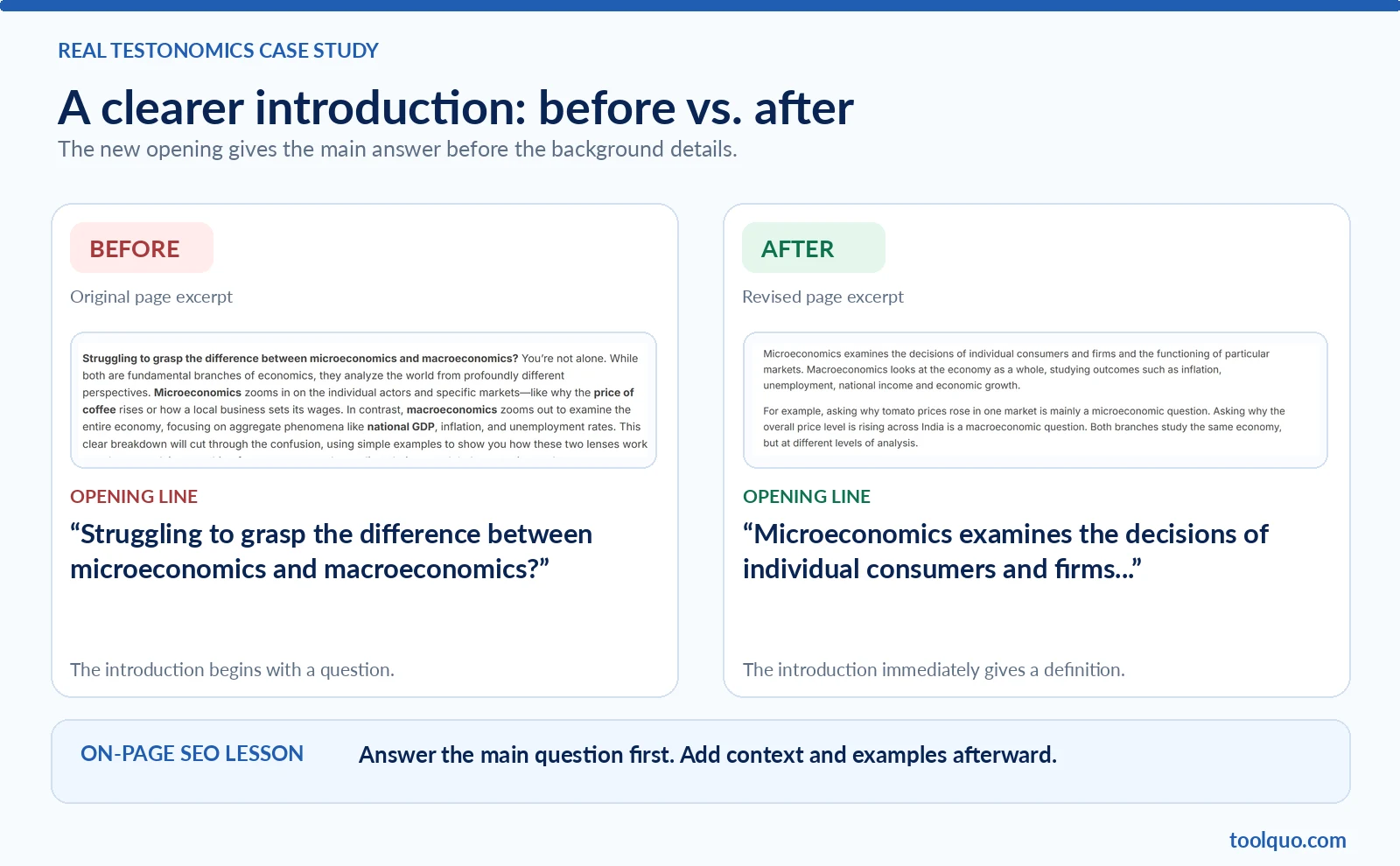
We first changed the introduction so it explained the difference between microeconomics and macroeconomics immediately, rather than beginning with a long rhetorical setup. Next, we corrected a spelling error in the meta description. The existing comparison table and examples were useful, so we improved them rather than pretending the old article had none. We added another table comparing the two perspectives on the same event, along with educational illustrations.
We also replaced a body structure containing five H3 headings but no H2 headings with eight H2 sections and six H3 subsections. A working eight-link table of contents made it easier for readers to reach specific sections. Finally, we placed three contextual internal links to the article from related Testonomics preparation guides. We kept the existing URL instead of changing it merely to shorten the slug.
The practical lesson is simple: each change should solve a problem that you can explain. A direct opening helps someone get the answer sooner. Clear headings and a contents menu improve navigation. Relevant tables and links make the explanation easier to use.
Why did the Rank Math score move from 82 to 81 to 87?
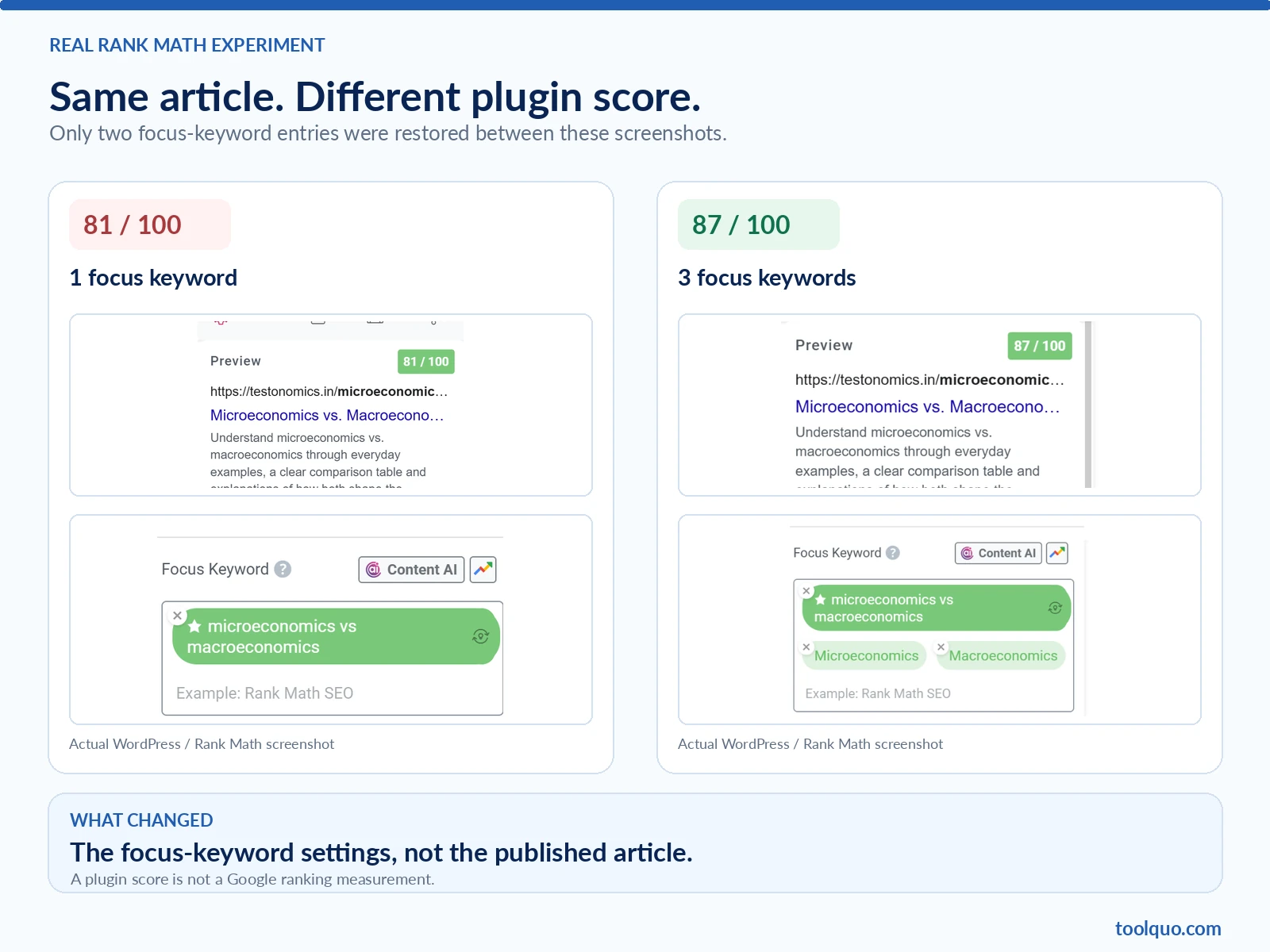
Rank Math originally gave the page 82/100 with three focus keywords entered in its editor. After the content improvements, the score displayed 81/100, but the revised editor was checking just one focus keyword. That meant 82 and 81 did not represent identical scoring conditions.
To investigate, we restored the two original secondary focus keywords inside Rank Math without editing the revised article’s title, paragraphs, headings, links or images. The score immediately rose from 81 to 87. The public page remained the same. Those six points came from a change in the plugin’s analysis settings, not an improvement to what visitors read. Rank Math focus keywords are not submitted to Google as instructions to rank a page.
What did we learn from the experiment?
We kept changes that genuinely improved the page and ignored warnings that lacked a clear purpose. For instance, we did not add exaggerated words to a neutral educational title or install another table-of-contents plugin when our existing menu already worked. Rank Math helped detect a real metadata typo, but it could not judge whether an economics explanation was accurate or whether the manual contents menu served readers.
These observations establish what we changed and how Rank Math behaved. They do not establish that rankings, clicks or traffic increased afterward. For screenshots, the original checks, the 82/81/87 score experiment and the decisions behind the edits, read our published Rank Math case study. Our Rank Math review covers the plugin’s broader features and limitations.
On-Page SEO Checklist
Before publishing or updating a page, check the following:
- Does the article answer one main search need and related questions?
- Is the main topic clear in the title and opening?
- Are primary and supporting keywords used naturally?
- Are the SEO title, meta description and URL descriptive?
- Do H1, H2 and H3 headings follow a useful hierarchy?
- Is the content accurate, complete enough and easy to read?
- Do informative images have suitable filenames, alt text and file sizes?
- Do internal links have useful destinations and descriptive anchor text?
- Does the page work well on mobile?
- Have you evaluated SEO plugin warnings instead of blindly following them?
Common On-Page SEO Mistakes and How to Avoid Them
Knowing the right techniques is helpful, but beginners also need to recognise when an apparently sensible SEO change can make a page worse. Here are four common problems and what to do instead.
1. Repeating keywords until the writing sounds unnatural
Imagine writing: “For tomato pots, choose tomato pots that suit tomato plants in pots.” The phrase is repeated, but it does not tell the reader what to choose. Rewrite it to explain the actual decision, such as the space the roots need or whether the pot has drainage holes. Use a keyword when it makes the meaning clear, not to reach a target density. Google considers unnatural repetition intended to manipulate results a form of keyword stuffing.
2. Trying to answer unrelated search intents in one article
A growing tutorial might become confusing if half the page suddenly compares the prices of twenty planters. Someone learning how to care for tomatoes and someone ready to buy a planter need different information. Keep the tutorial focused, briefly mention what makes a suitable pot, and link to a separate comparison if readers would benefit. Related questions can share a page; different main goals may need different pages.
3. Making promises that the article does not fulfil
A title like “Grow Perfect Tomatoes in Three Days” might sound exciting, but it misleads readers if the page only gives ordinary planting advice. Similarly, adding a number or an emotional phrase merely because an SEO plugin suggests it can make a straightforward guide less trustworthy. Choose a specific title that describes the content honestly. Write a useful meta description too, knowing that Google may display another snippet.
4. Making technical changes just to satisfy a score
A plugin may flag a long URL or fail to recognise a table of contents you built manually. Before changing anything, inspect the actual page. Does its navigation work? Is its existing URL linked from other sites? If you change a published URL without a redirect, visitors may reach a 404 error. Our Rank Math experiment also showed a score increase of six points without any change to the public article. Use plugin warnings as questions to investigate, not commands to obey.
A quick final test helps: if the plugin score disappeared, would you still be able to explain how the proposed edit helps a real visitor or search engine? If not, reconsider it. To learn which recommendations to follow and when to ignore them, see our guide to understanding and improving the Rank Math SEO score.
If you use Yoast, our guide to Yoast’s traffic-light recommendations applies the same reader-first approach, with an original test and examples of warnings worth reviewing.
Final Thought
The most practical way to learn on-page SEO is to improve one real page at a time. Ask what the reader came to find, make the answer clearer, then improve the title, headings, images and internal links. Measure search performance separately and avoid assuming every improvement causes a ranking gain.
About the author
Nikhil Bhardwaj
Founder & Editor, Toolquo
Nikhil leads Toolquo’s editorial direction, focusing on practical software research, transparent comparisons, and clear buying decisions.
View author profile →Keep exploring
Related guides
November 3, 2026
Yoast SEO Sitemap: How to Find, Configure and Fix Errors (2027)
Find your Yoast SEO sitemap, choose which URLs belong in it, submit it to Google Search…
November 1, 2026
How to Use Yoast SEO: Complete Beginner’s Guide (2027)
Learn how to install and configure Yoast SEO, choose WordPress SEO settings, optimize a post, and…
October 29, 2026
Yoast SEO Review (2027): How Good Is It, and Is Premium Worth It?
Our hands-on Yoast SEO review explores Free features, Premium pricing, strengths, limitations, and whether upgrading is…