Best SEO Tools for 2027: Free & Paid Tools by Use Case
There is no single best SEO tool for every task. The right SEO tool depends on what you need it to do. We tested free and paid SEO tools for keyword research, competitor analysis, technical SEO, backlinks, rank tracking and WordPress — and matched them to real workload limits.
On this page
There is no single best SEO tool for every task. The right choice among the best SEO tools depends on what you need it to do—keyword research, technical SEO, backlinks, rank tracking or WordPress optimization.
If you already know you need a paid platform, our best paid SEO tools picks are Semrush for broad SEO work, SE Ranking for value-focused all-in-one use, Ahrefs for backlink-heavy research, Ubersuggest for smaller budgets, Screaming Frog for technical crawling and Rank Math Pro for advanced WordPress SEO.
For many websites, the most sensible setup is not one “perfect” tool. It is one main research platform, supported by a few strong free or specialist tools. And if you are still small, you may not need a paid SEO platform at all.
This guide focuses on the decision that actually matters: what problem are you solving, how large is your workload, and which limitation are you willing to pay to remove?
Toolquo principle: Don’t pay for features. Pay to remove a limitation you actually have.
Best SEO Tools by Purpose
| Purpose | Best Free Option | Best Paid Option | Why / When to Choose |
|---|---|---|---|
| One Tool for Most SEO Tasks | Google Search Console + Keyword Planner + Screaming Frog Free + Rank Math Free | Semrush Pro | Best when you regularly need keyword research, competitor analysis, tracking, backlinks and audits together. |
| Keyword Research | Google Keyword Planner | Semrush Pro | Use Keyword Planner to validate demand; use a paid platform when you need difficulty, competitor gaps and deeper SERP research. |
| Competitor Research | Ubersuggest Free for light use | Semrush Pro | Paid tools become more useful as the number of competitors and research frequency rises. |
| Technical SEO | Screaming Frog Free | Screaming Frog Paid | The free version is excellent up to 500 URLs. Paid becomes more useful at larger scale or when you need advanced crawling. |
| Backlink Research | Ahrefs Webmaster Tools for verified sites | Ahrefs / Semrush | Use free verified-site tools for your own properties; paid access matters much more for competitor research. |
| Rank Tracking | Google Search Console for own-site performance | SE Ranking / Semrush | Dedicated tracking becomes more valuable once you want frequent monitoring across a larger keyword set. |
| WordPress SEO | Rank Math Free | Rank Math Pro | Useful for implementation inside WordPress, not as a replacement for market or competitor research. |
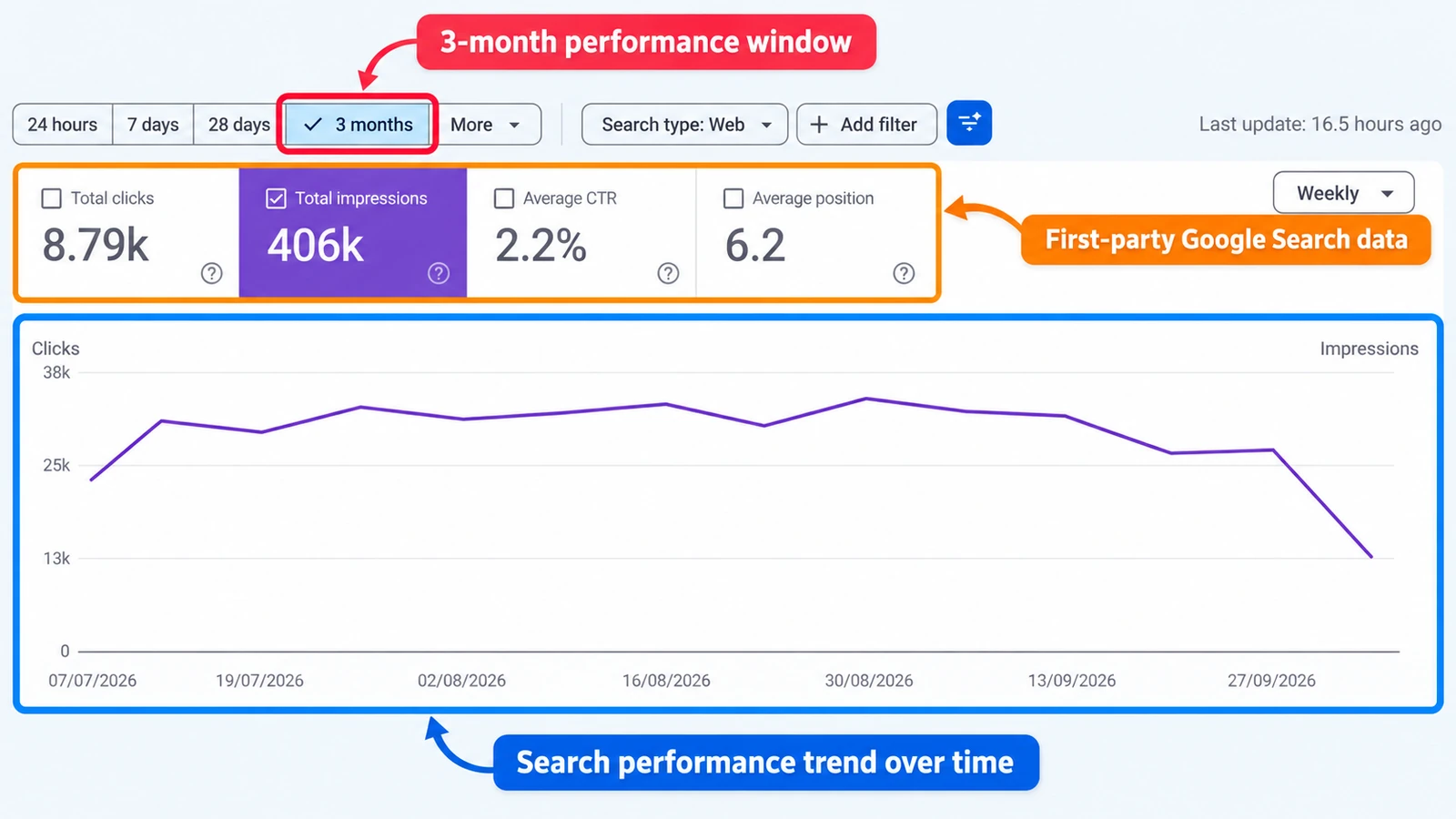
If you own a website, start with Google Search Console. It gives you first-party Google Search data for your verified property. Other tools estimate search demand, rankings and traffic from their own databases and models.
How We Tested These SEO Tools
We used the tools on real SEO tasks: a mature WordPress site, the same keyword set across platforms, competitor-gap workflows, rank tracking and technical crawls. We also recorded practical limits such as keywords tracked, competitors monitored, pages crawled, report/search limits and export restrictions.
Where our paid testing is incomplete, we say so. Free-plan and trial limits can change; figures below reflect our hands-on testing in October 2026 unless stated otherwise.
Do You Actually Need a Paid SEO Tool?
Not necessarily. Google Search Console covers your own Google performance, Keyword Planner helps validate demand, Screaming Frog Free crawls up to 500 URLs, and Rank Math Free handles many WordPress SEO tasks.
Pay when a real limitation starts affecting the work: deeper competitor research, larger keyword gaps, hundreds of tracked keywords, more competitors, bigger audits, exports, historical data or a faster integrated workflow. For many users, the sensible setup is one paid platform plus several strong free tools.
Before subscribing, ask: What can’t I do efficiently with the tools I already have?
Best Free SEO Tools
You can do a surprising amount of SEO without paying. The strongest free tools are usually specialized rather than comprehensive, so choose them by purpose.
Best Free SEO Tools by Purpose
| Free SEO Tool | Best For | What You Get Free | Main Limitation |
|---|---|---|---|
| Google Search Console | Your own Google performance | Clicks, impressions, queries, pages, indexing, links and Core Web Vitals | Only for verified properties; not a competitor-research tool |
| Google Keyword Planner | Validating keyword demand | Demand estimates, related keywords, CPC and advertiser competition | Built for Google Ads; limited SEO-specific competitive analysis |
| Screaming Frog Free | Technical SEO crawling | Detailed crawl data and exports | 500 URLs per crawl |
| Semrush Free | Occasional multi-purpose research | Limited keyword, domain, competitor and project functionality | Very tight daily and project limits |
| Ahrefs Webmaster Tools | Backlinks and technical SEO for your own site | Verified-site backlink, keyword, internal-link and audit data | Broad competitor and keyword research remains restricted |
| Ubersuggest Free | Beginner-friendly research | Keyword, competitor, rank and audit functionality at small scale | Tight daily/search/report limits |
| Rank Math Free | WordPress SEO | Metadata, schema, sitemaps, indexing controls and on-page guidance | Not a keyword/competitor research platform |
| Google Trends | Trends and seasonality | Relative interest over time, geography and related topics | Not conventional monthly search volume |
| PageSpeed Insights | Performance and Core Web Vitals | Field/lab performance diagnostics | Specialist performance tool only |
| Bing Webmaster Tools | Bing search visibility | Bing performance, indexing, URL inspection and site tools | Not a replacement for Google Search Console |
How Much Do the Free Plans Actually Let You Do?
| Tool | Observed Free Capacity | Where You Hit the Limit |
|---|---|---|
| Semrush Free | About 10 research requests per day in our test; one project; about 10 tracked keywords | Regular research hits the daily cap quickly |
| Ubersuggest Free | About 3 reports/searches per day; 25 tracked keywords; 2 competitors; 150 pages per audit | Research depth, rows, filtering and exports become restrictive |
| Screaming Frog Free | 500 URLs per crawl | Any full crawl above 500 URLs requires a different approach or paid licence |
| Ahrefs Webmaster Tools | Verified-site access, but usage is still capped: in our test we hit a monthly row limit and Ahrefs told us to wait until the reset date or upgrade | Rank Tracker, broad competitor research, Keywords Explorer and exports are restricted |
We exclude tools such as Google Search Console, Google Keyword Planner, Trends, Rank Math and PageSpeed Insights from this quota table because their usefulness is not defined by a comparable project/rank/crawl allowance.
Google Search Console — Best Free Tool for Your Own Google Performance
Google Search Console provides first-party Google Search data for a verified site: clicks, impressions, average positions, queries, pages, indexing, Core Web Vitals and links.
That is different from Semrush, Ahrefs, SE Ranking or Ubersuggest, which estimate traffic, rankings and search demand from proprietary databases. In our testing, those estimates sometimes differed substantially.
Best use: GSC for the truth about your own Google performance; third-party tools for competitor intelligence and broader research.
Google Keyword Planner — Best Free Tool for Validating Keyword Demand
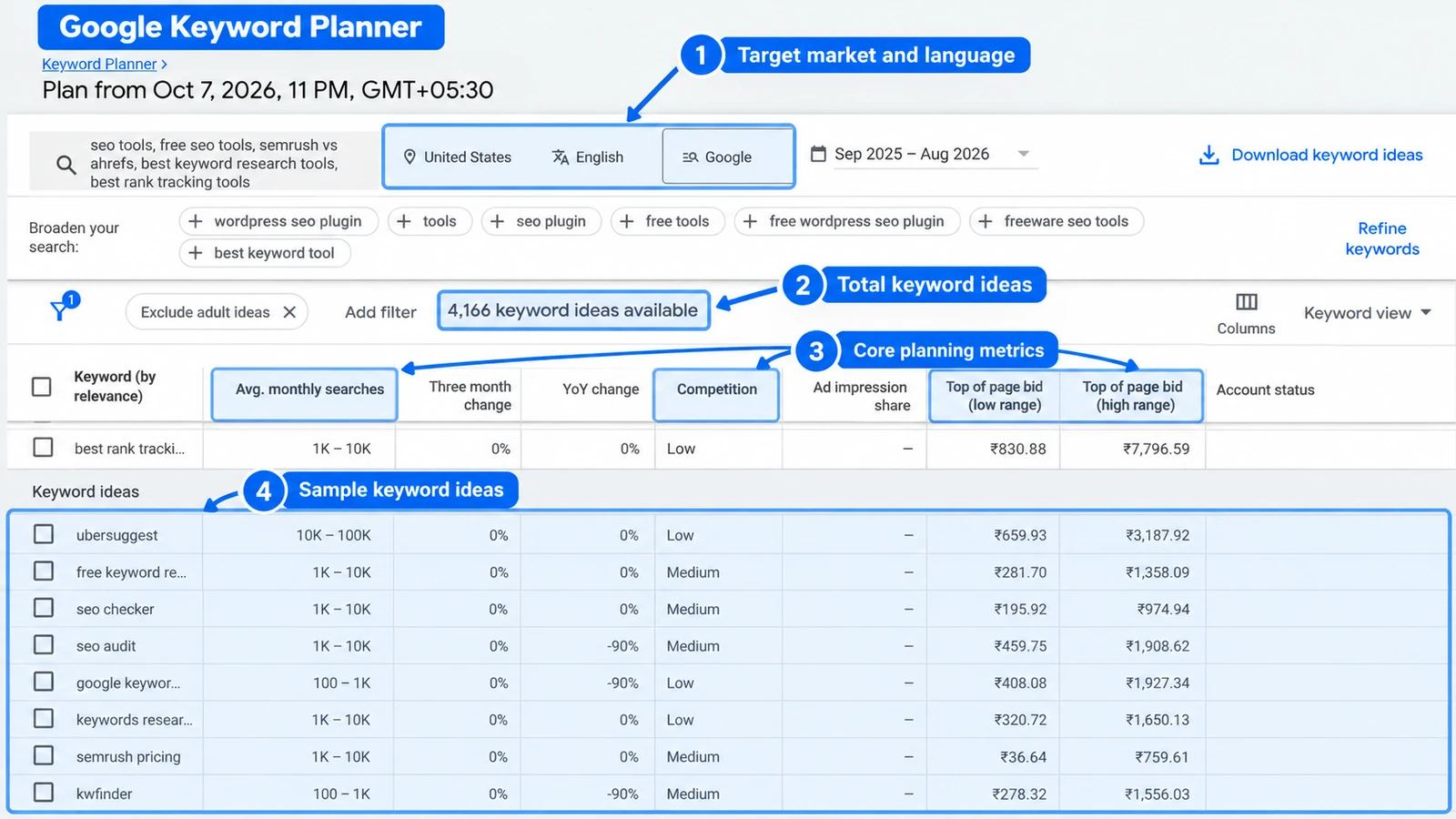
Keyword Planner helps validate relative demand, keyword variations, CPC and advertiser competition—useful when third-party volume estimates disagree. Because it was built for advertisers, it lacks the deeper keyword-difficulty, competitor-gap and SERP analysis of dedicated SEO platforms.
Best use: validate demand here; use an SEO tool for deeper difficulty, intent and competitor analysis.
Screaming Frog Free — Best Free Technical SEO Crawler
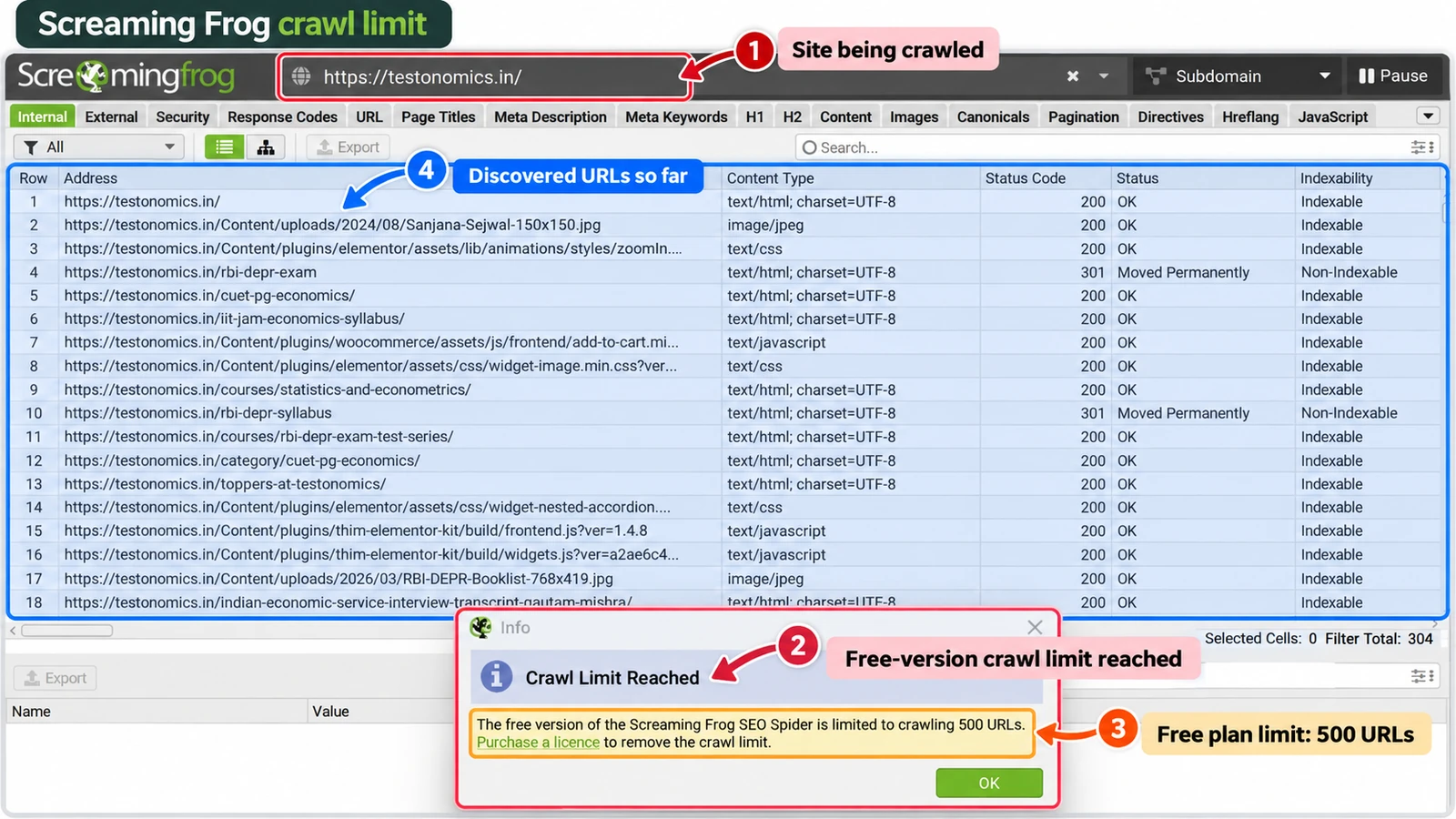
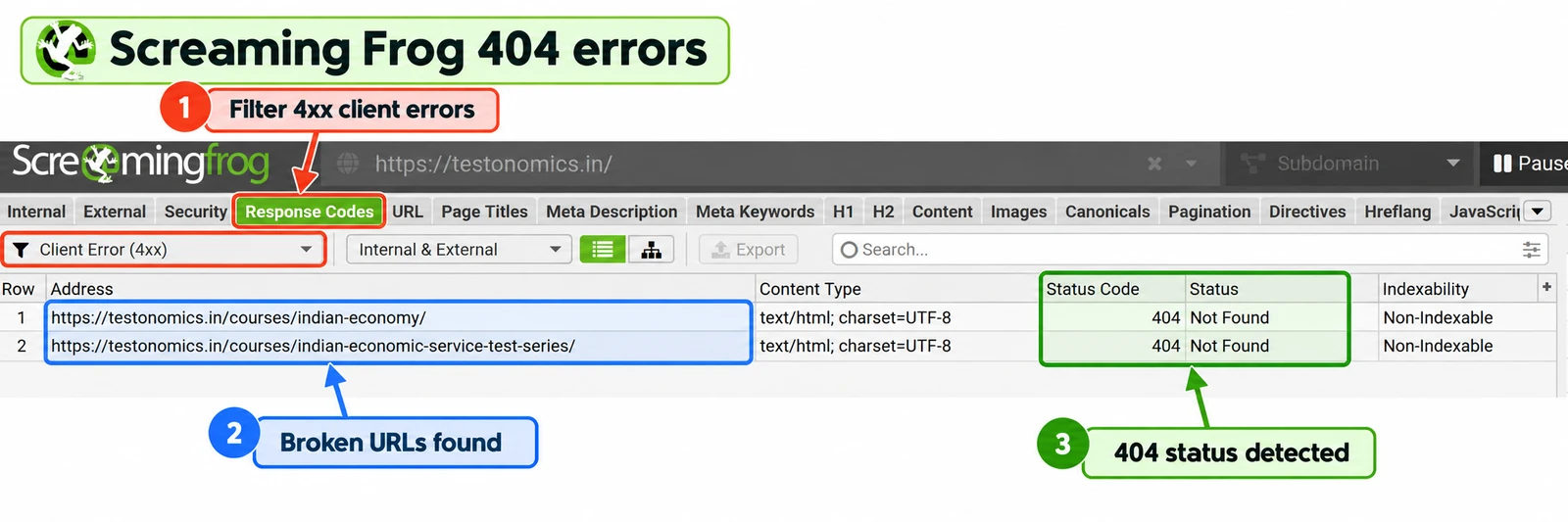
On our mature WordPress test site, Screaming Frog surfaced broken URLs and images, duplicate titles, large images, indexability problems and a malformed canonical. Its strength is raw URL-level crawl detail, not just a health score.
The free version is capped at 500 URLs per crawl. Beyond that—or when you need JavaScript rendering, scheduled crawls or advanced controls—the paid licence becomes more useful.
Semrush Free — Best Free Option for Occasional Multi-Purpose SEO Research
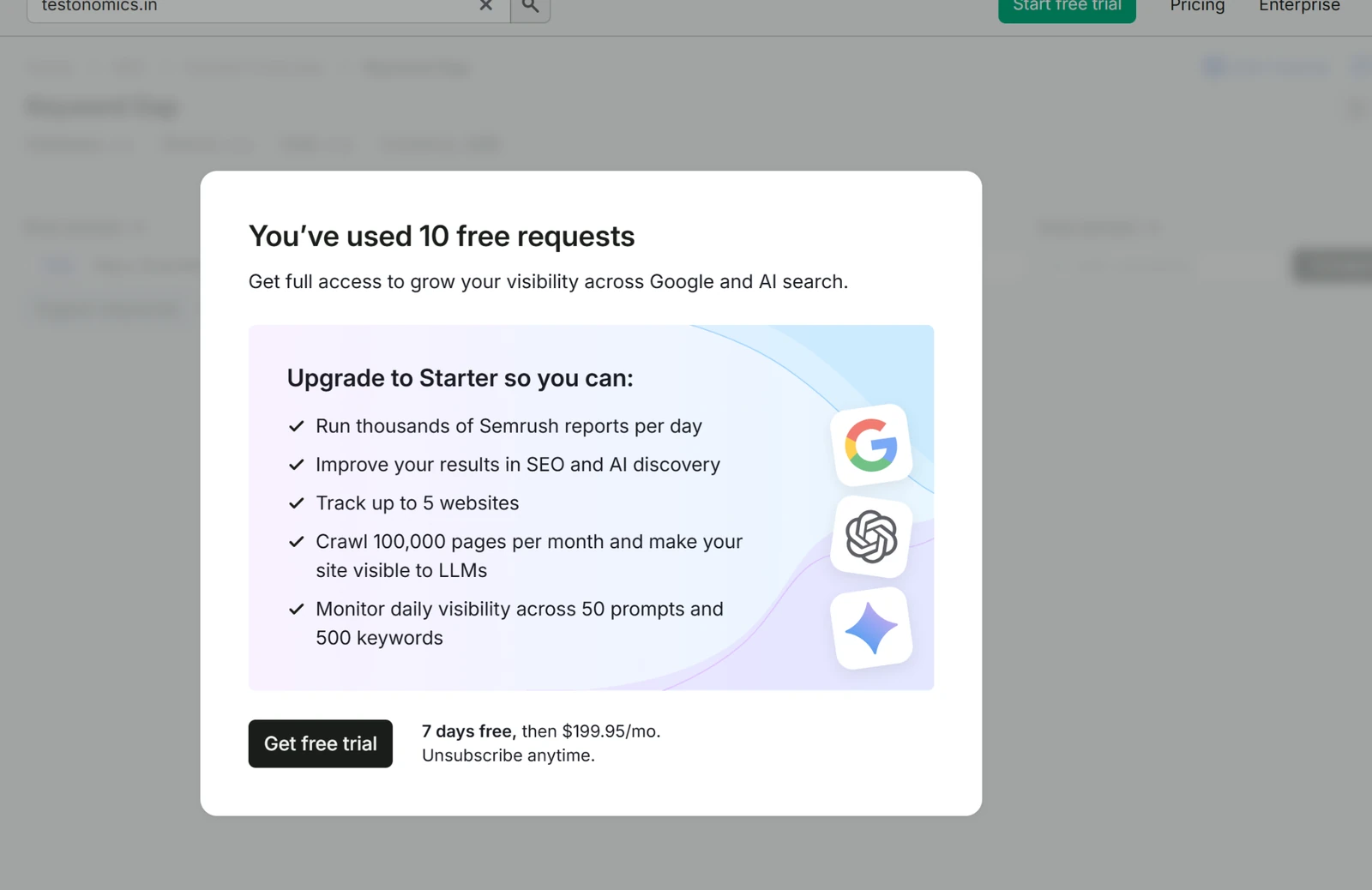
In our test, Semrush Free allowed around 10 research requests per day, one project and roughly 10 tracked keywords. That is useful for occasional checks, but regular competitive research, exports and tracking quickly expose the limits.
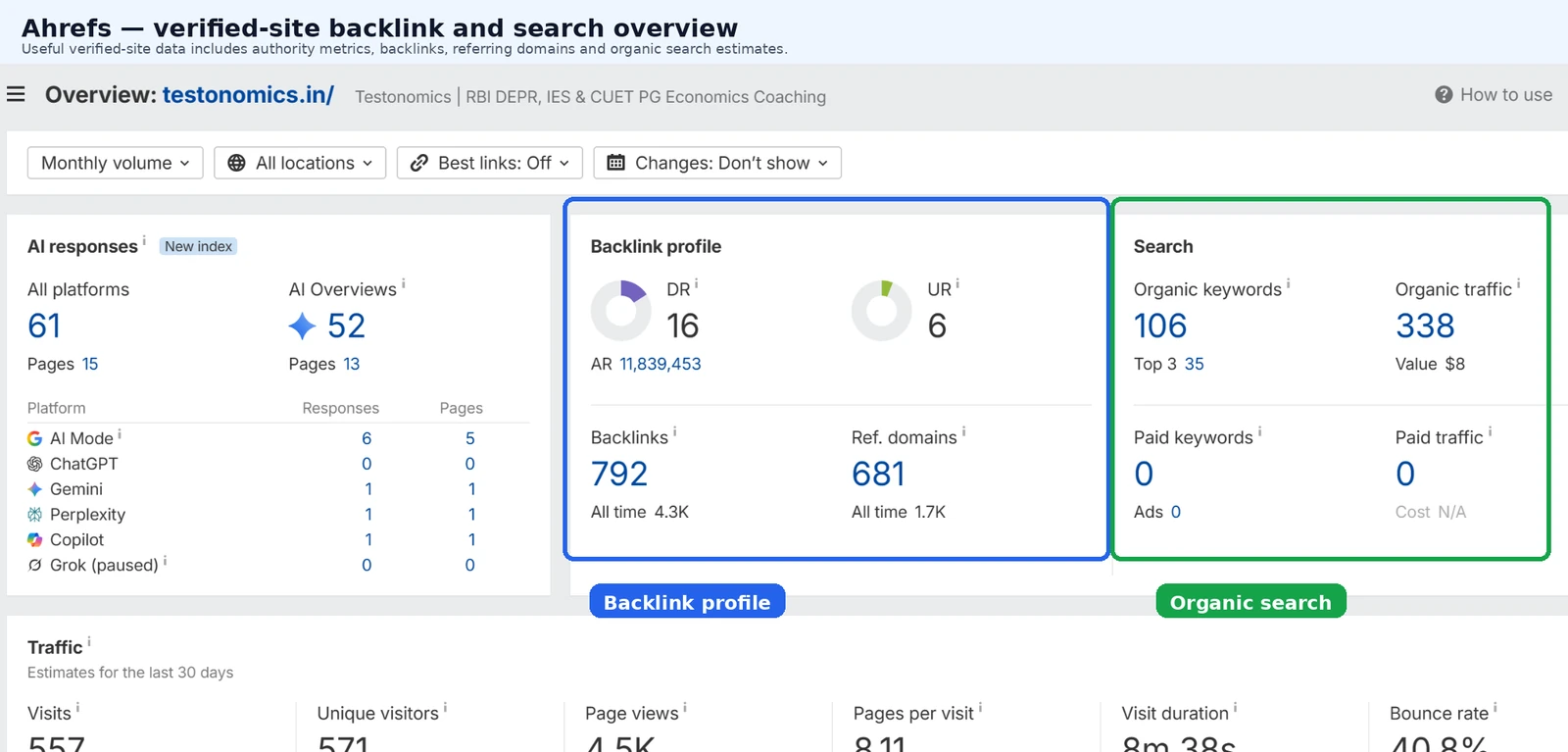
Ahrefs Webmaster Tools — Best Free Option for Backlinks and Technical SEO on Your Own Site
For our verified site, Ahrefs Webmaster Tools provided backlink, organic-keyword, internal-link and Site Audit data, including broken-link, broken-image, orphan-page and 4XX findings.
Competitor domains, Competitive Analysis, Rank Tracker, Keywords Explorer and exports were much more restricted. Treat it as a strong free site-owner toolkit, not the full Ahrefs platform.
Ubersuggest Free — Best Beginner-Friendly Free SEO Research Tool
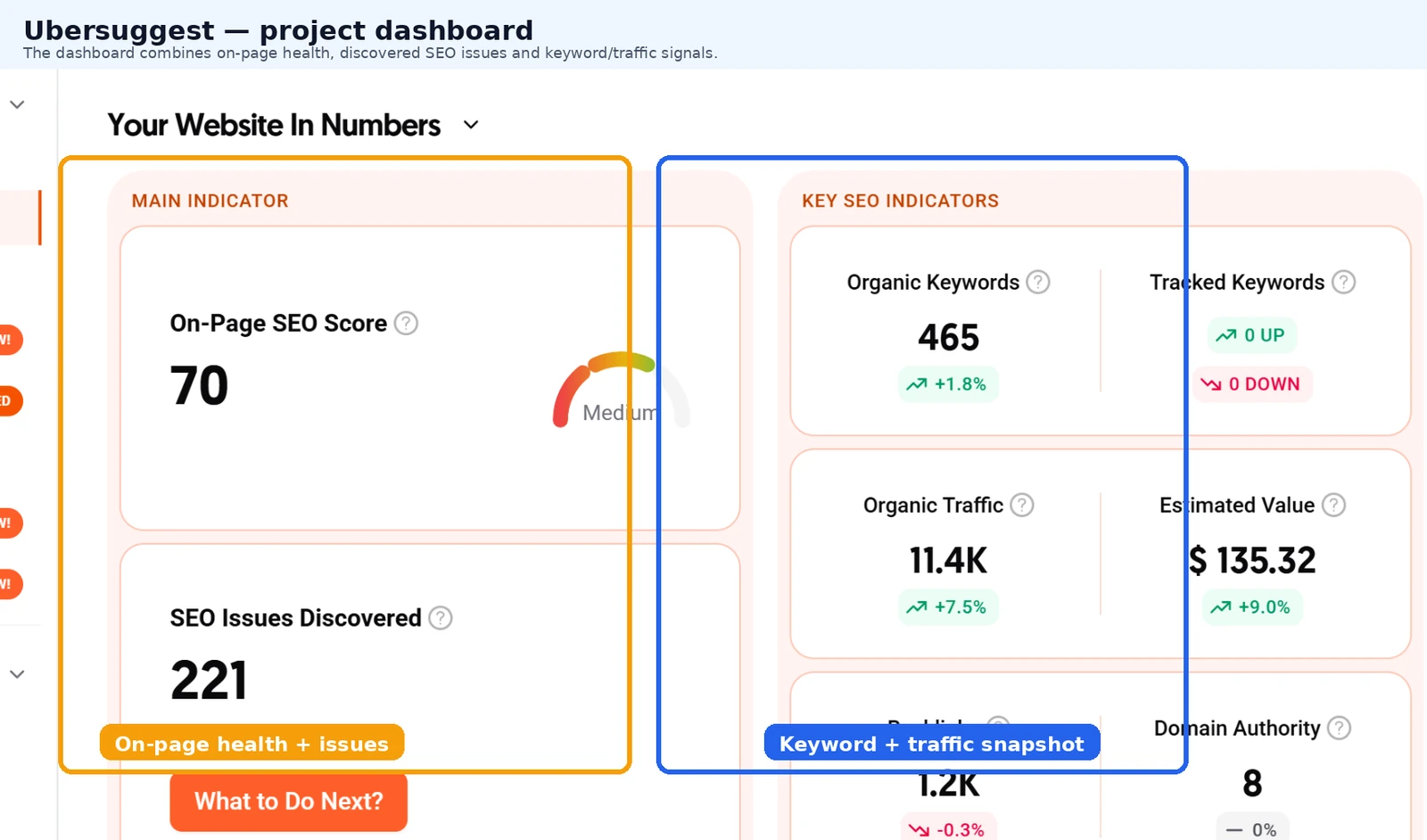
Ubersuggest combines simple keyword, competitor, backlink, tracking and audit tools. In our test, free access allowed around 3 reports/searches per day, 25 tracked keywords, 2 competitors and 150 pages per audit, with further limits on rows, filters and exports.
Rank Math Free — Best Free WordPress SEO Plugin
Rank Math Free handles metadata, schema, XML sitemaps, indexing controls, redirects and on-page guidance inside WordPress. It is an implementation tool, not a replacement for keyword research, competitor analysis, backlinks or technical crawling. Our Rank Math review explains how those features performed in our tests and when upgrading to Pro may be worthwhile. If you are considering another WordPress plugin, our Yoast SEO review examines what Yoast Free offers, where its checks fall short and when Premium could be worthwhile.
To choose between these WordPress options, use our Rank Math vs Yoast comparison. It compares the jobs each free plugin can handle and when a paid plan becomes useful.

Google Trends — Best Free Tool for Trends and Seasonality
Google Trends shows relative interest over time, seasonality, geography and related topics. It is not monthly search volume; use it alongside Keyword Planner or a paid keyword tool.
PageSpeed Insights — Best Free Tool for Page Performance and Core Web Vitals
PageSpeed Insights diagnoses Core Web Vitals, rendering, images and JavaScript/CSS performance. Field data reflects real users where available; lab data is diagnostic. Use it with GSC and a crawler. Our technical SEO guide explains which speed and indexing issues deserve attention first.
Bing Webmaster Tools — Best Free Supplement to Google Search Console
Bing Webmaster Tools adds first-party Bing performance, indexing, URL inspection, backlinks, keyword research, sitemaps, Site Explorer, Site Scan and IndexNow. It supplements rather than replaces Google Search Console.
Best Paid SEO Tools: Our Picks by Use Case
The top paid SEO tools are not interchangeable. A broad platform such as Semrush or SE Ranking can cover research, tracking and audits, while specialist tools such as Screaming Frog or Rank Math Pro solve narrower jobs. The right paid SEO tool depends on which limitation in your current workflow you are actually paying to remove.
Paid SEO tools are easier to justify when their limits match the scale of your work. The question is not simply “Which tool has the most features?” It is which tool gives you enough useful capacity to solve your actual problems without forcing unnecessary workarounds.
| Paid Tool | Best For | Why We Recommend It | Main Limitation |
|---|---|---|---|
| Semrush Pro | Best overall paid SEO platform for broad SEO work | Deep keyword/competitor workflows plus tracking, backlinks and audits | High cost if you only use a small part of the platform |
| SE Ranking | Best value-focused paid SEO platform | Strong rank tracking and solid keyword, competitor and audit coverage | Some deeper detail/export access was restricted in our trial |
| Ahrefs | Best paid SEO tool for backlink-focused research | Strong link intelligence and technical/site-owner tools | Our paid testing is not yet as deep as for Semrush |
| Ubersuggest Paid | Best lower-cost paid SEO suite for smaller workloads | Useful multi-tool coverage at smaller workloads | Research depth and filtering are weaker than larger suites |
| Screaming Frog Paid | Best paid technical SEO crawler | Specialist crawl controls, detail and scale | Not a keyword/competitor research suite |
| Rank Math Pro | Best paid WordPress SEO upgrade for advanced implementation | More schema, automation and tracking inside WordPress | Does not replace an SEO research platform |
Paid SEO Plans: Capacity at a Glance
| Tool / Plan | Websites / Projects | Keywords Tracked | Competitors | Site Audit / Crawl Capacity | Best Value When… |
|---|---|---|---|---|---|
| Semrush Pro trial | Project-based | 500 | Up to 20 per tracking campaign | We successfully configured a 1,000-page audit | You use several major modules regularly |
| SE Ranking trial | Project-based | 750 in our trial | 5 in our project | 1,000 pages in our trial | Rank tracking and broad SEO functionality matter |
| Ubersuggest Individual | 1 project | 125 | 5 | 1,000 pages/project | You have a smaller workload and want multiple SEO functions at lower cost |
| Screaming Frog Paid | Not priced by website | N/A | N/A | Practical crawl size depends on your machine rather than the free 500-URL cap | Technical crawling is your main requirement |
| Rank Math Pro | Multiple personal WordPress sites | Plan-dependent tracking allowance | N/A | Not a conventional crawler | You need advanced WordPress implementation rather than market research |
| Ahrefs paid | Plan-dependent | Plan-dependent | Plan-dependent | Plan-dependent | Backlink and competitor intelligence justify the subscription |
Why these limits matter: a cheaper tool can be better value if you only need to track 50 keywords and two competitors. But if you need 400 tracked keywords, 12 competitors, large keyword-gap reports and regular site audits, a more expensive platform may offer better value because you actually use its additional capacity.
Semrush Pro — Best Paid Tool for Most SEO Tasks
Semrush is the strongest general-purpose option we tested for users who want keyword research, competitor analysis, rank tracking, backlinks and Site Audit in one connected workflow. Its biggest advantage is the integration between modules.
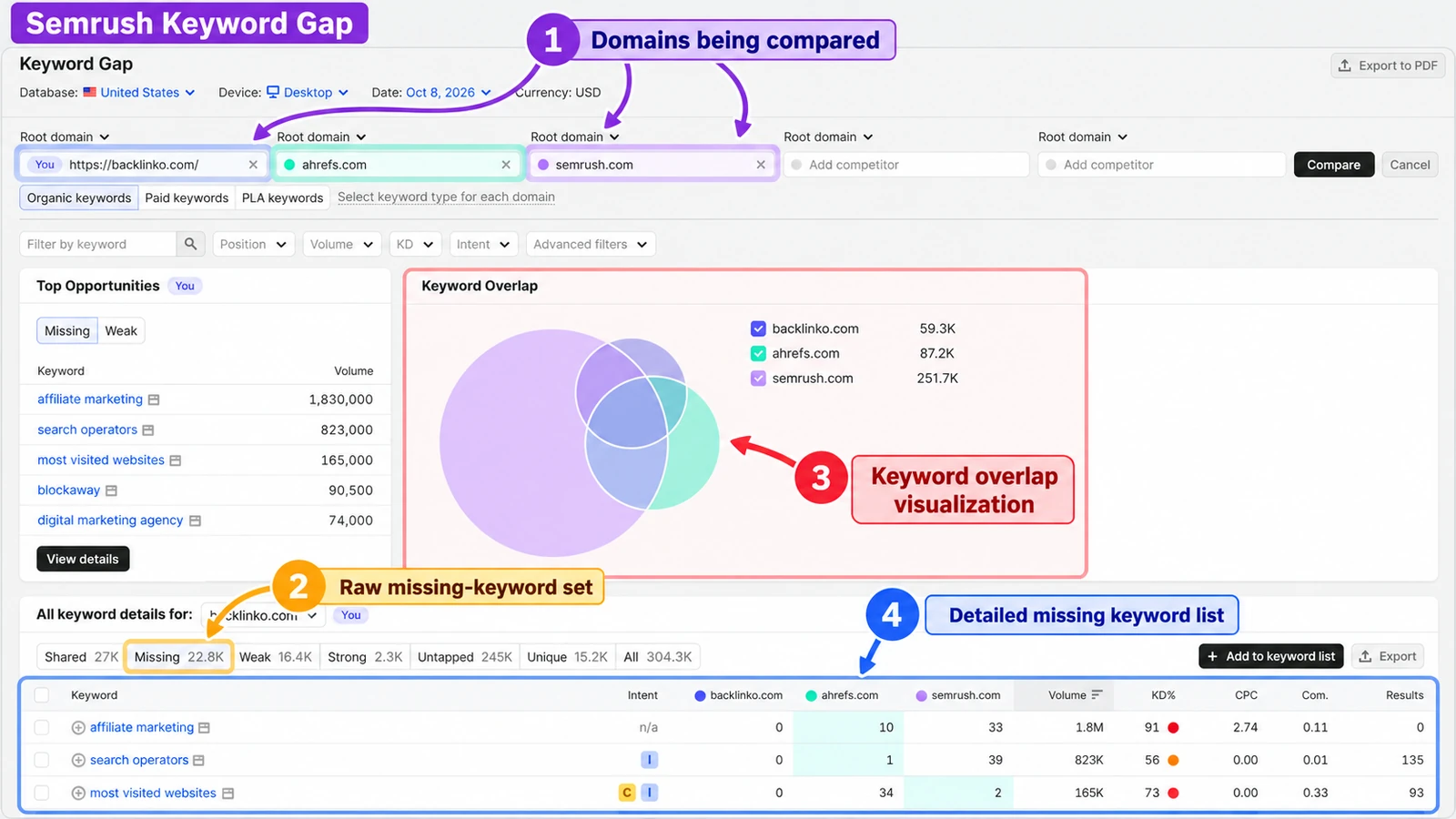
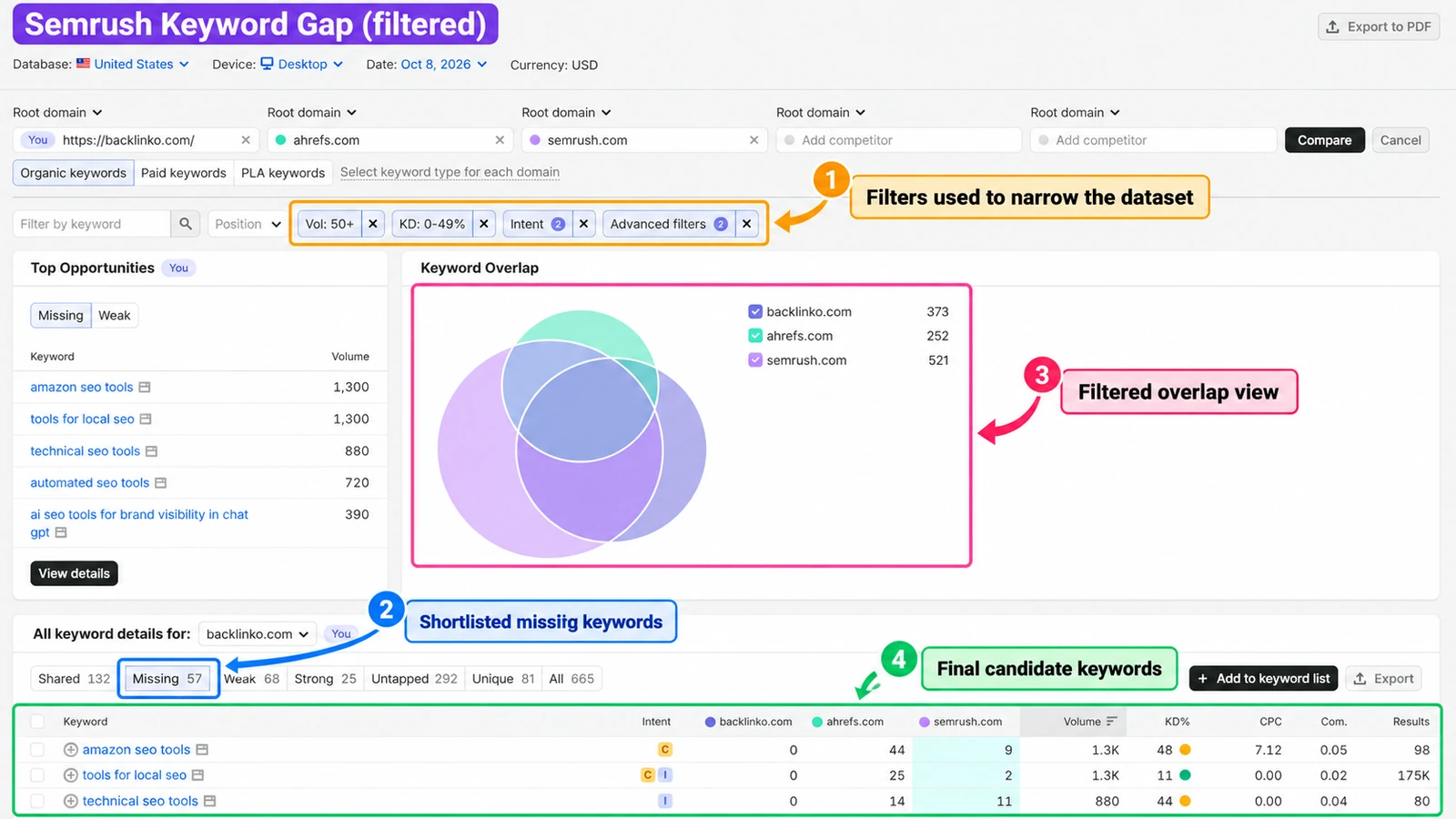
In our competitor-gap testing, Semrush surfaced around 23,000 missing keywords. Filters for volume, difficulty, intent and SEO relevance reduced that raw set to a much smaller shortlist: one run returned 91, while the later snapshot shown below returned 57. A tighter software-related filter brought the list down further to about 20 opportunities. That filtering workflow is where a larger platform starts earning its price.
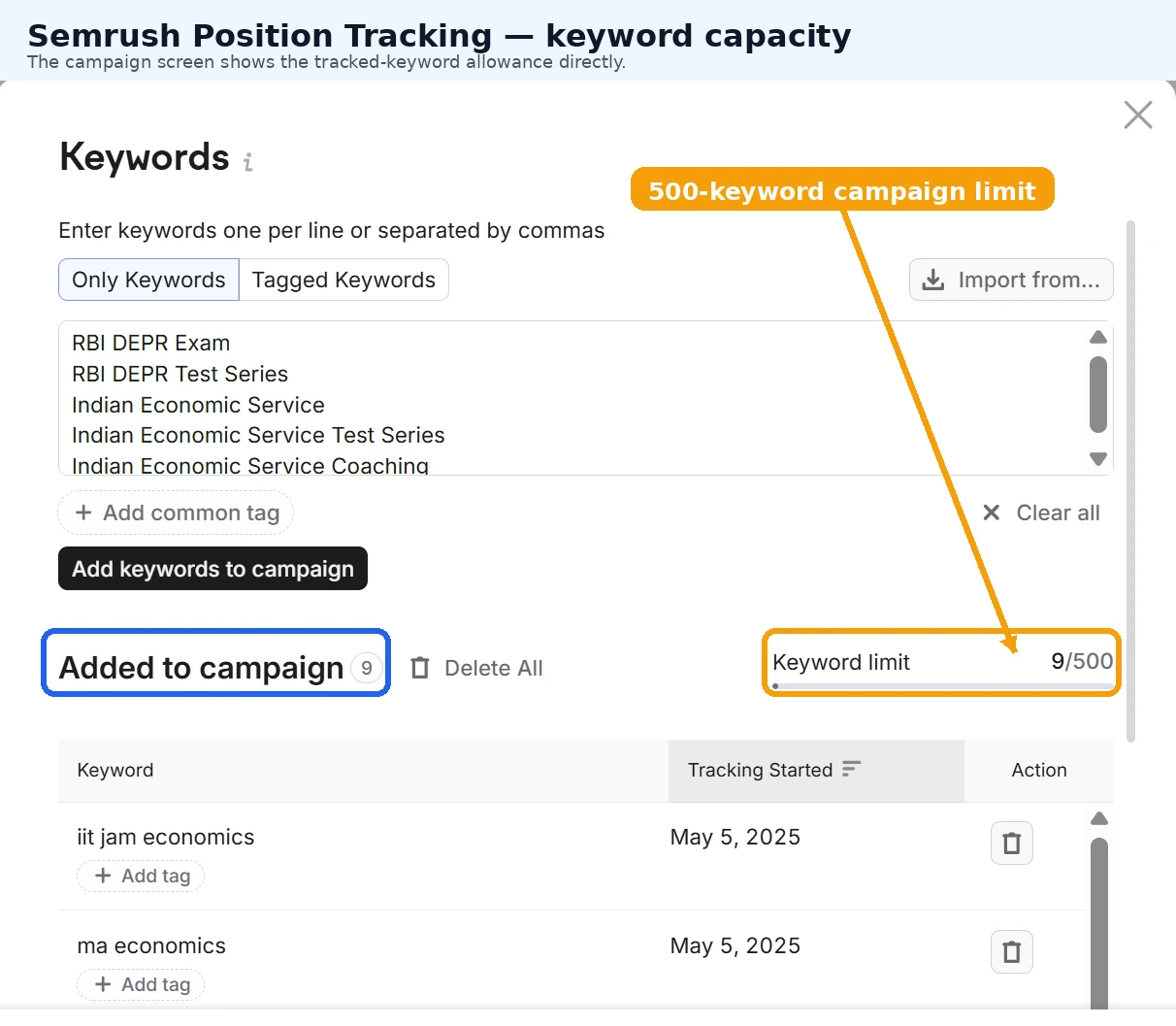
Our Pro trial allowed 500 tracked keywords and up to 20 competitors per Position Tracking campaign. In Site Audit, we configured a 1,000-page crawl and Semrush identified 308 crawlable URLs on the test site.
Weaknesses also showed up: raw reports can be noisy, some backlink-gap filtering felt broad, and one On Page SEO Checker test produced a poor keyword-page association. Human judgment still matters.
When does Semrush become value for money?
For a site tracking 20 keywords and two competitors, much of Semrush may go unused. If you need 400 tracked keywords, 12 competitors, regular keyword-gap research, site audits and backlink analysis, the economics change: compare the subscription with the cost and time of reproducing that workflow across several smaller tools.
The more of Semrush’s major modules you genuinely use, the stronger its value proposition becomes. If you need only one, a specialist or cheaper tool may offer better value.

SE Ranking — Best Value-Focused Paid SEO Platform
SE Ranking is a strong alternative for users who want keyword research, competitor analysis, rank tracking and site auditing in one platform with a simpler interface than Semrush.
Rank tracking stood out in our trial: the account allowed up to 750 tracked keywords, and our project supported 5 competitors. Competitor research also covered traffic estimates, keyword counts, top pages and relationships.
The main caveat was access depth: some affected-URL detail and exports were restricted during the trial, so full paid-plan capability still needs deeper testing.
For detailed hands-on findings about its keyword research, audits, rank tracking and AI visibility tools, read our SE Ranking review.
Ahrefs — Best for Backlink Research and Advanced SEO Analysis
Ahrefs is a strong candidate for backlink-focused SEO, but our hands-on experience is currently deeper with its free verified-site tools than the full paid suite.
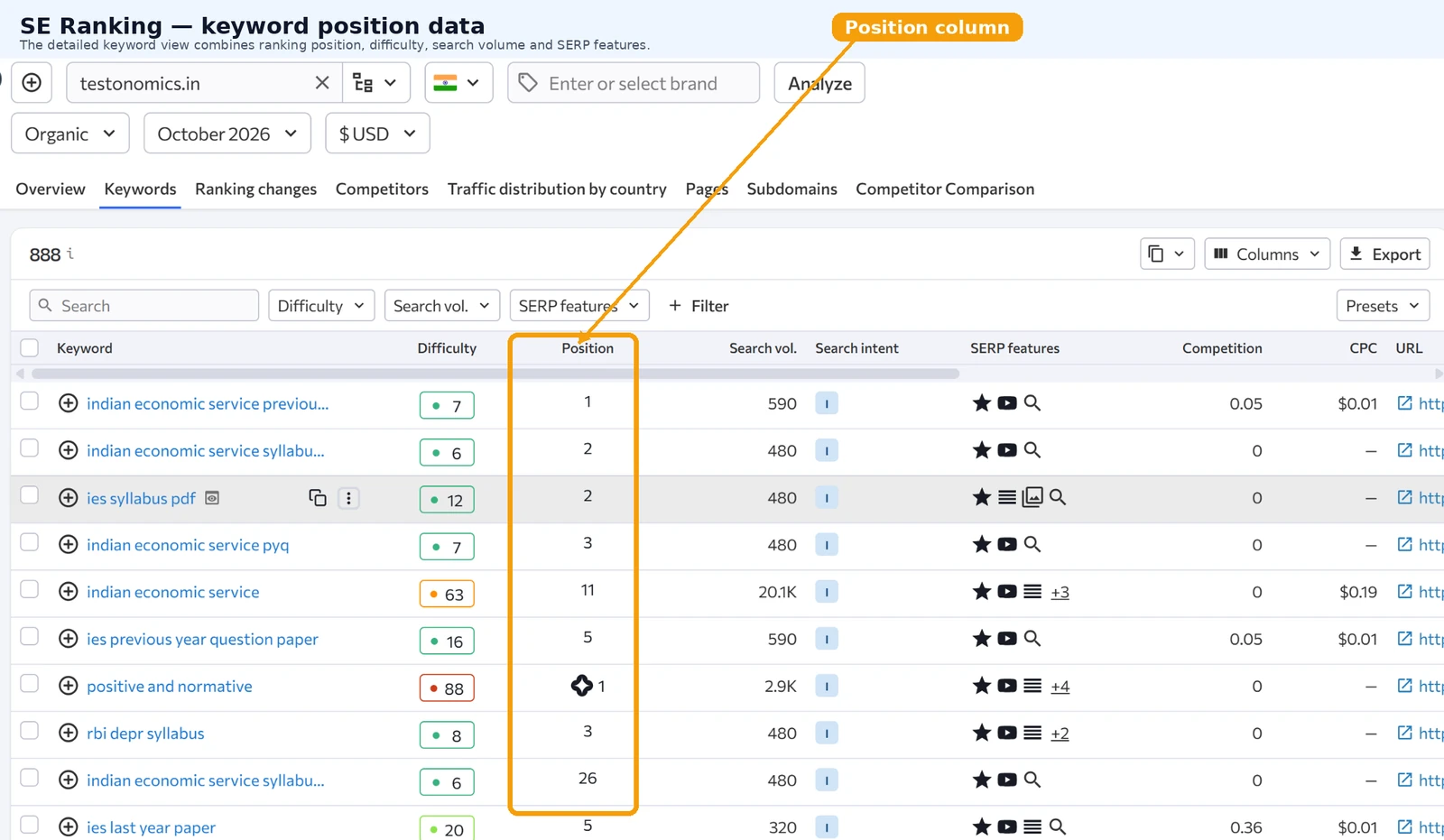
On our verified site, it provided backlink, organic-keyword and internal-link data plus useful Site Audit findings, including pages linking to broken URLs, broken images, orphan pages and 4XX pages.
We still want deeper paid testing of Keywords Explorer, competitor backlinks, Content Gap, Rank Tracker, exports and plan limits before assigning a final Toolquo rating.
Ubersuggest Paid — Best Low-Cost Paid SEO Suite for Beginners
Ubersuggest Paid is appealing because it combines keyword research, competitor analysis, rank tracking, backlinks and Site Audit at a much lower entry point than the biggest SEO suites.
Its interface is simpler than Semrush, which can make it easier for beginners or smaller site owners. The Individual plan information we observed showed 1 project, 125 tracked keywords, 5 competitors and a 1,000-page audit capacity, along with substantially more daily research capacity than the free account.
The trade-off is depth. In our competitor-gap testing, Ubersuggest could surface very large opportunity sets, but the filtering was much less powerful than Semrush. The raw output also contained more noise, and we want to verify paid-plan export behavior before making stronger claims.
If your workload fits comfortably within its limits, however, that simplicity and lower cost can make it better value than buying a much larger platform you will barely use.
Screaming Frog Paid — Best Paid Tool for Deep Technical SEO Crawling
Screaming Frog Paid is a specialist technical SEO crawler, not a broad research suite. Its value comes from how deeply it lets you inspect a website.
The paid licence removes the free 500-URL crawl cap and adds more advanced capabilities such as JavaScript rendering, crawl scheduling, crawl comparison, custom extraction, integrations and the ability to save and reopen crawls.
It becomes especially attractive if your site exceeds 500 URLs, technical SEO is an important part of your work, you regularly audit multiple websites or you need more advanced crawl control.
If your site is comfortably below 500 URLs and the advanced features are unnecessary, the free version may already be enough.
Rank Math Pro — Best Paid SEO Plugin for WordPress
Rank Math Pro is primarily a WordPress SEO implementation tool, not a market-research platform. It extends the free plugin with more advanced schema, automation, historical/rank functionality and additional workflow features.
Its value is highest for WordPress site owners who already use Rank Math and want more functionality directly inside the publishing workflow. It does not replace Semrush, Ahrefs, SE Ranking or Screaming Frog.
If Rank Math Free already handles your metadata, sitemaps, schema and indexing needs, there may be no reason to upgrade immediately. If your main requirement is competitor or keyword research, spend that budget on a research platform instead.
Other SEO Tools Worth Considering
These specialist tools solve narrower SEO problems. We have not tested them as deeply as the main tools above, so we are not assigning Toolquo ratings or declaring category winners yet.
| Tool | Best For | Why It May Be Worth Considering |
|---|---|---|
| AccuRanker | Specialist rank tracking | Potentially useful when rank tracking is the main requirement; we plan to compare it directly with SE Ranking and Semrush. |
| Sitebulb | Technical SEO auditing | A more visual technical-audit approach that may be easier to prioritize and communicate than raw crawler data. |
| Surfer | Content optimization | Focused on on-page/content recommendations; we want to test whether the suggestions improve decisions without encouraging mechanical SERP imitation. |
| LowFruits | Low-competition keywords | Designed to surface long-tail and weaker-SERP opportunities, especially for smaller sites. |
| Mangools | Simpler SEO toolkit | Combines keyword research, SERP analysis and rank tracking with a simpler interface; data depth and limits still need comparison. |
| Link Whisper | WordPress internal linking | Could become useful as a content site grows; we want to test the contextual quality of its suggestions before rating it. |
We Tested the Same Keywords Across SEO Tools — The Numbers Were Very Different
Keyword tools often display search volume and keyword difficulty as precise-looking numbers. In practice, these are estimates produced from each provider’s own database and methodology, and they can differ substantially.
We entered the same set of keywords into multiple tools using the United States database wherever possible.
| Keyword | Semrush | Ubersuggest | SE Ranking | Google Keyword Planner* |
|---|---|---|---|---|
| seo tools | 550K | 110K | 60.5K | ~500K |
| free seo tools | 14.8K | 3.6K | 660 | ~5K |
| semrush vs ahrefs | 9.9K | 880 | 290 | ~500 |
| best keyword research tools | 1.6K | 1.6K | 30 | ~500 |
| best rank tracking tools | 880 | 1K | 10 | ~5K |
*Google Keyword Planner often reports broader ranges or aggregated estimates and should not be treated as a precise monthly SEO-search figure.
The differences are too large to dismiss as rounding. For example, SE Ranking estimated only 10 monthly searches for “best rank tracking tools,” while Ubersuggest estimated 1,000. For “semrush vs ahrefs,” Semrush showed 9,900, compared with 880 in Ubersuggest and 290 in SE Ranking.
Keyword Difficulty Can Disagree Even More
| Tool | Keyword Difficulty for “free seo tools” |
|---|---|
| SE Ranking | 11 |
| Ubersuggest | 61 |
| Semrush | 81 |
One tool effectively treats the keyword as relatively easy while another treats it as highly competitive. But the tools do not always disagree: for “semrush vs ahrefs,” the difficulty estimates we recorded were 46 in SE Ranking, 47 in Ubersuggest and 49 in Semrush.
The lesson is not that keyword difficulty is useless. It is that KD is a proprietary scoring system, not an objective measurement shared across tools.
Toolquo takeaway: Treat SEO-tool metrics as decision aids, not ground truth. The number on the screen looks precise; the underlying estimate often is not.
Which SEO Tool Was Best for Technical Audits?
We also tested several SEO tools against the same mature WordPress website. The results reinforced another important point: a higher issue count does not necessarily mean a better audit.
| Tool | What Stood Out | Main Weakness |
|---|---|---|
| Screaming Frog | Deep raw crawl data; strong for broken links, canonicals, titles, images and exports | More technical interface |
| Semrush Site Audit | Strong prioritization and integrated reporting | Warning counts can become noisy |
| Ahrefs Site Audit | Strong link/orphan-page diagnosis | Several deeper features/exports were restricted in our setup |
| SE Ranking | Clear issue categorization and explanations | Some affected-URL detail was restricted during trial |
| Ubersuggest | Easy-to-understand overview | Shallower detail and tighter limits |
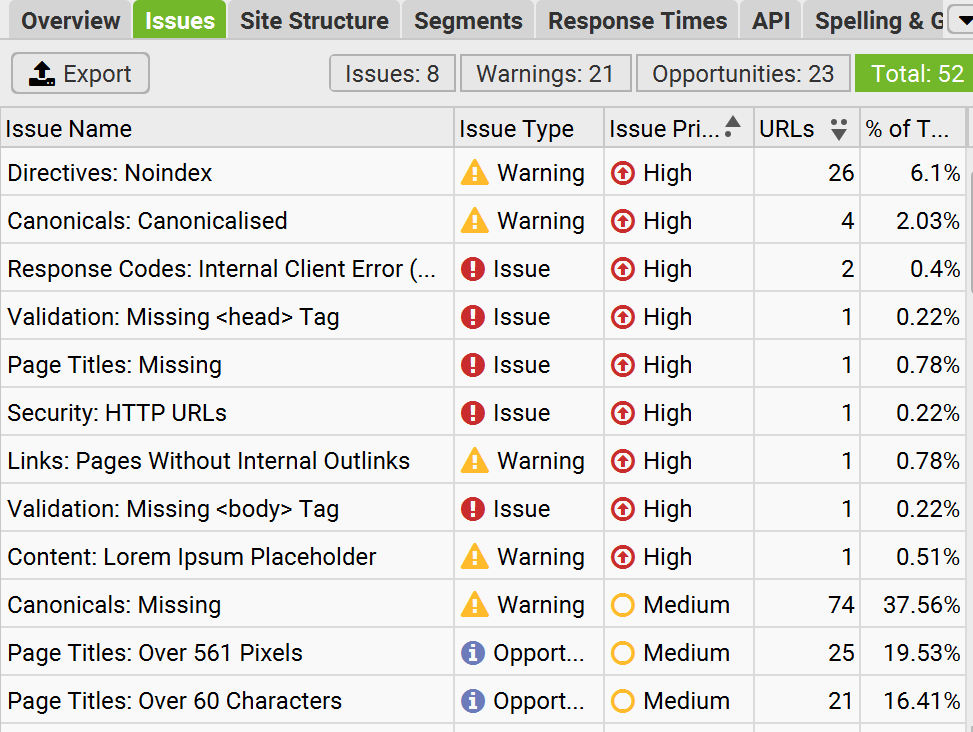
Screaming Frog helped us uncover a malformed canonical, broken internal links, broken images and oversized images. Ahrefs was particularly useful for finding orphan pages and pages linking to broken URLs.
Semrush’s expanded crawl found 222 errors, including 128 broken internal-link instances and 67 broken internal JavaScript/CSS files. It also reported more than 13,000 warnings, largely because repeated uncompressed/uncached resource issues were counted many times.
This is why we would not compare technical SEO tools using health scores or total issue counts alone.
Toolquo takeaway: The best technical SEO tool is the one that helps you identify and prioritize real problems—not the one that produces the largest issue number.
Which SEO Tool Stack Fits Your Workload?
The best setup is usually a combination of tools. Match the stack to the scale of the work rather than buying the largest plan by default.
| Workload | Suggested Stack | Why |
|---|---|---|
| Completely free | Google Search Console + Keyword Planner + Screaming Frog Free + Rank Math Free | Covers own-site Google performance, demand validation, technical crawling and WordPress implementation. Add Trends, PageSpeed Insights and Bing Webmaster Tools when useful. |
| Low-cost paid | Ubersuggest Paid + Google Search Console + Screaming Frog Free | Adds keyword research, competitors, tracking and basic backlinks without moving immediately to a premium suite. |
| Value-focused serious SEO | SE Ranking + Google Search Console + Screaming Frog Free/Paid | Stronger tracking and broader research while keeping specialist crawling separate. |
| Advanced / heavy SEO | Semrush Pro + Google Search Console + Screaming Frog | Broad research and monitoring in Semrush, first-party Google data in GSC, and deeper technical crawling in Screaming Frog. |
| WordPress content site | Rank Math Free/Pro + GSC + Keyword Planner + one research platform | Choose Ubersuggest for lower-cost workloads, SE Ranking for value, or Semrush for deeper research. |
Capacity Checkpoints That Change the Recommendation
| What You Need | Range | What Changes |
|---|---|---|
| Pages to crawl | Up to 500 URLs | Screaming Frog Free can often crawl the whole site. |
| 500–1,000 | The free crawl cap starts mattering; paid crawling becomes easier to justify. | |
| 1,000–5,000 | Regular full-site auditing becomes more important. | |
| 5,000+ | Prioritize crawl capacity, scheduling, JavaScript rendering, crawl comparison and exports. | |
| Keywords to track | Up to 10 | Basic free tracking or Google Search Console may be enough. |
| Up to 25 | Ubersuggest Free can cover a small priority set. | |
| 26–125 | Ubersuggest Individual becomes a low-cost paid option. | |
| 126–500 | Semrush Pro becomes more relevant; compare SE Ranking too. | |
| 500+ | Tracking capacity becomes a major plan-selection criterion. | |
| Competitors to monitor | 1–2 | Free or light plans may be enough. |
| 3–5 | Entry paid plans become more useful. | |
| 6–20 | Higher-capacity competitive workflows matter more. | |
| 20+ | Compare higher tiers or specialist solutions against the actual workflow. |
You do not need to track every keyword a site ranks for. Track the keywords that matter strategically.
Three Quick Examples
200-page blog, 20 keywords, 2 competitors: start free. 1,500-page content site, 300 keywords, 8 competitors: a paid platform such as Semrush or SE Ranking becomes much easier to justify, with Screaming Frog Paid for deeper crawling. 20,000-page site, 2,000 keywords, dozens of competitors: choose by capacity, update frequency, projects, locations, exports and competitor allowances—not headline price.
The best SEO setup is often a combination of specialized tools rather than one subscription.
How to Choose the Right SEO Tool
Start with the job. For keyword and competitor research, compare broad platforms such as Semrush, SE Ranking, Ahrefs or Ubersuggest. For technical crawling, look at Screaming Frog. For WordPress implementation, Rank Math. For your own Google Search performance, start with Google Search Console.
Then measure the workload. Check pages to crawl, keywords to track, competitors to monitor, projects to manage and how often you will research. If free tools already solve the problem, keep using them. Upgrade when a real limit costs time or leaves an important question unanswered.
Compare value, not price alone. A cheaper tool is better value when it comfortably covers your needs. A more expensive platform can become better value when it replaces several smaller tools or saves enough research time to justify the difference.
Value = useful capacity + capabilities actually used + time saved, relative to price.
Finally, test with your real website, real keywords and real competitors before committing long term. A live workflow tells you more than a feature list.
The five questions: What problem am I solving? How large is my workload? What can I already do for free? Which limits will I actually hit? Will this tool save enough time or improve enough decisions to justify its price?
Frequently Asked Questions About SEO Tools
What is the best SEO tool overall?
There is no universal winner. Semrush is one of the strongest broad platforms when you need keyword research, competitors, tracking, backlinks and audits together; a specialist tool may be better for a narrower job.
What is the best free SEO tool?
For a site you own, Google Search Console is the most important starting point because it provides first-party Google Search data. Pair it with Keyword Planner, Screaming Frog Free, Rank Math Free, Google Trends and PageSpeed Insights as needed.
Do I need to pay for an SEO tool?
Not necessarily. Pay when free limits begin blocking deeper competitor research, larger tracking sets, bigger audits, exports, historical data or a more efficient workflow.
Is Semrush worth the money?
It depends on workload. Semrush is difficult to justify if you track only a few keywords and rarely research competitors. Its value improves when you regularly use several modules and enough of the plan’s capacity.
Is Ahrefs better than Semrush?
Neither is automatically better. Semrush may suit a broad integrated workflow, while Ahrefs is especially attractive when backlink and competitor-link research are central. We will test this more deeply in our full Semrush vs Ahrefs comparison.
Which SEO tool is best for beginners?
Start free. If you later need a paid platform, Ubersuggest can suit smaller workloads and SE Ranking can offer a broader step up. The best beginner choice is the one whose limits fit the work you actually need to do.
Final Recommendation: Which SEO Tool Should You Choose?
Choosing among the best SEO tools comes down to what you need to do, how large your workload is, and which limitations you are actually hitting.
If you want a lower-cost paid option, Ubersuggest can make sense for smaller workloads. If you want a broader, value-focused platform with strong rank tracking and competitor research, SE Ranking is worth considering. If you regularly use keyword research, competitor analysis, rank tracking, backlinks and site auditing together, Semrush becomes much easier to justify despite its higher price.
For specialist needs, the answer changes. Screaming Frog is better suited to deep technical crawling than a general SEO suite, while Rank Math solves a different problem entirely inside WordPress.
Don’t pay for the tool with the most features. Pay for the tool that removes the limitations you actually face.
Before subscribing, check your own numbers: how many pages you need to crawl, keywords you need to track, competitors you need to monitor, projects you manage and how frequently you will use the tool.
That is the basis on which Toolquo evaluates SEO software—and software more broadly.
About the author
Nikhil Bhardwaj
Founder & Editor, Toolquo
Nikhil leads Toolquo’s editorial direction, focusing on practical software research, transparent comparisons, and clear buying decisions.
View author profile →Keep exploring
Related guides
November 10, 2026
What Is Technical SEO? How to Check and Improve Your Site
Learn what technical SEO is, why it matters, and how to check your site's crawling, indexing,…
November 7, 2026
Rank Math vs Yoast SEO (2027): Which WordPress SEO Plugin Is Better?
Compare Rank Math and Yoast for on-page SEO, technical SEO, readability, redirects and growing a WordPress…
November 3, 2026
Yoast SEO Sitemap: How to Find, Configure and Fix Errors (2027)
Find your Yoast SEO sitemap, choose which URLs belong in it, submit it to Google Search…