Rank Math Review (2027): Is Free Enough or Pro Worth It?
Our hands-on Rank Math review examines Free vs Pro, on-page SEO checks, schema, redirects, AI tools, pricing, and whether upgrading is worth it.
On this page
In this Rank Math review, we test the plugin’s free SEO tools, compare Free with Pro, and explain which features are useful for a WordPress website—and when paying for an upgrade may make sense.
1. What Should a WordPress SEO Plugin Help You Do?
If you run a WordPress website, you probably want your articles to reach people searching for the subjects you cover. You may also want a way to check the on-page SEO of each article before publishing it. That includes reviewing its title, headings, content, links and other elements that help readers and search engines understand the page.
Search engine optimization, or SEO, involves more than choosing a keyword. A WordPress SEO plugin can help you complete certain tasks, catch common SEO omissions and manage website settings without editing code. The important question is which jobs it makes easier.
Readers new to the subject may want to start with our What Is SEO? guide before evaluating individual WordPress plugins.
The practical needs vary. A new blogger may want a checklist while writing. A publisher with 200 posts may want to edit many SEO descriptions efficiently. A business moving pages to new URLs may need redirects so visitors do not encounter broken links.
Here are the main jobs we expect an SEO plugin to support, together with the corresponding Rank Math features.
Improve articles before publication. Rank Math checks focus keywords, headings, image descriptions, links, SEO titles and other on-page elements. It can catch SEO omissions, such as a missing description or an image without meaningful alt text, but cannot judge the article’s overall quality.
Control how pages are described in search. Its SEO title, meta description, canonical and robots settings help specify a page’s subject and how search engines should treat its URL. A canonical URL identifies the preferred version when similar pages are accessible at different addresses.
Help search engines discover important pages. XML sitemaps list URLs that search engines can find and consider crawling. Rank Math generates and updates these lists.
Explain what kind of content a page contains. Schema markup is structured information that describes a page as an article, product, recipe or another type of content. It can help eligible pages qualify for certain enhanced search appearances.
Manage changed or missing URLs. A 404 error means that the requested page was not found. Rank Math can record which missing addresses visitors tried to open and redirect outdated URLs to a relevant live page. This helps website owners discover and address broken links.
Make SEO management less repetitive. The plugin offers bulk metadata editing, link information, role permissions and maintenance tools for people managing larger websites.
Review performance and optional automation. Rank Math can display selected Google Search Console figures in WordPress and offers AI-related tools with varying access limits.
We assess Rank Math against these tasks throughout this review. The quality of its output and how much work it saves matter more than the number of menu items it offers.
2. Rank Math Review: Quick Verdict — Is It Worth It?
Rank Math Free is a capable WordPress SEO plugin, and for many blogs it already handles most essential tasks. We configured Rank Math on Toolquo and tested its article controls, sitemaps, schema, redirects, 404 monitoring, link information, bulk editing and other features. Several of those tools worked well without a paid plan.
Our strongest findings concern implementation rather than promises of higher rankings. Rank Math helped us configure how pages are described to search engines, produce valid Article structured data, handle a test redirect and edit metadata across posts. These are practical reasons to use it.
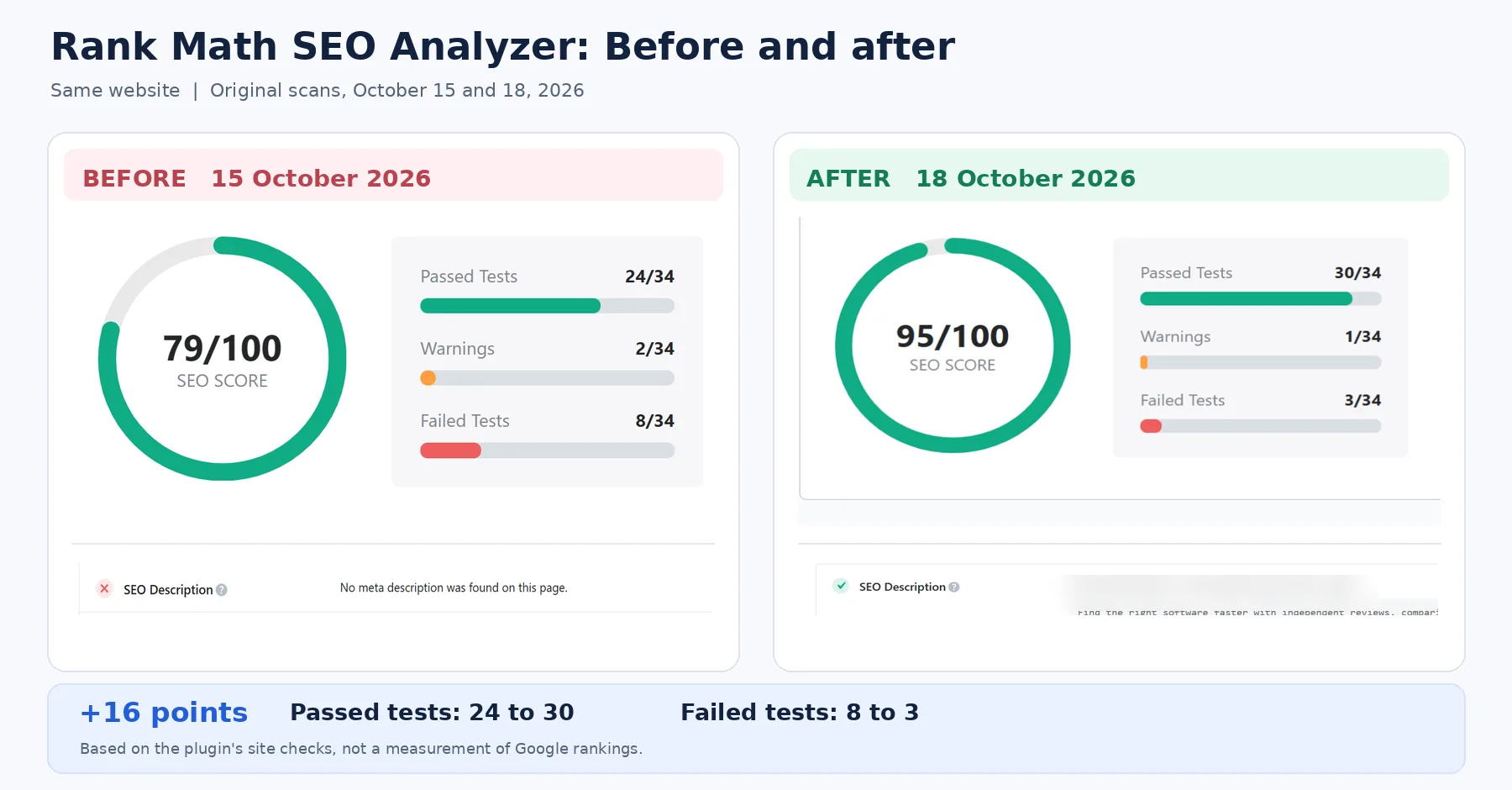
The results were not uniformly positive. Some SEO checklist items encouraged changes that would not necessarily improve the article. The site-wide SEO Analyzer was useful for identifying issues to investigate: after reviewing its October 15 report and making site improvements, our score rose from 79/100 to 95/100 on October 18. Its Google Search Console dashboard required troubleshooting, and experienced users may still prefer Search Console itself.
Our conclusions come from configuring the plugin and checking actual outcomes. The later sections explain how each important feature performed rather than judging Rank Math from an advertised feature list.
Who should choose it? We would start with Rank Math Free for a new or small WordPress content site. Rank Math Pro is worth examining when a specific requirement, such as advanced structured data, rank tracking or client-site management, clearly justifies the additional cost.
In brief: best for bloggers and publishers wanting wide-ranging free controls; strongest areas include technical settings, schema, redirects and bulk editing; main limitations are occasionally misleading checks, an extensive interface and confusing premium prompts. The following sections explain the evidence behind that assessment.
3. Rank Math SEO Plugin: Interface and Features
Rank Math is a WordPress SEO plugin that places many SEO controls inside the WordPress admin area. Before evaluating individual features, it is useful to see where those controls live and what you can do with them.
3.1 Dashboard: switch modules on or off
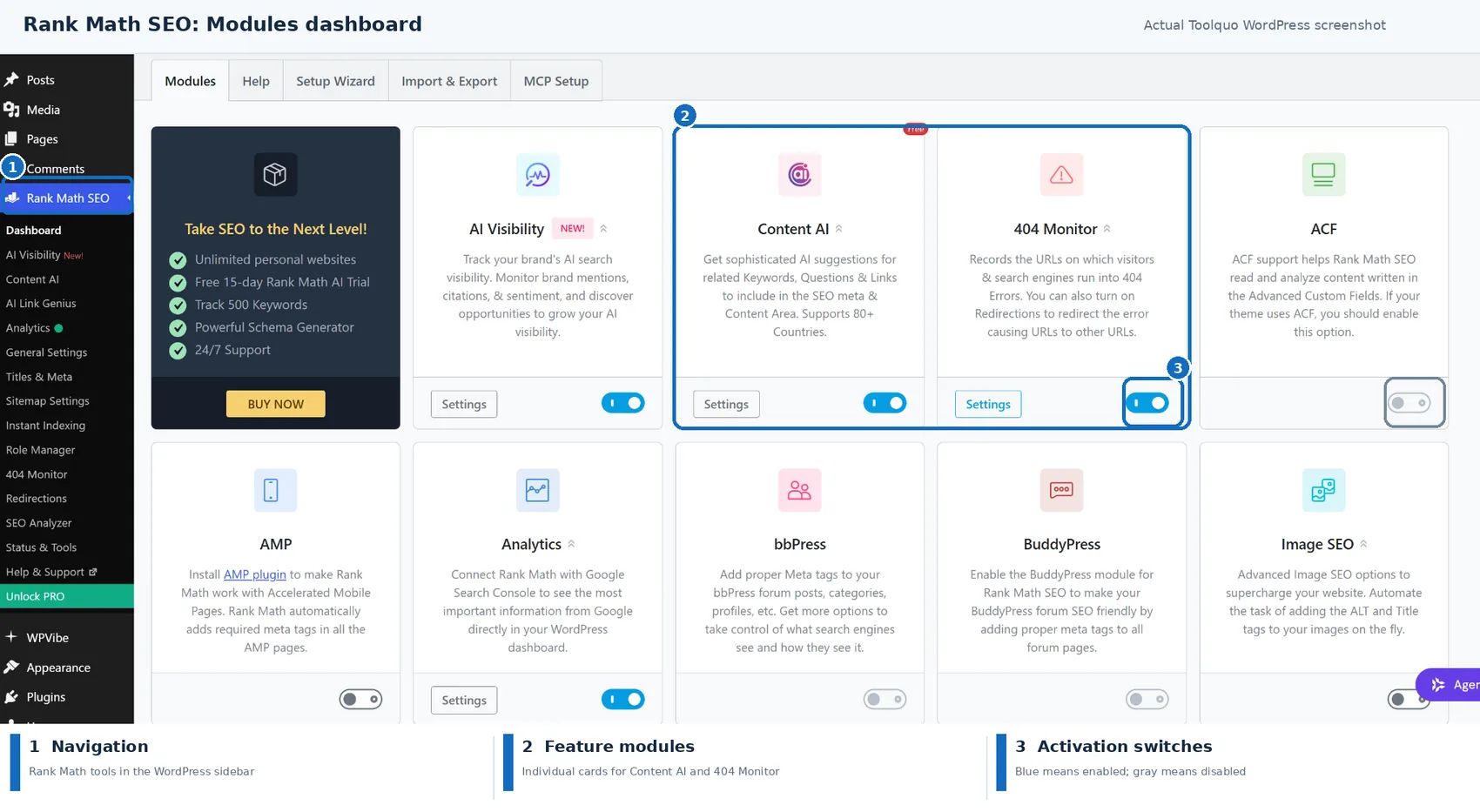
The Rank Math dashboard groups tools into modules, including sitemaps, schema, Analytics, 404 Monitor, Redirections and Content AI. Switching a module on makes its related controls available. For example, the 404 Monitor can help identify URLs visitors requested but could not find, while Redirections lets you direct an old URL to a replacement page.
This arrangement helps keep optional tools separate from core settings. It also means beginners should first decide which problems they need to solve rather than enable every module at once.
3.2 Post editor: check and configure each article
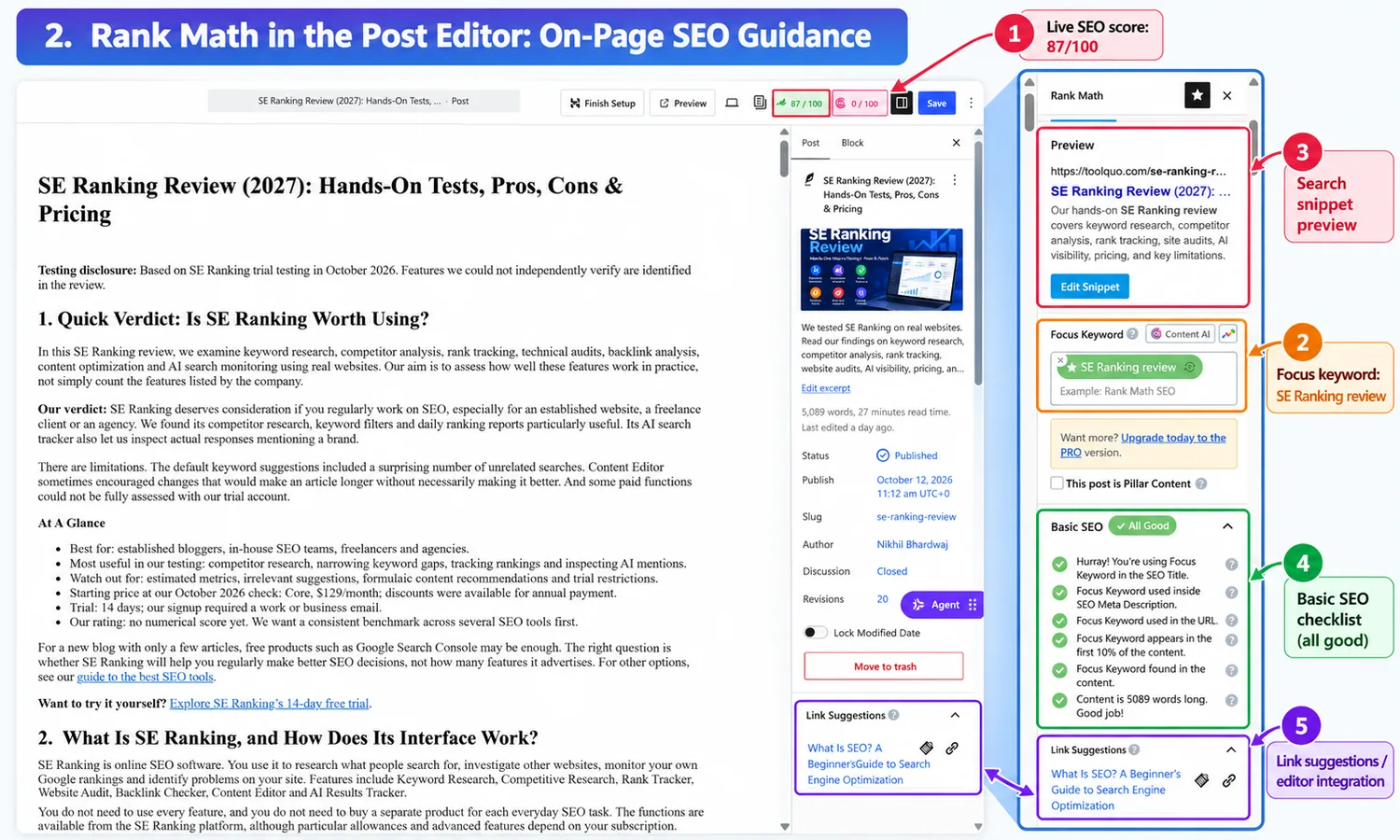
The post-editor panel is the part most writers will use frequently. Here you can specify a focus keyword, review an SEO checklist, improve the search-result title and description, check internal links, and choose relevant schema. For example, before publishing a product review you can check whether its title clearly describes the subject, whether it links to related guides, and whether the structured data identifies it correctly as an article.
Rank Math also displays an SEO score out of 100. We will examine that score carefully because following every suggestion is not the same as writing a better article. Our separate guide explains Rank Math’s scoring components, what counts as a good score, and which recommendations deserve attention.
3.3 A quick map of Rank Math’s features
Content optimization: focus keyword analysis, title and description preview, headings, links, readability checks and social previews.
Technical SEO: XML sitemaps, indexing directives, canonical URLs, schema markup, breadcrumbs and other metadata.
Monitoring and repair: SEO Analyzer, 404 logs, redirects, IndexNow submissions and Google Search Console-based Analytics.
Content management: internal-link reports, SEO metadata bulk editing, permissions for WordPress user roles, export and backup tools.
Optional AI: Content AI, AI Link Genius and AI Visibility. Some features have limited free allowances, while others require paid access.
4. Installing, Setting Up and Using Rank Math
For a complete installation and configuration walkthrough, follow our step-by-step guide to using Rank Math SEO in WordPress. It explains the Setup Wizard, module choices, article optimization and ongoing SEO checks.
Rank Math’s setup process is manageable for a WordPress user, but the most important choices still require some understanding of SEO. For example, it is easy to click a noindex option, but you need to know that it asks search engines to exclude the page from their results.
Rank Math was already installed on Toolquo but had not been configured when our testing began. We completed its Advanced Setup Wizard, connected Google Search Console and configured sitemaps, indexing and schema defaults. We also enabled the modules relevant to our tests. Our usability assessment therefore covers initial configuration and day-to-day use, but not the initial plugin installation.
The routine workflow was convenient. Editing an SEO title, inspecting a post score and checking a redirect did not require leaving WordPress. The challenge was deciding which settings mattered. A wrong canonical URL or indexing instruction can do more harm than leaving a sensible default in place.
The interface also displayed upgrade prompts in some areas where limited related functionality was available for free. Content AI was one example. That makes the Free-versus-paid boundary less obvious than it should be.
5. On-Page SEO: How Useful Is Rank Math’s Checklist?
On-page SEO means improving the content and page elements that visitors and search engines encounter. It includes matching the reader’s search intent, explaining the subject accurately, organizing information with helpful headings, writing clear titles and descriptions, and linking to relevant resources. Image alt text and appropriate structured information can help too.
For step-by-step guidance before using a plugin, read our on-page SEO guide for beginners.
Rank Math tries to assist with part of this work by checking an article while you write or edit it. Its list can catch missing metadata, unhelpful keyword placement or overlooked links. But it cannot decide whether the argument is convincing, the information is current or the article actually answers the reader’s question.
5.1 How to get the best value from the checklist
If you already understand SEO, use Rank Math as a final check for things you may have missed. If you are new to SEO, treat a warning as a reason to investigate what the recommendation is trying to achieve. Make the change only if it helps the article or the way it is presented. Do not rewrite natural prose simply to raise the numerical score.
5.2 Our Rank Math Review Test Using the SE Ranking Article
To see how well this approach worked in practice, we opened Toolquo’s published SE Ranking Review in the editor and examined each recommendation. The article was 5,089 words long and Rank Math gave it 87/100. The plugin correctly recognized many basic elements, including the focus keyword, metadata and links.
We used our published SE Ranking Review as the test article because it contained real headings, links, metadata and a custom table of contents.
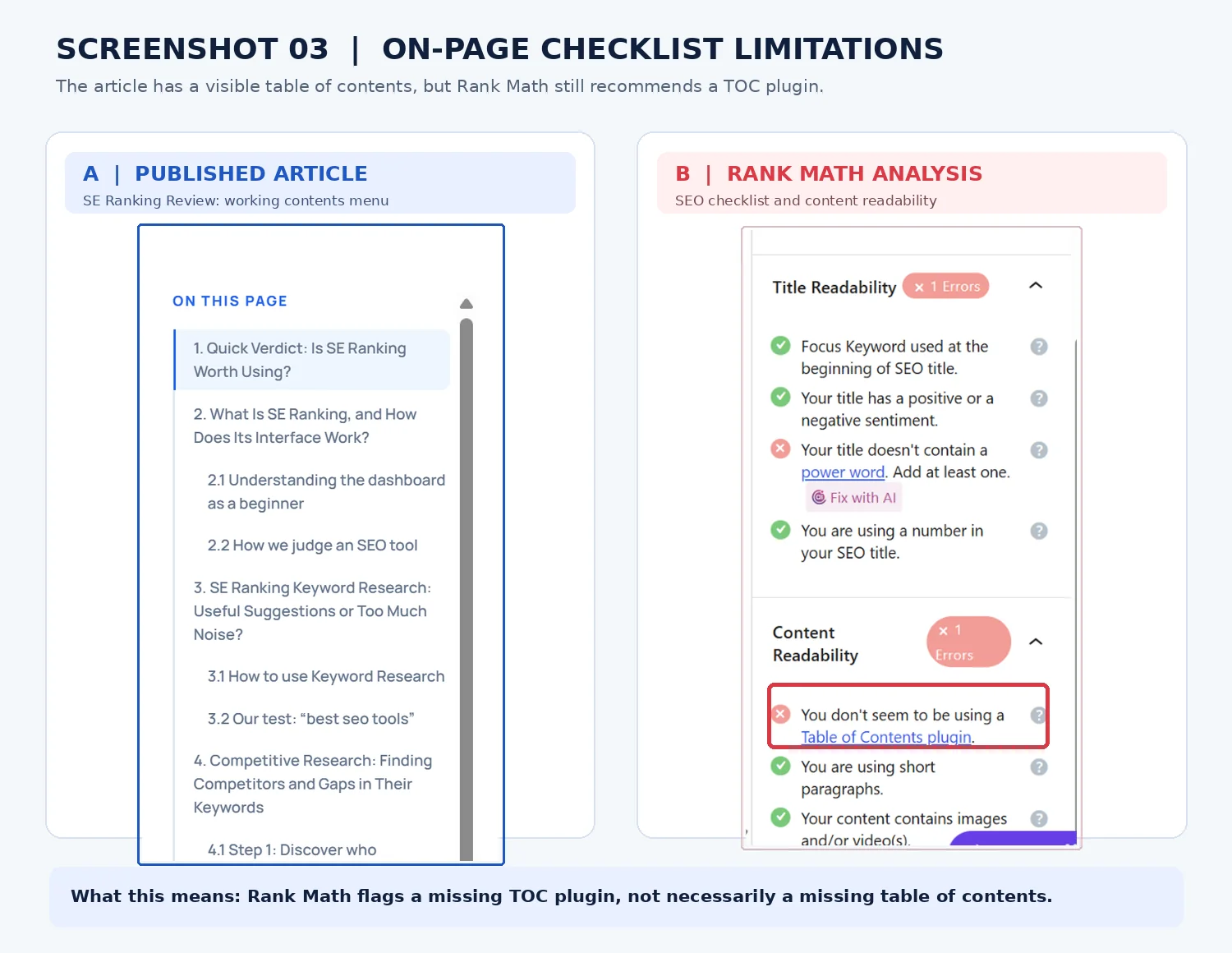
It also raised four findings worth questioning. The exact focus keyword appeared four times, giving a density of 0.08%. The title lacked a so-called power word. The checker said it could not detect a table-of-contents plugin. It also encouraged use of Content AI.
We checked these against the article itself. Toolquo already provided a working desktop contents sidebar and a mobile contents control, so installing another plugin would not improve navigation. Our title already explained what the reader would find. Repeating the keyword or adding a dramatic adjective might improve the score but would not necessarily make our product analysis clearer.
5.3 The snippet editor was useful for a more concrete task
A search snippet typically displays a page title, URL and description. Rank Math’s snippet editor let us preview the approximate desktop and mobile appearance of our article, then edit its SEO title and meta description without changing the visible heading.
We tested its character and pixel-width indicators and checked separate social titles, descriptions and images. The indicators helped flag a title that might be truncated. They do not control exactly what Google will show, because Google can choose different text for a particular search.
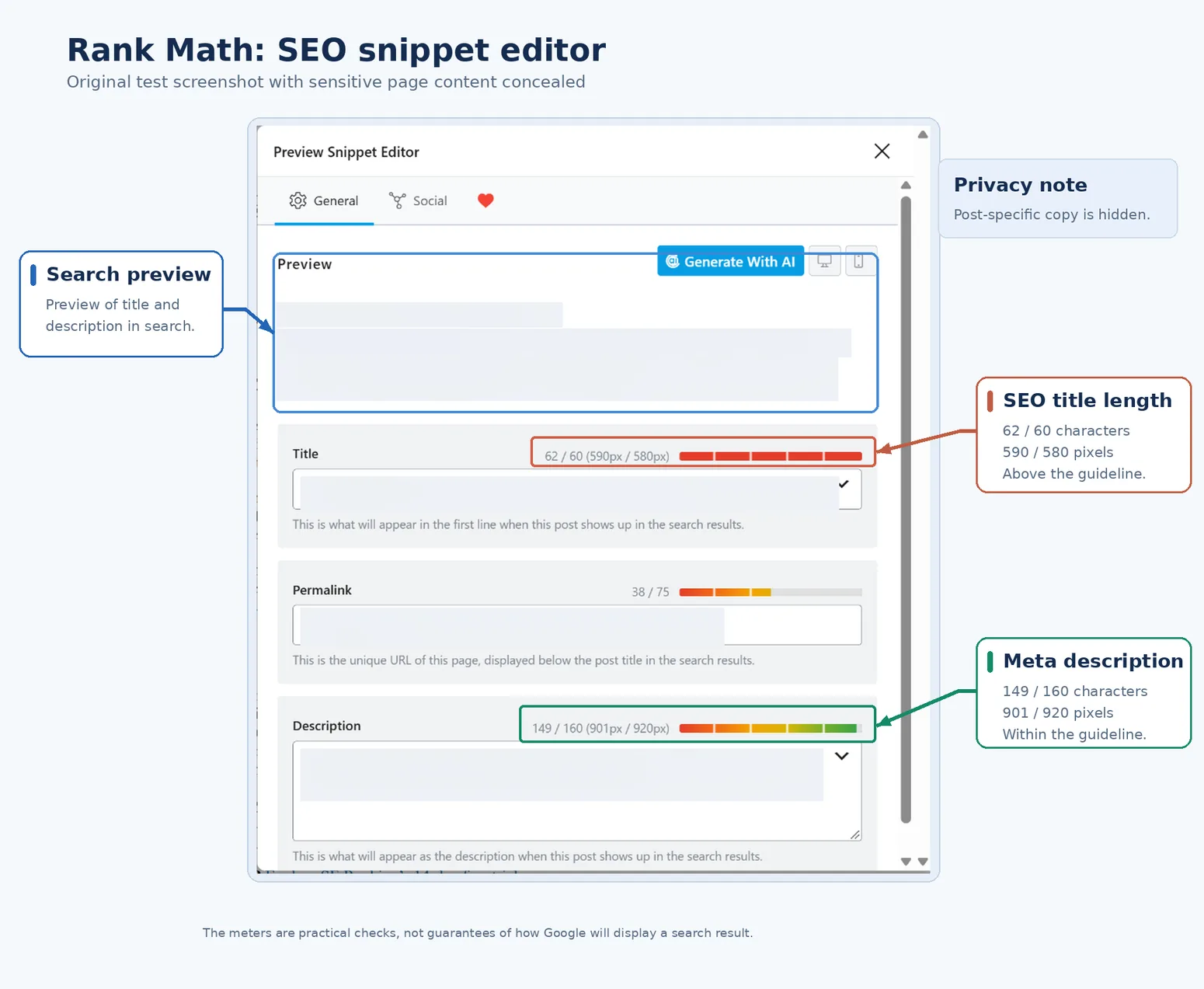
This feature was useful for a clear reason: it helped us communicate the article’s subject to potential visitors more precisely. That is different from trying to increase a score for its own sake.
Google’s guidance on search-result title links explains why a preview is only an approximation rather than a guarantee of the exact title displayed for every query.
Our conclusion on on-page SEO is positive but qualified. Rank Math provides a handy checklist. The more valuable skill is understanding which recommendations improve an article’s usefulness and which ones can safely be ignored.
6. Technical SEO: What Rank Math Free Helps You Accomplish
Technical SEO concerns the website settings that help search engines reach pages, interpret them correctly and deal with URL changes. Several elements work together. Sitemaps aid discovery. Indexing and canonical settings clarify which pages should be considered. Schema provides structured context. Redirects help users and crawlers reach a page after its address changes. These are distinct jobs, and Rank Math has controls for each.
6.1 XML sitemaps and indexing settings
We first inspected Toolquo’s live XML sitemap index and its associated sitemap settings. Posts, pages and categories were present according to our configuration, while tag archives were excluded and marked noindex. That helped us maintain a list of the content types we actually wanted considered for search discovery.
Rank Math also exposes robots directives and canonical settings for individual pages. These give a website owner control over how a URL should be treated, but search engines make their own final indexing and canonical decisions. A sitemap is an invitation to discover content, not proof that Google has indexed it.
Google’s own sitemap documentation explains that submitting a sitemap helps discovery, but does not guarantee that its URLs will be crawled or indexed.
6.2 Schema markup and independent validation
Schema markup supplies search engines with structured facts about a page, such as whether it is an article and who published it. A blog owner may use Article schema so that search engines can interpret basic publication information more reliably.
We tested Rank Math Free’s Article schema on our published SE Ranking Review. After examining the plugin settings, we checked the live page with Google’s Rich Results Test. The test reported one valid Article item. The result mattered because the plugin generated usable BlogPosting markup without us writing JSON-LD code.
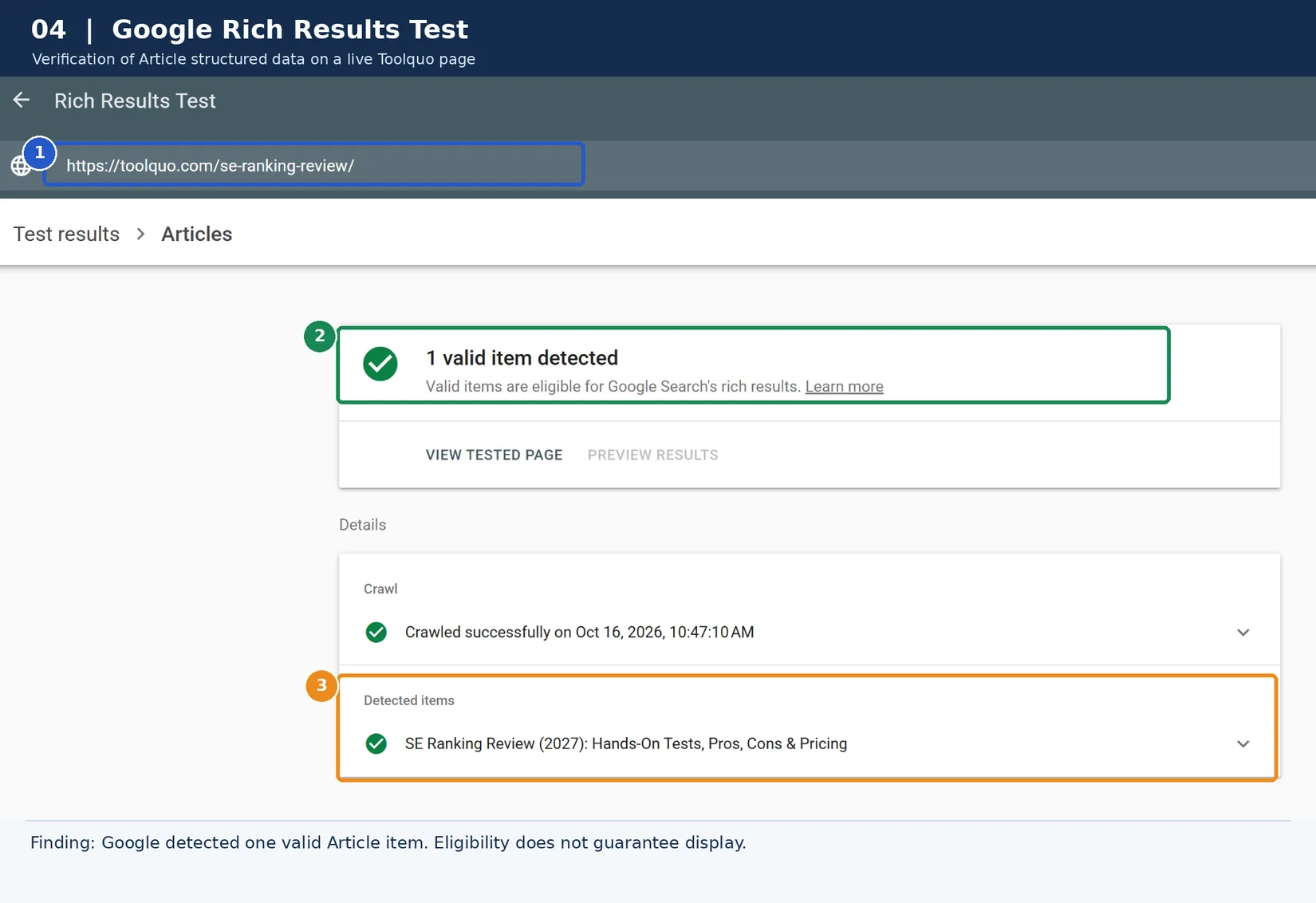
Google’s structured data guidelines likewise explain that valid markup does not guarantee a rich result.
This does not guarantee a special result in Google Search. Custom schema building, additional schema formats and integrated premium validation tools are also not all included in Free.
6.3 404 Monitor and Redirections
The 404 Monitor helps answer a practical question: are visitors requesting addresses that no longer lead to a page? To test it, we deliberately requested a nonexistent Toolquo URL and checked the log. Rank Math recorded the request. We then created a 302 redirect to another destination and verified that the redirect worked.
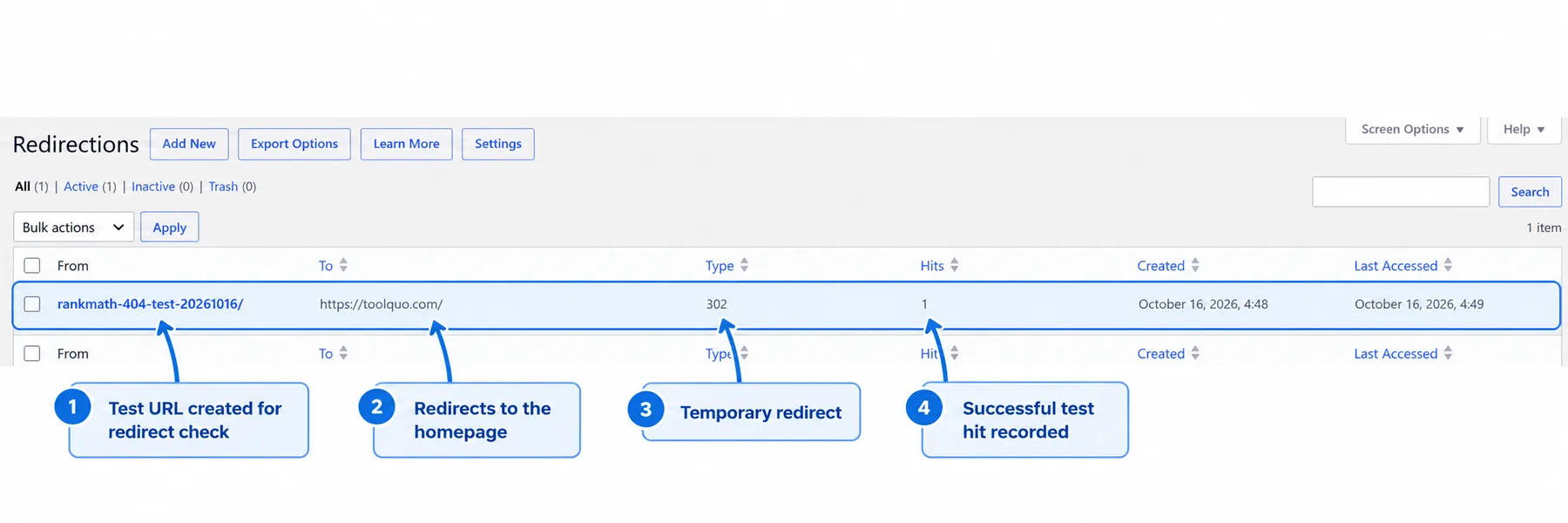
The test showed that both tools could handle these basic tasks. A 302 redirect signals a temporary move; for a permanent URL change, a 301 is generally appropriate. Not every 404 requires a redirect, since some requests are mistyped or irrelevant.
6.4 IndexNow submissions
IndexNow is a way to notify participating search engines when a URL is new or has changed. We examined automatic submission history and tested a manual submission through the WordPress Posts screen. Rank Math recorded HTTP 200 and 202 responses, indicating success or acceptance for processing. A separate manual submission form did not produce a recorded result on our initial attempt.
Submission is not indexing. Search engines still decide whether to crawl and index a page, and IndexNow should not be presented as a method for forcing an ordinary article into Google’s results.
6.5 Breadcrumbs and social metadata
Breadcrumbs display a page’s place in the site structure, such as Home, then SEO, then a particular review. Rank Math’s breadcrumb shortcode worked, but Toolquo’s theme already provided breadcrumbs. Using both would risk duplication. We also checked live Open Graph and X/Twitter metadata, which help social platforms identify the intended title, description and image when a page is shared.
Taken together, these tests make technical SEO one of the strongest reasons to consider Rank Math Free. It helped us configure and verify several useful website functions. The main caution is that changing powerful settings without understanding them can create problems.
7. Analytics and SEO Analyzer: Are the Reports Useful?
Rank Math includes monitoring tools, but we would separate their convenience from their accuracy and added value.
Analytics brings selected Google Search Console data into WordPress. During setup, a missing database table prevented our reports from populating until we used a repair tool. One post later showed 146 impressions in Rank Math and 147 in GSC, although the reporting windows were different and some site metrics remained incomplete. Since GSC provides the original data and richer analysis for free, we see Rank Math’s dashboard mostly as a convenience for quick checks.
SEO Analyzer helps identify website issues worth investigating. On October 15, 2026, we ran it on Toolquo and received 79/100, with 24 passed tests, two warnings and eight failed checks. We reviewed the findings and made improvements to the site. When we ran it again on October 18, the score had risen to 95/100, with 30 passes, one warning and three failed checks. The homepage SEO Description check, for example, was marked as passed in the later scan.
This gave us a useful way to check progress, although a higher plugin score does not by itself demonstrate improved Google rankings. We also distinguished actual website problems from test limitations: one remaining failure was labelled “Mobile Speed: Test execution failed,” which is not proof of poor mobile performance.
8. Managing Many Articles: Bulk Edits, Links and Permissions
An SEO workflow changes when a website grows. Editing one article is easy; updating descriptions across dozens of posts, finding useful internal-link opportunities and giving writers limited permissions takes more organization.
8.1 Bulk editing
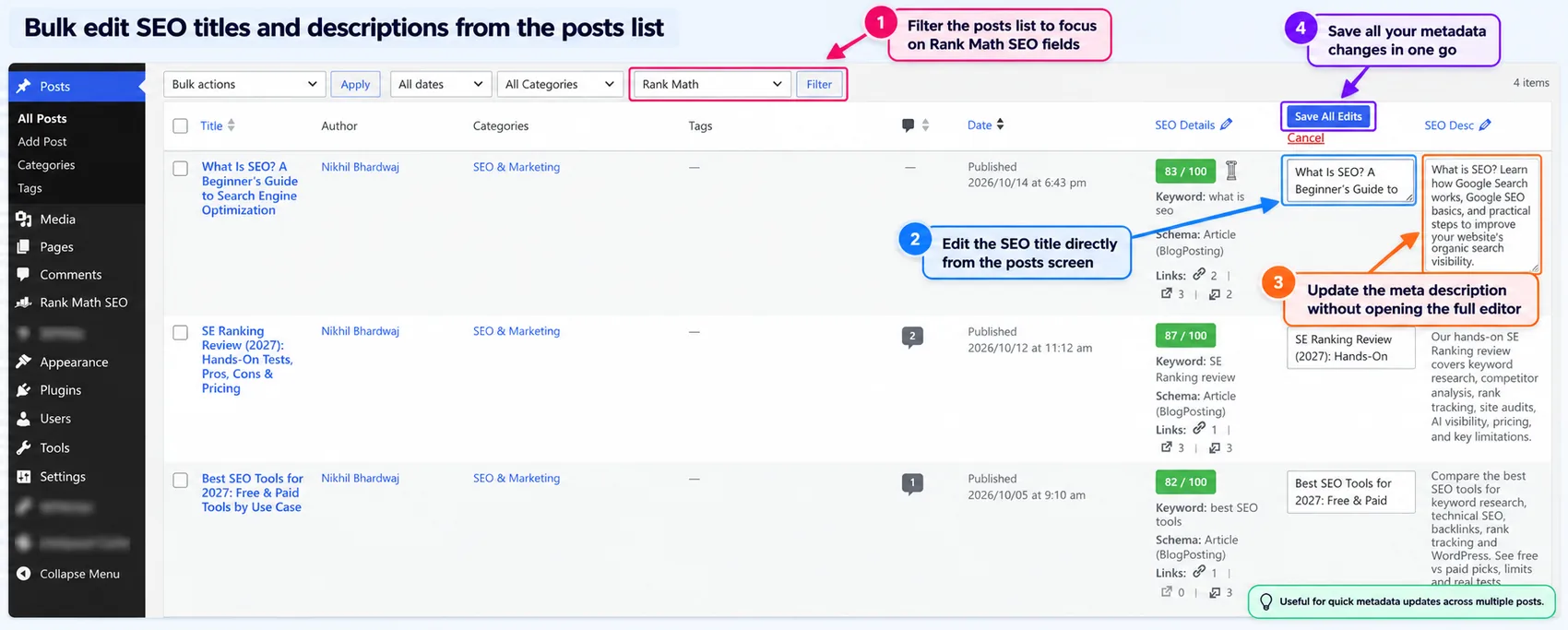
We enabled the SEO Title and SEO Description columns in WordPress’s Posts screen, then clicked their pencil icons. Rank Math Free opened editable fields for multiple posts, together with Save All Edits and Cancel buttons. This demonstrated that we could manage metadata in one place rather than opening each post individually. We did not save a production change, so the test establishes the interface, not a verified saved update.
8.2 Link analysis
Internal links help readers move to relevant information elsewhere on the same site. We checked Rank Math’s editor suggestions and AI Link Genius reports to see whether they helped us spot linking opportunities. Suggestions were initially sparse, but the editor later recommended linking to our What Is SEO article. AI Link Genius showed detected internal, external and incoming links for posts.
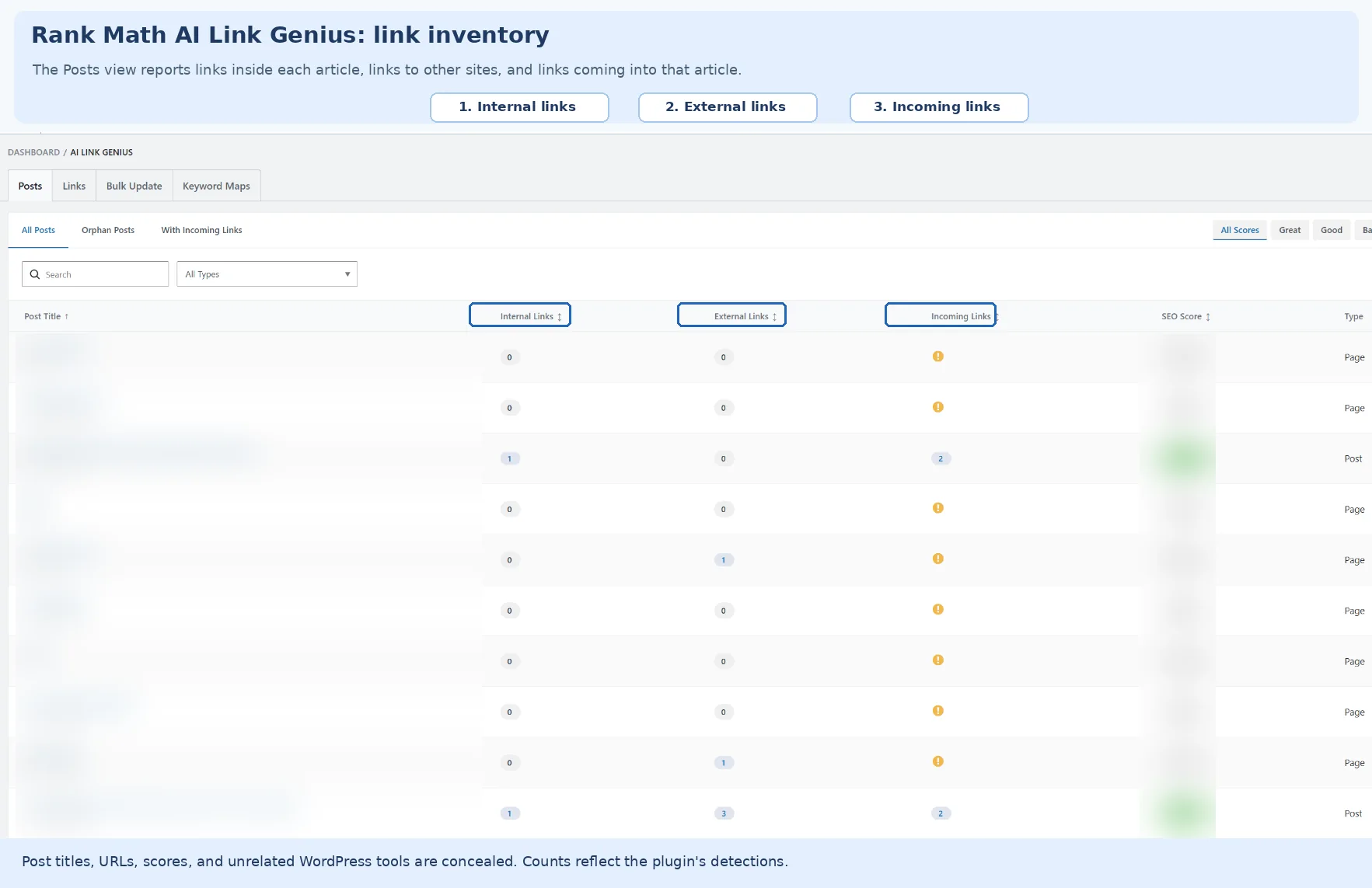
For example, both Best SEO Tools and SE Ranking Review showed two incoming links in the tool. That helped us identify which published pages Rank Math recognized as receiving links, although the counts should not be assumed to include every dynamically generated site link. Bulk Update and Keyword Maps required an upgrade.
8.3 Role Manager and maintenance
Role Manager is intended for sites where several people edit content. We enabled it and checked controls for administrators, editors, authors, contributors and subscribers. The interface let us distinguish content-level SEO privileges from site-wide permissions. Contributors and subscribers had all shown permissions unchecked. We did not sign in under other roles to test enforcement.
We also exported Rank Math settings and created a settings backup. This is useful before changing configurations, but it is not a complete backup of WordPress content and files.
For a publisher with many articles, these management tools may save more time than cosmetic improvements to an SEO score.
9. Rank Math’s AI Tools: Useful Free Features or Paid Extras?
Rank Math promotes several AI tools, but they serve different jobs and come with different allowances. We tested the parts accessible in our Free installation rather than assuming an AI-labelled feature was fully usable.
9.1 Content AI
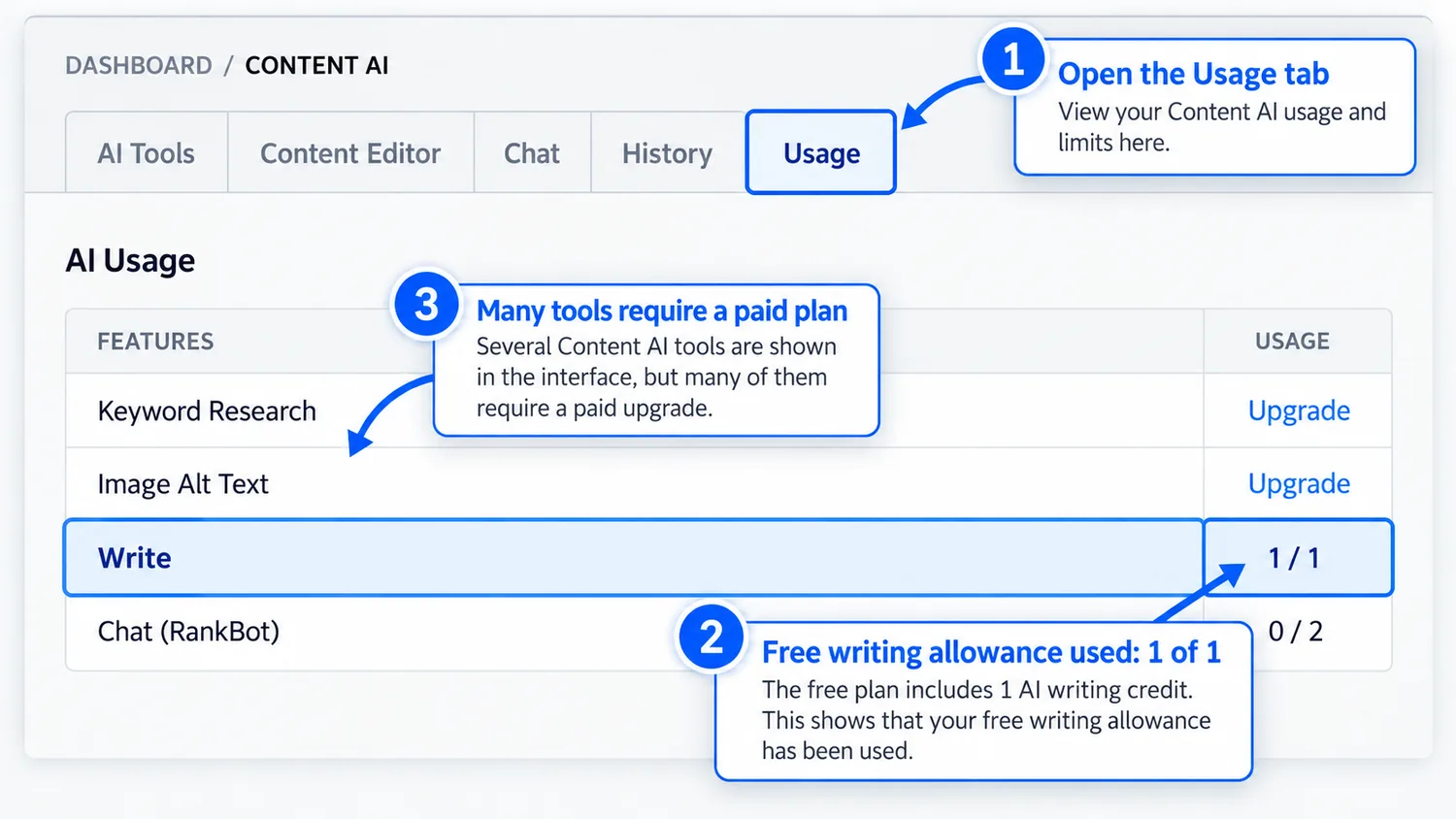
Content AI can help draft or reword passages. Its main screen initially displayed a subscription prompt, but we found a working AI writing tool inside the article editor. We supplied instructions based on our SE Ranking findings and generated one paragraph. The summary was broadly accurate but felt mechanical, so we would have edited it before publication.
Afterward the free Write counter displayed 1/1, confirming that we had consumed that allowance. This is enough to try the tool, not enough for an ongoing writing workflow. A successful AI generation also does not by itself improve search rankings.
9.2 AI Link Genius and AI Visibility
As described earlier, AI Link Genius exposed basic link information in Free while advanced bulk operations and keyword maps displayed Pro prompts. AI Visibility, advertised for tracking how brands appear in AI answers, was behind an upgrade or trial screen in our test. We did not evaluate its underlying measurements.
Our conclusion is straightforward: assess these AI features as separate products with their own limits. For most bloggers, Rank Math’s established SEO controls are likely to be more immediately useful than an AI add-on.
10. Rank Math Free vs Pro: Which Features Do You Need?
Rank Math Free already handles the fundamental jobs of a WordPress SEO plugin. The extra features in Rank Math Pro matter mainly when a particular website or workflow needs more than those basics. This is why we would compare the two plans by use case, not by counting features.
Writing and optimizing posts. Free provides the focus-keyword checklist, snippet editor, basic schema and social metadata. Pro adds premium capabilities, but buying it does not make the article itself more helpful or accurate.
Managing technical SEO. Free provides regular XML sitemaps, indexing and canonical controls, common schema types, 404 logging and redirects. Pro offers more advanced schema creation and specialized News or Video sitemap capabilities.
Managing many pages or clients. Free provides the inline SEO title and description editor and role settings that we used. Paid plans add more advanced editing, imports, reporting and rank-tracking options. Business and Agency tiers are intended for sites managed for clients.
AI features. Limited free writing and link views worked for us. Other AI functions were locked or restricted, and sustained AI use is marketed through separate Rank Math AI subscriptions. A Pro SEO license does not necessarily mean full ongoing AI access.
These are feature entitlements and our observed Free results, not a performance test of Pro. Our planned Rank Math Free vs Pro guide will cover restrictions in more detail.
11. Who Should Consider Rank Math Pro?
The sensible upgrade decision begins with a problem you need to solve. A new blogger who is still learning how to write useful articles and configure basic metadata can usually stay with Free. A small business site whose needs are limited to standard titles, sitemaps, schema and redirects may also be well served by it.
A content publisher might benefit from Pro if keyword tracking, richer reporting or repetitive-workflow features save significant time. A site needing custom schema across many templates has a more concrete technical reason to investigate the paid version.
For an SEO consultant, licensing matters as much as features. Rank Math Pro is positioned for personally owned sites, whereas Business and Agency include specified client-site allowances. We have not tested Pro’s capabilities on large client portfolios, so these recommendations remain conditional.
Before upgrading, ask which task Free cannot accomplish adequately, what the paid feature would change, and whether a dependable free alternative already exists. For detailed search-performance analysis, Google Search Console is a relevant example.
12. Rank Math Pricing and Value
Rank Math’s pricing page displays monthly equivalent prices billed annually. A monthly rate therefore does not necessarily mean you can pay month by month, and renewal charges may be higher.
We checked the official pricing page in October 2026. It displayed euro-denominated prices to us. We have kept those verified EUR amounts below rather than presenting currency conversions as official US-dollar prices. Toolquo’s standard is USD, and the exact USD checkout rates should be checked before publication.
Pro: €7.99 per month as an annual-billing equivalent, with an advertised renewal equivalent of €8.99 per month. It supports personally owned sites and advertises tracking of 500 keywords.
Business: €24.99 per month as an annual-billing equivalent, with an advertised renewal equivalent of €27.99 per month. It supports up to 100 client sites and advertises tracking of 10,000 keywords.
Agency: €54.99 per month as an annual-billing equivalent, with an advertised renewal equivalent of €64.99 per month. It supports up to 500 client sites and advertises tracking of 50,000 keywords.
The total can vary with taxes, location and promotions. Rank Math AI has separate subscriptions, with their own limits. The relevant question is whether Pro solves a real problem or saves enough time to justify the annual cost.
For up-to-date conditions, check Rank Math’s official SEO plugin pricing, its Free vs Pro feature comparison and its separate AI pricing.
13. Rank Math Pros and Cons
These Rank Math pros and cons reflect our October 2026 tests of Free. We did not independently test Pro.
| Strength or limitation | What our tests showed | Who it matters to |
|---|---|---|
| Pro: useful technical tools in Free | We checked live sitemaps, validated one Article item with Google’s Rich Results Test, and tested a logged 404 and working 302 redirect. | Blog owners who need everyday SEO controls without paying for these basic workflows. |
| Pro: routine article controls | We could configure metadata and inspect editable SEO columns across posts; we did not save bulk metadata changes to production articles. | Publishers managing titles and descriptions across a growing archive. |
| Con: checklist results need judgment | Our 82 → 81 → 87 case study showed why content improvements and score changes can diverge. | Beginners tempted to rewrite useful content solely to reach 100/100. |
| Con: Analytics needed troubleshooting | Our connection required repair. The comparison with Search Console also used different reporting windows, limiting conclusions about agreement. | Readers expecting the dashboard to replace checking their original Search Console reports. |
| Con: analyzer failures need investigation | In our testing, an incomplete SEO Analyzer test could appear as a failure. | Site owners deciding which reported problems actually require a fix. |
| Con: free and paid limits can be unclear | Some premium screens made free access limits difficult to interpret. | Anyone choosing a plan for a specific feature: confirm access before paying. |
For configuration steps, use our Rank Math setup tutorial. For interpreting checklist warnings, see Rank Math SEO Score Explained.
14. Rank Math Alternatives
Rank Math is not the only WordPress SEO plugin for these jobs. Yoast SEO, All in One SEO and SEOPress offer alternative interfaces and different mixes of free and paid tools. Which is best depends on the tasks a reader needs to perform.
We’ve now tested Yoast SEO Free separately. Our hands-on Yoast SEO review examines its strengths, limitations and Free vs Premium features, so readers can evaluate that option before choosing a WordPress SEO plugin. These were separate reviews, not matched head-to-head tests, so we are not declaring a universal winner between Yoast and Rank Math. A direct comparison is still planned.
For a wider selection of research, analysis and website optimization software, see our Best SEO Tools guide.
15. Final Verdict: Is Rank Math Worth Using?
Yes, particularly in its free version, if your goal is to implement and manage the fundamentals of WordPress SEO efficiently. It performed well in several of the tasks we expect from an SEO plugin, including technical metadata, schema, sitemaps, redirects and routine article management.
Use its checklist as a guide and its settings as tools. Neither a 100/100 score nor an upgrade to Rank Math Pro is a substitute for well-researched content, clear explanations and good editorial judgment. Start with Free, then upgrade only when a specific paid function earns its place in your workflow.
16. Frequently Asked Questions
16.1 Is Rank Math Free enough for a blog?
For many blogs, yes. Free includes the principal content and technical SEO settings needed to publish and manage articles. The right choice depends on the tasks you need, not the size of the feature list.
16.2 Does improving the Rank Math score improve Google rankings?
Not directly. The score represents Rank Math’s checks, not a Google ranking factor. Use the warnings to investigate possible issues, then improve the content where there is a genuine reason.
16.3 Is Rank Math SEO Pro worth buying?
It can be if you need advanced schema, rank tracking or paid management workflows. The case is weaker when your needs are already covered by Free.
16.4 Can Rank Math guarantee indexing through sitemaps or IndexNow?
No. These tools help search engines discover or learn about URLs, but indexing decisions remain with each search engine.
16.5 Is Rank Math better than Yoast SEO?
We have tested Rank Math Free and Yoast SEO Free separately, but have not yet completed a matched head-to-head comparison. We therefore do not claim a universal winner. Our dedicated comparison will assess the same tasks across both plugins.
16.6 Is Rank Math Content AI free?
Our test confirmed one functioning free Write generation with a limited allowance. Other AI functions and higher usage can require a separate paid plan.
17. How We Tested Rank Math
Our review is based mainly on firsthand testing of Rank Math Free on Toolquo in October 2026, using version 1.0.280. With the plugin already installed, we configured it through the Advanced Setup Wizard, connected Google Search Console, set relevant defaults and tested the functions we would expect a WordPress website owner to need.
Our approach follows the practical testing principles set out in How We Review Software, including comparing observed outputs with independent evidence.
We used published Toolquo articles, including our SE Ranking Review, to examine on-page recommendations and page-level controls. We checked sitemaps and structured data against live outputs, tested a missing URL and redirect, examined IndexNow history, compared a small sample of Analytics figures with Google Search Console, tested editable SEO columns and inspected AI and role-management access.
Whenever a tool produced a result, we asked what it meant for the user’s task. For example, we independently validated Article structured data, compared SEO Analyzer results from October 15 and October 18 after site improvements, and did not interpret IndexNow acceptance as proof of indexing.
Limitations matter. We did not independently test Rank Math Pro, WooCommerce-specific features, role enforcement under separate accounts, or long-term AI Visibility accuracy. We did not save bulk metadata edits to production articles. The Analytics windows were not identical. Results from our website should not be treated as guarantees for every installation.
About the author
Nikhil Bhardwaj
Founder & Editor, Toolquo
Nikhil leads Toolquo’s editorial direction, focusing on practical software research, transparent comparisons, and clear buying decisions.
View author profile →Keep exploring
Related guides
November 3, 2026
Yoast SEO Sitemap: How to Find, Configure and Fix Errors (2027)
Find your Yoast SEO sitemap, choose which URLs belong in it, submit it to Google Search…
November 1, 2026
How to Use Yoast SEO: Complete Beginner’s Guide (2027)
Learn how to install and configure Yoast SEO, choose WordPress SEO settings, optimize a post, and…

October 29, 2026
Yoast SEO Review (2027): How Good Is It, and Is Premium Worth It?
Our hands-on Yoast SEO review explores Free features, Premium pricing, strengths, limitations, and whether upgrading is…