Rank Math vs Yoast SEO (2027): Which WordPress SEO Plugin Is Better?
Compare Rank Math and Yoast for on-page SEO, technical SEO, readability, redirects and growing a WordPress blog, with original tests and practical Free and paid recommendations.
On this page
Choosing an SEO plugin means finding one that meets your SEO needs today and as your blog expands. You may start with titles, descriptions and a sitemap. Later, you may need to merge articles, redirect old URLs, update hundreds of descriptions or help several writers publish consistently.
This Yoast SEO vs Rank Math comparison explains what each WordPress SEO plugin offers for on-page SEO, technical SEO and managing a growing blog. We used Rank Math on ToolQuo and tested Yoast SEO Free, with official documentation supporting the paid-feature comparison.
Looking for a specific answer? Use the table of contents to jump to on-page SEO, technical SEO, site management or pricing.
1. Rank Math vs Yoast: our verdict
For deeper individual evaluations, read our Rank Math review and Yoast SEO review.
At a glance: choose by the job you need to do
| What you need | Our choice | Why |
|---|---|---|
| A new blog with room to grow | Rank Math Free | SEO basics, redirects and 404 logs in one free plugin. |
| Help making writing easier to read | Yoast Free | A separate readability panel with specific writing checks. |
| Several keyword checks on one page | Rank Math Free | Up to five focus phrases by default. |
| Basic sitemaps and indexing controls | Either Free plugin | Both cover a typical blog’s technical essentials. |
| Redirects and missing-page logs | Rank Math Free | Yoast’s integrated redirect manager requires Premium. |
| A paid plan for several sites you own | Rank Math Pro | One subscription covers unlimited qualifying personally owned sites. |
2. Yoast vs Rank Math: setup and ease of use
An SEO plugin should help you choose sensible settings and review a draft without making you learn every feature first.
Both plugins guide you through initial setup, including whether the site represents a person or organisation. Both then provide settings for content types, archives and search appearance.
Once you have chosen, follow our Rank Math setup tutorial or Yoast SEO beginner’s guide for installation, settings and your first optimized article.
Yoast separates SEO analysis from readability analysis. For a beginner asking “what should I improve in this draft?”, that division is easy to follow: review the SEO checklist, then review the writing checklist.
Rank Math presents a numerical SEO score out of 100 and groups its tools into modules. This suits users who want to manage more tasks in one plugin. Start with the functions you need and add others as your site develops.
3. Rank Math Free vs Yoast Free: on-page SEO
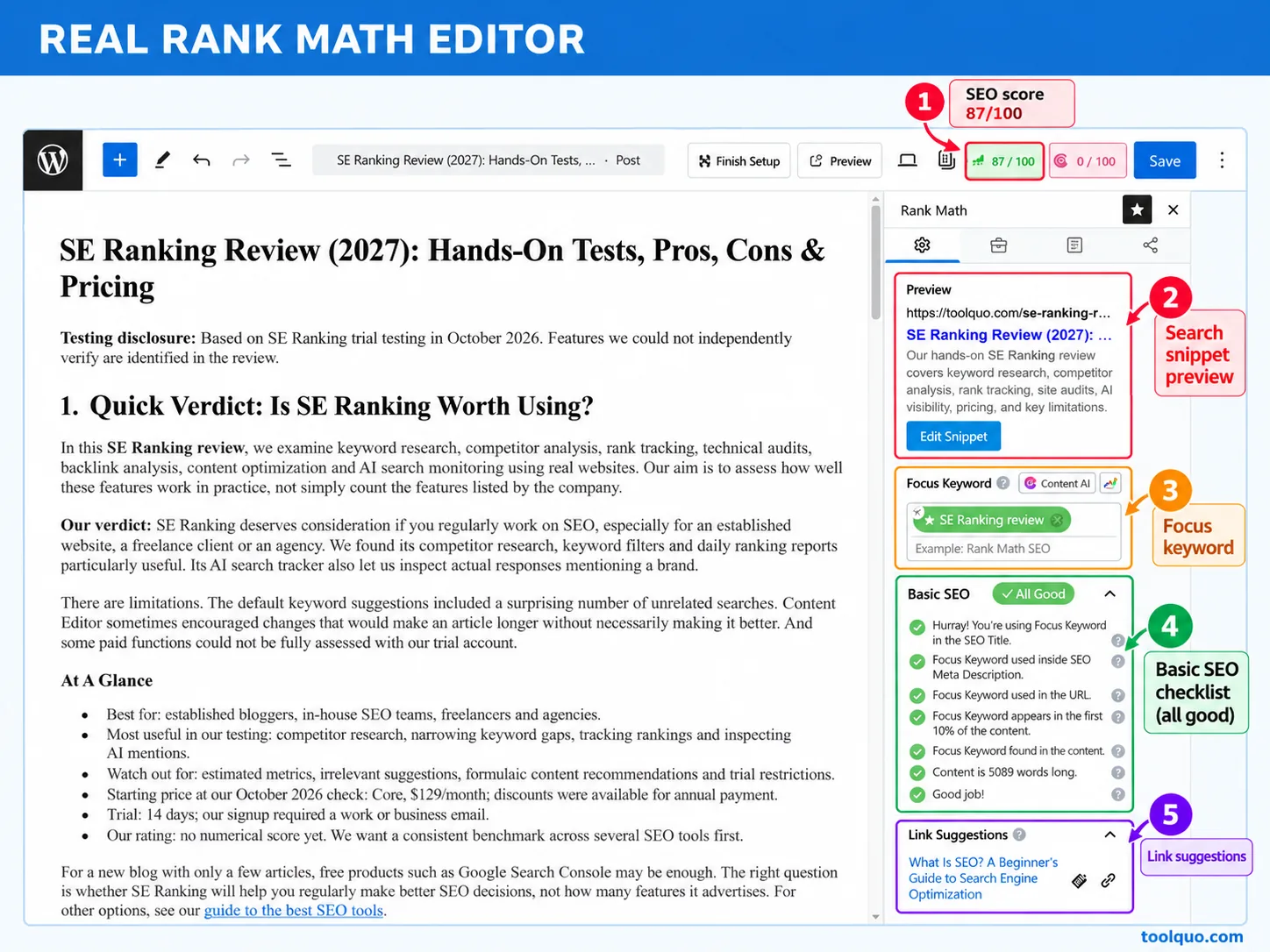
On-page SEO covers how clearly a page communicates its topic through the content, title, headings, links and other page elements. Both plugins help you review these, but in different ways. Rank Math stands out for its easy-to-read numerical score out of 100 and several focus-keyword fields on one page. Yoast stands out for separating SEO feedback from readability feedback and for its detailed writing checks.
3.1 Focus keywords and content recommendations
A focus keyword is the phrase you ask the plugin to check your draft against. For a guide about WordPress backups, you might use “how to back up WordPress”. The analysis can then flag whether the title, description and content address that phrase.
- Rank Math Free: up to five focus keywords for a single post or page by default.
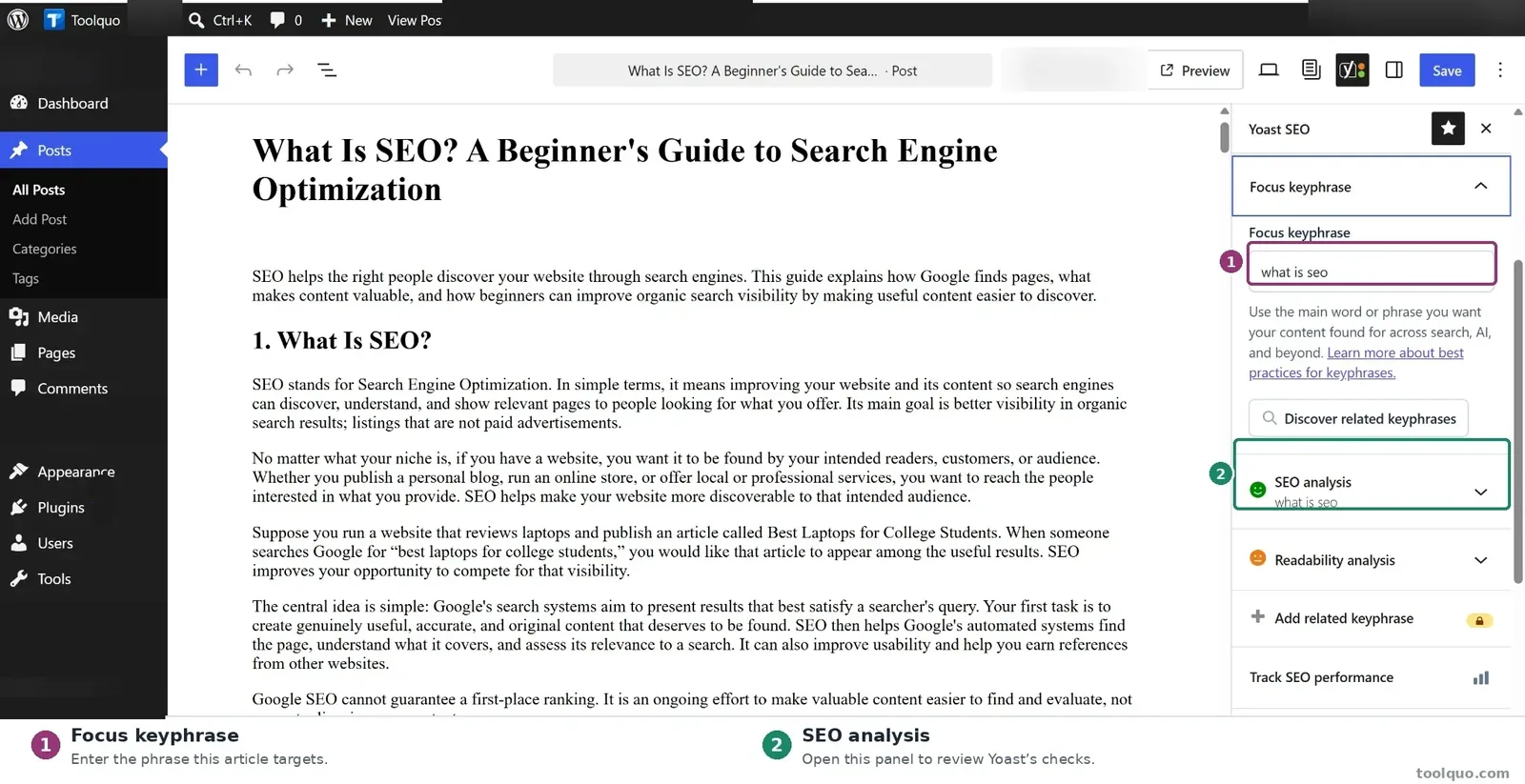
- Yoast Free: checks that post or page against one focus keyphrase.
Yoast also offers related-keyphrase suggestions after you connect a Semrush account. Free users can use these suggestions for research; checking the same page against additional related keyphrases within Yoast requires Premium. Rank Math users can research related keywords directly in Semrush too, so Yoast’s integration offers convenience inside the editor rather than exclusive access to that research.
Focus-keyword fields tell the plugin what to check; they do not tell Google which searches the page can rank for. A Yoast Free page can still appear for many relevant queries.
3.2 Readability: helping readers understand your explanation
Readers need to follow an explanation before they can act on it. Readability feedback can highlight long sentences, dense paragraphs and weak sectioning that make an article difficult to read.
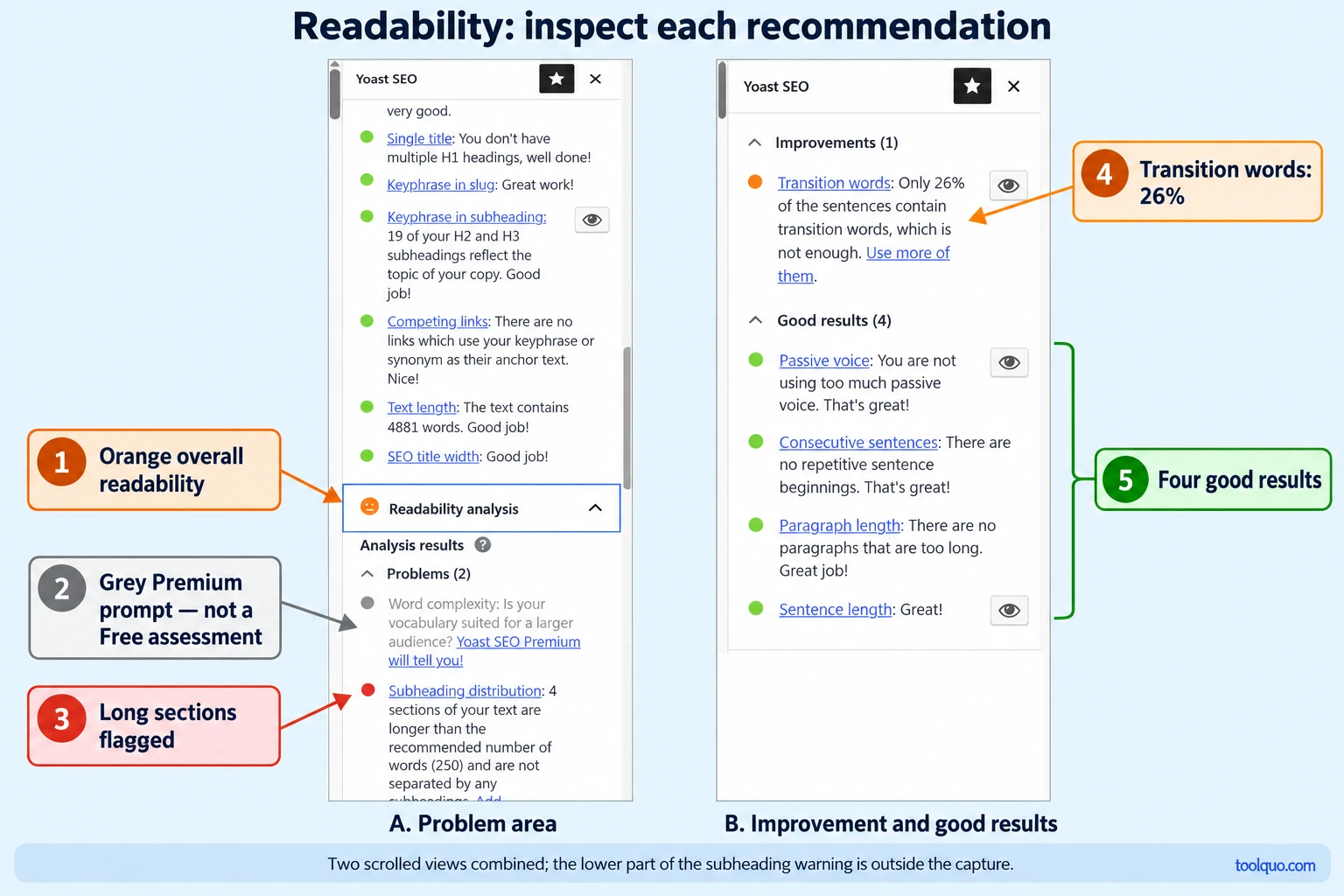
Yoast provides a separate assessment with checks such as sentence and paragraph length, passive voice, transitions and subheading distribution. Rank Math includes readability-related checks in its broader content analysis, but its presentation is less detailed for reviewing prose.
For example, if a paragraph explains three settings, the readability checks can prompt you to split it into three clear points. Review each suggestion in context; adding transition words solely to turn a light green can make writing less natural.
3.3 SEO scores: which feedback is easier to use?
Rank Math gives its on-page SEO analysis a numerical score out of 100, with a checklist explaining the findings. Yoast uses traffic-light indicators and separate panels for SEO analysis and readability analysis. The SEO panel checks the page against your focus keyphrase; the readability panel reviews how the text is written.
For examples of Yoast’s indicators and warnings, see our Yoast SEO score guide.
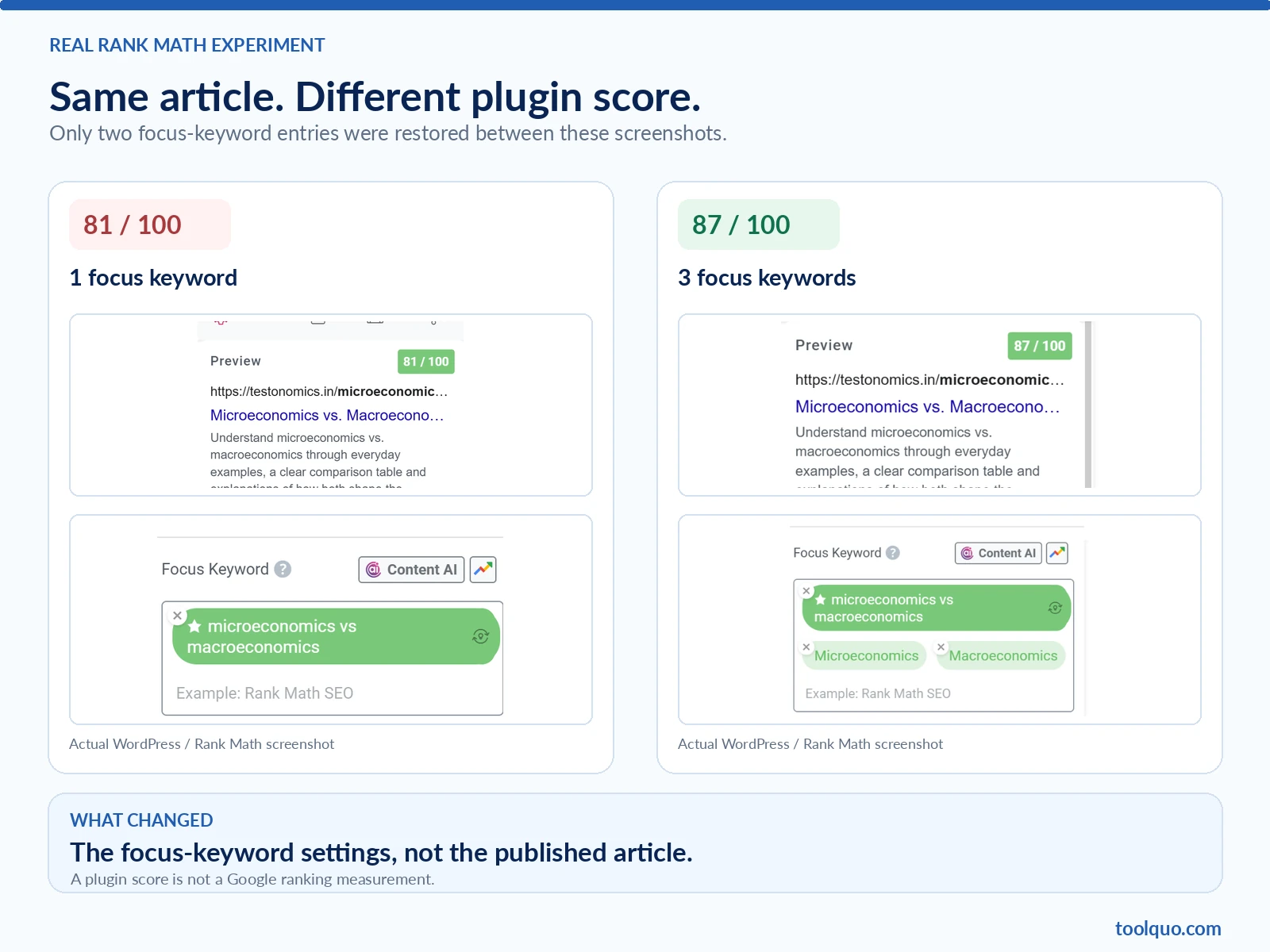
In our Rank Math case study, the score moved from 82 to 81 after editorial improvements, then to 87 after changing focus-keyword entries without further editing the published content. The score therefore depends on checklist inputs as well as the page itself.
A high score or green light shows that a page meets the plugin’s checks. It does not establish how useful the article is or how Google will rank it. Fix genuine problems, such as an unclear title, rather than changing good prose merely to earn points. Our Rank Math SEO score guide explains the experiment.
3.4 Search titles, descriptions and social sharing
A search title and description tell people what a page offers in search results. Social-sharing titles, descriptions and images help present the page when someone shares its link on a platform such as Facebook.
Both Free plugins let you set SEO titles and descriptions and use templates for consistent defaults. In Rank Math, we examined social controls and the resulting public metadata. In Yoast Free, we saved separate social titles and descriptions through its Bulk Editor. Paid social previews are a different feature from saving those text fields.
4. Technical SEO: discovery, indexing and structured data
Technical SEO helps search engines access and interpret your pages. Both plugins cover the usual foundations; the larger practical difference is how much maintenance you can manage within the Free plugin.
4.1 XML sitemaps, indexing and canonical URLs
- XML sitemap: lists pages for search engines to discover.
- Noindex: asks search engines not to include a page in search results.
- Canonical URL: tells search engines which address you want treated as the main version when two URLs contain similar content.
Both Free plugins generate sitemaps and provide indexing and canonical controls. We examined sitemap output in both. In Yoast, we also checked archive behaviour: disabling author archives redirected the tested author URL to the homepage.
If you choose Yoast, our Yoast SEO sitemap tutorial shows how to find the sitemap, control its contents and investigate common problems.
4.2 Schema and breadcrumbs
Schema adds machine-readable information to a page’s code, such as “this is an article” and “this person wrote it”. Breadcrumbs show the page’s position in the site, for example Home → Guides → WordPress Backups.
Yoast generated a connected set of schema objects in our tests, including Article, WebPage, WebSite, Organization and Person. Its FAQ and How-to blocks also produced corresponding markup. Rank Math provided common schema choices, and we checked its Article output.
Both plugins can add breadcrumbs, but your theme may already provide the visible navigation. Check the page before adding another trail. Schema markup and visible breadcrumbs should describe the same content and site structure.
4.3 Redirects and 404 monitoring
When you merge an old tutorial into a better guide, readers and external links may still use its old URL. A redirect sends them to the replacement. A 404 monitor records requests for missing pages so you can investigate broken paths.
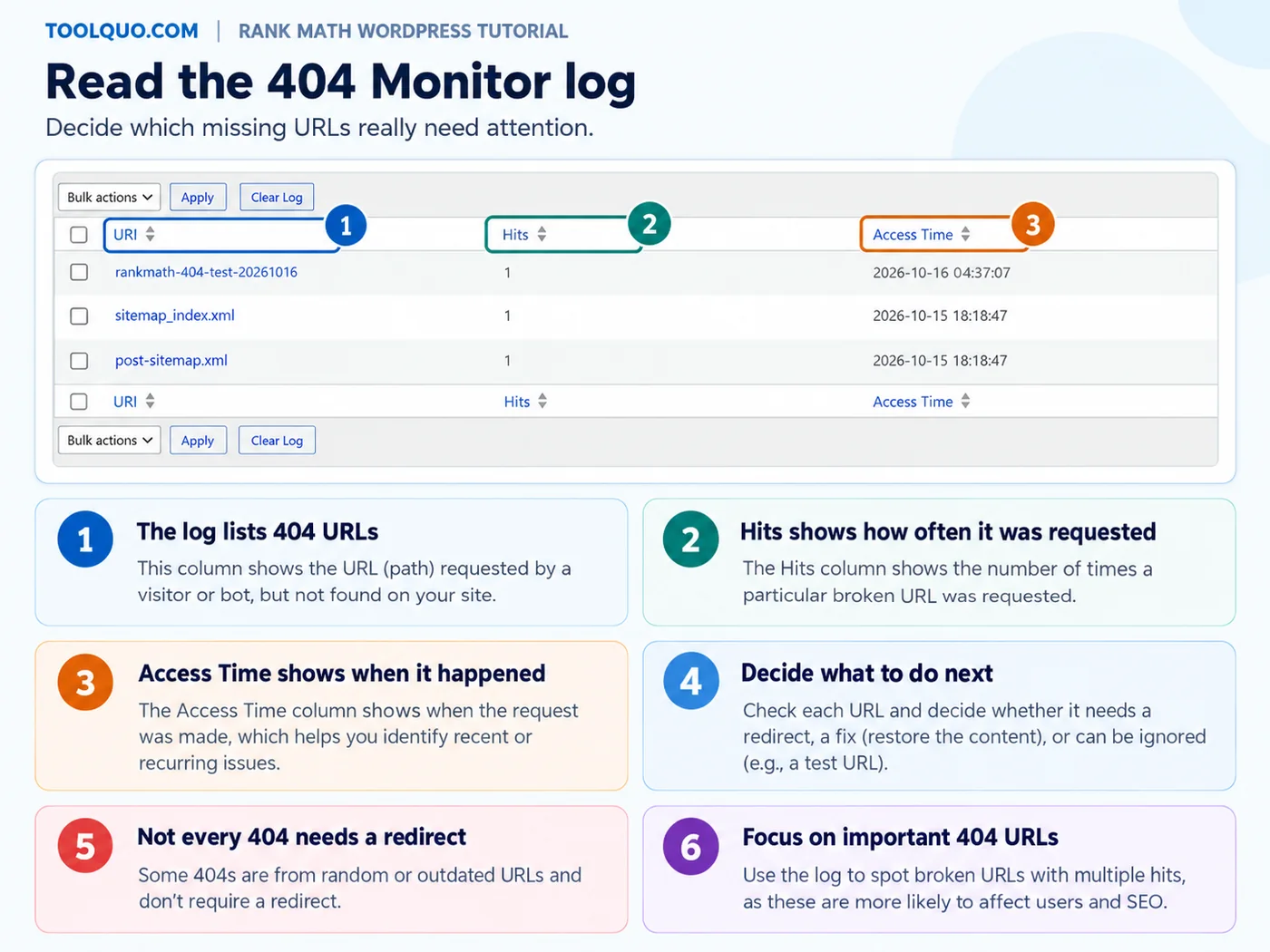
Rank Math Free includes redirect management and a 404 monitor.
Yoast’s integrated redirect manager is a Premium feature. With Yoast Free, you can use a separate redirect plugin or server-level rules; you will need another solution for missing-page logs.
However, if you already use Yoast with a reliable redirect plugin, Rank Math would bring those tools into one place rather than give you a task you could not perform before.
5. Managing a growing content library
Growth creates repetitive tasks: updating old descriptions, connecting related articles and coordinating writers. Compare how the plugins reduce that work rather than assuming a larger blog automatically needs a paid plan.
5.1 Bulk editing titles and descriptions
A bulk editor lets you update metadata across many articles without opening every post. This matters when an older content library has missing descriptions or inconsistent titles.
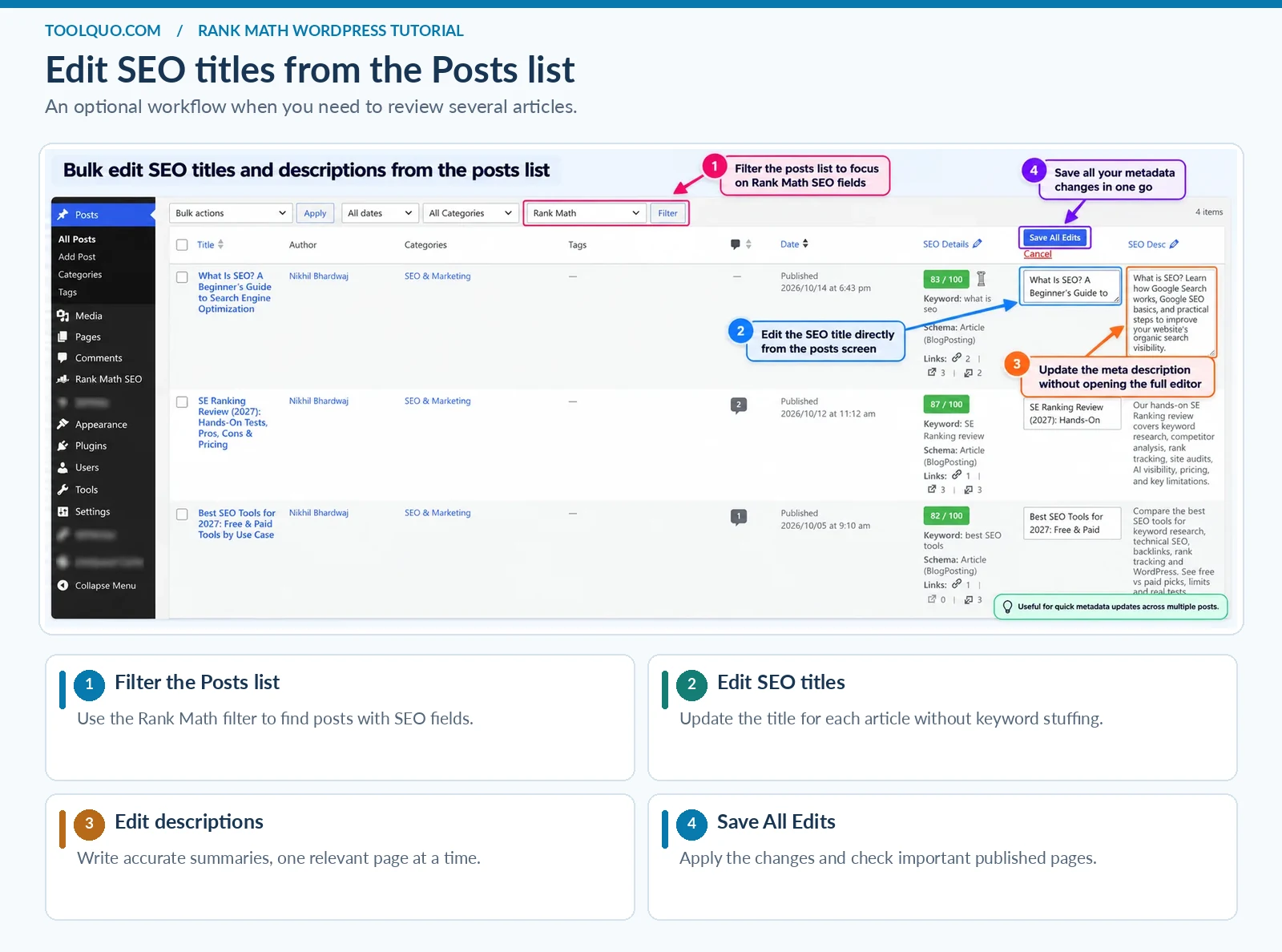
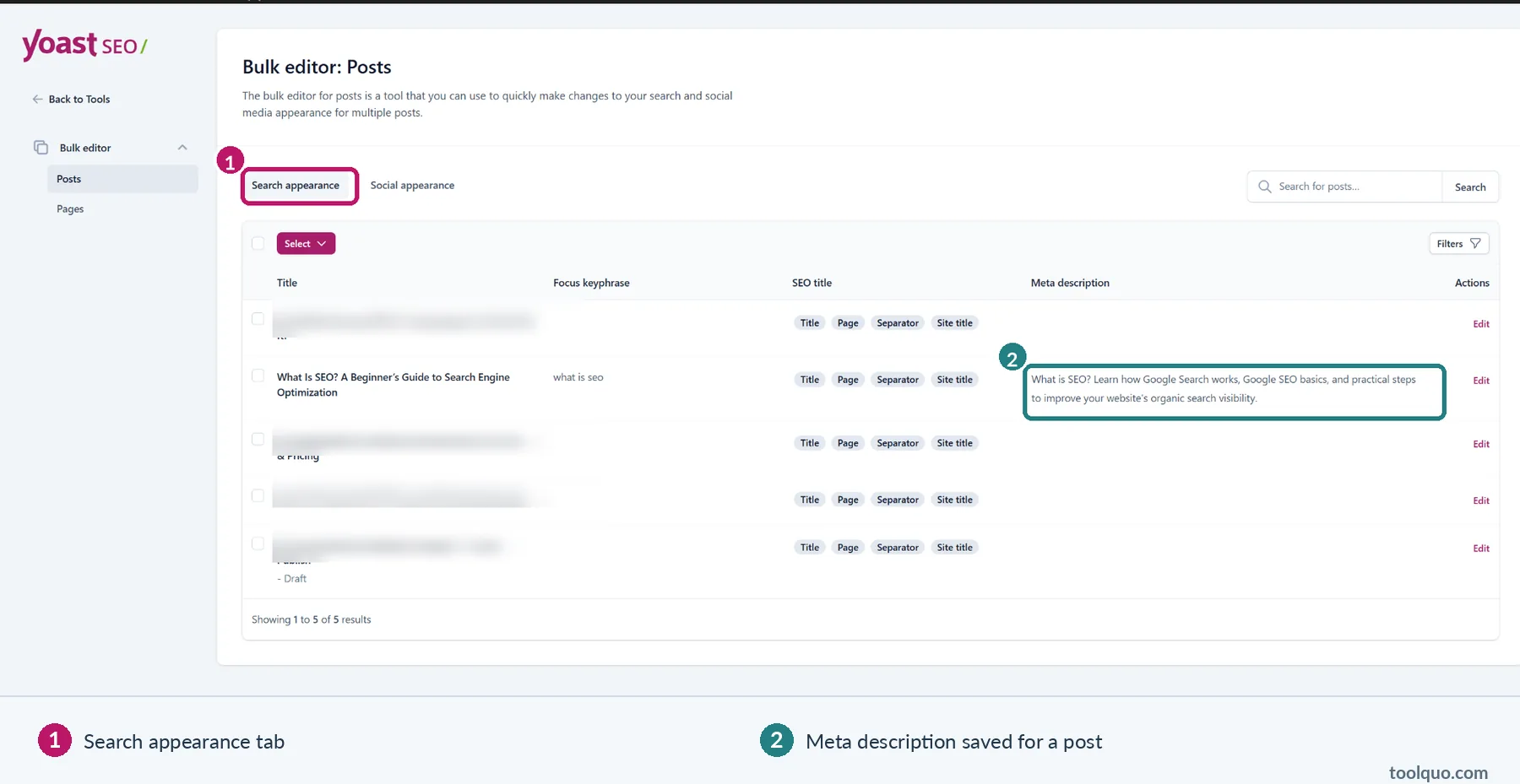
Yoast Free’s Bulk Editor saved our manual meta-description and social-text changes successfully. Rank Math Free also exposed editable title and description columns and a Save All Edits control. Our Rank Math check here covered the interface rather than a saved production edit.
Yoast’s paid AI bulk generation is different from manually editing titles and descriptions. You can use the manual Bulk Editor without buying Premium.
5.2 Internal linking and important articles
Internal links help readers reach related explanations and give search engines paths between pages. For example, a WordPress backup guide can link to a restore tutorial at the point where readers need it.
Rank Math Free can suggest links to articles marked as pillar content, meaning important guides you want other posts to link to. In our test, it recommended our What Is SEO article. Yoast Free lets you mark cornerstone content, but its automatic internal-link suggestions require Premium.
5.3 Several writers or several websites
A publishing team needs suitable access permissions; a website owner managing several sites needs a licence that covers them. These are separate requirements.
Rank Math Free includes Role Manager controls for choosing which SEO settings different WordPress user roles can access. Yoast offers multi-site purchasing options for paid use.
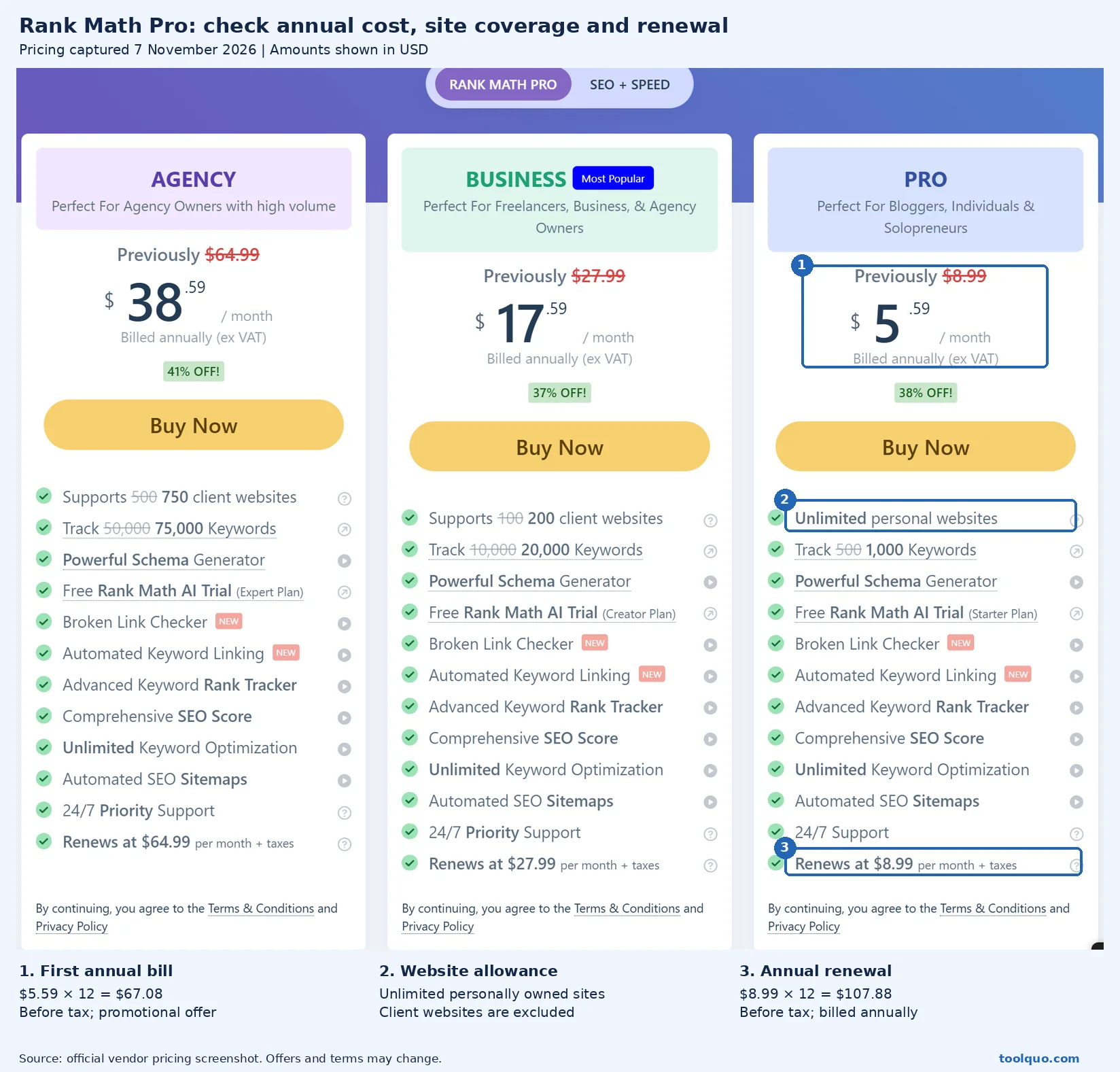
One Rank Math Pro subscription can be used on as many websites as you personally own. For example, one subscription can cover your own blog and your own business website. It does not cover clients’ websites; those need an appropriate Business or Agency plan.
6. Search reporting: understanding what works
Search reporting shows which pages appear in Google, which searches bring visitors and where clicks are growing or falling. Seeing those reports inside WordPress can save trips between dashboards.
Rank Math Free can display selected connected Google Search Console data inside WordPress. In our setup, a database-table problem needed repair before reports populated. Advanced Google Analytics reporting and paid rank tracking should be evaluated separately.
Yoast provides verification controls and integrations, including routes to Semrush and Wincher. We examined those connection options without completing a full test of the connected services.
7. Rank Math Pro vs Yoast Premium: paid features and costs
Upgrade when a paid feature solves a job that your current free tools cannot handle, or saves enough recurring work to justify the cost.
7.1 When Rank Math Pro or Yoast Premium makes sense
Rank Math Pro: consider it when you need advanced schema options, more detailed reporting or tracking of selected keyword positions. One subscription covers unlimited personally owned websites, which makes it attractive if you run several sites. Redirects and 404 monitoring already belong to Rank Math Free, so you do not need Pro for those tasks.
Yoast Premium: consider it when you want its writing workflow together with automatic internal-link suggestions, related-keyphrase and synonym analysis, a redirect manager and support. It is a stronger upgrade candidate for an existing Yoast user who wants those tasks handled together. The decision is whether that help saves enough writing and maintenance time to justify the subscription.
For WooCommerce, local businesses, news or video publishing, compare the relevant product’s exact schema, sitemap and integration needs. Yoast currently lists Local, News and Video plugins within Premium; WooCommerce remains a separate purchase consideration. Our content-site tests do not establish a store-specific winner.
AI tools also need a separate allowance check. A plugin licence or trial does not necessarily provide unlimited writing, linking or AI-visibility services. Our single successful Rank Math writing generation used the displayed 1/1 allowance; it was not evidence of an ongoing free writing service.
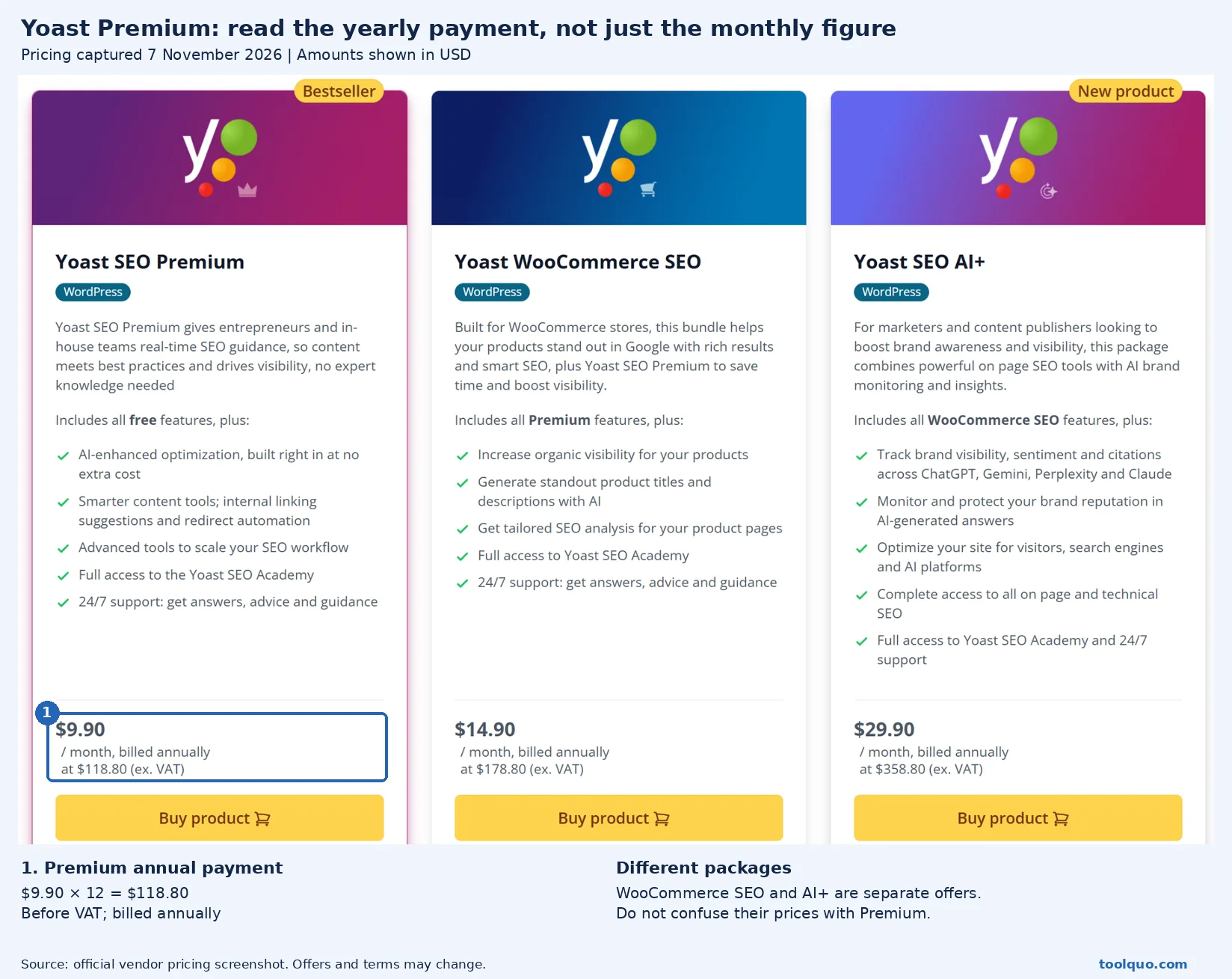
7.2 Compare annual bills and renewal prices
| Cost or allowance | Rank Math Pro | Yoast Premium |
|---|---|---|
| First annual bill, before tax | US$67.08 promotional price | US$118.80 listed annual price |
| Renewal, before tax | US$107.88/year stated | Confirm the applicable renewal price at checkout |
| Website coverage | Unlimited personally owned sites; excludes client sites | Listed price for one site; check multi-site offer |
| AI tools | Check separate product and credit allowances | Check which AI features and allowances the purchase includes |
Yoast’s listed annual price is for one website; check its multi-site offer if you need more. Both prices exclude tax. Promotions, renewal terms and included products can change, so use the official Rank Math pricing and Yoast Premium pricing pages before buying.
8. Should you switch from one plugin to the other?
Switch from Yoast to Rank Math if integrated free redirects, 404 monitoring or multi-phrase analysis would remove recurring work or cost. Switch from Rank Math to Yoast if a trial shows its readability and editorial workflow is easier for you or your team to use.
Before you switch: a short migration checklist
- Back up the website and test the migration on a copy.
- Check which titles, descriptions, canonicals, indexing rules, schema and redirects the importer transfers.
- Keep one plugin responsible for overlapping SEO output.
- Inspect representative public pages and monitor Search Console.
9. Frequently asked questions
Yoast vs RankMath: which free plugin suits a growing blog?
Rank Math Free is our overall choice for a beginner who expects their blog to grow and wants integrated maintenance tools. Yoast Free is our preference when readable writing and a clearly separated editorial checklist are the top priorities.
Does Yoast Free support related keywords?
Its Semrush integration can discover related keyphrases after connection. Yoast Free’s content analysis uses one focus keyphrase; additional related-keyphrase analysis is a Premium capability.
Which plugin will improve rankings more?
Our tests do not establish a ranking winner. Choose the tool that helps you publish better explanations, maintain correct technical settings and solve the specific tasks above. A higher plugin score is not a ranking result.
Which plugin is faster?
We have not run a controlled performance benchmark on identical configurations. Test the functions you intend to enable on your own setup rather than inferring speed from plugin size or feature counts.
10. How we tested
We used Rank Math on ToolQuo and tested Yoast SEO Free 28.7 in October 2026. We examined content analysis, metadata, sitemaps, schema, archive behaviour and selected management tools, checking saved values or public output where relevant. These were separate practical tests, not identical benchmark runs.
Paid features are documented capabilities unless explicitly described as tested. We did not conduct a controlled migration experiment, compare ranking gains or test a large WooCommerce catalogue. Our recommendations distinguish those evidence limits from our judgment about which workflow is more useful.
Sources and further reading
ToolQuo: Rank Math review; Yoast SEO review; Rank Math case study; Rank Math SEO score guide; Rank Math setup guide; on-page SEO guide.
Official documentation: Yoast related keyphrases and Semrush; Yoast Bulk Editor; Rank Math Analytics; Rank Math pillar content and link suggestions; Rank Math Role Manager; Rank Math pricing; Yoast Premium pricing.
About the author
Nikhil Bhardwaj
Founder & Editor, Toolquo
Nikhil leads Toolquo’s editorial direction, focusing on practical software research, transparent comparisons, and clear buying decisions.
View author profile →Keep exploring
Related guides

November 10, 2026
What Is Technical SEO? How to Check and Improve Your Site
Learn what technical SEO is, why it matters, and how to check your site's crawling, indexing,…

November 3, 2026
Yoast SEO Sitemap: How to Find, Configure and Fix Errors (2027)
Find your Yoast SEO sitemap, choose which URLs belong in it, submit it to Google Search…
November 1, 2026
How to Use Yoast SEO: Complete Beginner’s Guide (2027)
Learn how to install and configure Yoast SEO, choose WordPress SEO settings, optimize a post, and…