How to Use Rank Math SEO in WordPress: Complete Setup Guide (2027)
Learn how to install and set up Rank Math SEO, choose WordPress settings and modules, optimize posts, and monitor SEO performance step by step.
On this page
Want to know how to use Rank Math SEO without guessing which settings to select? This WordPress tutorial shows you how to install Rank Math, complete the Setup Wizard, choose the right settings and modules, optimize a blog post, and check your results afterward. At each stage, you’ll see what to do, why we recommend it, and when you should choose something different.
This guide is designed for a beginner who has never used an SEO plugin. We will guide you through Rank Math setup and show you how to use the plugin on a real Toolquo article, including steps we completed during our firsthand tests. We explain technical terms as they arise and identify settings you can safely leave alone. You do not need to understand SEO before starting.
1. What Does Rank Math SEO Actually Do?
Quick orientation: Rank Math is also commonly written “RankMath” or “RankMath SEO.” These names refer to the same WordPress plugin. In this guide we use the official spelling, Rank Math.
Rank Math is a WordPress SEO plugin. It helps you manage how search engines understand your pages and check articles for common omissions. For example, you can suggest the title and description that may appear in Google, create a list of pages for search engines to discover (a sitemap), control which pages are eligible for search results, and redirect visitors when a page’s address changes.
A quick vocabulary guide before we start:
- SEO (search engine optimization): making your site easier for people and search engines to understand and discover.
- SEO title: the headline you suggest for a search result. It may be different from the article’s visible heading.
- Meta description: a short explanation you suggest for the search result snippet.
- Focus keyword: the main search phrase you want your page to answer, entered so Rank Math knows what to check.
- Sitemap: a list of the site’s important addresses for search engines to discover.
- Index/noindex: whether a page is eligible to be included in search results.
- Schema: extra machine-readable information identifying a page as an article, product or another type.
- 404/redirect: a 404 is a missing-page response; a redirect sends visitors from an old URL to another URL.
You do not need to memorize these terms. The steps below show you exactly where each one matters.
Rank Math also checks your draft and flags possible omissions. It is a helper, not an automatic SEO expert. A green score cannot tell whether your explanation is accurate or genuinely useful. Our rule throughout this tutorial is simple: follow recommendations that make a page clearer or technically correct; ignore recommendations that would make it worse. Search engines still decide which pages to crawl, index and rank. For a practical explanation of the color bands, scoring components and warnings, read what your Rank Math SEO score means and how to improve it.
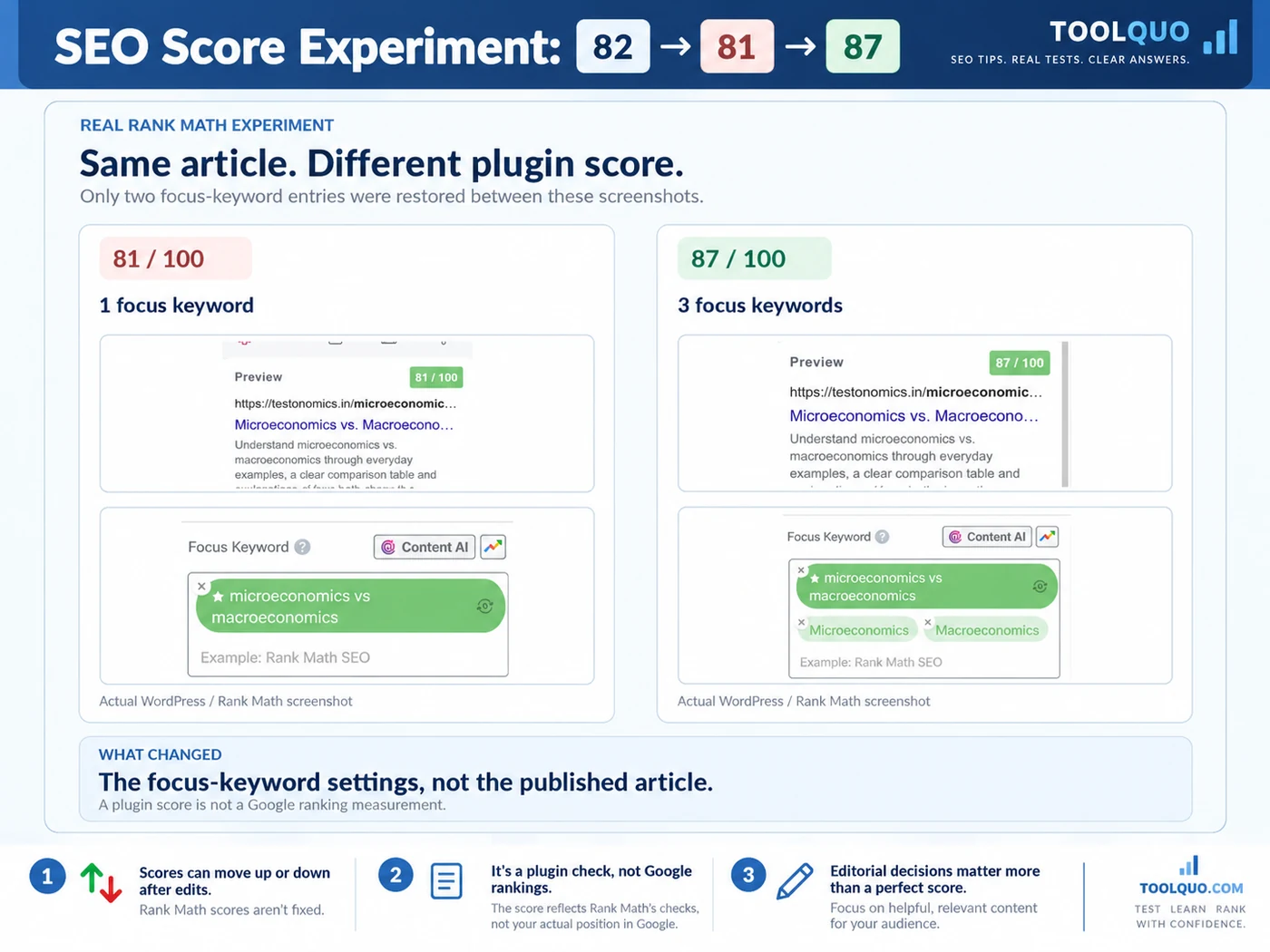
For an example of applying that judgment, our Rank Math case study follows an article through content improvements and score changes from 82 to 81 to 87.
We explain its strengths, limitations, pricing and Free-versus-Pro trade-offs in our Rank Math Review. If you are completely new to search engine optimization, our What Is SEO? guide explains the underlying concepts first.
2. Before You Install Rank Math SEO
2.1 Check your existing SEO setup
Go to WordPress → Plugins → Installed Plugins. If you see Yoast SEO, All in One SEO or another SEO plugin active, do not simply activate Rank Math alongside it. Two plugins can generate conflicting page titles, descriptions, sitemap files or structured data (code describing your page). For an existing website, back up first, use Rank Math’s import process, check several important pages, and only then finish switching. If you are thinking of switching from Yoast, first check our Yoast SEO review to understand what its Free and Premium versions can already do. If you already use Rank Math, skip installation and jump to Section 4.
2.2 Back up the website and know your priorities
Before you change any sitewide setting, make a backup that you know how to restore. Keep the addresses of two or three important posts handy for checking afterward. A new blog may need only titles, sitemaps and post optimization; a shop may need product settings, and a local service business may need correct business details. You do not need to understand these differences in advance: the recommendations below will walk you through them.
2.3 Start with Free unless you need something specific
The core workflow in this tutorial uses Rank Math Free. Paid tiers add capabilities and allowances, but do not buy Pro simply because the dashboard offers an upgrade. First identify a task that Free cannot handle well enough. Our best SEO tools comparison also explains why a WordPress optimization plugin does not replace keyword or competitor research tools.
3. How to Install Rank Math SEO in WordPress
3.1 Install and Activate Rank Math SEO
Use the following steps to install Rank Math SEO. You will need a WordPress administrator account or another account with permission to install plugins:
Reading on a phone? Tap a screenshot to open its full-size version in a new tab, then zoom in to read the settings.
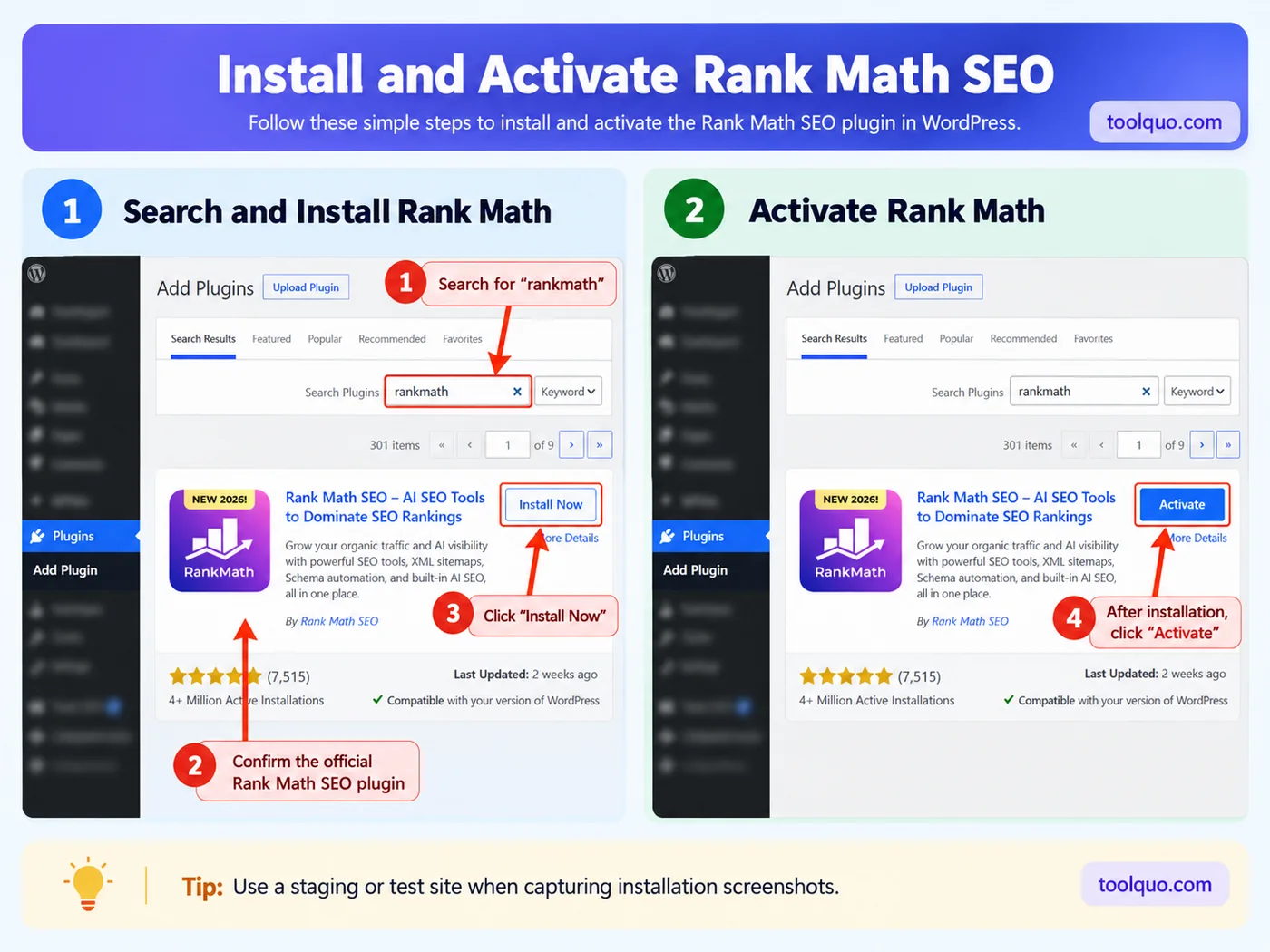
- Open yoursite.com/wp-admin/ and sign in.
- Select Plugins → Add New Plugin.
- Use the Search Plugins field to search for “Rank Math SEO”. Choose the plugin published by Rank Math, not a similarly named add-on.
- Click Install Now. Wait for WordPress to finish downloading it.
- Click Activate. “Installed” only means the plugin files are present; “Activated” means WordPress is running the plugin.
- Find Rank Math SEO in the left sidebar. If the Setup Wizard or account connection page opens automatically, continue with it.
If you do not see Add New Plugin, you may be using a limited-permission account or a managed WordPress.com plan that does not allow plugin installation. Ask your site administrator rather than changing hosting settings at random.
After activation, Rank Math may ask you to Connect Your Account. We recommend connecting a free account if you plan to use its Google-service integration or other account-based features. Follow the sign-in prompts; confirm you are connecting the correct WordPress site. If you only want the basic plugin and see Skip Now, you may skip and return later. Optional usage tracking is separate from account connection; choose it based on your privacy preference.
Next, open the Setup Wizard and review the Compatibility Check. It looks for potential conflicts with your website. If you previously used another SEO plugin, choose Import when Rank Math detects supported existing settings. Importing can preserve earlier SEO titles and descriptions; verify a few live pages afterward. If anything looks wrong, restore from your backup rather than blindly deactivating plugins. Complete the wizard only after the checks make sense.
3.2 What if Rank Math is already installed?
Open Rank Math SEO → Dashboard → Setup Wizard to revisit configuration. You do not need to uninstall and reinstall the plugin to access these screens again. If you are migrating from another SEO plugin, verify that its SEO titles, descriptions, redirects and indexing settings have been imported accurately.
We installed and activated Rank Math Free on Toolquo and configured it during our October 2026 tests using version 1.0.280. The installation and setup instructions below reflect this experience and Rank Math’s documentation. Screenshots in the finished article will show the actual WordPress screens, not invented interfaces. If the plugin has changed since our tests, look for the equivalent option shown in the instruction.
4. Rank Math Setup: Complete the Setup Wizard
4.1 Choose the Setup Mode: Easy, Advanced or Custom
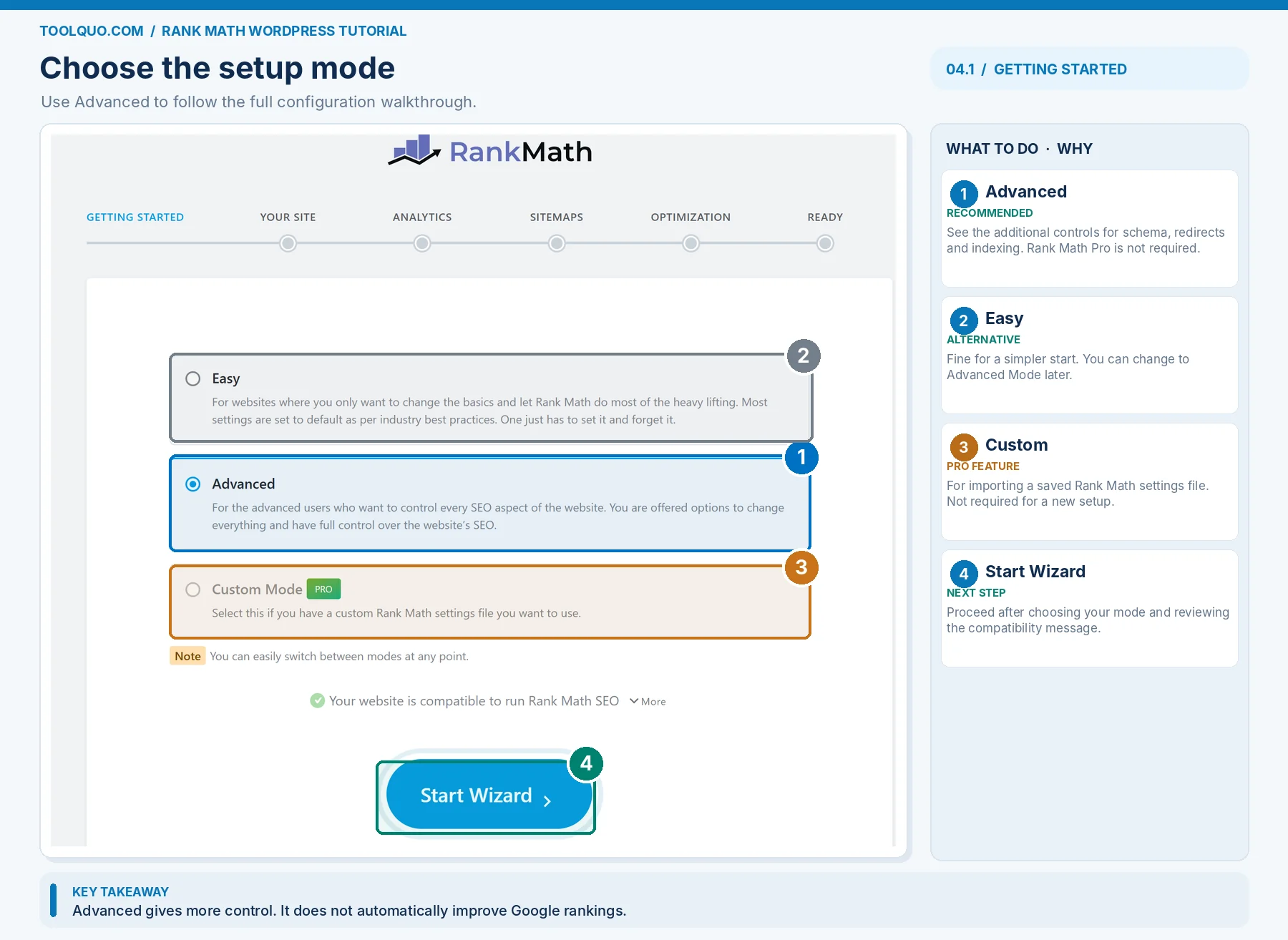
Rank Math offers three modes at the start of the wizard:
- Easy: fewer screens and fewer visible controls. Choose this if you want the shortest setup and do not plan to manage redirects or other advanced settings yet.
- Advanced: the basic wizard plus additional controls for items such as 404 Monitor, Redirections, Role Manager and schema defaults. This is the mode we demonstrate.
- Custom (paid): imports a previously exported Rank Math settings file. Choose it only if you are transferring a saved configuration from another Rank Math website, not because you run a business.
The mode changes how much control you see, not how Google ranks your pages.
Choose Advanced Mode, then select Start Wizard. This is our recommendation because the guide explains the additional controls, allowing you to set them correctly rather than discover them later. Advanced Mode does not improve Google rankings merely by being selected. Leave any unfamiliar setting unchanged until its purpose is explained below. For example, a sitewide Noindex setting could prevent your articles from appearing in search results. Easy Mode is also acceptable if you want fewer settings; you can switch later at Rank Math SEO → Dashboard.
4.2 Choose the Right Website Type
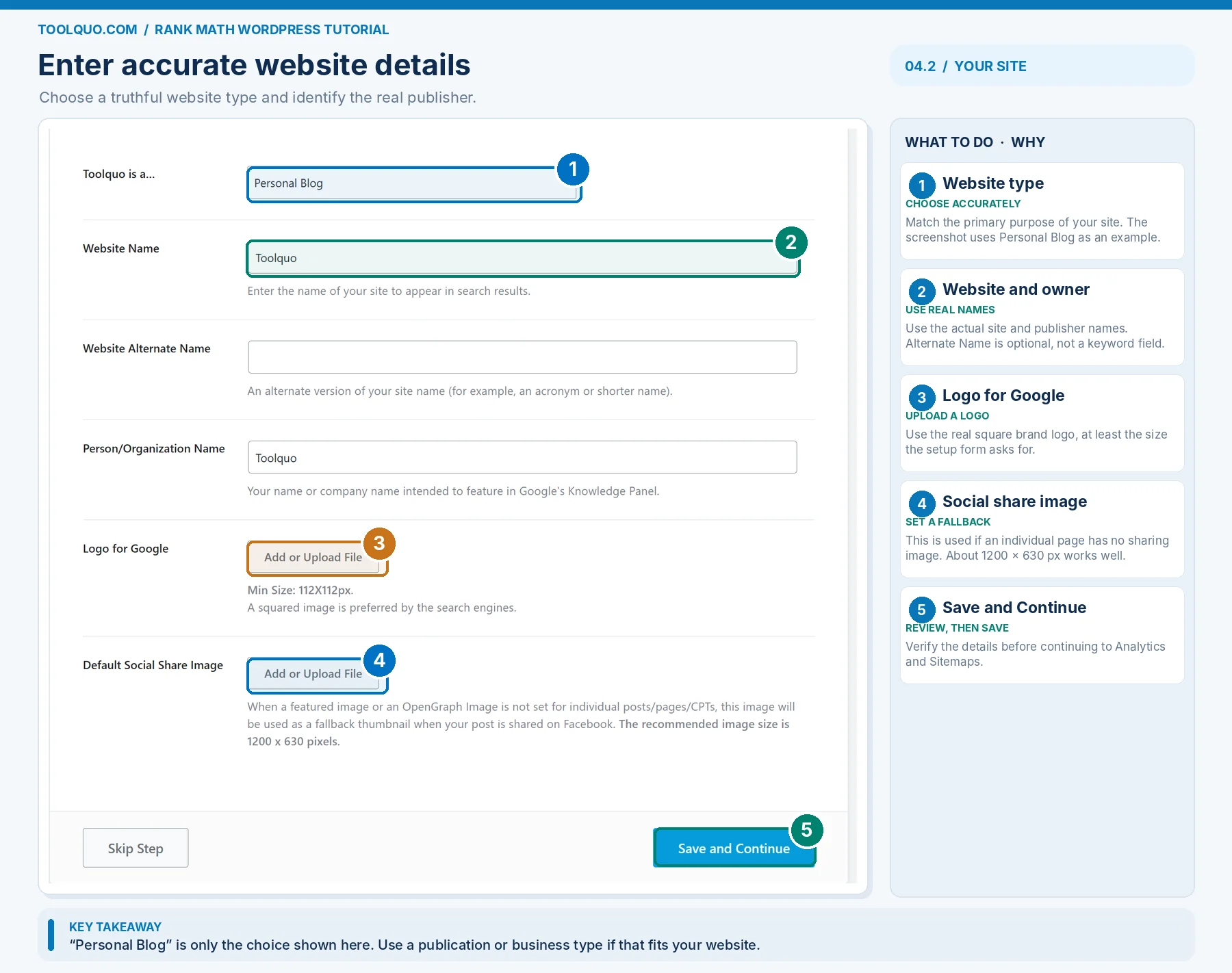
On the Your Site screen, Rank Math asks “Your Website is.” Choose the type that best describes your website’s main purpose. This choice helps Rank Math prepare appropriate website information, but it does not directly improve your Google ranking. First decide whether yours is an individual’s blog, a publication, a portfolio, a business website or an online store. Then use the examples below to select the closest option.
- Personal Blog: Choose when an individual publishes articles, advice or personal experiences under their own identity. Example: a single-author travel journal or a student’s technology blog. Do not choose this merely because your company has a blog section.
- Community Blog/News Site: Choose for a publication, magazine, news outlet or editorial website primarily publishing articles for an audience. Example: a software-review publication with an editorial identity, even if it has only a few writers. A company selling consulting services and occasionally posting news usually belongs under a business option instead.
- Personal Portfolio: Choose when the website’s main purpose is to show one person’s work, qualifications or completed projects. Example: a freelance photographer showing a gallery and client projects. A photographer selling products through an online checkout may instead fit Webshop.
- Small Business Site: Choose for a business mainly explaining its services, providing contact details or collecting leads. Examples: a private tutor, consultancy, salon, dentist or small coaching business. Do not select Webshop simply because your site displays course fees or accepts an occasional payment.
- Webshop: Choose when online selling is the website’s main purpose and customers browse products and complete purchases there. Examples: a WooCommerce clothing store or online shop selling downloadable templates. It is the site’s primary activity, not the presence of a payment link, that matters.
- Other Personal Site: Choose for an individual’s website that is neither a normal blog nor a portfolio. Example: a personal resume or a hobby site’s static information pages.
- Other Business Site: Choose for an organization that does not fit Small Business, Webshop or publication. Examples: a large software company, nonprofit organization, university or corporate information website.
What if two categories seem reasonable? Choose the one describing the site’s primary purpose and ownership, not the category you hope will boost rankings. The choice supports appropriate metadata but does not itself provide a ranking advantage.
If you select a business-oriented type, Rank Math may ask for Business Type. This is a second, more specific choice: restaurant, professional service, store, organization and so on. Choose the closest *truthful* type; choose general Organization if there is no good match. Do not claim to be a local store if you operate online without a physical shop.
Fill in Website Name (what readers know you as), optional Alternate Name (a real short name, not extra keywords), Person/Organization Name (the actual owner or publisher), and the genuine logo. Add a Default Social Share Image as a fallback for pages that have no relevant featured image. Recommended image size is about 1200 × 630 pixels. A review or tutorial should still have its own featured image so social shares show the actual subject. Click Save and Continue.
4.3 Connect Google Search Console if you want integrated reports
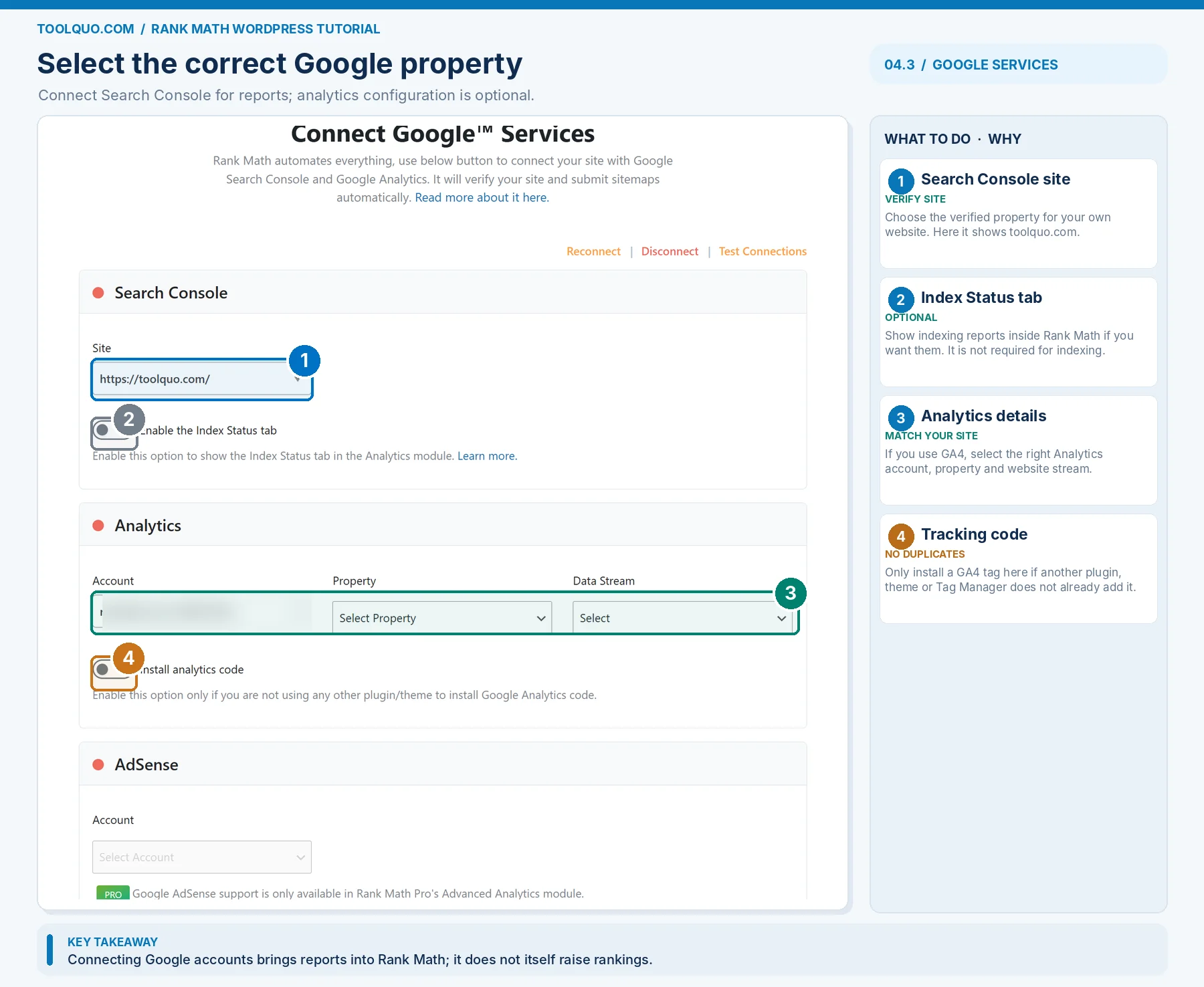
Recommended choice: connect the Google account that manages your website’s Google Search Console property. Search Console is Google’s free service reporting which search queries showed your pages, how often people clicked them and whether Google has indexed particular URLs. Connecting it allows Rank Math to show some of that data in WordPress; it does not increase rankings.
Step by step: in the Analytics wizard screen click Connect Google Services; sign in with the correct Google account; review requested permissions before accepting; choose the verified Search Console site/property that matches your website. If Analytics is offered, select the correct GA4 property only if you use Google Analytics. Do not enable “Install Analytics Code” if another plugin, your theme or Google Tag Manager already installs the same tag, or you may count visits twice.
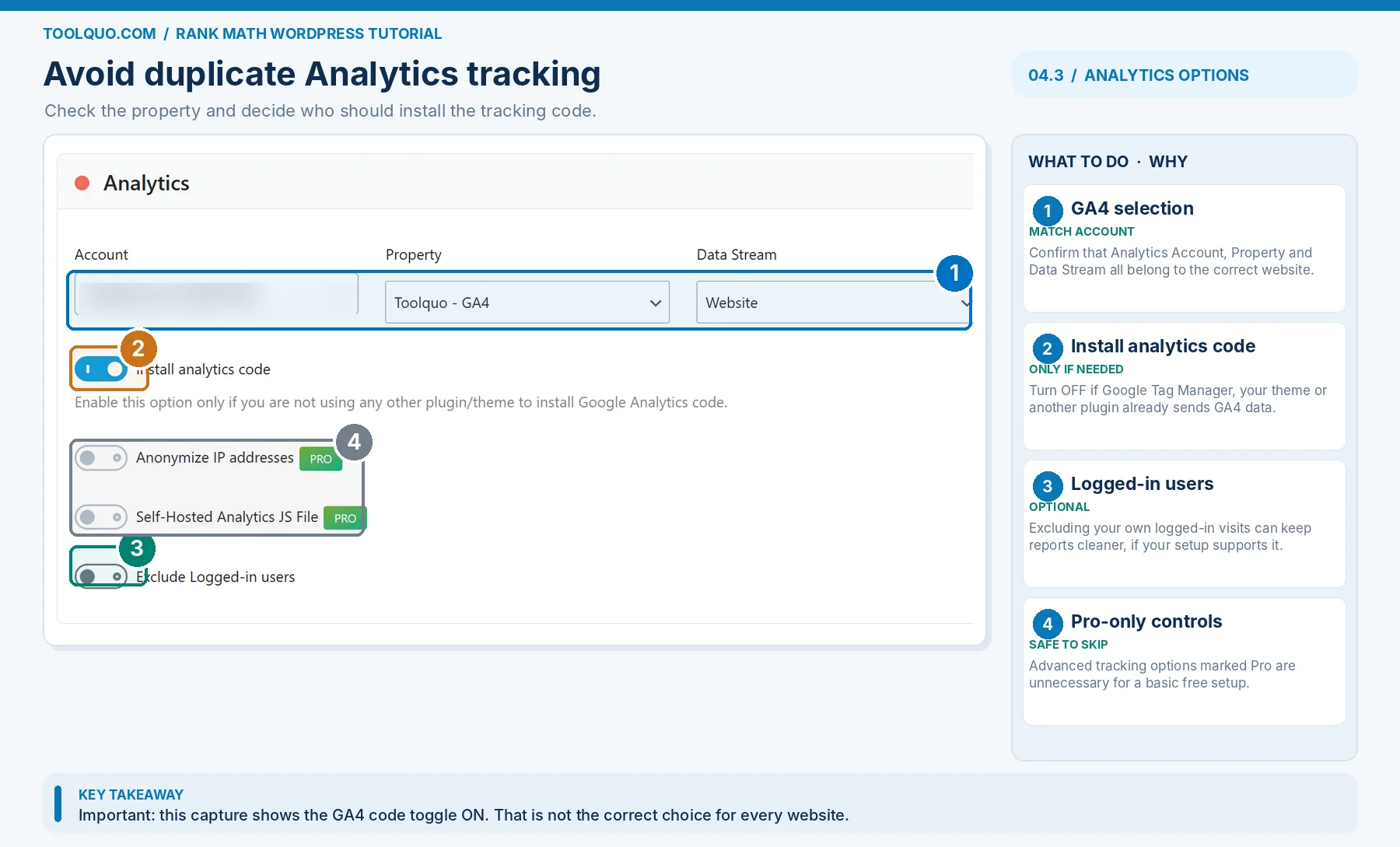
If your site is new and you have no Search Console property yet, create/verify it in Google Search Console or return to it later. You can revisit the connection from Rank Math SEO → General Settings → Analytics. If Rank Math displays no data immediately, allow time for the connection and report processing, then confirm the figures in Search Console itself. We encountered some Rank Math reporting troubles during Toolquo testing, so we recommend using the Google source when checking actual search performance.
4.4 Review your XML sitemap choices
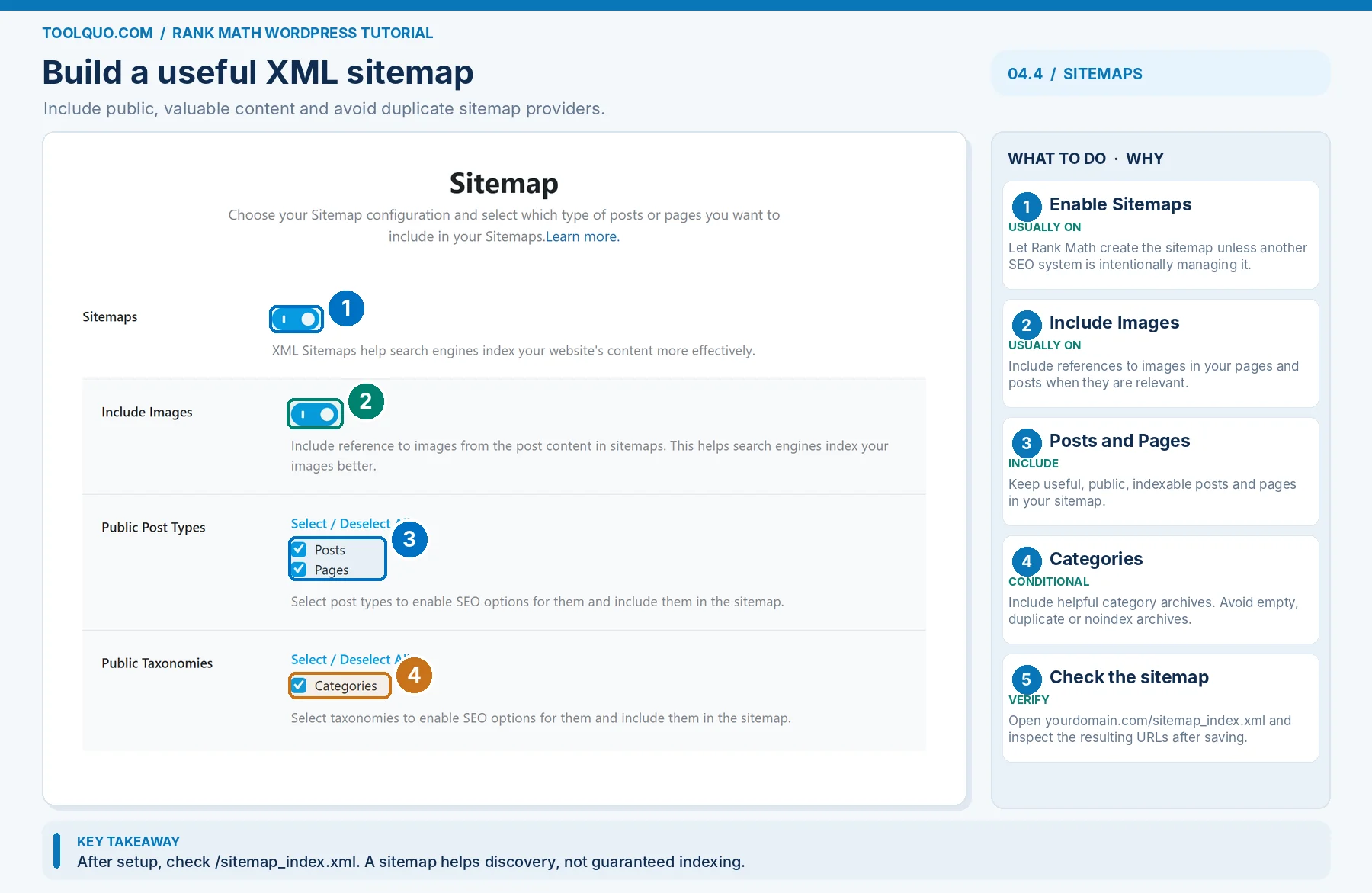
Think of an XML sitemap as a list of pages you want search engines to discover. Most websites should enable Rank Math’s Sitemap feature. For a normal blog, choose Posts = ON and Pages = ON. Choose Categories = ON if you maintain useful category pages that group related articles; choose Tags = OFF initially if they only duplicate categories or contain very few posts. Exclude private, empty or unhelpful archives. An online store normally includes indexable products too. Do not leave two plugins generating competing sitemap indexes if you are switching from another SEO plugin.
To check the result after saving: open Rank Math SEO → Sitemap Settings, then visit yourdomain.com/sitemap_index.xml in a browser. You should see links to the sitemaps of the content types you selected. Open the post sitemap and confirm one of your important posts appears. If a post is missing, check whether you marked it noindex or excluded its type. A sitemap only helps discovery: it does not mean Google has indexed or ranked the page.
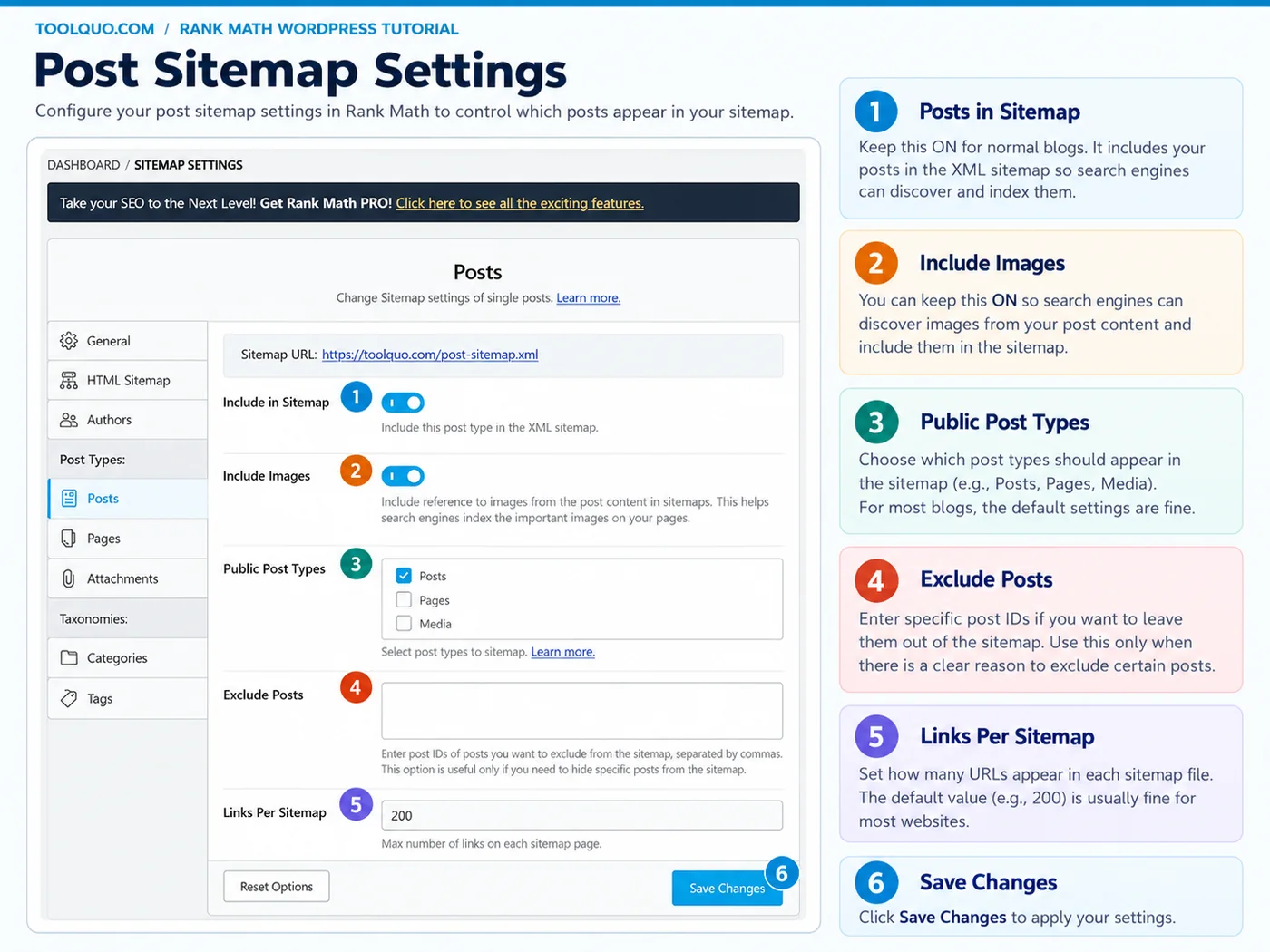
After the wizard, open Rank Math SEO → Sitemap Settings → Posts to check the finer details shown below. Keep the post sitemap enabled for public articles and include images if useful. Leave the Exclude Posts field empty unless a specific post should be omitted, and keep the default Links Per Sitemap unless you have a reason to change it.
4.5 Review optimization and finish the wizard
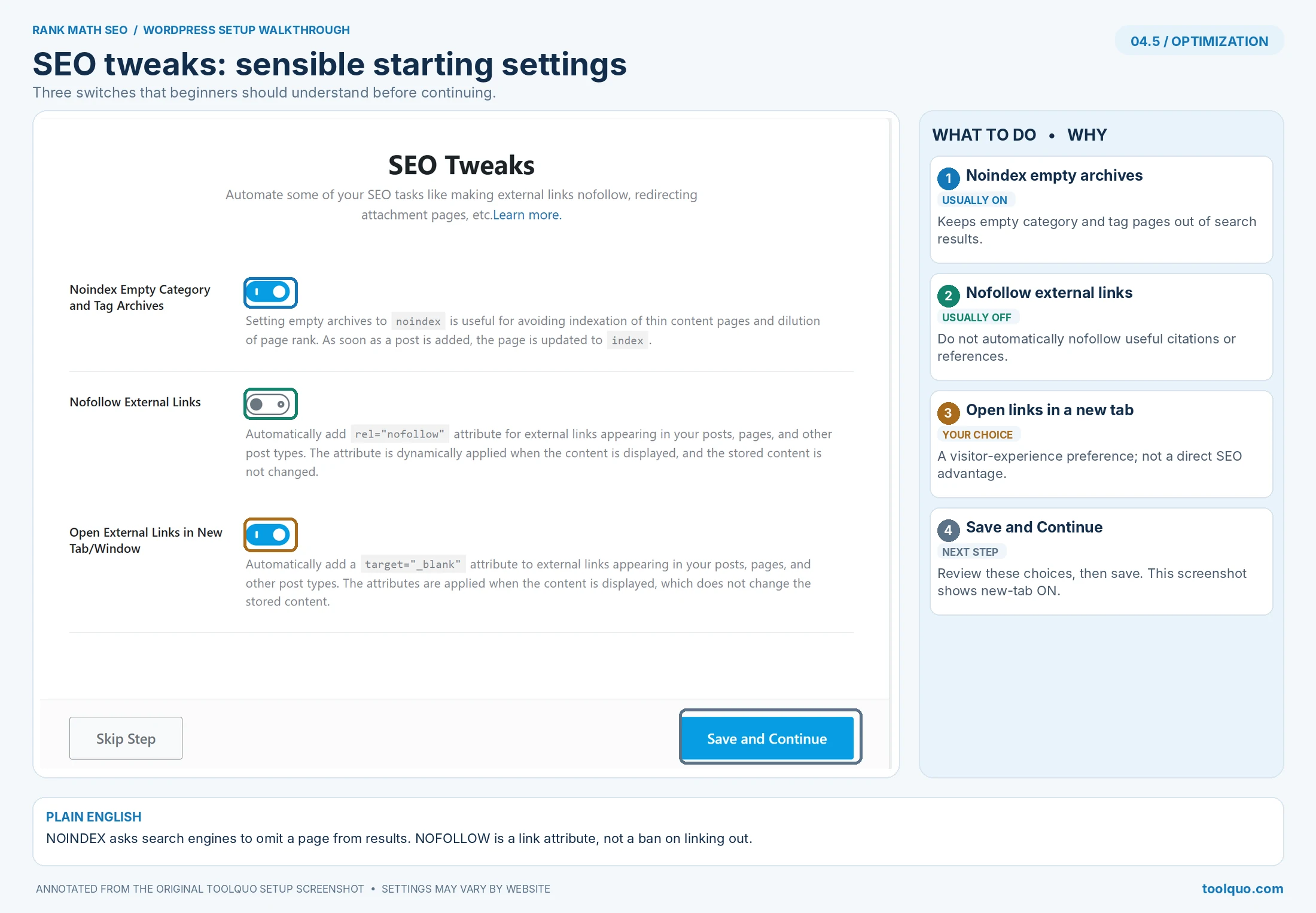
Recommended choices on the Optimization screen:
- Noindex Empty Category and Tag Archives → ON. Empty archive pages have little to offer searchers.
- Nofollow External Links → OFF for most sites. Nofollow is an instruction about a link, not a general safety setting. A normal citation to Google’s documentation can remain a regular link. Use sponsored for paid placements and nofollow or ugc when appropriate for untrusted/user-generated links.
- Open External Links in New Tab/Window → usually OFF unless you have a deliberate accessibility-tested preference; this is not an SEO ranking setting.
Save and Continue. An archive page is a page automatically gathering all posts in a category or tag; an *empty* archive has no posts to list.
In Advanced Mode, make these additional decisions:
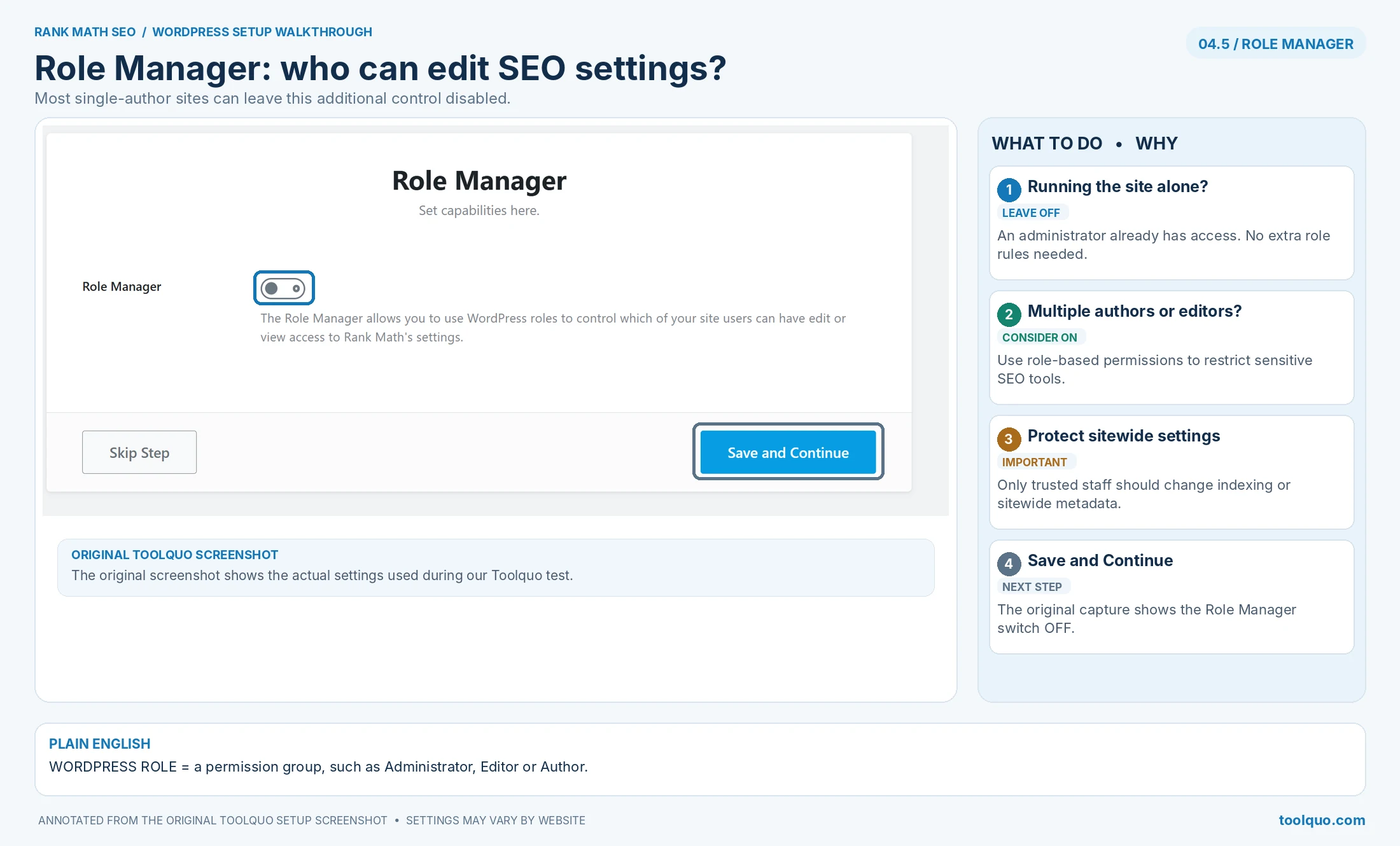
- Role Manager → OFF if you are the only person managing WordPress. Enable only when different authors or editors need different permissions.
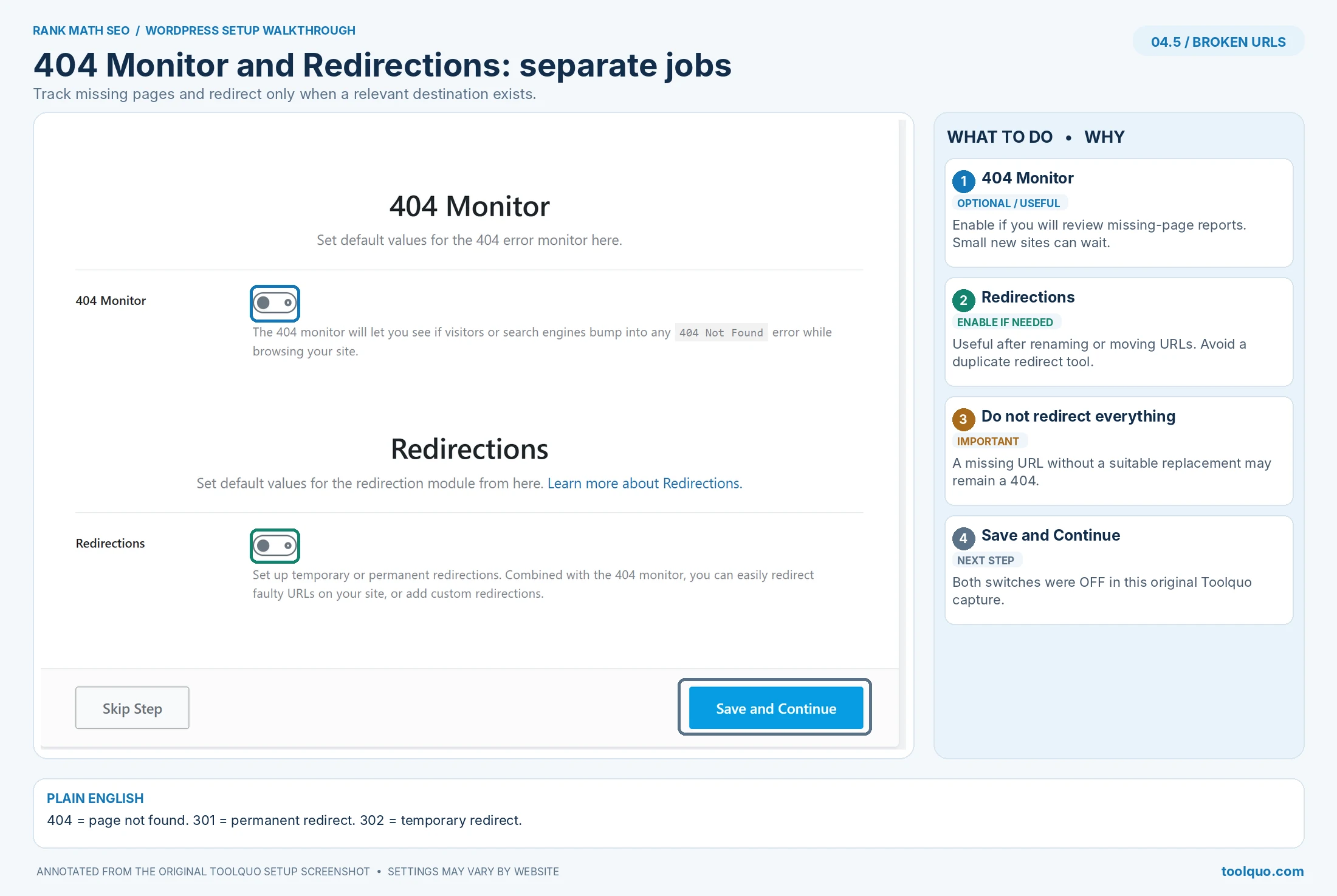
- 404 Monitor → ON if you want to check broken URLs, particularly on an older or frequently edited site. Choose Simple logging first. A 404 is the “page not found” error when someone visits an address that no longer exists. A new low-traffic site can turn this on when it needs to investigate a problem.
- Redirections → ON if you expect to change article addresses or combine old posts. It sends visitors from an old URL to an appropriate new URL. Leave it OFF if another working redirect tool already manages redirects.
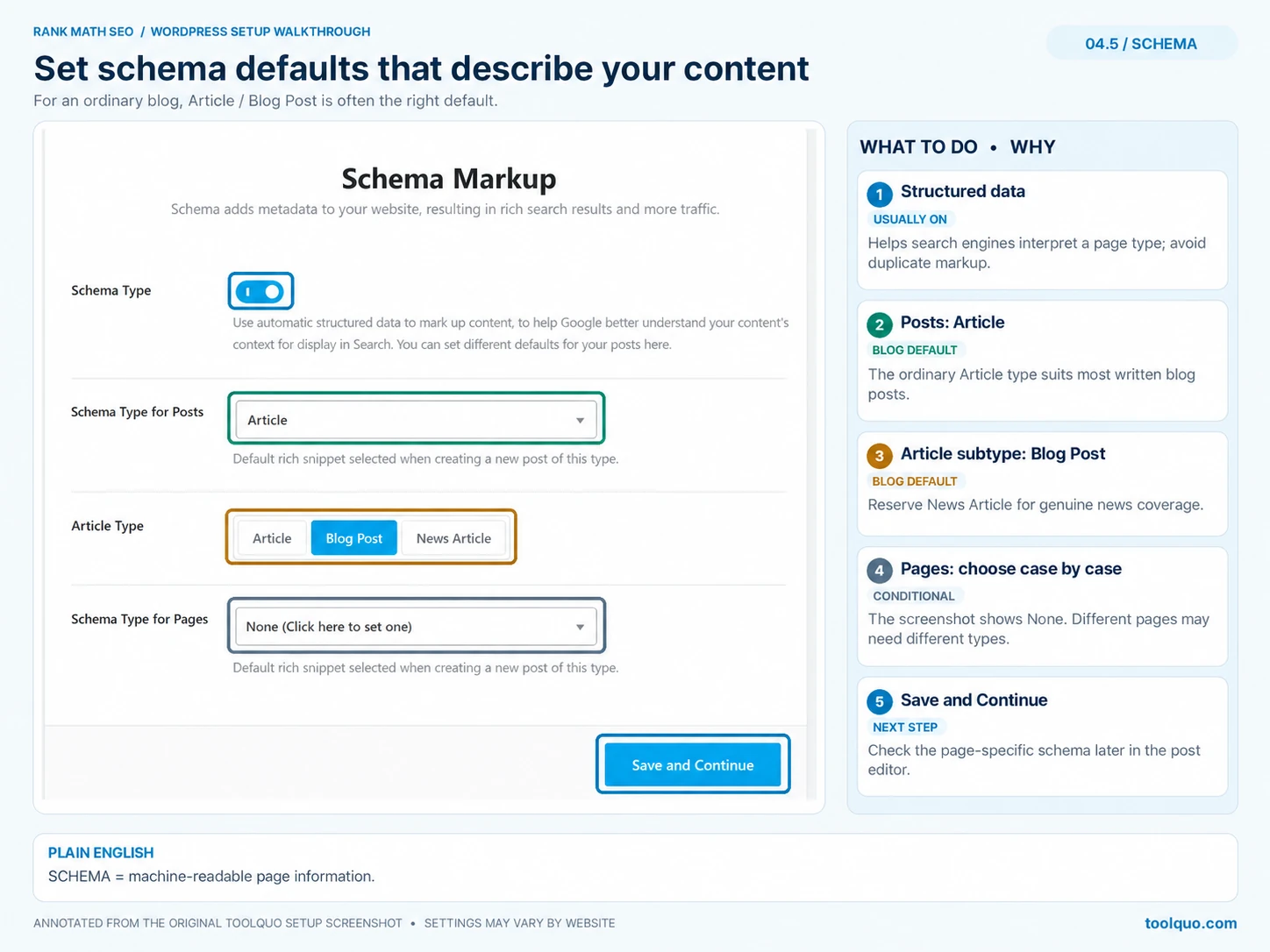
- Schema Markup → ON for a normal blog. Select Article/BlogPosting as the default for informational posts, not Product for every page. Schema is extra information describing a page to search engines, not content you need to write into the article.
Finish the wizard and then open one important existing post to confirm its SEO title and indexing settings have not been damaged.
5. Rank Math Modules: Which Should You Enable?
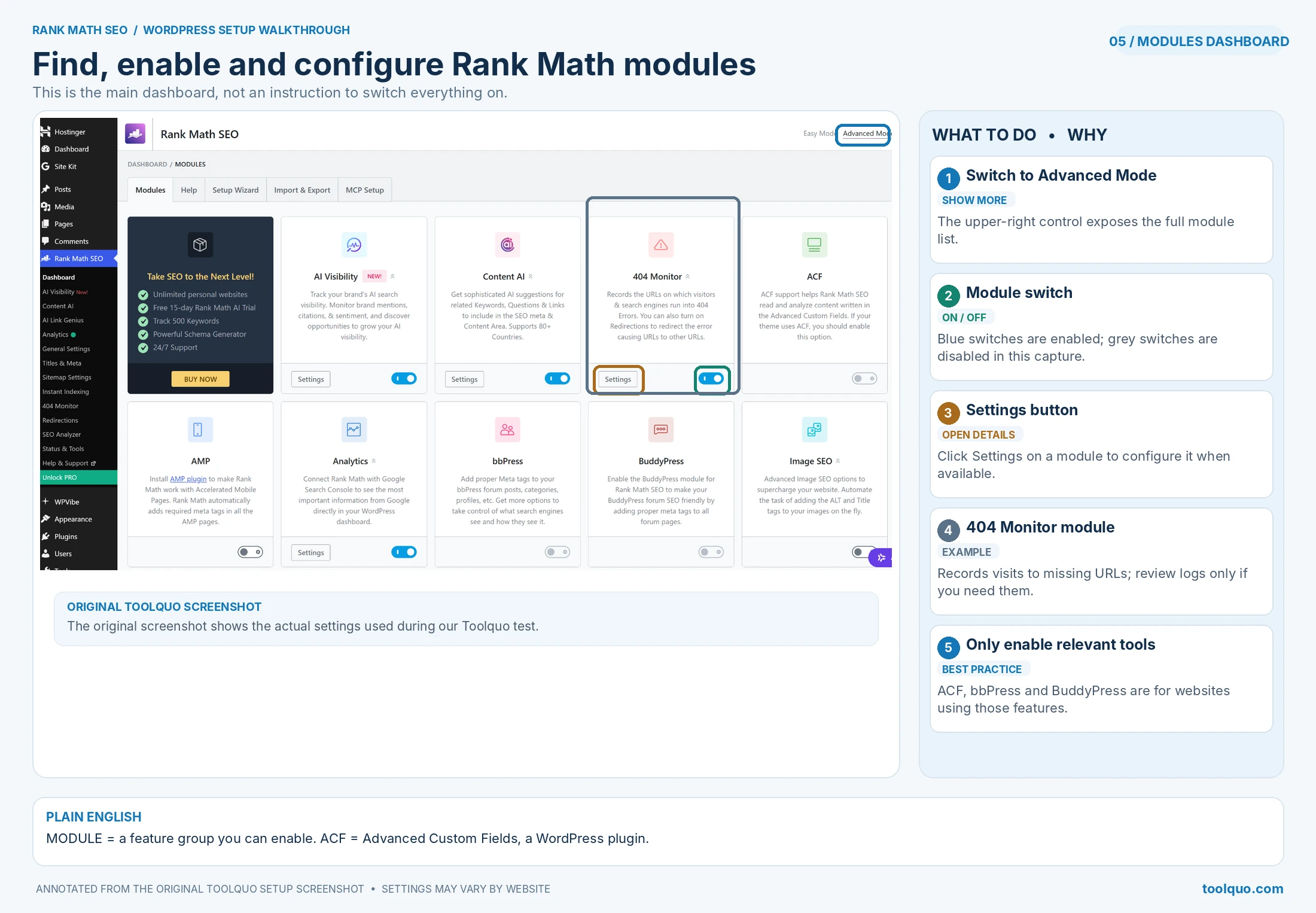
Open WordPress → Rank Math SEO → Dashboard, switch to Advanced Mode if the module cards are hidden, and look for the Modules tab. A module is a group of related features, such as creating sitemaps or recording missing pages. Turn its switch on to use that feature. Turning a module on does not normally change a page’s SEO score immediately; it makes additional tools available. For example, turning on Redirections reveals Rank Math SEO → Redirections.
Recommended starting rule: enable Sitemap and Schema on most ordinary websites; enable Analytics if you plan to use Rank Math’s reports; enable Redirects and 404 Monitor when you actually need them. The remaining modules depend on the kind of website you run.
For every module below, we give a default recommendation and one clear exception. Think of a small recipe blog. It needs a sitemap and Article schema; it does not need WooCommerce controls, a community forum integration or local store opening hours. In contrast, an online shop really does need product-specific functionality. More enabled modules do not mean better rankings.
5.1 Start With the Modules Relevant to Most Content Websites
Sitemap → ENABLE for most sites. This creates a list of your public pages and posts for search engines to discover. A small business with five service pages still benefits from a sitemap, not only a large blog. Exception: leave Rank Math Sitemap OFF if another SEO system is intentionally producing the site’s one authoritative sitemap. After activation, click Sitemap Settings, then visit yourdomain.com/sitemap_index.xml to check it. If you recently switched from Yoast, first make sure Yoast’s old sitemap is no longer the active source.
Schema (Structured Data) → ENABLE for most sites. Schema is code that tells search engines “this page is an article,” “this page describes a product” or “this is an organization.” For a typical blog post, use Article/BlogPosting as the default. For a store, use accurate product information for real product pages. Exception: if your theme or another plugin is already providing the same schema, check the output and avoid duplicates. Enabling Schema is not a promise of stars or special results in Google.
Analytics → OPTIONAL; ENABLE if you want Google Search Console data inside WordPress. This is convenient for checking clicks and impressions without leaving your dashboard. For a beginner already using Search Console, it is fine to leave Rank Math Analytics off; the Google tool provides the original data. Example: you might see 200 impressions (your result was shown 200 times) and 12 clicks (12 people opened it). That is information to review, not a grade Rank Math can improve just by being switched on.
Link Counter → USE if the option is available. It is often a link-count display in the Posts list, not a separate module toggle. “Incoming internal links” are links from another article on your own website to this article. “Outgoing internal links” lead from this article to another page on your website. For example, your new tutorial ought to receive links from your Rank Math Review. A post with zero incoming links might be overlooked by readers and search-engine crawlers, but a low count alone is not proof of a problem.
5.2 Modules to enable when you have a specific need
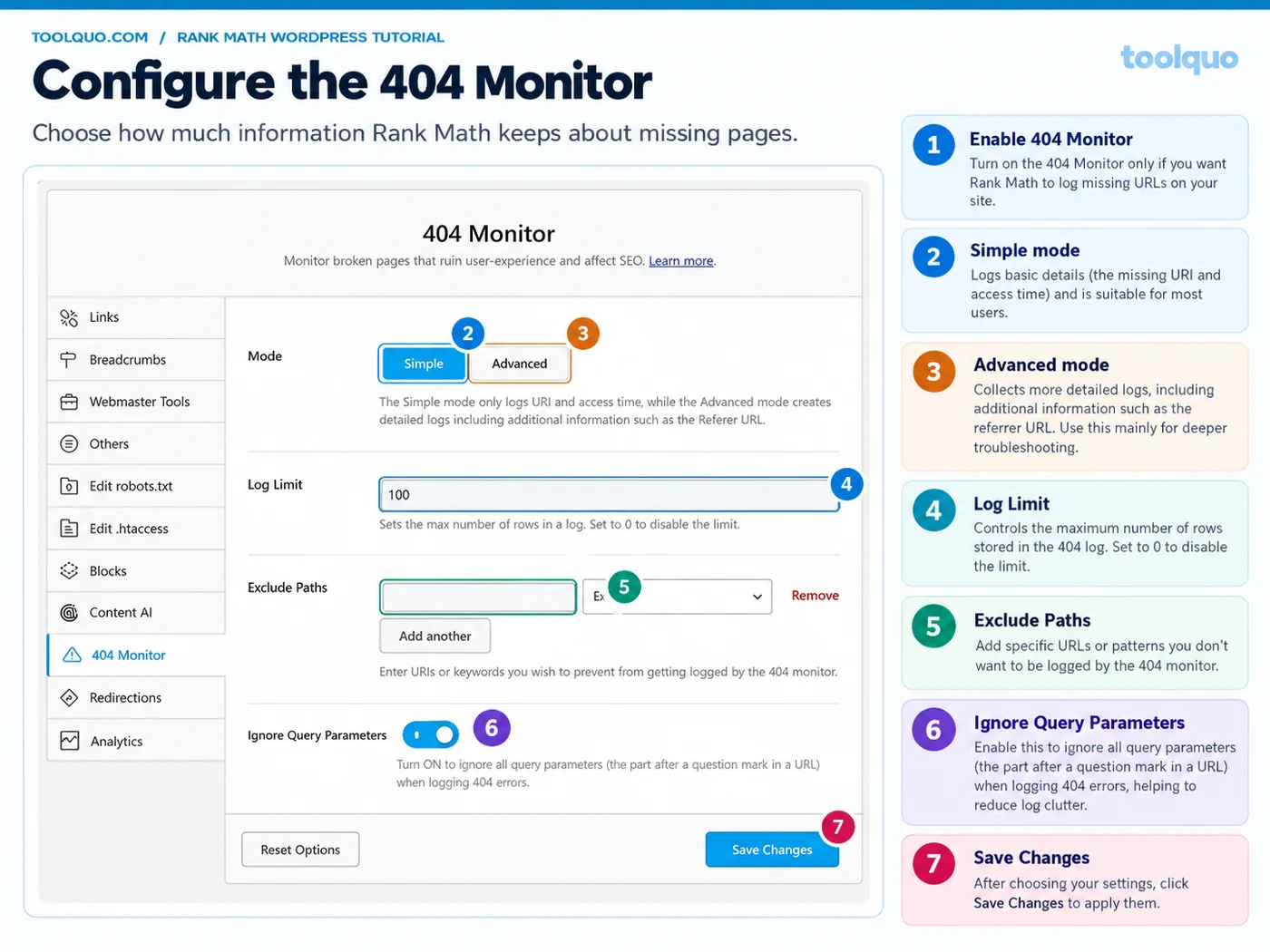
404 Monitor → ENABLE on an established site, or when investigating broken URLs; choose Simple Mode. A 404 means someone requested a page that your website could not find. Example: you changed /seo-tools-old/ to /seo-tools/ and people still visit the old address. Rank Math SEO → 404 Monitor shows the old address and its hits, helping you identify the problem. Simple Mode records fewer details and is the right default; Advanced logging is only for troubleshooting difficult cases. A brand-new blog can leave the monitor off until there is a reason to use it. Do not redirect every strange bot-generated 404.
Redirections → ENABLE if you change URLs, or if you want Rank Math to manage future URL changes. A redirect makes an old address automatically open the relevant new address. If /best-seo-tools-2026/ becomes /best-seo-tools/, a permanent 301 redirect usually makes sense. A temporary 302 is for a genuinely temporary move. Exception: leave this module off when your host or another redirect plugin is already managing all redirects to avoid duplicate rules. Never send every missing URL to the homepage, and check that each new destination works. We successfully tested a 302 redirect on Toolquo.
Image SEO → usually LEAVE OFF on a new site where you can write image descriptions yourself. It can fill missing image fields using templates, useful for a large backlog of images. However, the filename “img_1029.jpg” does not tell a blind reader what the picture depicts. For an actual screenshot, write meaningful alternative text, such as “Rank Math Setup Wizard with Advanced selected.” Use automation to flag or populate gaps, but review important images manually.
Role Manager → OFF if you are the only administrator. ENABLE on a team site where authors, editors or clients need different access. A writer may need to edit SEO titles on their posts, but should not necessarily be able to set the whole website to noindex. Give technical settings only to trusted roles. Do not enable it just because it appears on the dashboard.
5.3 Modules that depend on your website type
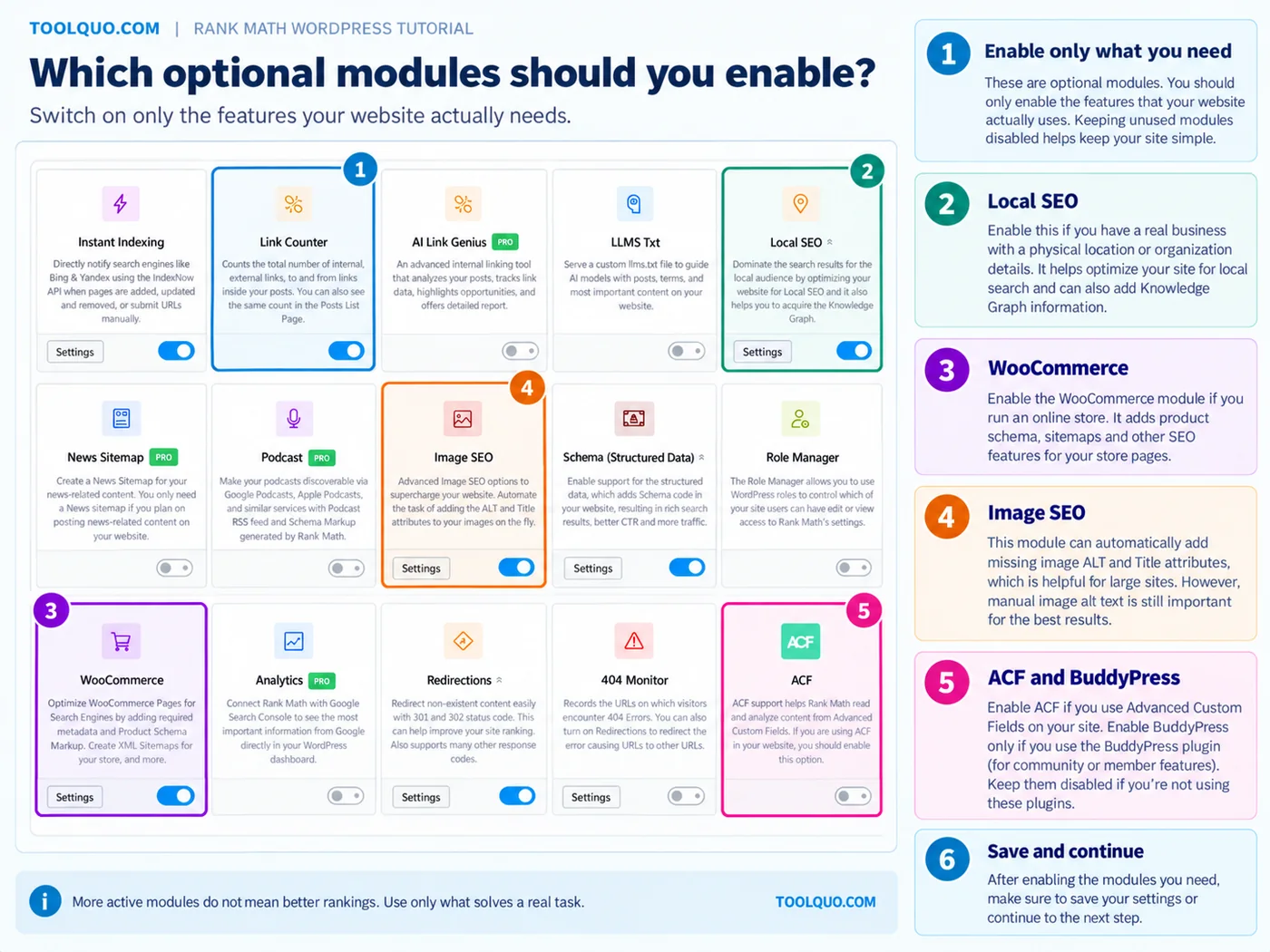
Local SEO → ENABLE if the website represents a business with genuine organization and location information to publish. For a salon serving customers at an address, enter the real name, address, phone number and opening hours. For a fully remote software-review blog, you do not need to invent a shop address or store hours. A general company identity can still be configured accurately without pretending it has a walk-in location.
WooCommerce → ENABLE only if your website runs the WooCommerce store plugin. It adds options for products and product categories. Example: an online shoe shop needs real product names, prices and availability; an economics tutorial blog does not. The module may only appear or become usable when WooCommerce is active. Do not activate WooCommerce itself solely to get this SEO module.
Advanced Custom Fields (ACF) → ENABLE only when your site stores important article content in ACF fields that Rank Math otherwise misses. bbPress → ENABLE only when you have an actual bbPress forum. BuddyPress → ENABLE only when you run a BuddyPress community with member features. A regular WordPress blog without these plugins can leave all three off. Likewise, use AMP or Web Stories integrations only if you actually use those formats. In many installations, these options are conditional rather than always visible.
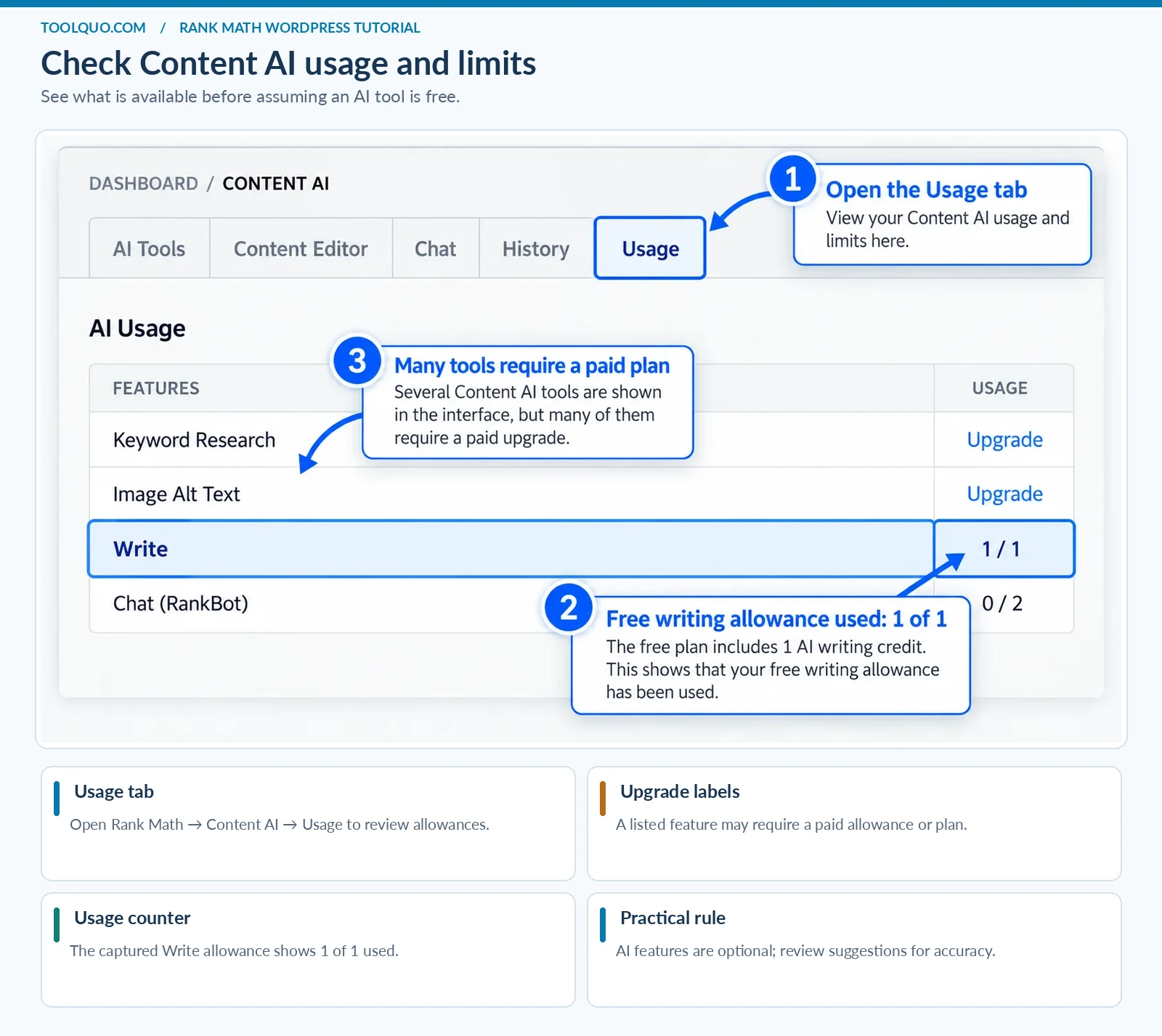
Content AI and AI Link Genius → OPTIONAL. These features may suggest wording, topics or links, but availability and free allowances differ by account and paid plan. We tested a limited Content AI allowance on Toolquo. If a suggestion makes the article less accurate or natural, do not accept it. Beginners do not need AI modules for a sound basic SEO setup, and they should not assume that every tool shown on the dashboard is included for free.
Instant Indexing / IndexNow → OPTIONAL, not essential for beginners. It can send notifications about new or updated URLs to participating search engines, but does not mean Google has indexed them. Google’s Indexing API is not a general submission tool for ordinary blog posts. Most beginners should concentrate first on a working sitemap and Google Search Console.
SEO Analyzer → RUN after setting up the site and periodically afterward. It is an audit screen rather than a feature you must keep switched on. It checks a variety of sitewide conditions, such as metadata and some technical settings. A warning is a prompt to investigate, not an instruction to change the site without thinking. We’ll show exactly how to use this screen in Section 9.
One-page decision guide:
- Personal blog: Sitemap ON; Schema ON; Analytics optional; no need for WooCommerce, Local SEO store details, bbPress or BuddyPress. Add Redirections and 404 Monitor as needed.
- Service business: Sitemap ON; Schema ON; accurate business identity; Local SEO settings if applicable; redirects when service URLs change.
- Online shop: Sitemap ON; Schema ON; WooCommerce integration ON if using WooCommerce; accurate product information; redirects for moved product pages.
- News or multi-author publication: Sitemap ON; Schema ON; useful category archives; Role Manager if authors need restricted access; 404 monitoring is usually worthwhile.
- Portfolio website: Sitemap ON; Schema ON; most commerce/community extras OFF unless genuinely used.
6. Best Rank Math Settings for Beginners
6.1 Set helpful defaults for titles and descriptions
Open Rank Math SEO → Titles & Meta → Posts. A template is a rule used when you have not written a custom title for a specific post. For most blogs, a straightforward post-title plus site-name pattern is a sensible starting point. You can leave the default template if it produces clear titles. For an important article, open its editor → Rank Math → Edit Snippet and write a specific title. Example: “Rank Math Review: Free vs Pro, Features & Tests” is more informative than only “Blog Post | My Site”. Avoid stuffing many keyword variations into the template.
6.2 Be especially careful with index and noindex
Index means a page is eligible to appear in search results. Noindex tells search engines not to include it. Recommended default: leave normal, useful public Posts and Pages set to Index. Many websites should initially noindex empty or low-value tag archives, but keep a useful category hub indexable if it helps people navigate a topic. Example: a category named “SEO Guides” listing a coherent collection of helpful articles may deserve indexing; a tag archive with one duplicate post may not.
In Rank Math SEO → Titles & Meta, inspect Posts, Pages and taxonomy options. Do not click Noindex on all posts just to remove an SEO warning. Doing so can make your entire blog ineligible for Google Search.
Before applying a sitewide noindex rule, check exactly which post types or taxonomies it affects. It is easier to accidentally hide a valuable section than to recover its search visibility quickly.
6.3 Choose appropriate schema defaults
For standard written articles, choose Article or BlogPosting for posts in Rank Math SEO → Titles & Meta → Posts (where this default is offered). For a page explaining your company’s services, do not label it as a physical product simply to get a special Google appearance. If you publish actual products or recipes, configure the appropriate type only for those pages and provide the required factual details. Verify markup with a structured-data testing tool. A valid result means the code meets certain requirements; it does not guarantee a rich result.
6.4 Keep sitewide settings simple
Keep Canonical URL on its default self-referencing value unless you have a genuine duplicate-page issue. “Canonical” is the address you prefer search engines to treat as the main version. Example: if the same guide is accessible from two URLs with nearly identical content, the canonical can indicate the preferred one. Beginners should not point all posts to the homepage. Also check General Settings → Links only when you need a specific link behavior, and do not turn on sitewide nofollow for ordinary editorial references.
7. How to Use Rank Math SEO to Optimize a Blog Post
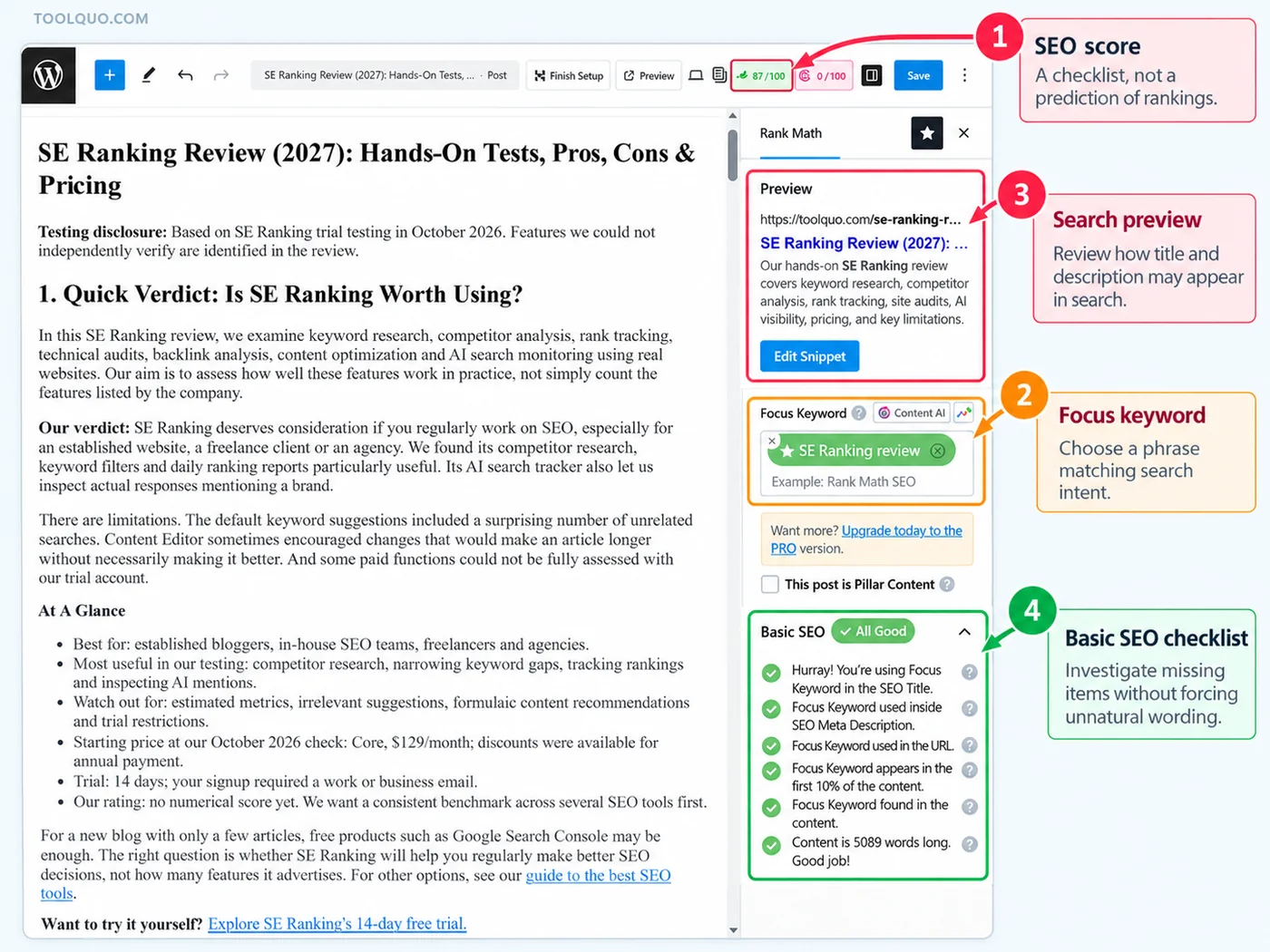
Now comes the task you will repeat for each article. We will use Toolquo’s published SE Ranking Review as our real example, because we inspected its Rank Math recommendations and tested the editor ourselves. You can follow the same steps with any post, such as a recipe, business tutorial or product guide. Start with a clear reader question and edit the actual content; do not treat the plugin as a machine that can invent the right answer for you.
7.1 Open the editor and Rank Math panel
- Go to WordPress → Posts → All Posts. Open a post you want to improve, or select Posts → Add New if you are writing a new article.
- In the block editor (Gutenberg), click the Rank Math score or icon near the upper-right corner. If you do not see it, check that the Rank Math SEO panel is enabled in the editor preferences and that Rank Math is active.
- Open General. This shows Focus Keyword, the snippet preview and Basic SEO/Additional checks. Advanced controls affect indexing; Schema describes the type of page; Social controls the sharing preview.
- Leave the Rank Math panel open and work through the following steps, saving the post as a draft or revision as you go.
7.2 Choose a focus keyword that reflects search intent
A focus keyword is the search phrase that best represents what the reader wants. Example: “SE Ranking review” tells us the reader is deciding whether the software is worth trying, so the article should cover features, firsthand tests, drawbacks, pricing and alternatives. “What is SEO” is a different question and deserves a different article. For a local bakery, a phrase like “custom birthday cakes in Pune” might better match a service page than the broad term “cakes”. Choose one primary topic first; you do not need to buy an expensive tool to understand the basic distinction.
Type the phrase into Focus Keyword and press Enter if your editor requires it. Rank Math will compare the words with your title, headings, URL and content. This tells the plugin what to check; it does not directly submit a keyword to Google. Use the wording naturally where it belongs. If you have two very different reader questions, consider separate pages rather than forcing both into one. Do not add the exact phrase to every heading to turn the score green.
7.3 Write the SEO title and meta description
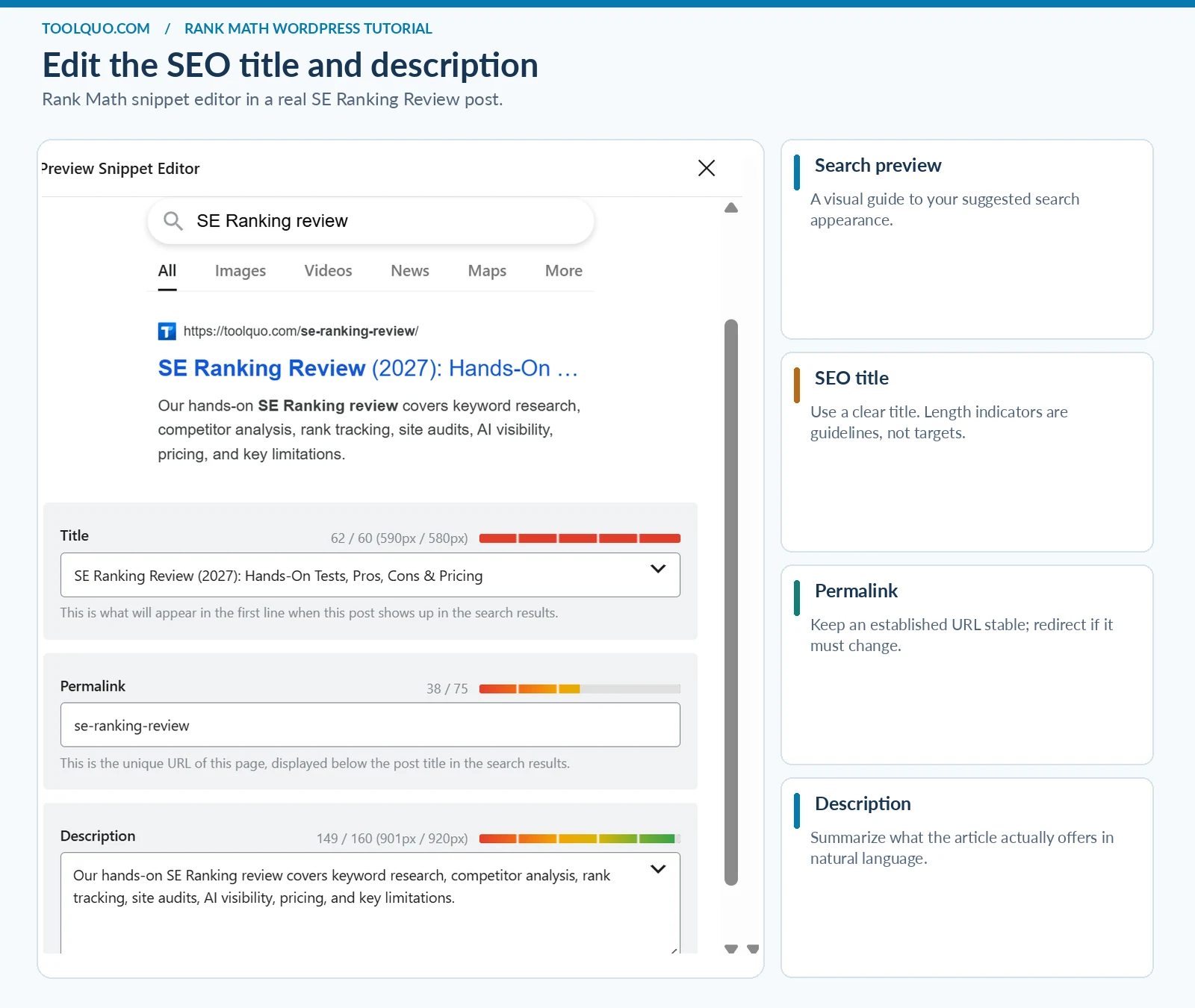
In the Rank Math General tab, click Edit Snippet. You will see fields for the SEO Title, Permalink/URL and Meta Description. These may differ from the visible post heading. Recommended choice: use a title that names the subject and says what the visitor will get. For our example, “SE Ranking Review (2027): Hands-On Tests, Pros, Cons & Pricing” is useful because it describes both product and evaluation.
Avoid titles like “AMAZING SEO TOOL!!!” or strings of repeated product names. Rank Math’s green title-length indicator is only an estimate; Google can display a different title link.
Write a short, accurate meta description explaining who the page is for and what it answers. Example: “We tested SE Ranking’s keyword research, audits and rank tracking. See strengths, limitations and pricing before choosing a plan.” There is no need to list every keyword. Google’s displayed snippet may differ from what you enter.
Check the post’s URL slug too. For a new article, a clear slug such as /se-ranking-review/ is preferable to a date-filled or vague address. Do not casually change the URL of an already published page: existing visitors and links may stop working. If a change is necessary, create a relevant permanent redirect and update internal links.
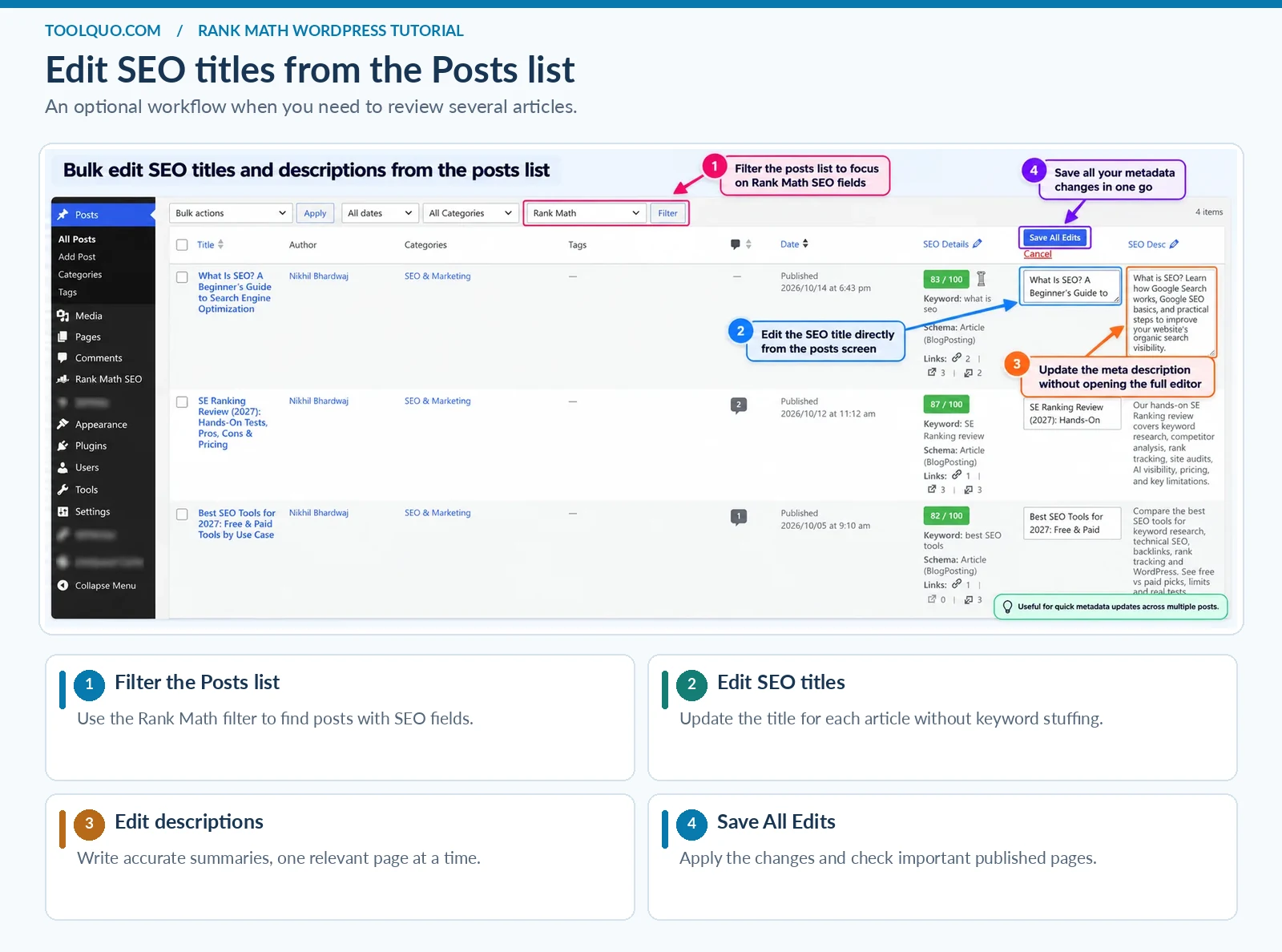
If you need to update SEO titles or descriptions across several existing posts, Rank Math also offers bulk editing controls. Make careful changes and review important pages individually rather than applying the same wording to every post.
7.4 Check the headings and the substance of the article
Read your article as a visitor would. Does the opening answer the searcher’s main question? Does each major part have a descriptive heading? For a software review, headings such as Pricing, Features We Tested, Limitations and Final Verdict help more than repeatedly using the exact product name. Use H1 for the main page title, H2 for major sections and H3 for subsections. WordPress usually supplies the H1 from the post title, so do not add several other H1 blocks without a reason.
Rank Math may ask you to add the keyword to the first paragraph or more headings. Do so only when it reads naturally. Write enough to answer the question; a minimum word count is not a reason to pad the page.
In our firsthand review, Rank Math scored the SE Ranking article 87/100. It flagged a low exact-keyword frequency and the absence of a so-called power word. Those findings did not justify awkward rewriting. The best outcome is a helpful page with sensible metadata and technical settings, even if the plugin does not award a perfect score.
7.5 Add relevant internal and external links
Highlight words in the WordPress editor, select the link icon and paste the relevant URL. Prefer a descriptive phrase such as “our guide to SEO basics” over “click here”. For a Rank Math tutorial, a link to our detailed Rank Math Review helps someone deciding whether to upgrade; a link to Google’s official documentation supports a technical claim.
Internal links lead to another page on your own website. External links go to other websites. Both can be useful. The aim is to help a reader continue naturally, not to satisfy a target number of links.
After linking, open the published page and test the link. When changing an old URL, update internal links so they point to the final address even when a redirect exists. Do not force a link to an unrelated page just because Rank Math suggests more internal links.
7.6 Describe images meaningfully
In WordPress, select an informative image and enter its Alternative Text (Alt Text) in the image settings or media library. This text describes the image to someone who cannot see it. For example, “Rank Math Setup Wizard showing Advanced Mode selected” is better than “rank math seo plugin best rankmath wordpress” or “IMG_3421”. Decorative images can use an empty alt attribute. Compress screenshots to a reasonable file size while keeping interface labels legible.
7.7 Review schema, social preview and indexing
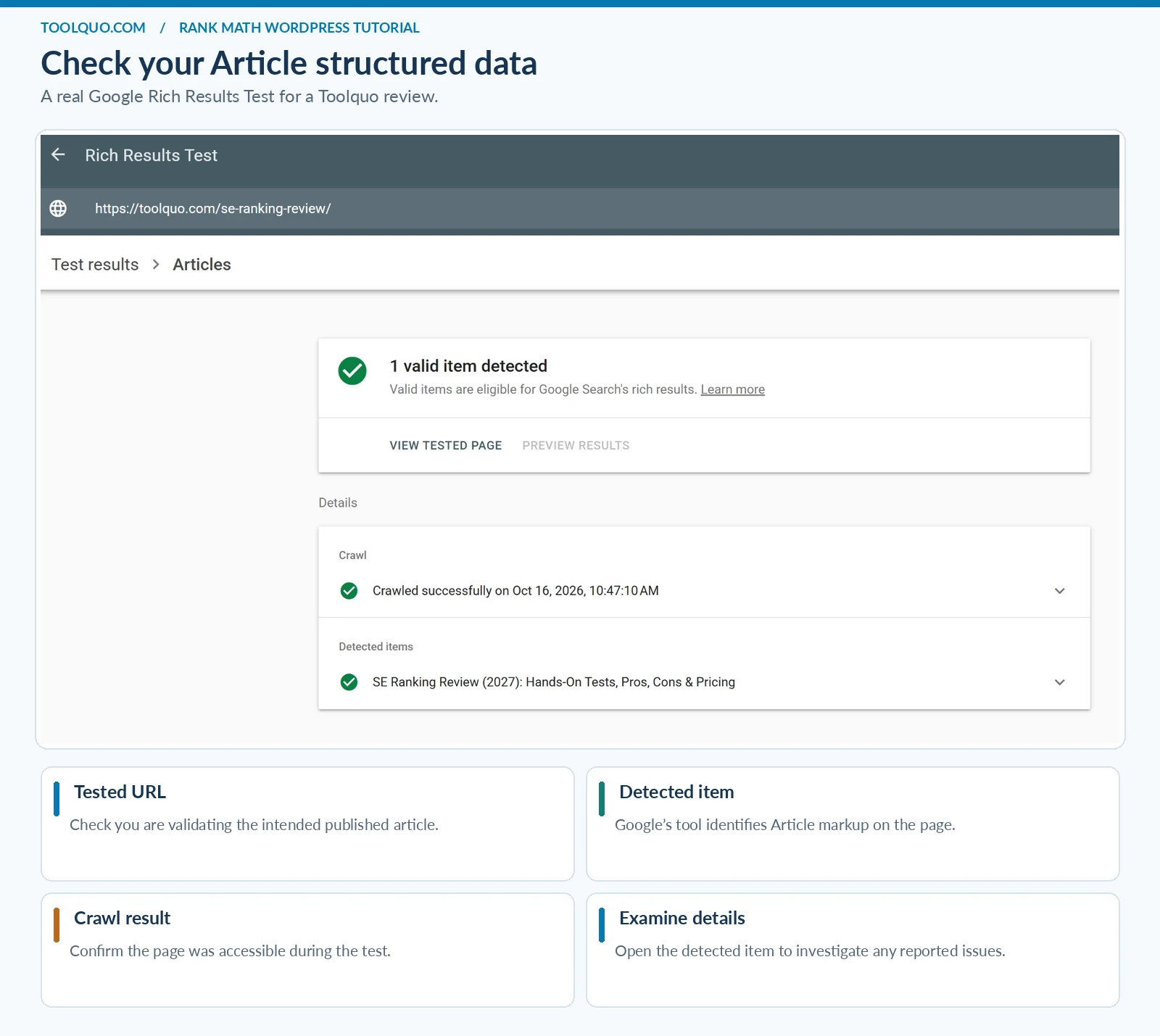
Open Rank Math → Schema for the post. For a normal explanatory article, choose Article or BlogPosting where appropriate. Do not choose Product for an opinion article just because it mentions a product, or Review markup solely to seek Google stars. The structured data must accurately reflect what readers can see.
Next open Social and preview the title, description and image that will appear when the URL is shared. Give important articles their own relevant featured image. Finally open Advanced and check that the post is not unintentionally set to Noindex and that any custom canonical points to the correct preferred URL.
Click Preview, inspect the page on desktop and phone, and confirm that headings, tables, buttons and screenshots remain readable. Save or Update the article. Then open the live URL and repeat a quick spot check. A plugin score cannot tell you whether text overlaps on mobile or whether a table of contents is easy to use.
8. What Does the Rank Math SEO Score Really Mean?
8.1 Post score versus sitewide analyzer score
You will encounter two different numbers. The post editor’s SEO score checks one article against Rank Math’s rules, such as keyword placement, metadata and links. The separate SEO Analyzer checks conditions across your website, including the homepage and technical settings. Neither measures how high Google ranks you. Think of them as checklists for possible omissions, not grades awarded by Google.
Our Rank Math case study gives a concrete example: the article’s score was initially 82, later 81, and then 87 after we restored two additional focus-keyword entries. The last increase happened without changing the published article. That is useful evidence that a plugin score reacts to settings and checklist conditions, not evidence of better Google rankings.
8.2 Follow recommendations selectively
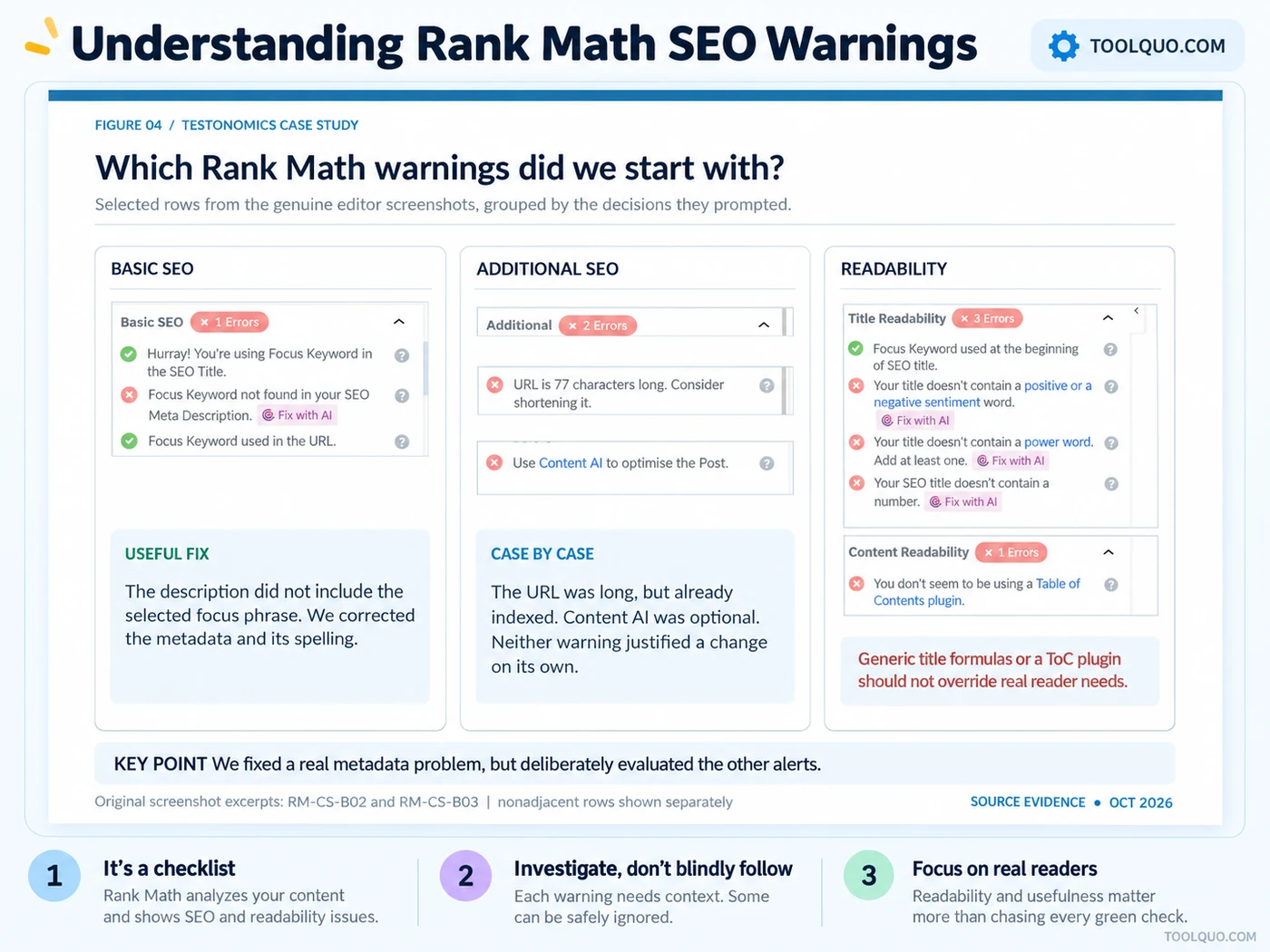
Follow a recommendation when it identifies a real omission: a missing SEO description, an unintended noindex rule or a link that does not work. Investigate, rather than automatically obey, requests for exact keyword density, power words or extra text that would not help the reader. Example: if your title already says “SE Ranking Review: Features and Pricing”, adding “Ultimate Shocking” merely to satisfy a power-word check would make the title worse.
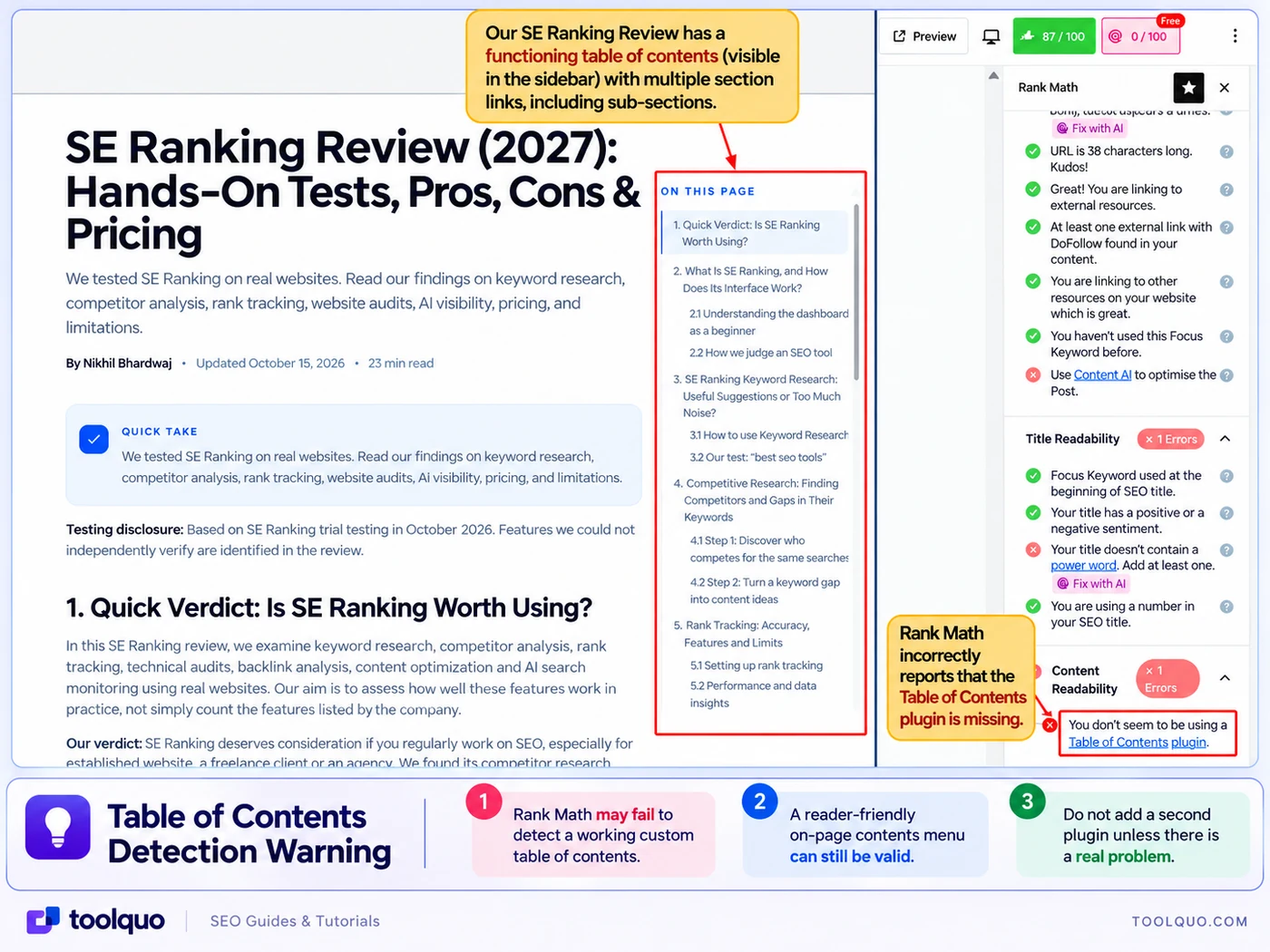
Our published SE Ranking Review had a working table of contents, yet Rank Math warned that it could not detect a table-of-contents plugin. Installing an unnecessary second plugin would not have helped readers, so we left the navigation alone. The lesson is to check what visitors actually experience before installing another plugin solely to clear a warning.
8.3 A higher analyzer score is not proof of more traffic
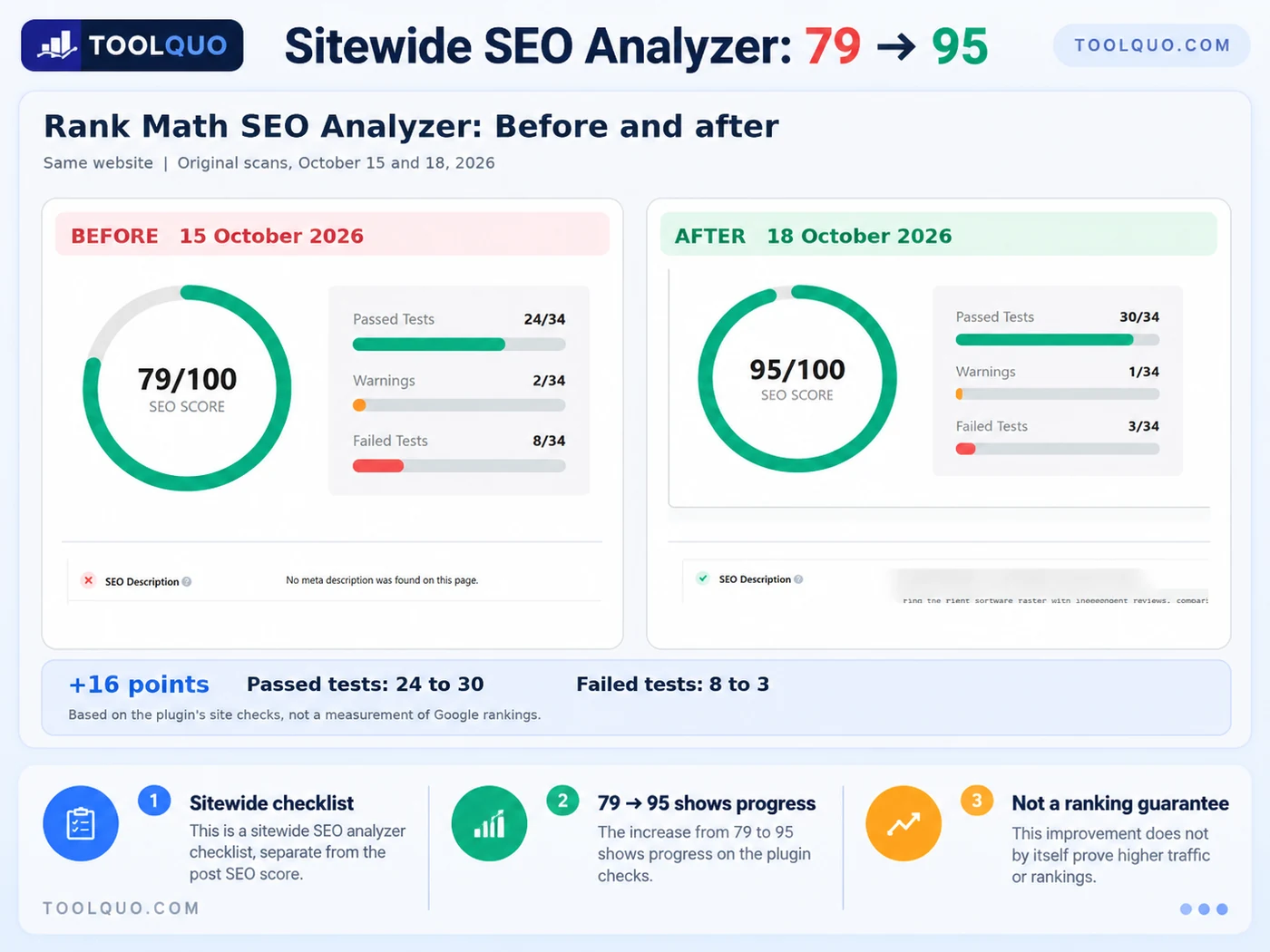
We used the sitewide SEO Analyzer to identify issues worth checking. On October 15, 2026, Toolquo scored 79/100 with 24 passes and eight failed checks. After investigating and making site improvements, the October 18 scan showed 95/100, 30 passes and three failed checks. This demonstrates progress against the plugin’s tests, not a rise in organic traffic or rankings. Those must be measured over time in Google Search Console.
Use Rank Math’s checks as a starting point, not as a substitute for editorial judgment. Improving titles, headings, images and links is part of on-page SEO regardless of which plugin you use. Fix omissions that affect people or search engines, and measure actual search clicks and rankings separately.
9. How to Monitor Website SEO Performance After Publishing
Publishing is the beginning of monitoring, not the end. You do not need to inspect every report every day. Follow a small routine: weekly, check Google Search performance and meaningful 404 errors; monthly, check redirects and run SEO Analyzer; whenever you move a URL or change sitewide settings, check sitemaps and indexing. Below are the exact screens to visit and what to do with the results.
9.1 Weekly: Google Search Console and Rank Math Analytics
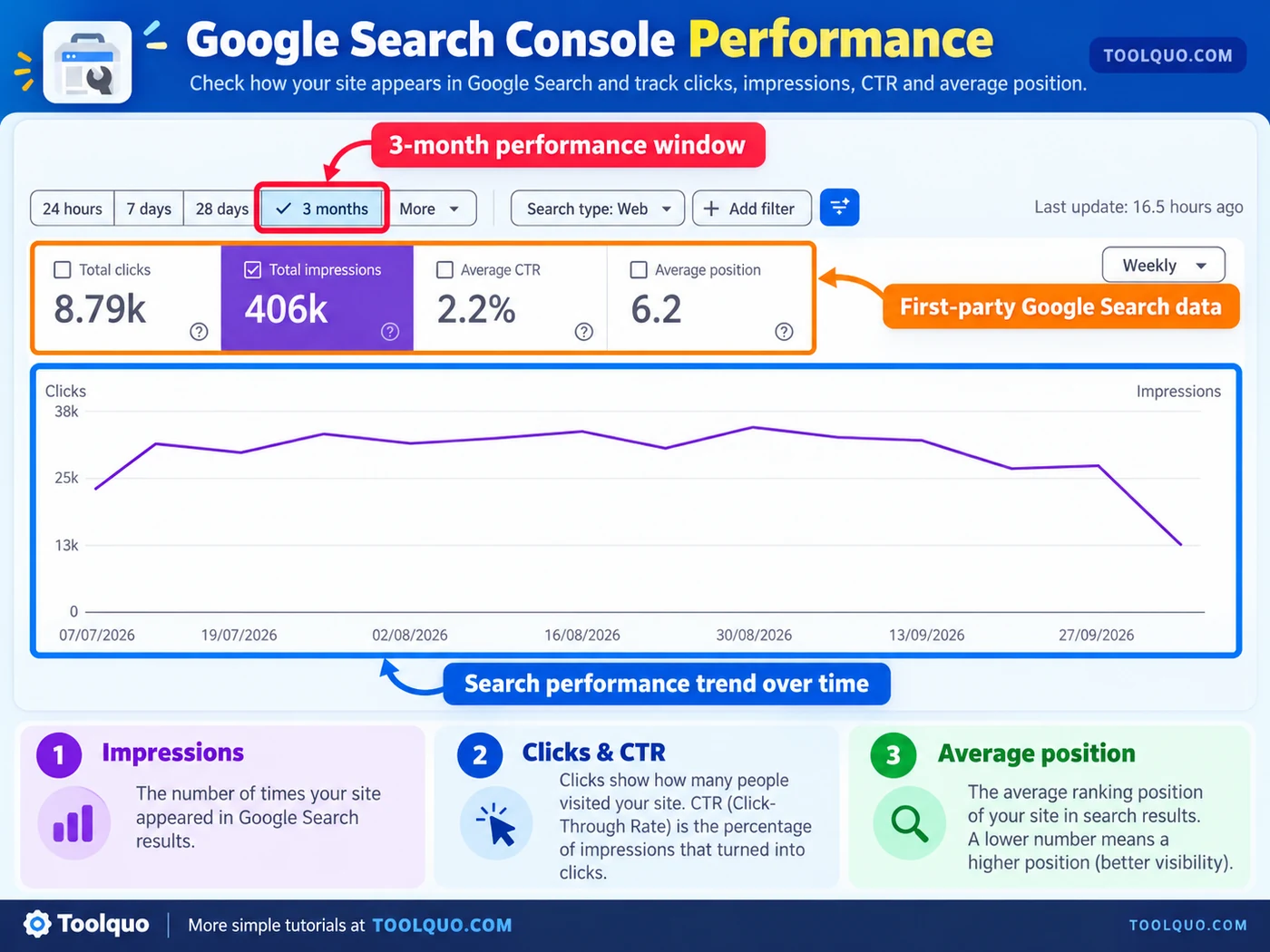
Open search.google.com/search-console, choose your website and select Performance → Search results. Start with the Last 3 months date range, then compare similar periods. Look at:
- Impressions: how many times your page appeared in search results.
- Clicks: how many times people clicked through.
- CTR: clicks divided by impressions. For example, 10 clicks from 200 impressions means 5% CTR.
- Average position: an average of where your result appeared for the included searches, not a fixed rank.
Click Pages to investigate a specific article and Queries to see the searches bringing impressions. Do not judge a page solely from one day’s figures.
You can also open WordPress → Rank Math SEO → Analytics if you connected Google services. It is useful for a quick view of selected reports, but its display may be delayed, limited by your plan or affected by connection problems. Use Google Search Console itself as the reference when numbers disagree.
9.2 Weekly: Check 404 Monitor for important broken URLs
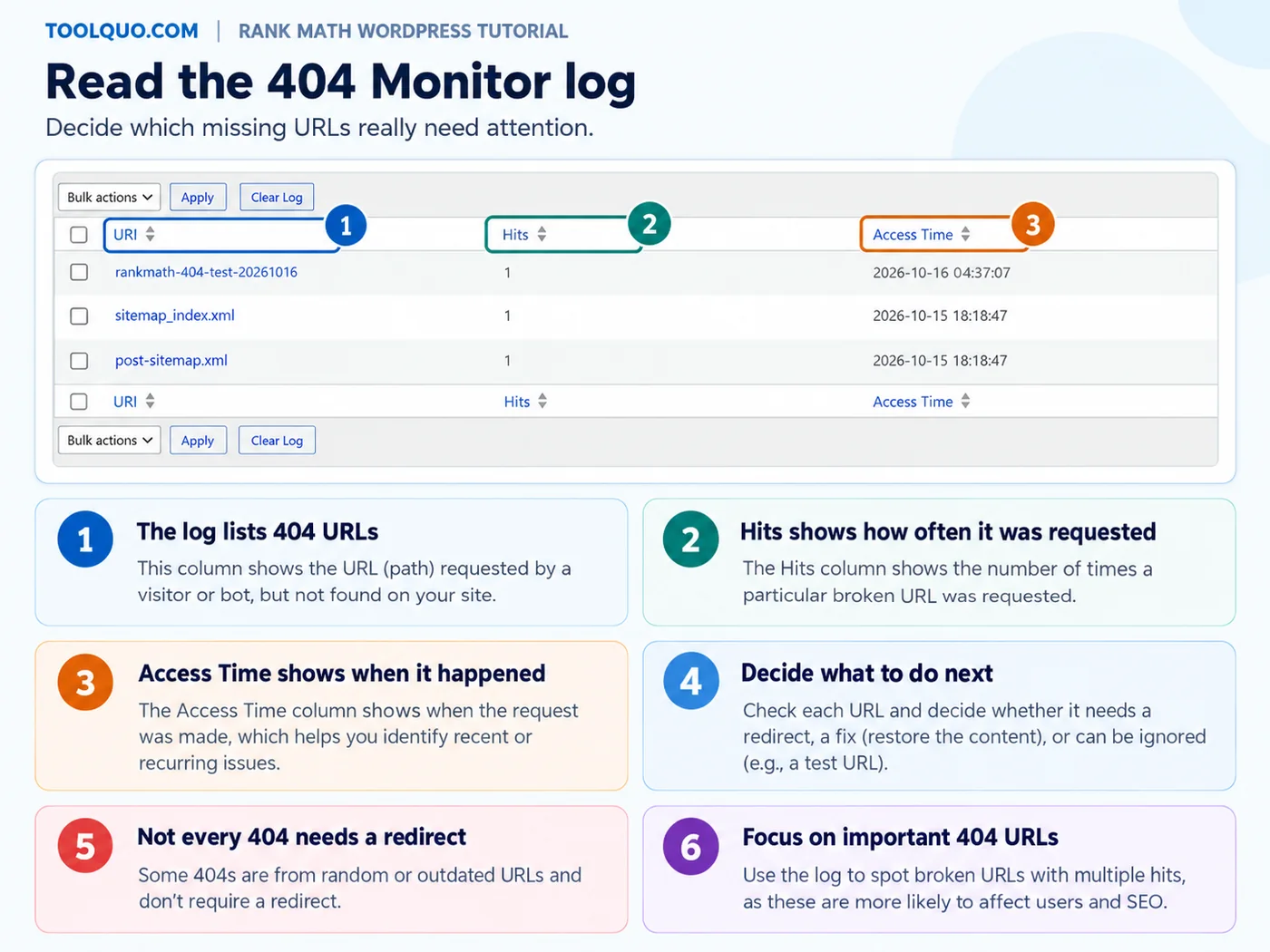
Go to WordPress → Rank Math SEO → 404 Monitor (enable the module under Dashboard first). A 404 is a requested address that does not exist. Start with rows showing repeated hits, especially those resembling an earlier article URL. Example: /old-guide/ has 40 visits after the post moved to /new-guide/. That merits investigation. By contrast, one bot request for /random-file-xyz/ usually does not.
If the old page now has a close replacement, make a 301 redirect and update your internal links. If the page was removed and no suitable replacement exists, leaving a real 404 or 410 response may be correct. Never redirect every unknown 404 to your homepage, since visitors will arrive somewhere unrelated to what they sought.
9.3 Monthly: Review existing redirects
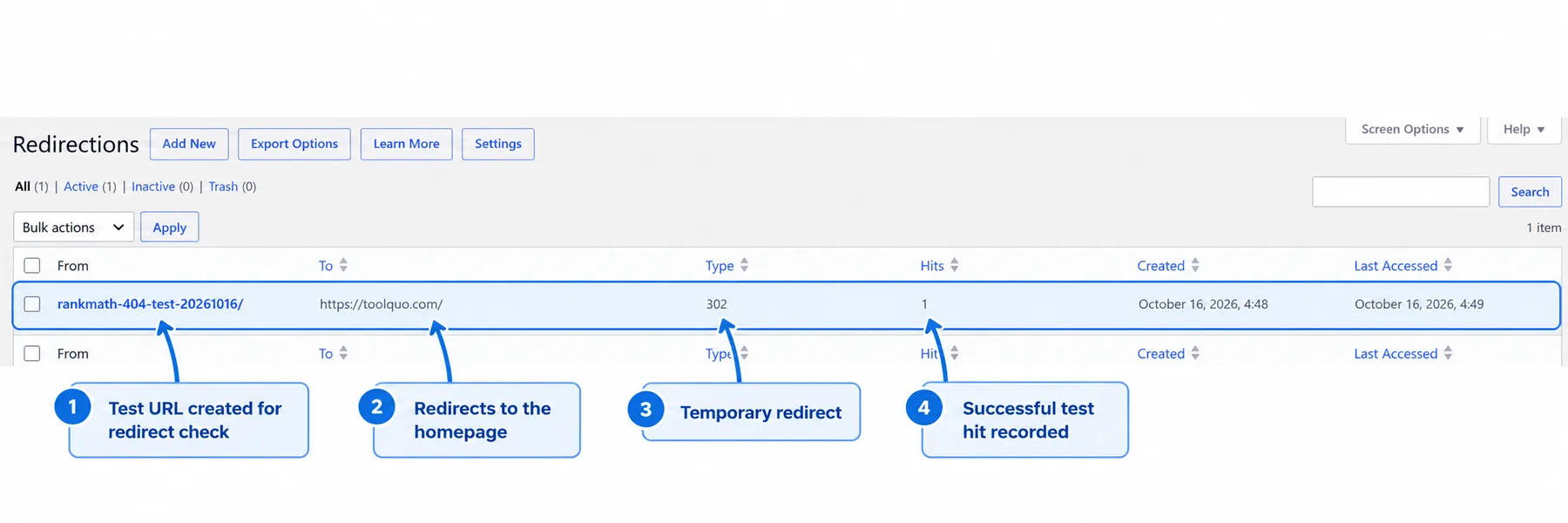
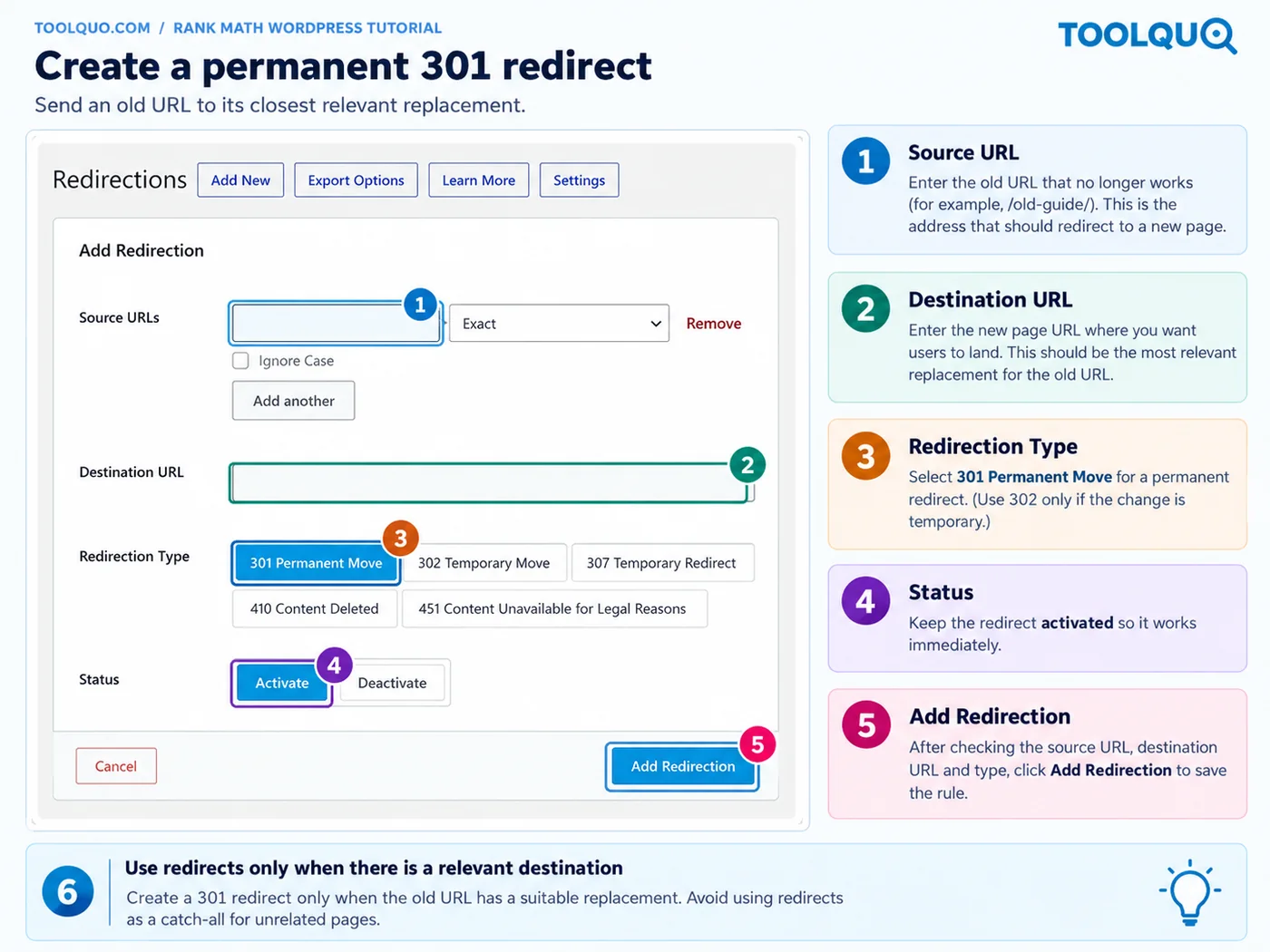
Open WordPress → Rank Math SEO → Redirections. To add one, choose Add New, enter the old relative address under Source URLs, enter the full replacement address in Destination URL, choose 301 for a permanent move, activate it and save. Example: /old-seo-guide/ → https://example.com/new-seo-guide/. Then paste the old address into a browser to confirm it reaches the intended destination. A 302 is for temporary moves; avoid chains where old URL A redirects to B and then C. Review the list monthly, especially after reorganizing your site.
9.4 Monthly or after major changes: Run SEO Analyzer
Go to WordPress → Rank Math SEO → SEO Analyzer, click Start SEO Analyzer if needed, then open Failed Tests and Warnings. For each finding, ask: Did the test run successfully? Is this a real problem? What action will fix it without harming readers?
For example, a missing homepage description is worth correcting; “Mobile Speed: Test execution failed” means the check did not complete, not that your website is necessarily slow. Do not adjust settings just to gain a few points. Record the date, the issue and the actual change so you can compare scans accurately.
Keep a short record of what you changed and when. Our 79-to-95 comparison was useful because we preserved the original result, the follow-up result and the dates.
9.5 Occasionally: Inspect links, sitemap and indexing
Once a month, review whether your important articles receive contextual internal links from other posts. Example: a Rank Math tutorial should be linked from the Rank Math Review and related SEO guides when it helps readers. Check Rank Math’s Posts link-count columns or run a website crawl.
After publishing or changing URLs, open yourdomain.com/sitemap_index.xml and check the relevant sitemap. In Google Search Console, use URL Inspection for a particular page if you need to understand whether Google has indexed it. “Present in the sitemap” means discoverable, not guaranteed indexed.
Save this routine:
- Every week (10 minutes): Search Console Performance and, if enabled, 404 Monitor.
- Every month (15 minutes): Redirections, incoming internal links and SEO Analyzer.
- After publishing a key article: check the live page, sitemap inclusion and its URL Inspection report when needed.
- After moving a URL: update internal links, test its redirect, and inspect any new 404s.
10. Common Rank Math Mistakes to Avoid
- Keeping two SEO plugins or overlapping features that output conflicting titles, schema or sitemaps.
- Enabling noindex globally without understanding which posts or archives it affects.
- Rewriting useful prose only to hit a keyword-density or power-word target.
- Adding schema types that do not accurately describe the page.
- Redirecting every 404 to the homepage, including URLs with no relevant replacement.
- Assuming a high SEO score or successful URL submission means Google will rank the page.
- Ignoring the published page’s appearance because the editor checklist looks good.
11. Rank Math Checklist Before Publishing
□ The article answers a specific reader question, and the focus keyword reflects that intent.
□ The SEO title, description, visible heading and section headings accurately describe the content.
□ Important claims are supported; relevant internal and external links help readers.
□ Informative images have descriptive alt text, and screenshots are readable.
□ Schema, canonical URL and indexing instructions have been reviewed.
□ The mobile page is usable, with no broken links or overlapping elements.
□ After publishing, the article appears in the appropriate sitemap and Search Console can be used to monitor results.
12. Frequently Asked Questions
12.1 Is Rank Math SEO free?
Yes. Rank Math Free covers many routine WordPress SEO tasks, including metadata, sitemaps, basic schema and on-page checks. Paid plans offer additional features and allowances. Compare them against the tasks you actually need before upgrading.
12.2 Does Rank Math work with Gutenberg and Elementor?
Rank Math supports multiple WordPress editing environments, including the block editor, Classic Editor and Elementor. The panel position and controls may differ, so follow the options shown in your editor.
12.3 Should I aim for 100/100 on every article?
No. Investigate the recommendations, fix genuine omissions and protect natural writing. Rank Math’s score is a diagnostic checklist, not Google’s assessment of your article.
12.4 Is Rank Math Analytics the same as Google Search Console?
No. Rank Math can display connected Search Console information inside WordPress, alongside its own reports and features. Google Search Console remains the primary source for your site’s Google Search queries and performance.
12.5 Should I enable the 404 Monitor and Redirections modules?
Enable them when you have URLs to monitor or manage, particularly on a changing website. Do not create redirects for every random 404 request; investigate whether the URL has a relevant replacement.
12.6 Can Rank Math guarantee indexing or rich results?
No. Sitemaps, schema and indexing settings help communicate information to search engines, but the engines make their own crawling, indexing and display decisions.
12.7 What if a Rank Math setting or module is missing?
First open Rank Math SEO → Dashboard and check whether Advanced Mode is enabled. Some modules require WooCommerce, ACF or another plugin to be installed; others require Pro or an account connection. Do not purchase a plan merely because your tutorial screenshot has an option you cannot see. Check the feature’s requirements and whether you actually need it.
12.8 What if my website already uses Yoast or another SEO plugin?
Do not run overlapping SEO systems without a migration plan. Back up the site, import compatible settings into Rank Math, verify several important pages and check who generates metadata and sitemaps. Switch over deliberately rather than disabling the old plugin before verifying the results.
13. Conclusion: Use Rank Math as a Workflow, Not a Scorecard
The simplest way to use Rank Math SEO is to follow a consistent process: install it, complete the Setup Wizard, enable only relevant modules, optimize each article, and return to the monitoring screens afterward. Prioritize clear explanations for readers and correct technical settings over a perfect plugin score. When you need an opinion on Free versus Pro, read our full Rank Math Review.
14. Further Reading and Sources
Rank Math official installation and setup: Installation guide; Setup Wizard guidance; Advanced Mode.
Rank Math official operational guides: SEO titles and focus keywords; 404 Monitor; Redirections; Analytics.
About the author
Nikhil Bhardwaj
Founder & Editor, Toolquo
Nikhil leads Toolquo’s editorial direction, focusing on practical software research, transparent comparisons, and clear buying decisions.
View author profile →Keep exploring
Related guides
November 3, 2026
Yoast SEO Sitemap: How to Find, Configure and Fix Errors (2027)
Find your Yoast SEO sitemap, choose which URLs belong in it, submit it to Google Search…
November 1, 2026
How to Use Yoast SEO: Complete Beginner’s Guide (2027)
Learn how to install and configure Yoast SEO, choose WordPress SEO settings, optimize a post, and…
October 29, 2026
Yoast SEO Review (2027): How Good Is It, and Is Premium Worth It?
Our hands-on Yoast SEO review explores Free features, Premium pricing, strengths, limitations, and whether upgrading is…