Off-Page SEO: A Practical Guide to Backlinks, Link Building and Website Authority
Learn off-page SEO from scratch, including quality backlinks, eight proven strategies, free competitor research in Bing Webmaster Tools, and a real case study.
On this page
Suppose you publish an excellent guide to growing tomatoes on a balcony. It answers common questions, has clear photographs, and works well on mobile phones. Yet almost nobody outside your website knows it exists. How can gardening bloggers, teachers, journalists, and readers discover your guide and recommend it?
Off-page SEO addresses this problem. It helps people discover and assess your work beyond your own website. Its best-known outcome is a backlink, which is a link from another website to one of your pages. Other activities include useful expert contributions, content promotion and relevant public mentions.
This guide moves from the basics to practical link-building techniques, free and paid research methods, risk management, measurement and an original case study. We explain why each approach may be useful, not just what buttons to click.
1. What Is Off-Page SEO?
Off-page SEO (also called off-site SEO) is the work you do beyond your website that can help people and search engines discover, evaluate, or recommend it. Unlike changing a title or rewriting a page, you usually cannot control the final result: another website owner decides whether to mention or link to your work.
Imagine a gardening magazine preparing an article on vegetables that grow well on balconies. It discovers your tomato-growing guide and links to it because readers may benefit from your photographs and watering instructions. You control your guide, but the magazine’s editor decides whether to recommend it. That independent editorial decision is what makes the citation meaningful.
External references may serve different purposes. A link can introduce readers, support a particular claim or help search engines interpret the linked page. Other mentions may raise awareness without creating a backlink. Record these benefits separately instead of assuming all attention has the same ranking effect.
Off-page SEO vs. on-page SEO vs. technical SEO
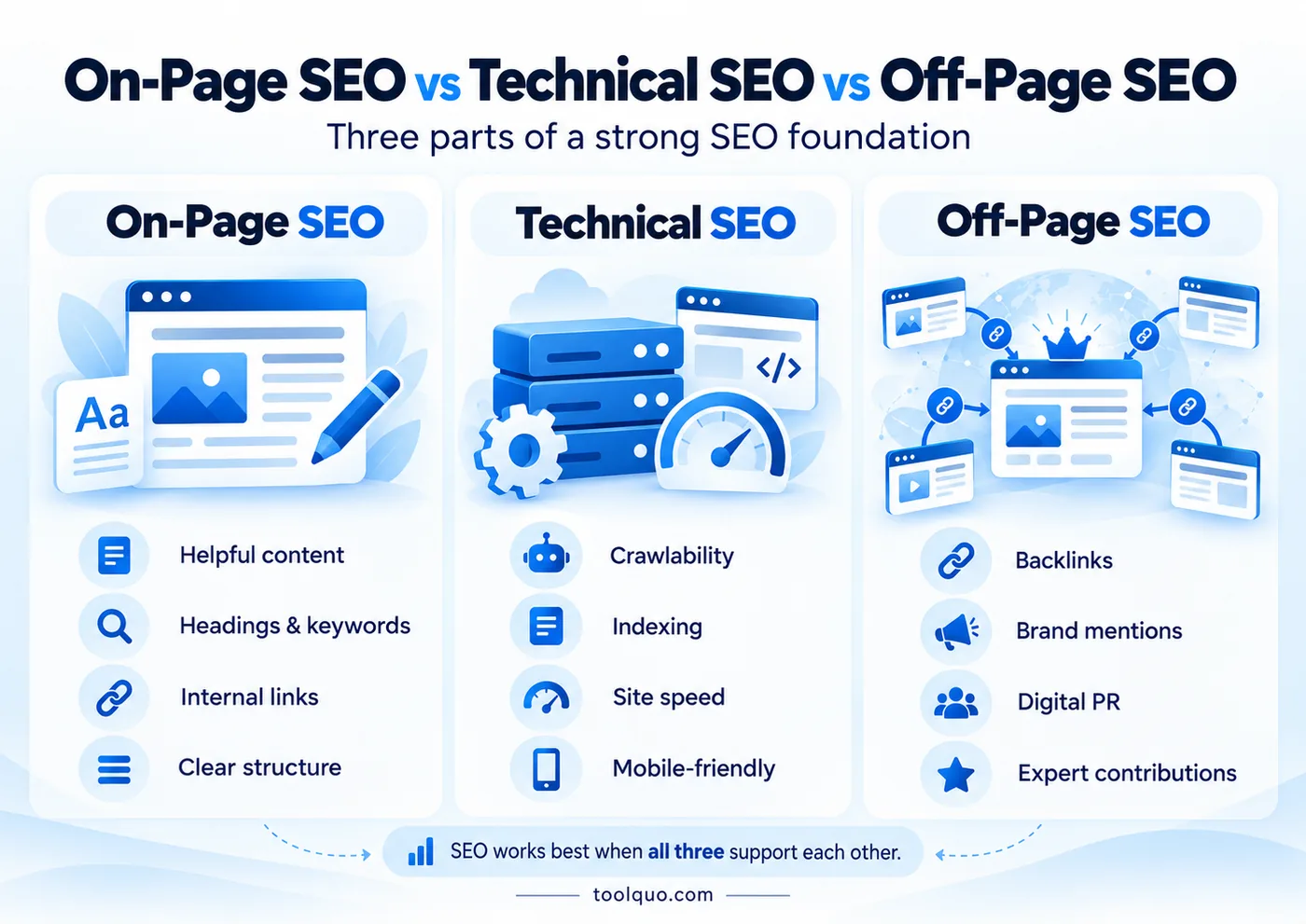
The three parts of SEO work together. On-page SEO makes an individual page useful and understandable: better explanations, relevant keywords, helpful headings, titles, images, and internal links. Technical SEO helps search engines access and process the site: for example, fixing broken pages, ensuring important pages can be indexed, and using redirects correctly. Off-page SEO helps your work become known outside the site, particularly through relevant independent references.
For the tomato guide, on-page SEO means accurate instructions, clear headings and useful photographs. Technical SEO means the page is accessible and can be indexed. Off-page SEO means another publisher independently recommending the guide. All three contribute to effective search optimization.
If you want the wider background, read Toolquo’s What Is SEO? guide and our detailed On-Page SEO guide. This article concentrates on what happens beyond your website.
2. What Are Backlinks, and Why Do They Matter for SEO?
If a gardening magazine links to your tomato guide, that is a backlink. If your tomato guide links to another article about planters on your own site, that is an internal link. The difference is whether the linking page is on someone else’s website or on yours.
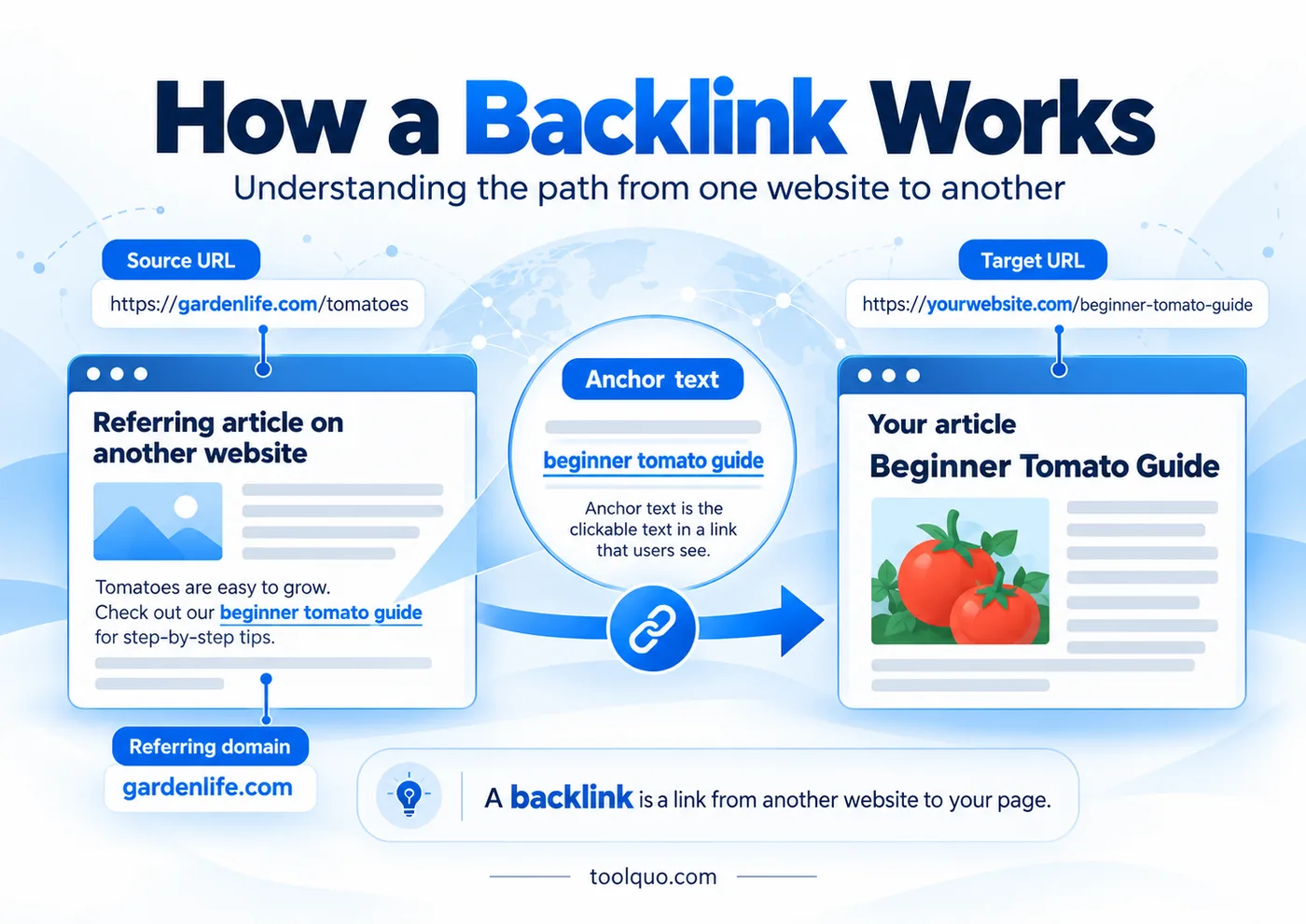
Why can a backlink matter for SEO? Google uses links to discover pages and as one of many signals in its ranking systems. Link analysis, including PageRank, can help Google assess the relevance and importance of a linked page. SEO professionals sometimes describe the ranking credit associated with a link as ‘passing authority’ or ‘link equity’. This is a simplified expression, not a transfer of a fixed number of points, and it is not the same as a third-party Domain Authority or Domain Rating score. Google does not disclose the exact value of an individual link.
The practical implication is that off-page SEO cannot replace on-page and technical SEO. A gardening association might link to your tomato guide, which could bring readers and contribute useful ranking signals. But if the guide contains incorrect watering advice, is difficult to understand or cannot be indexed, the link does not solve those problems. Publish helpful, accessible content first, then work on earning relevant recommendations. Even a strong backlink does not guarantee a particular ranking.
Backlink glossary: ten essential terms
View the 10 essential backlink terms
- Backlink: a link from another website to your page. Example: a school’s reading-list page links to your free guide on preparing for an exam.
- Internal link: a link between two pages on your own website. Example: your exam timetable article links to your revision-planning article. It helps navigation, but it does not count as an external backlink.
- External or outbound link: a link that takes readers from your website to another website. From your perspective, it goes out; from the other website’s perspective, it is an incoming backlink.
- Referring domain: the website domain that sends the backlink. If five different articles on examplegarden.com link to you, these may be five separate backlinks, but there is only one referring domain: examplegarden.com. SEO tools may count multiple links differently, so check their definitions.
- Linking page and target page: the linking page contains the clickable link; the target page is the destination. In our gardening example, the magazine’s rose-care article is the linking page and your rose-disease guide is the target page.
- Anchor text: the clickable words in a text link. A sentence saying “see this rose-pruning guide” uses “rose-pruning guide” as anchor text. It helps readers understand where they will go.
- Editorial backlink: a link added because the publisher believes readers will benefit from the destination. A journalist citing your original rainfall data is an example.
- Contextual link: a link placed within relevant explanatory text, rather than, say, in an unrelated footer. Its surrounding sentence helps the reader understand why it is there.
- Referral traffic: people who click a link on another website and reach yours. This is a real benefit even if the backlink brings no measurable ranking improvement.
- Link building: the deliberate work of earning relevant backlinks, including creating useful content, identifying possible linking websites, and contacting editors with a genuine reason to consider your resource.
Types of backlinks: followed, nofollow, sponsored and UGC
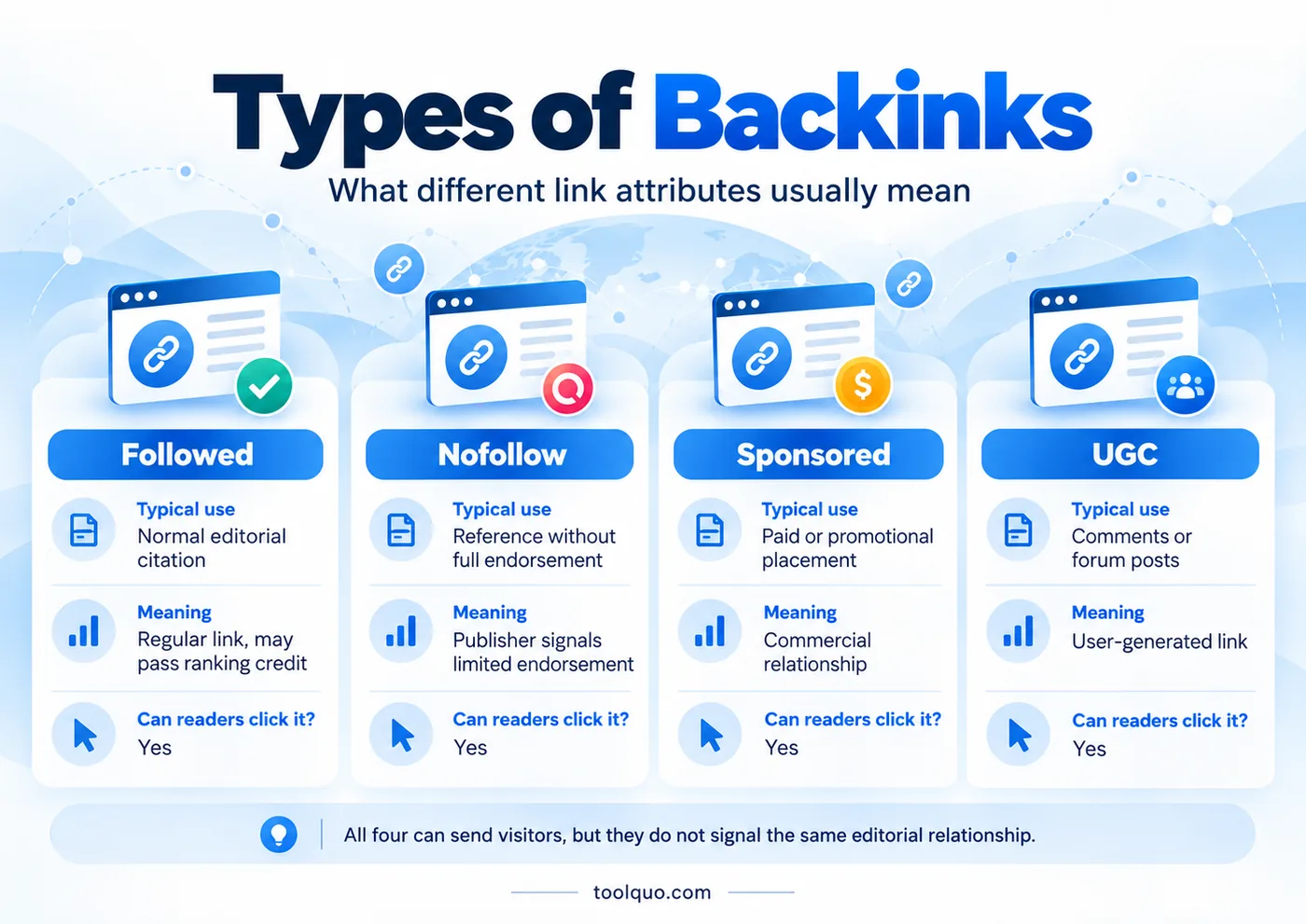
SEO professionals often call an ordinary, unqualified hyperlink a ‘dofollow’ or ‘followed’ link. There is no special rel="dofollow" attribute. Such a link can be considered in Google’s link analysis and may pass ranking credit, sometimes called link equity. A link marked rel="nofollow" tells Google that the publisher does not intend to offer the usual endorsement. Google treats nofollow, sponsored and UGC attributes as hints, so the exact ranking effect of any link cannot be predicted.
- Followed link (informally, ‘dofollow’): a gardening magazine voluntarily recommends your tomato guide in an article about balcony gardening. It is a normal link that readers can click and that Google may consider when assessing the destination page.
- Nofollow link (rel="nofollow"): a publisher links to a disputed claim so readers can examine it but does not want to endorse the source. The link is still clickable. The attribute asks Google not to treat it as an ordinary editorial endorsement.
- Sponsored link (rel="sponsored"): a travel business pays a magazine for an advertisement linking to its booking page. The magazine uses this attribute to identify the commercial relationship. Google prefers sponsored for paid links, although nofollow is also acceptable.
- User-generated-content link (rel="ugc"): someone shares a URL in a forum post or a blog comment. The platform can use UGC to distinguish a reader’s link from a link chosen by its own editors.
All these links can send visitors. Their attributes help Google understand why they were placed. Do not assume that every clickable link passes the same ranking credit or represents an independent editorial recommendation.
3. What Makes a Backlink High Quality?
Start with the actual page containing the backlink. Is its subject related to yours, and does your resource help someone understand the topic? A relevant contextual citation has a clear purpose because it adds useful information. An unrelated link placed mainly to influence search rankings may offer readers little value and, if manipulative, can violate Google’s spam policies.
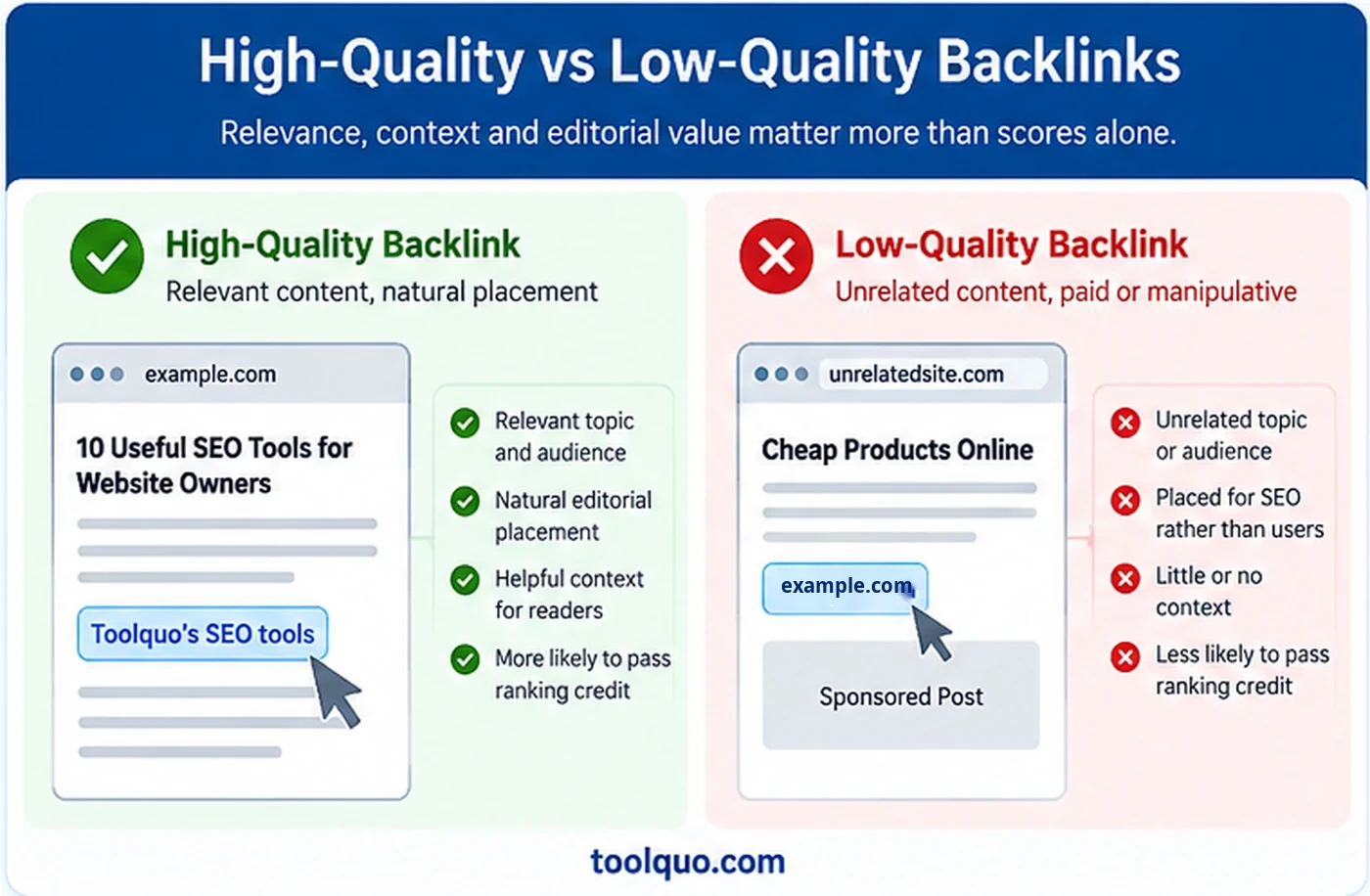
For example, a gardening article about plants for small apartments could naturally cite your indoor-herb guide. An unrelated entertainment directory offering a paid placement among hundreds of links has no comparable reader need. A higher authority score does not change that.
Seven questions to ask before pursuing a backlink
- Is the topic relevant? Does the linking page discuss a subject closely related to your page, or would the citation seem out of place?
- Would the link genuinely help the other site’s reader? Does your page answer a question, supply an example, provide evidence, or fill a gap in what the other writer has explained?
- Was it an independent editorial choice? Did the editor decide your information was worth citing, or is someone selling a link primarily to manipulate search rankings?
- Is the linking page reliable? Does it have an identifiable purpose, useful information, credible sourcing, and signs that it is maintained? Do not judge only by design or a single tool score.
- Where would the link appear? A natural reference beside relevant text is usually easier to justify to readers than a random footer link repeated across hundreds of pages.
- Could interested people visit through it? Even a modest publication can send readers who genuinely need your content. Referral visitors are a useful outcome separate from Google rankings.
- Does the link follow appropriate rules? Paid, sponsored, and user-submitted references may need qualifying attributes. Avoid demanding unnatural keyword-filled anchor text.
Domain Authority, Domain Rating and Authority Score: useful indicators, not Google scores
SEO platforms calculate their own ratings to summarize aspects of a website’s backlink profile. Moz calls its estimate Domain Authority (DA), Ahrefs uses Domain Rating (DR), and Semrush uses Authority Score (AS). Each company publishes some explanation of its approach, but uses its own data and methodology. These are third-party estimates, not scores taken from Google’s ranking system. They are not interchangeable, so a DA of 40 does not mean the same thing as a DR of 40.
Imagine two links from the same prominent website. One is in a carefully written article about your topic; the other is in an unrelated list. The domain-level score is identical, but their contexts differ. This is why tool metrics can help discover prospects without replacing your judgment about the actual page.
For a deeper assessment, inspect the specific linking URL, its audience, the surrounding text, the link placement and whether the destination still works. These are details a domain-wide metric cannot convey.
4. Eight Off-Page SEO Techniques to Earn Quality Backlinks
Each link-building technique serves a different purpose. Original research supplies evidence, broken-link outreach helps repair outdated references, and expert contributions add relevant experience. Choose the method that fits what you can genuinely offer.
4.1 Create original research or resources worth citing
A linkable asset is simply a page or resource useful enough that another writer might want to recommend it. Possibilities include an original survey, reliable statistics, a hands-on comparison, a free calculator, a downloadable template, or photographs showing a process that is difficult to explain in words.
For example, a home baker might test how different dough-resting times affect a loaf, recording the timings, ingredients, photographs and results. Another writer explaining common baking problems could cite these findings. This is verifiable evidence: readers can see what was tested, how the experiment was carried out and whether the conclusions follow from the observations.
A weak version of this tactic is publishing an ordinary list of claims with no original evidence and calling it “research.” To be cite-worthy, the material should solve a specific problem better, more transparently, or more conveniently than available alternatives.
4.2 Broken link building: help another blogger repair an outdated reference
Imagine an article titled ‘How to Start Composting at Home’ on Garden Blog A. It tells readers to consult a chart showing which household scraps belong in a compost bin, and links to that chart on Blog B. Later, Blog B deletes the chart. Anyone clicking the link from Blog A now sees a 404 error, meaning the page cannot be found. Blog A’s readers have lost the reference they were promised.
You run Garden Blog C and have a clear, accurate chart covering the same question. You can contact Blog A’s editor, point out the exact broken link and offer your chart as a possible replacement. If the editor chooses it, Blog A’s article becomes more useful and your page earns a backlink. The editor may also choose another resource or make no change. The opportunity exists because you can repair a real problem for their readers.
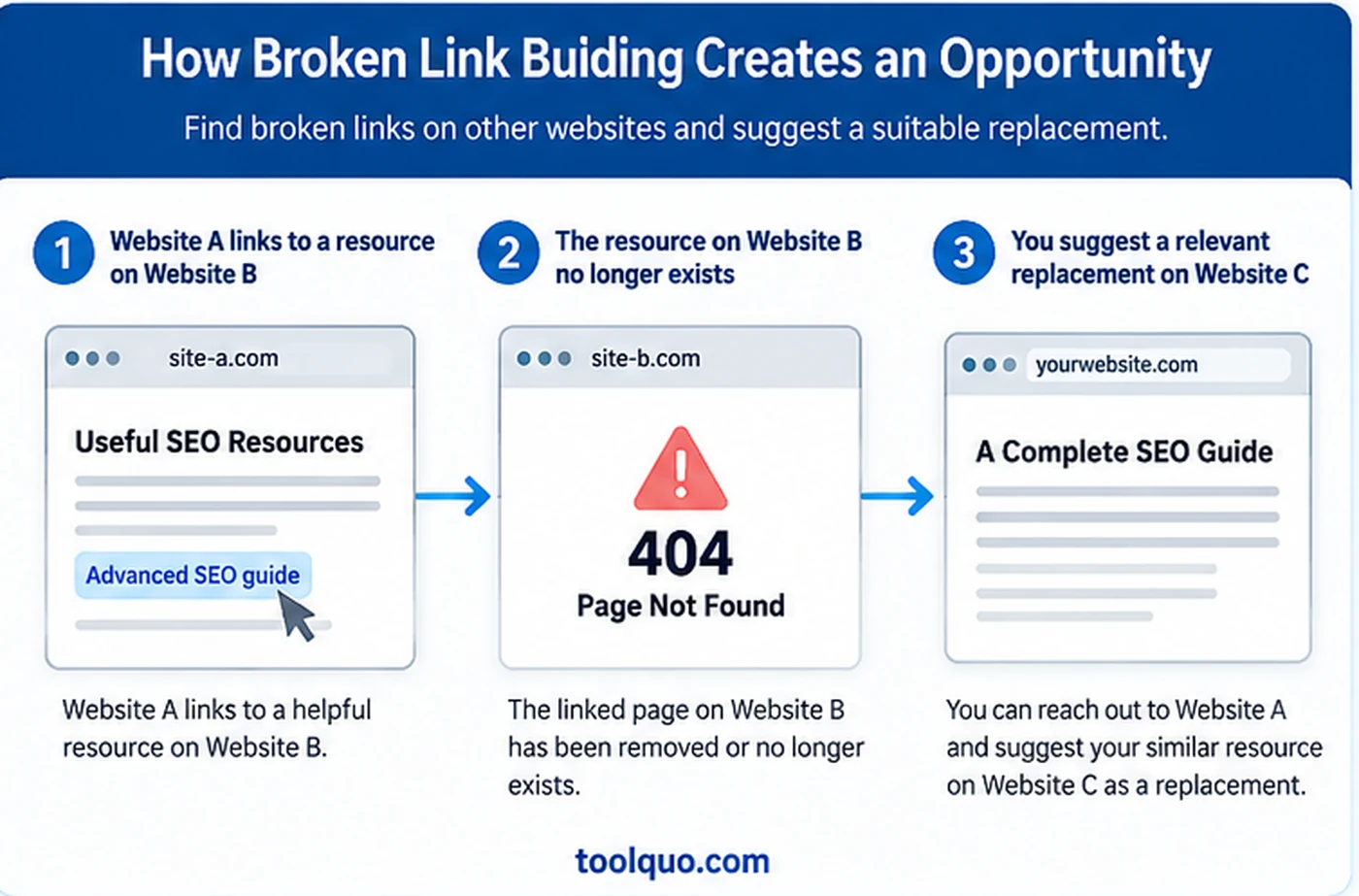
- Find a relevant article or resource list in your subject area. Inspect its external links using your browser or a link-checking tool; confirm each broken link by opening it.
- Understand what the deleted page was meant to explain. A replacement must answer the same reader need, not just share a broad keyword.
- Check that your own page is accurate, accessible, and at least as useful for that specific purpose.
- Send the editor the exact broken URL and the location in their article. Mention your replacement only as an option.
This is a good beginner tactic when you have a suitable resource. It is a poor tactic when you contact hundreds of owners with an unrelated article simply because their page contains a broken link.
4.3 Analyze competitors’ backlinks to find relevant publications
Competitor backlink analysis means finding webpages that link to another site in your field and learning why they linked. Suppose your blog covers beginner photography. You find that a photography course links to a competitor’s printable camera-settings cheat sheet. That tells you two things: teachers in this area recommend printable learning aids, and a course website may be interested in genuinely useful supporting material.
Do not simply copy a competitor’s resource and request the same link. Check whether yours supplies something different, such as clearer beginner examples or an accessible worksheet. If you cannot explain the additional value, it is probably not a suitable prospect.
Section 9 provides the detailed Bing workflow for investigating competitors’ linking pages.
4.4 Find unlinked mentions of your work
Sometimes an article names your brand or refers to your study but does not link to the original source. For example, a local newspaper might mention a walking-trail map you created without showing readers where to find it. A source link would make it easier for those readers to view the map.
Search your brand name and distinctive research titles in Google, and consider using Google Alerts to notice new references. Verify that the publication is actually talking about your work. If a link would improve the reader’s experience, politely offer the original URL. An unlinked mention can create awareness, but we should not claim that every unlinked mention is a confirmed direct Google ranking factor.
4.5 Earn coverage through digital PR and useful expert comments
Digital PR means earning attention from publications by offering something newsworthy, reliable, or helpful. For example, a cycling expert might explain bicycle safety changes to a local journalist, or a food researcher might provide original findings about ingredients. A journalist may quote the expert, cite the research, or decide not to use it.
The best opportunities match the publication’s current reader questions. Follow specialist newsletters, local publications, relevant journalist requests, and stories where your evidence could add value. Verify claims before pitching and make data or methods available for checking.
Avoid services promising guaranteed editorial backlinks from mass-distributed press releases. A credible mention can have value even without a followed link, but a fabricated or paid-for “news” link is not the same as genuine reporting.
4.6 Write guest articles and collaborate with relevant publications
Guest posting means writing an article for someone else’s website. It can make sense when you have genuine knowledge that would help their readers. For instance, an experienced gardener might contribute “Five mistakes beginners make when repotting orchids” to a plant-care magazine. A teacher could contribute an article about creating an effective revision schedule to an education website.
How do you find opportunities? Start with publications you already read and respect. Look for contributor guidelines, bylined guest articles, expert columns, and editorial contact details. Search for a subject plus phrases such as “write for us” or “contributor guidelines,” but review each result carefully: many pages accepting guest posts are really selling links. You can also contact a niche editor with a thoughtful, unpublished article idea even if there is no public contributor form.
- Read several articles on the prospective publication to understand its level, tone, and audience.
- Choose a topic not already covered adequately. Suggest a useful angle or original experience rather than a promotional company profile.
- Prepare a short pitch with the proposed headline, what readers will learn, and why you are qualified to explain it.
- Follow the publication’s editorial rules. Be prepared for changes, rejection, or the editor choosing not to link to your site.
Guest blogging is not automatically against Google’s policies. The risk arises when guest posts are produced at scale mainly to insert optimized links or otherwise manipulate rankings. Contribute to educate readers, not to manufacture a backlink package.
4.7 Get listed on genuinely useful resource pages
Many organizations maintain curated lists that help their audiences find reliable material. A school may recommend free revision resources. A local hiking association may list authoritative trail-safety guides. A professional body may maintain member resources.
Look for pages that are actively curated and closely related to your topic. Explain why your resource fills a gap or helps that audience. Avoid bulk submission to unrelated directories. For genuine local businesses, accurate listings and business citations can serve a different, locally relevant purpose, but a nonlocal blog should not pretend to operate local branches to collect links.
4.8 Recover lost links and avoid breaking good links yourself
You can accidentally break backlinks that you have already earned. Imagine a craft blog links to your paper-flower guide at /easy-paper-flowers/. You then move the guide to /paper-flowers-for-beginners/ and remove the old address without creating a redirect. Visitors who click the original backlink reach a 404 error instead of your guide. Search engines may also stop reaching the intended page through that link. If the link had helped discovery or contributed useful signals, losing the working connection can reduce visibility and potentially harm search rankings. The precise impact cannot be predicted, but the mistake is preventable.
Before changing an established URL, ask whether the change is really necessary. If it is, set up an appropriate permanent redirect (usually a 301) from the old URL to the new, closely matching page. Test the old link and make sure it reaches the right destination. Update your internal links and sitemap where appropriate.
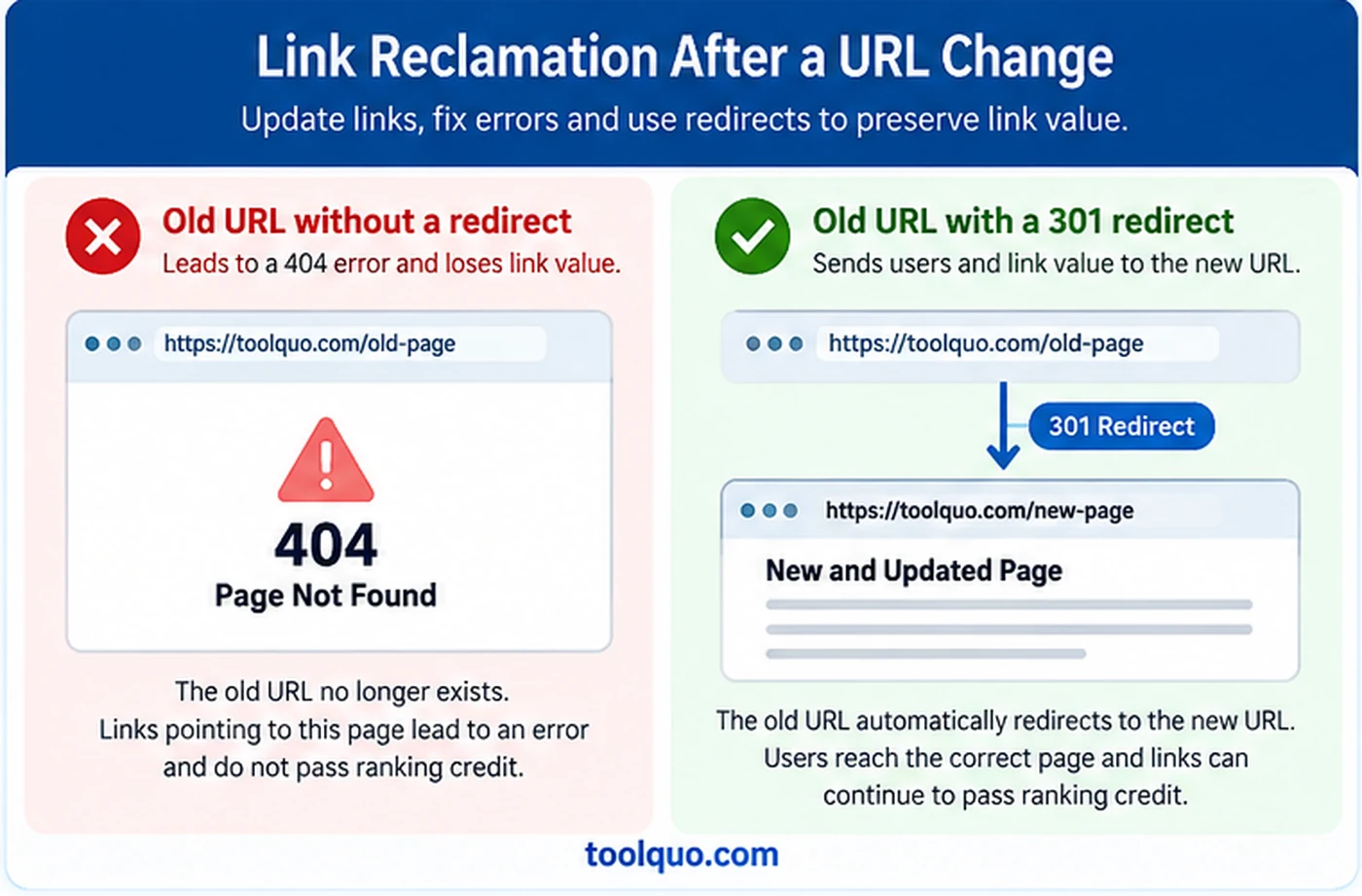
You can also inspect backlink reports for links pointing to missing pages, check site logs or 404 reports, restore content where appropriate, and politely request a correction if another publisher made a mistake. Do not redirect every deleted article to an unrelated homepage: that does not serve visitors well.
5. How to Conduct Link-Building Outreach Without Spamming People
Outreach starts only after you have a useful resource and a relevant publisher. Name a specific question or gap in the other article and explain how your page could help its readers. Asking someone to link merely because you want better rankings gives the editor no reason to act.
A practical outreach process
- Choose one specific article on another site and read it fully. Identify the exact paragraph where a reference could genuinely help.
- Verify your resource is relevant, accurate, and more useful than simply linking to its homepage.
- Find the appropriate editorial contact or a publicly listed submission channel. Do not assume every journalist wants unsolicited promotional email.
- Write a short, personalized message naming the article and the reader problem. Offer a link only as a possible helpful addition.
- Record who you contacted, why, when, and any response. If needed, send a single reasonable follow-up rather than repeated messages.
Example: a respectful broken-link email
Subject: Broken composting reference in your beginner guide
Hello, I was reading your article on composting at home. The link to the “what to compost” diagram in your materials section currently leads to a page-not-found error. I thought you would want to know so readers can access that explanation. We have a simple, checked diagram on the same topic here: [URL], in case it is useful as a replacement. Thanks for the helpful guide.
Notice what this message does not say: it does not request a specific anchor phrase, mention “link juice,” offer a reciprocal link, or promise search rankings. It gives the publisher an accurate reason to consider a change.
What should an outreach tracker contain?
Keep an outreach log containing the referring article, the proposed contribution, the contact route, the date of your message and the response. Section 9 shows which source, target and anchor-text fields to add when a backlink report prompted your research.
6. Off-Page SEO Beyond Link Building
Unlinked mentions and reputation
As explained in Section 4.4, a publication can mention your work without adding a clickable link. That attention may lead people to search for the resource or cite it later. Record the present benefit as awareness rather than an earned backlink or a proven ranking signal.
A trustworthy public reputation grows when independent people find your information accurate and helpful. Do not confuse general brand awareness, actual referral visits, and Google ranking signals: they are different outcomes.
Reviews and E-E-A-T
For a shop or service business, genuine customer reviews may help potential customers decide whether to visit or buy. For an informational blog, clear authorship, first-hand evidence when relevant, accurate claims, and transparent limitations matter more than trying to manufacture ratings.
You may see E-E-A-T discussed in SEO articles. The letters stand for Experience, Expertise, Authoritativeness, and Trustworthiness. Google explains that E-E-A-T itself is not a single specific ranking factor. Use it as a practical reminder to demonstrate who created content, how claims were checked, and why a reader should trust the information, not as a score you can increase by purchasing mentions.
Social media, forums, and community promotion
A well-written social post or a helpful answer in a gardening community can bring interested visitors to your page. A teacher who finds the article through that discussion might later link to it in a course resource list. The social share did not magically become an editorial backlink; it helped the resource reach someone who could independently recommend it.
Answer a community question completely before adding your link. Include it only when it provides something genuinely useful that would otherwise be missing, such as a detailed diagram or a source readers can check. If the link does not help, leave it out.
7. First Build a Page Another Website Would Want to Cite
Having reviewed several techniques, now test whether a page of your own is worth promoting. Instead of asking which article you most want to rank, identify one that supports a specific claim, demonstrates a difficult step or provides a resource another writer’s readers could use.
Imagine a cooking blogger writing about why homemade bread fails to rise. A separate article containing clear photographs of under-proofed and over-proofed dough, with a sensible explanation of the differences, could improve the blogger’s piece. A generic page saying “bread making is important” would not.
A five-question test for your proposed linkable asset
- Who would use this? Identify a specific reader group, such as beginner gardeners or parents helping children revise.
- What problem does it solve? Point to one difficulty or unanswered question, not a broad topic like “gardening tips.”
- Why would another writer refer to it? Does it offer an original chart, a tested explanation, an unusually good picture, a printable tool, or reliable data?
- Can a reader verify or use it? Explain methods, sources, measurements, dates, and practical limitations where relevant.
- Does it work without a backlink campaign? A useful resource should still be worth publishing even if nobody links to it.
If the answers remain unclear, improve the resource first. Experienced teams may prepare different assets for different needs, such as original datasets for reporters, diagrams for teachers and task-focused templates for practitioners.
8. How to Check Your Website’s Backlink Profile
A backlink profile is the set of outside links a particular tool has discovered pointing to your website. Record the tool, date, source pages and destinations so future comparisons have a credible starting point.
Start with Google Search Console
- Open Google Search Console and select the correct verified property for your website.
- Open the Links report. Under External links, look at the sites and pages linking to you and the pages on your website receiving links.
- Export the available data and write down the date of the export.
- Open a few reported referring pages. Check whether the link is still live and why it was placed.
- Record the observation date beside each figure. Search Console reports links found in its own dataset, not necessarily every link that exists anywhere on the web.
For a beginner, the most useful distinction is between “the report shows no backlinks” and “the website has no backlinks anywhere.” Search engines and third-party services maintain different indexes, so no single report proves that a link does not exist elsewhere.
Distinguish links to your homepage from citations to particular articles. A homepage link may identify your brand, while an article-level link may reveal which explanations or original findings outside publishers chose to cite.
Three measures that should not be confused
- Total backlinks: the number of links counted by that particular tool under its rules. Multiple links from the same site may increase this total.
- Referring domains: the number of distinct domains reported as linking to you. Five separate backlinks from the same domain can still represent only one referring domain.
- Linking pages: the particular webpages where the links appear. This is often the most useful list to inspect because you can read why each citation was made.
Backlink services crawl different parts of the web and use different counting methods. Their reports are overlapping estimates. If one shows 50 links and another shows 30, adding them does not prove you have 80 unique backlinks. Verify the source pages instead.
9. How to Check Competitors’ Backlinks for Free in Bing Webmaster Tools
A free backlink report will not reveal every link to your competitors, but it can show where to begin looking. We followed the process below when investigating links for a new blog in October 2026. The objective is not to build the longest possible list of domains. It is to find actual articles that reference comparable resources and understand why their authors chose to link.
The route through Bing, at a glance
Bing Webmaster Tools → Backlinks → Backlinks To Any Site → Add a site to compare → Top referring domains → View detailed report → Show domains not linking to my site → Select a domain → Referring Pages → Download all.
For anchor-text research, follow: Backlinks To Any Site → Top anchor texts → View detailed report → Select an anchor text → Referring Pages. The detailed menu and download options may change, but this sequence describes the workflow we used.
Step 1: Verify your website
Open https://www.bing.com/webmasters/ and sign in. If you already manage the website in Google Search Console, Bing offers ‘Import your sites from GSC’ during setup. Authorize the relevant Google account and select your verified property. Alternatively, use Bing’s XML-file, HTML-meta-tag or DNS verification method. Verification establishes that you own your site; you do not need permission from competitors to inspect the public link data Bing provides.
Step 2: Record the starting position
Choose your property in the top-left site selector, then open Backlinks in the left menu. The ‘Backlinks For Your Site’ tab shows the data Bing has detected for your property. Record the observation date, any referring-domain figures and the most-linked pages. If the panel says ‘No data available’, report exactly that, rather than claiming that no backlinks exist anywhere. Google Search Console → Links → External links provides a separate sample for your own site.
Step 3: Add two comparable websites
Select ‘Backlinks To Any Site’, then ‘Add a site to compare’. Enter one domain and repeat with a second. Bing compares your verified website with up to two others at a time. Select websites serving similar readers or offering the same type of content. A page that teaches indoor gardening is more usefully compared with another gardening guide than with an unrelated online plant retailer, whose links may arise from commercial relationships.
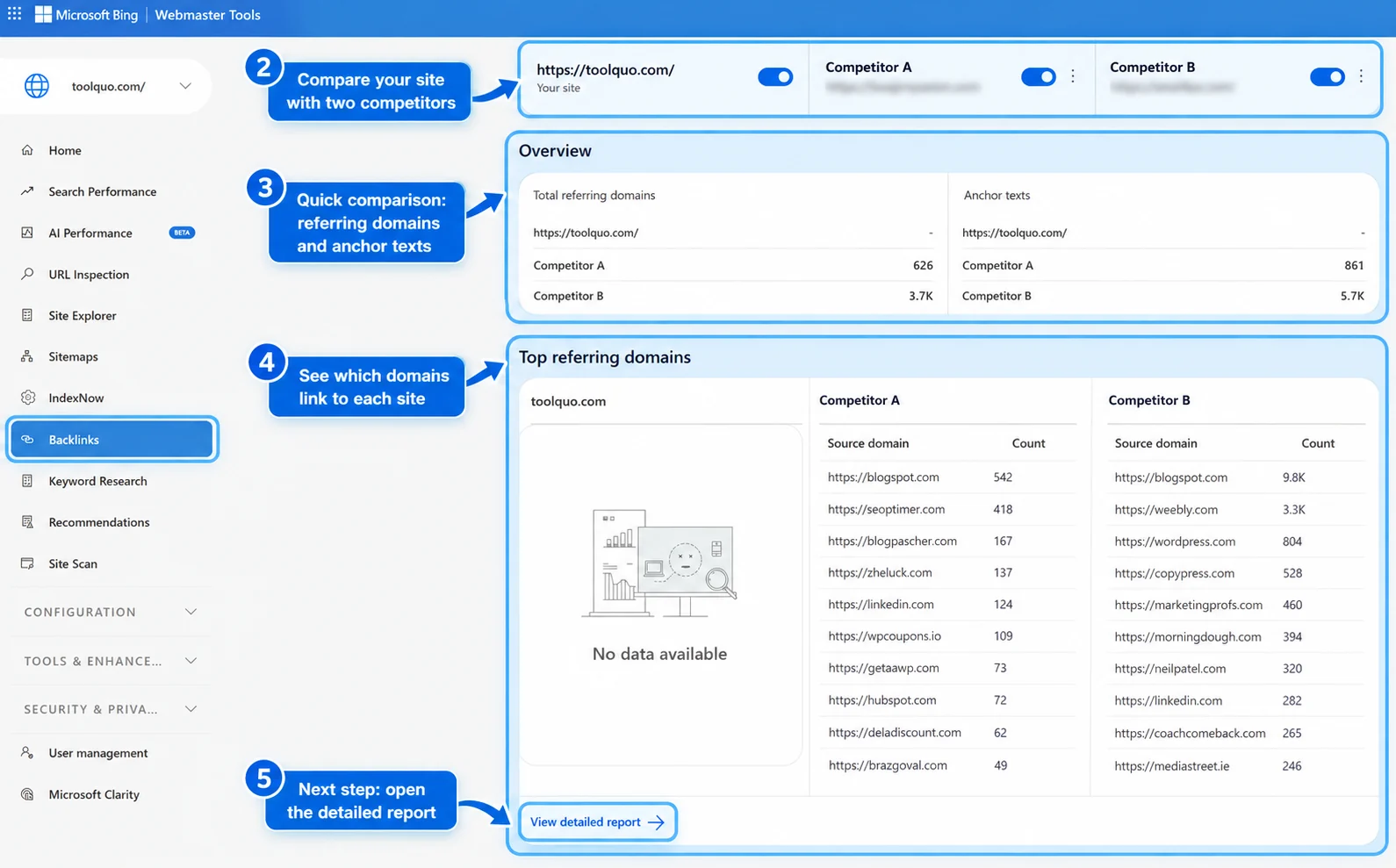
Step 4: Open and filter the referring-domain list
Below the comparison overview, find ‘Top referring domains’ and click ‘View detailed report’. The report offers filters including ‘Show all data’, ‘Show only common domains’ and ‘Show domains not linking to my site’. Choose the last option to find domains Bing reports as linking to competitors but not to you. These are potential leads, not automatic requests for a backlink.
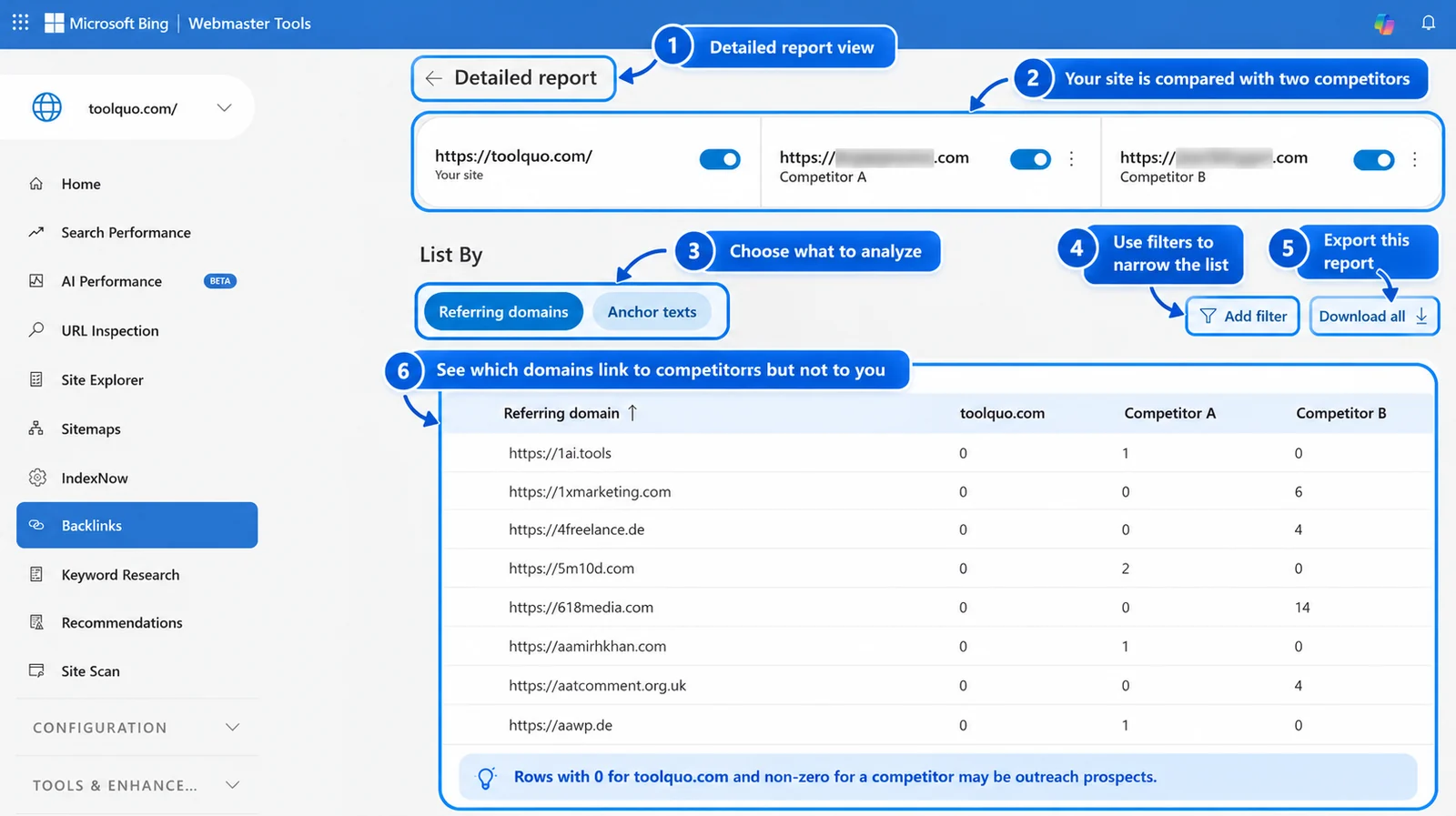
A referring domain is the external website containing one or more links. For instance, five separate articles from one education website can create five recorded backlinks while still representing one referring domain. You must open its referring pages to see what those links actually refer to.
Step 5: Download both summary reports
Use ‘Download all’ to export the referring-domain CSV when available. You can also open ‘Top anchor texts’ → ‘View detailed report’ and export its CSV. The domain report helps identify possible publishers. The anchor report shows clickable words used in links, including brand names, page names and topic-specific phrases. Neither report, by itself, establishes whether a link is an independent editorial recommendation.
Save each export with its date and compared domains. Avoid merging counts across different tools or export sets: they use different indexes, sampling rules and update schedules.
Step 6: Drill down to actual source pages
Return to the referring-domain report and click a relevant domain. Bing can display a ‘Referring Pages’ view, where the CSV commonly includes ‘Source Url’, ‘Anchor text’ and ‘Target Url’. The source URL is the outside article containing the backlink; the target URL is the competitor’s page receiving it; and the anchor text identifies the clickable wording. In the competitor comparison, detailed views can show up to 100 referring-page rows for the selected domain or anchor.
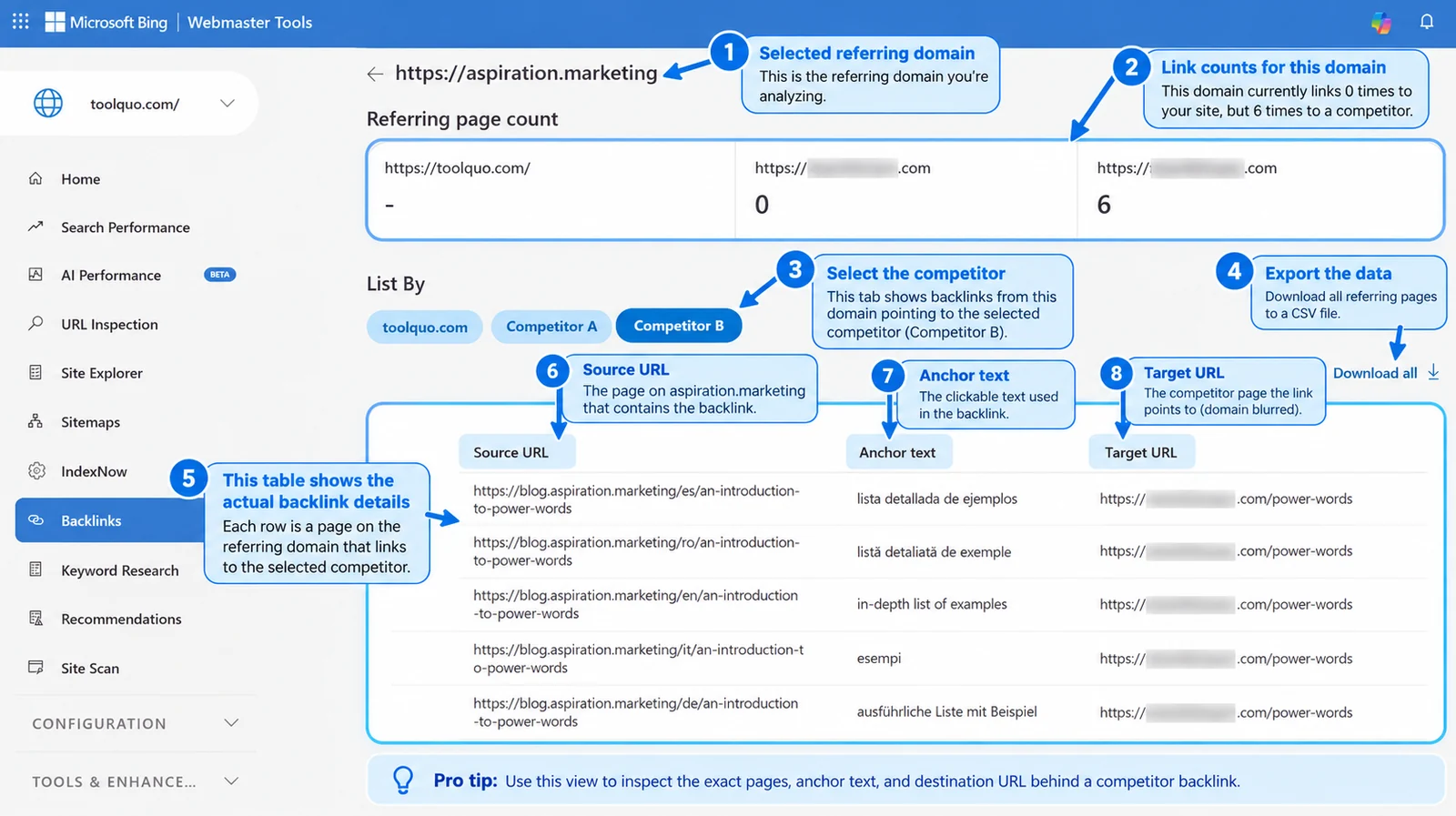
Now open the source page itself. Read the sentence around the link and check where the target actually leads. Is it an expert quotation, a list of resources, a reference to research, an advertisement or an automatically repeated link? The right answer determines whether your own page could add value.
Step 7: Separate reported rows from independent articles
Several rows may come from one article with different query parameters, translations or archive listings. These are not all the same phenomenon. Query parameters may identify alternate URLs for the same page; translations are separate language pages; and archive pages may reproduce snippets from an article. Inspect the pages and their canonical addresses before interpreting the count.
In our tests, a single translated article generated six link records, while a writing site produced thirteen records associated mainly with two original articles and their archive pages. Section 13 explains these observations without treating every row as a separate editorial decision.
Step 8: Turn the evidence into a realistic opportunity
For each promising linking page, record the competitor resource being referenced, why the writer cited it and what that writer’s readers needed. Next, assess whether you have an accurate, distinctive page that could help those readers. If you do not, mark the prospect as unsuitable. Do not contact a publisher merely because its domain appears in the report.
A useful tracking sheet includes: referring domain; source URL; target URL; anchor text; underlying article or repeated URL; reason for the link; your possible resource; reader benefit; contact method; and eventual result. This keeps the analysis focused on editorial fit rather than vanity backlink totals.
What the free report cannot tell you
Bing describes its backlink profile as a representative set rather than a complete inventory. For ‘Backlinks To Any Site’, its summary lists are based on the top 500 referring domains and anchor texts for each compared site. Detailed competitor views have a limit of 100 referring-page rows. These are Bing’s reported links, not a measurement of exactly which backlinks Google counts or how strongly it weighs them.
You may supplement the research with Search Console for your own site or limited free previews from commercial tools. The extra figures should be used to discover more pages to inspect, not added together as if each database contained different links.
Official source: Bing Webmaster Tools Backlinks documentation
How to analyze competitor backlinks with paid SEO tools
Paid tools can help when you need filters, historical data or exports beyond a free tool’s limits. They make discovery faster, but do not establish whether a reference would fit a publisher’s article. That requires reading the actual page.
Semrush: Open Backlink Gap, enter your website, and add up to four competing domains. The tool compares up to five sites in total. Apply the filter showing domains that link to competitors but not to you. Then inspect each promising source domain and its actual linking page, see which competitor article it recommends, and decide what a reader gained from that citation. The Backlink Analytics report provides further link details; exporting and other functionality depend on your account.
Ahrefs: Use Competitive Analysis and choose Link Intersect. Enter your website or specific article URL as the target, then select competing websites or article URLs. Ahrefs’ official instructions describe comparisons involving up to ten competitors. Inspect the referring domains or referring pages that link to them but not to you. For a particular guide, select an exact-URL comparison when possible. This avoids confusing links to a competitor’s homepage with citations earned by a specific article.
SE Ranking: In Backlinks, open Backlink Gap Analyzer. Enter your domain or article URL and up to five competitors. Examine the domains that link to competitors but not to you, then open the Backlinks view to examine the source page, destination and anchor text. Where your plan permits, export the relevant rows to CSV or XLS for closer examination.
For example, a cooking class might recommend two bread-making guides. A link-intersect report reveals the class’s resource page, but you still need to read it. If your guide adds original photographs explaining dough proofing, it might help students. If it adds nothing, the missing link is not an opportunity.
Reuse the tracker from Section 9. Extra paid-tool filters can prioritize its rows, but an authority score should never override relevance or a credible reason for citation.
For a new blog with a limited budget, do the first comparison in Bing Webmaster Tools before subscribing to anything. Pay for a specialist tool only when you know which extra data will change your next decision, such as historical links, more competitors, link-intersect filters or exports. Menu names and access limits can change, so check the provider’s current plan documentation.
10. Advanced Off-Page SEO Strategies
Once you understand backlinks and can assess a few prospects accurately, the next challenge is building a repeatable program. Advanced off-page SEO is less about discovering a secret trick and more about selecting the right pages, understanding why links were earned, controlling risk, and measuring outcomes carefully.
10.1 Compare individual pages, not just entire domains
When an article is your target, analyze that article’s backlinks instead of relying only on domain-wide counts. A major travel website may have thousands of referring domains, but only a few might cite its guide to one hiking route. Those page-level citations better explain what readers need on that narrow subject.
10.2 Perform link-intersect analysis
Link intersect means finding websites that link to two or more competing resources but do not link to yours. Imagine a cooking school’s reading list recommending two different blogs about baking bread at home. Your own bread-making guide is absent. The school clearly recommends beginner baking resources, so you can inspect what its readers need and assess whether your guide adds a useful explanation or original illustration. If it does, you may approach the school. If it does not, appearing in the tool’s missing-links report alone is not a reason to ask for a backlink.
To use the idea well, group prospective sites by the reason they link: research evidence, practical demonstrations, visual teaching aids, original photographs, or curated recommendations. The pattern can tell you which kind of resource to improve next.
10.3 Match outreach to the kind of citation
- For a statistical citation, offer well-labelled original data, source details, and methods.
- For a teaching resource, offer an understandable explanation, worksheet, or diagram that can be used by students.
- For a technical how-to guide, offer a demonstrated step, documented test, or reproducible example.
- For a resource roundup, explain which precise audience need your page fills that existing entries do not.
An editor writing an evidence-based report needs something different from a teacher assembling a class reading list. A generic pitch treats them as identical and often fails.
10.4 Assess opportunity versus effort
Not every potential backlink is worth pursuing. Consider the resources required to improve the destination page, find the right editor, personalize the message, and maintain the linked information. A possible citation from a highly relevant specialist association may deserve more attention than dozens of unclear leads from generic websites.
For a larger campaign, assess topic fit, reader benefit, editorial credibility, effort and potential referral visits separately. Recording the reasoning is more useful than producing an invented probability that a particular publisher will link.
10.5 Connect linkable information to the rest of your site
A free guide or original dataset may attract independent references more readily than a sales-focused page. Once readers arrive, useful internal links can direct them to related explanations, reviews, or services. For example, an educational guide to hiking safety might naturally link to a separate checklist for choosing suitable footwear.
The internal link should help the visitor; do not use an unrelated research page only as bait to push readers through a chain of commercial pages. Internal linking is an on-page activity that can complement off-page work.
10.6 Avoid assuming correlation proves causation
Suppose your site earns three new backlinks in March and its Google impressions rise in April. Did the links cause the rise? Possibly, but there may be other reasons: you updated content, seasonal interest increased, a competitor dropped out, or Google changed how results appear. The two events happening in sequence do not prove one caused the other.
Advanced measurement should record the dates of content edits, outreach, newly discovered links, Google Search Console impressions and clicks, and any notable search changes. Where possible, compare similar pages not involved in the campaign. Even then, describe the evidence as consistent with an effect rather than promising an exact ranking gain from a particular backlink.
11. Which Off-Page SEO Techniques Can Harm Your Website?
A seller may offer fifty backlinks for a fixed price and promise better Google rankings. That can sound easier than improving a resource and contacting editors. But when links are created mainly to manipulate rankings rather than help readers, they may violate Google’s link-spam policy. Google may ignore those links or take action against a website that participates in manipulative schemes. The result can be wasted money, lost search benefit and, in serious cases, lower search visibility and rankings.
Google’s link-spam policy specifically addresses schemes that create links to or from a website primarily to manipulate ranking. It lists buying and selling links for ranking purposes, excessive exchanges, automated link creation, certain low-quality directories, and large-scale optimized anchor-text placements among examples.
Examples of tactics to avoid
- Purchasing ‘100 dofollow backlinks’ from unrelated sites, where the purpose is to pass ranking credit.
- Joining a private blog network built mainly to link its members’ sites to one another.
- Mass posting a keyword-heavy link in blog comments, profiles, or forums.
- Exchanging links repeatedly with unrelated sites solely to boost rankings.
- Publishing many low-value guest articles whose main purpose is to place optimized links.
This does not mean every paid advertisement is prohibited. A business can buy advertising or sponsorship to reach an audience. Google says paid links should be properly qualified, typically with rel="sponsored" or rel="nofollow", rather than presented as ordinary editorial votes intended to pass ranking credit.
Are links marked ‘toxic’ necessarily dangerous?
Some SEO tools, particularly backlink-audit tools, label links as “toxic” or calculate a risk score. That label comes from the software company’s own model, not directly from Google. A warning is a reason to check the link’s context, not proof that Google has penalized your website.
Ask whether your site actually participated in manipulative link building, whether you have received a relevant message in Search Console’s Manual actions report, and whether the concerning links are part of a larger pattern. Do not panic about every unfamiliar domain.
When should you use Google’s Disavow Tool?
The Disavow Tool tells Google that you want it to disregard certain incoming links when assessing your site. Google explicitly says most websites do not need it. Its instructions set a high bar: you have a considerable number of spammy, artificial, or low-quality links, and those links have caused or are likely to cause a manual action.
Where possible, Google recommends first trying to remove problematic links. Disavowing the wrong domains can damage search performance. It is not a routine housekeeping step after every backlink audit, and you should not use it merely because an SEO tool colors some links red.
12. How to Measure Off-Page SEO Results
An off-page SEO campaign is not successful just because a backlink checker shows a higher number. You want to know what was earned, whether it was relevant, who visited as a result, and whether search visibility changed. These are related but different questions.
Metrics to track and what they mean
- Verified editorial links: the number of genuine citations you have checked on live pages, along with the actual destination URLs.
- Relevant referring domains: the number of distinct sites reported as linking to you, reviewed for topical fit rather than treated as inherently valuable.
- Linking pages and target pages: which outside articles are sending readers, and which of your own pages are receiving attention.
- Referral traffic: visits from other websites, as shown by web analytics such as GA4; review engagement and meaningful actions, not only sessions.
- Search visibility: changes in impressions, clicks, average position, and queries for important pages in Google Search Console. These are observations, not proof that links alone produced a change.
- Effort and outcomes: hours spent creating the resource and pitching it; relevant responses; placements earned; and whether the program seems worth repeating.
A worked example
Imagine a small educational blog contacts ten relevant course editors about its free printable revision timetable. Two editors reply, one adds a citation, and that citation sends twenty readers who download the worksheet. The campaign earned one verified link and measurable referral interest. Whether it also changed Google rankings requires separate evidence over time.
Keep the report honest. A single relevant link may send useful visitors even without a visible ranking improvement; twenty poor-quality links may provide little measurable value. Neither raw link count nor a third-party authority metric is a complete measure of success.
13. Off-Page SEO Case Study: What We Learned Starting With No Detected Backlinks
Can a new website learn how to earn quality backlinks without paying for an SEO subscription? We tested this question using Toolquo, a blog covering SEO and software tools. Our aim was to understand the reasons behind links earned by established websites, rather than copy their link counts or contact every site that appeared in a report.
The research was conducted on 23 October 2026. We used Google Search Console, Bing Webmaster Tools and manual checks of published articles. This is a completed analysis of available backlink evidence, not a link-building success story. We had not sent outreach emails or earned a backlink through this exercise.
First, establish an honest baseline
The Google Search Console ‘More sample links’ export for Toolquo contained no linking-page entries. In Bing Webmaster Tools, ‘Backlinks For Your Site’ displayed ‘No data available’. The competitor comparison also showed no detected links to Toolquo. We therefore recorded ‘no backlinks detected in these reports on 23 October 2026’. That wording matters: neither search engine claims its report contains every link on the web.
Next, compare referring domains and anchor texts
In Bing’s ‘Backlinks To Any Site’ comparison, we examined two established blogs with overlapping SEO and blogging topics. Their exported lists contained 500 referring-domain entries each, including 48 shared domains. Within those two limited lists, that meant 952 distinct domains. We also exported the anchor-text report, which contained 989 distinct phrases across the sampled lists. We later inspected a third established site to broaden the types of content we could investigate.
These numbers are useful for selecting leads, not for ranking one website against another. Established sites have a much longer publishing history than a new blog, and Bing’s comparison uses a limited sample. An anchor text or referring domain alone cannot tell us whether a link was editorial, relevant or genuinely valuable.
What we found by opening individual linking pages
We exported four referring-page reports from three publishers. Together they contained 45 backlink rows. We then compared the source URLs and opened representative articles instead of assuming that each row represented a separate recommendation.
| Sample investigated | Bing records | What the page checks revealed |
|---|---|---|
| Expert attribution | 2 | Two separate articles credited an expert contributor. |
| Links and URL variations | 24 | Ten distinct source-page paths after removing query parameters; fifteen rows came from variations of one article URL. |
| Translated article | 6 | Six language versions of one underlying article. |
| Article and archive pages | 13 | Two original articles plus eleven tag or archive URLs. |
| Total reported | 45 | These were not 45 independent editorial endorsements. |
Example 1, expert attribution and URL variations. One publisher’s first export showed two links crediting a named SEO practitioner in articles about content audits and launching a website. They pointed to the contributor’s homepage, not to a specific tutorial. Another export from that same publisher contained 24 links to a different competitor. Those 24 rows reduced to ten source-page paths when we removed query parameters for an initial comparison. Fifteen rows referred to variations of a single article URL. The lesson is to distinguish an author’s expert credit from a citation of a particular resource, and to check whether multiple URLs represent the same material.
Example 2, translated versions of one article. A marketing publisher had six links to a detailed resource about persuasive words. The six source URLs were English, French, German, Spanish, Italian and Romanian versions of the same underlying article. Each language page was a real URL, but the pattern originated from one editorial decision to recommend a useful reference. Counting six rows without that context would give a misleading impression of six unrelated recommendations.
Example 3, articles reproduced on archive pages. A copywriting publisher had thirteen reported links to the same reference. Two appeared in original writing-advice articles, while eleven came from tag or archive URLs that surfaced the articles’ content. Reading the original articles explained the link: the writer wanted readers to see a more comprehensive collection of examples. The source fit the subject naturally, but the thirteen rows did not represent thirteen independently written endorsements.
Three lessons from the results
First, a backlink count describes records in a tool’s database, not necessarily the number of independent editorial recommendations. Query-parameter variations, translated pages and archive listings can create several reported rows around one underlying piece of content. We should document the raw count and explain what manual inspection revealed instead of silently replacing one with the other.
Second, useful backlinks can be earned for different reasons. An expert contribution may be credited with a homepage link. A practical article may link to another page because it supplies additional examples, data or a worked explanation. Both can send readers, but they point to different approaches for earning future citations.
Third, appearing in a competitor backlink report is not enough to justify outreach. Our examples concerned expert commentary and persuasive-writing resources. That does not make those particular articles suitable places to request links to Toolquo’s SEO plugin tutorials. Any outreach must start with a specific gap in the referring article and a genuinely useful way to fill it.
How Toolquo can use this research
One possible approach is to contribute firsthand observations when a relevant publisher needs expert input. Another is to develop an evidence-based resource that another author can use as a reference. Toolquo’s documented Rank Math testing and comparisons of SEO-tool traffic estimates are possible starting points, provided the methods, dates and limitations are clear to readers.
The next step is not a mass outreach campaign. It is to select one well-supported Toolquo resource, identify a handful of articles that might genuinely benefit from it, and explain exactly what their readers would gain. We would then record which editors were approached, whether they replied, and whether any working editorial links resulted.
What this case study does and does not establish
The analysis shows that a free backlink-comparison tool, followed by manual page checks, can reveal the mechanism behind a competitor’s links. It does not show that Toolquo has earned backlinks, that any outreach will succeed, or that a particular type of link will increase rankings. The underlying Bing lists are limited samples from a single day, and we investigated only three referring publishers. The conclusions should therefore be treated as practical findings from a small experiment.
For transparency, three illustrative linking pages from our inspection are available below. They are evidence for the findings, not recommendations that every reader pursue these publishers:
Example 1 source: Expert quotation in a content-audit article
Example 2 source: Marketing article published in multiple languages
Example 3 source: Writing-advice article recommending a detailed reference
The next section turns these findings into a practical schedule for a small website with limited resources.
14. A 90-Day Off-Page SEO Plan for a New Website
This example schedule is a way to organize work, not a prediction that your site will earn a certain number of backlinks or reach a certain ranking within 90 days.
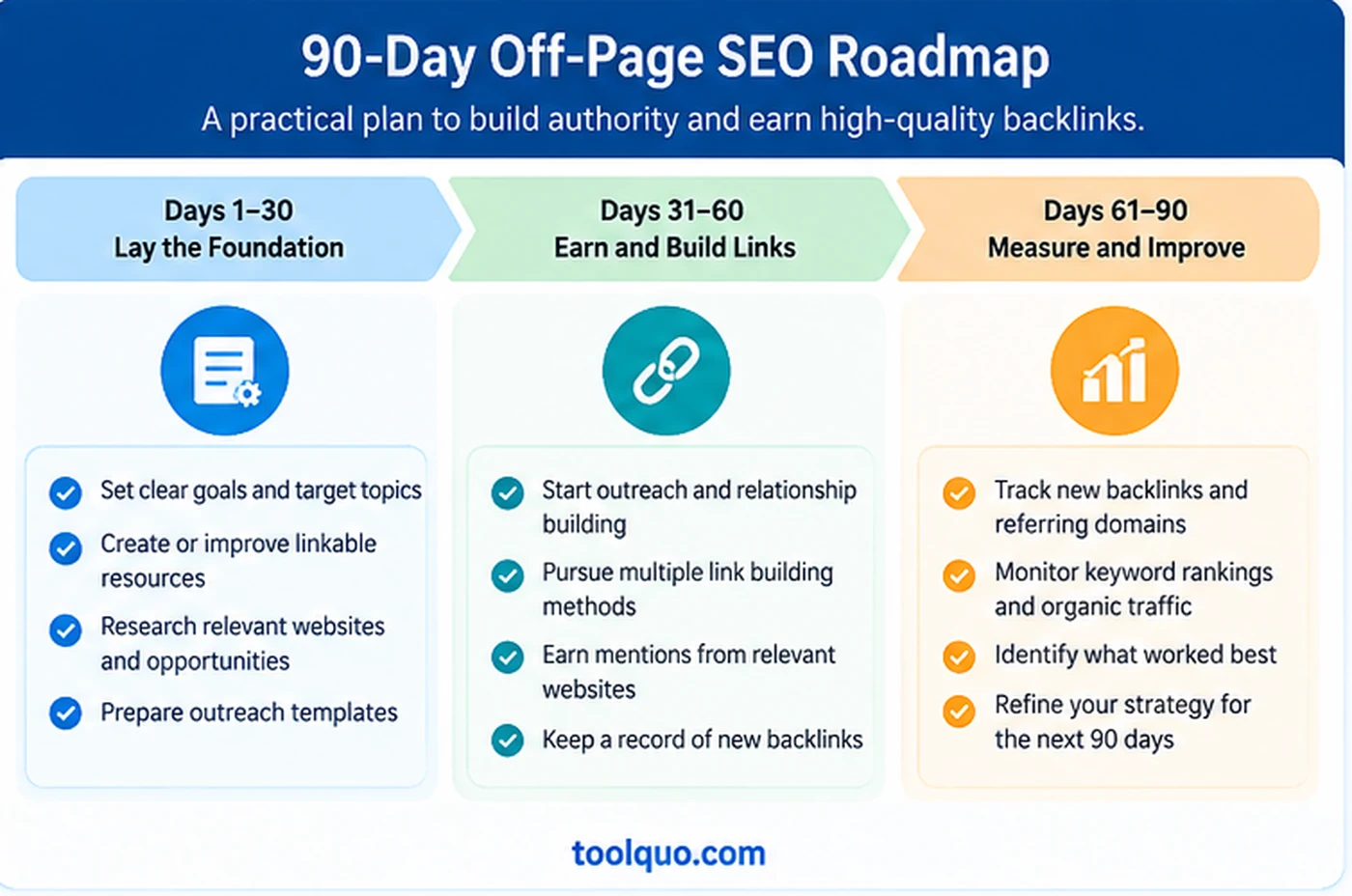
Days 1–15: Check the starting position
Use Google Search Console and, if available, Bing Webmaster Tools to record the currently detected links. Review your existing articles and identify one that contains a genuinely helpful example, dataset, diagram, or printable resource.
Days 16–30: Improve the resource
Make the chosen page accurate, clear, and easy to cite. Add source details, dates, labels and practical limitations. Test any downloadable file or calculator. Ask a reader unfamiliar with the topic whether the explanation makes sense.
Days 31–45: Identify relevant websites
Inspect a small number of competitor backlinks, relevant resource pages, and niche publications. Write down why each possible site’s readers might benefit from your resource. Discard poor matches early.
Days 46–60: Begin modest, personalized outreach
Approach a few carefully selected editors. Explain the particular reader benefit without demanding a link. Share the resource in communities only where it is useful and permitted.
Days 61–75: Improve from what you learn
If nobody responds, check whether your suggested content really fills a gap, whether the pitch is specific, and whether the contact was appropriate. Improve the resource, not just the subject line.
Days 76–90: Record outcomes
Verify any published links, check referral visits, and note search metrics without claiming causality. Review the time invested and decide whether to refine the asset, contact different publications, or test another approach.
15. Off-Page SEO Checklist and FAQs
Off-page SEO checklist
- I can clearly explain what my article helps another website’s readers do.
- My page contains accurate, useful information, and any research methods or dates are disclosed.
- I understand the difference between backlinks, internal links, linking pages, and referring domains.
- I have checked my backlink baseline without assuming one tool sees every link.
- I evaluate a possible backlink for topical relevance, editorial purpose, and reader benefit.
- I use legitimate methods such as useful resources, selective outreach, and correcting genuinely broken references.
- I protect working backlinks when URLs change by maintaining appropriate redirects.
- I avoid paid links intended to manipulate ranking and properly qualify advertising links.
- I measure editorial citations, referral visitors, and organic search changes separately.
Can a website rank on Google without backlinks?
Yes. Google does not publish a minimum backlink count required for ranking. Search intent, relevance, quality, and many other systems matter. In competitive topics, independent editorial backlinks may be particularly useful, but no count guarantees a position.
How many backlinks should a new blog build each month?
There is no universal safe or necessary target. The value of the link and the process used to earn it matter more than chasing a number. Set process goals, such as producing one useful asset and reviewing several suitable publications, not artificial quotas.
Are nofollow backlinks useless?
No. People can click them, and they can introduce your work to relevant readers. Google treats link attributes as hints, but you should not assume that an individual nofollow link passes a particular amount of ranking credit.
Do social media shares count as backlinks?
A normal social share is not the same as an independent editorial link from a relevant article. Shares can spread awareness and occasionally lead to later citations, but the share itself should not be treated as proof of a ranking gain.
Should I buy backlinks?
Avoid buying links for the purpose of passing ranking credit. Legitimate sponsored coverage or advertising can be appropriate if its links are properly qualified and its commercial nature is clear.
What if I change a URL that already has backlinks?
Avoid changing URLs without a reason. If a change is needed, use a permanent redirect to the most relevant new page, test the old URL, and update your own internal links. Otherwise, existing visitors may reach a 404 page.
Should I disavow every backlink an SEO tool calls toxic?
No. Google says most sites do not need to disavow links. Only consider this advanced action under the circumstances described in Google’s official guidance.
Conclusion: Off-Page SEO Starts With Helping Other Websites’ Readers
Off-page SEO is strongest when a useful resource meets a genuine reason for another publisher to recommend it. Our case study demonstrates why raw backlink numbers alone cannot show that: they may include repeated URLs and several distinct reasons for referencing content.
Choose one strong resource, find relevant pages where it would add information, and record the outcome. Improve your approach using verified citations, referral visits and search data, not a target number of backlinks.
About the author
Nikhil Bhardwaj
Founder & Editor, Toolquo
Nikhil leads Toolquo’s editorial direction, focusing on practical software research, transparent comparisons, and clear buying decisions.
View author profile →Keep exploring
Related guides
November 3, 2026
Yoast SEO Sitemap: How to Find, Configure and Fix Errors (2027)
Find your Yoast SEO sitemap, choose which URLs belong in it, submit it to Google Search…
November 1, 2026
How to Use Yoast SEO: Complete Beginner’s Guide (2027)
Learn how to install and configure Yoast SEO, choose WordPress SEO settings, optimize a post, and…
October 29, 2026
Yoast SEO Review (2027): How Good Is It, and Is Premium Worth It?
Our hands-on Yoast SEO review explores Free features, Premium pricing, strengths, limitations, and whether upgrading is…