Yoast SEO Score Explained (2027): What Do Green, Orange and Red Lights Mean?
Understand Yoast SEO’s traffic lights, see our original test, and learn which SEO and readability recommendations deserve attention.
On this page
You have finished an article, but Yoast still shows an orange or red light. Should you rewrite it? And if the light turns green, does that mean the page is ready to rank?
The Yoast SEO score tells you how your page performs against the plugin’s checks. It can reveal missing information and writing patterns worth reviewing. It cannot establish whether your article is accurate, more helpful than competing pages, or likely to rank on Google.
Our ToolQuo test illustrates the difference. Entering a focus keyphrase changed Yoast’s assessment of content already present. Adding and saving a meta description resolved further warnings. The final analysis showed 16 good results and one improvement, without a major rewrite.
Here is how to interpret the colours, prioritize useful changes and investigate results that seem wrong.
Looking for specific information? Use the table of contents to jump directly to the section you need.
1. What Is the Yoast SEO Score?
The Yoast SEO score is a graded assessment of selected aspects of your content and presentation against the plugin’s checklist. Yoast communicates that assessment through coloured traffic-light indicators.
Yoast provides separate SEO and readability analyses. The former checks selected on-page elements against your focus keyphrase; the latter examines writing patterns that can affect how easily readers follow the article.
Different WordPress SEO plugins communicate their assessments differently. Yoast shows traffic-light indicators. Rank Math displays a prominent score out of 100, as explained in our Rank Math SEO score guide. Each plugin applies its own checks, so a Yoast colour and a Rank Math number are not directly interchangeable. Neither is a score assigned by Google.
The check meets Yoast’s criteria.
Review the suggested improvement.
Investigate the issue named in the check.
May indicate informational feedback, missing input or an unavailable check. Read the label.
Yoast shows a colour for the analysis as a whole and a separate colour beside each check. For example, the overall SEO analysis might be green while the image-alt check is orange. Here, the orange bullet is an “individual result”: it tells you about the image-alt check specifically, rather than the article’s combined assessment. Read its explanation to decide whether a change would help your page.
How does Yoast calculate the overall assessment?
Yoast evaluates your article using several checks, such as keyphrase use in the introduction, meta description length, internal links and image alt text. Each applicable check receives an internal numerical result. Yoast’s documented SEO calculation combines these results using an average converted to a 0–100 scale. Some checks can apply penalties; it is not simply a count of green bullets. The readability assessment uses a separate calculation.
This calculation summarizes how your article performs against Yoast’s checks. It cannot determine whether your explanation is accurate, answers the reader’s question or is more useful than competing pages. Google’s ranking systems consider relevance, helpfulness and many other signals that this checklist cannot assess. Use the traffic lights to identify points worth reviewing, then apply your own judgement before changing the article.
2. How to Check Your Yoast SEO Score in WordPress
For a post, follow WordPress Dashboard > Posts > All Posts > find the article > Edit. For a page, follow WordPress Dashboard > Pages > All Pages > find the page > Edit.
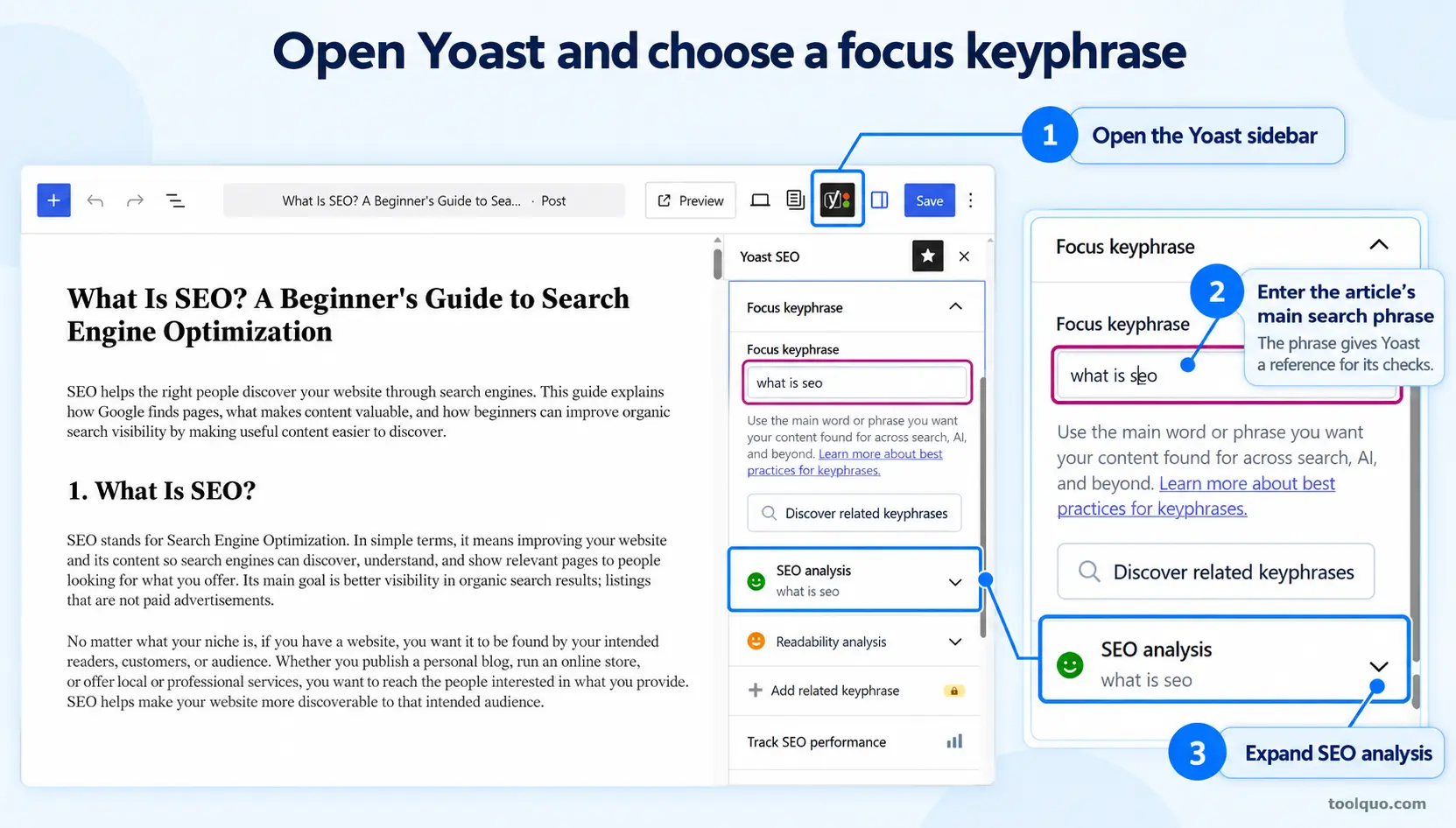
In the block editor, click the Yoast SEO icon near the upper-right corner to open its sidebar. Alternatively, scroll below the article to the Yoast SEO panel. Click SEO analysis, then expand Problems, Improvements and Good results to read the individual checks. Click Readability analysis to review the writing feedback separately. The panel’s location can vary with your editor and enabled settings.
Enter the intended search phrase in Yoast’s Focus keyphrase field before interpreting keyphrase-dependent warnings. This is the phrase you want the page to address, such as “what is seo” for an introductory SEO guide. Choose a phrase that matches the reader’s question, rather than words selected simply to produce green lights.
Read the explanation beside each bullet. “Keyphrase in meta description” and “Meta description length” concern different things even though both refer to the same field. Our guide to using Yoast SEO provides the detailed interface instructions.
3. Our Experiment: Why Yoast’s Analysis Changed
We tested Yoast SEO Free 28.7 in October 2026 using an existing copy of our What Is SEO? guide. We examined how the plugin’s analysis changed as we supplied its focus keyphrase and description; we did not measure changes in Google rankings.
Before entering the focus keyphrase
With the focus keyphrase field empty, Yoast displayed approximately ten problems. Several concerned keyphrase placement in the introduction, title, description, slug and headings. Other feedback concerned metadata or image alt attributes.
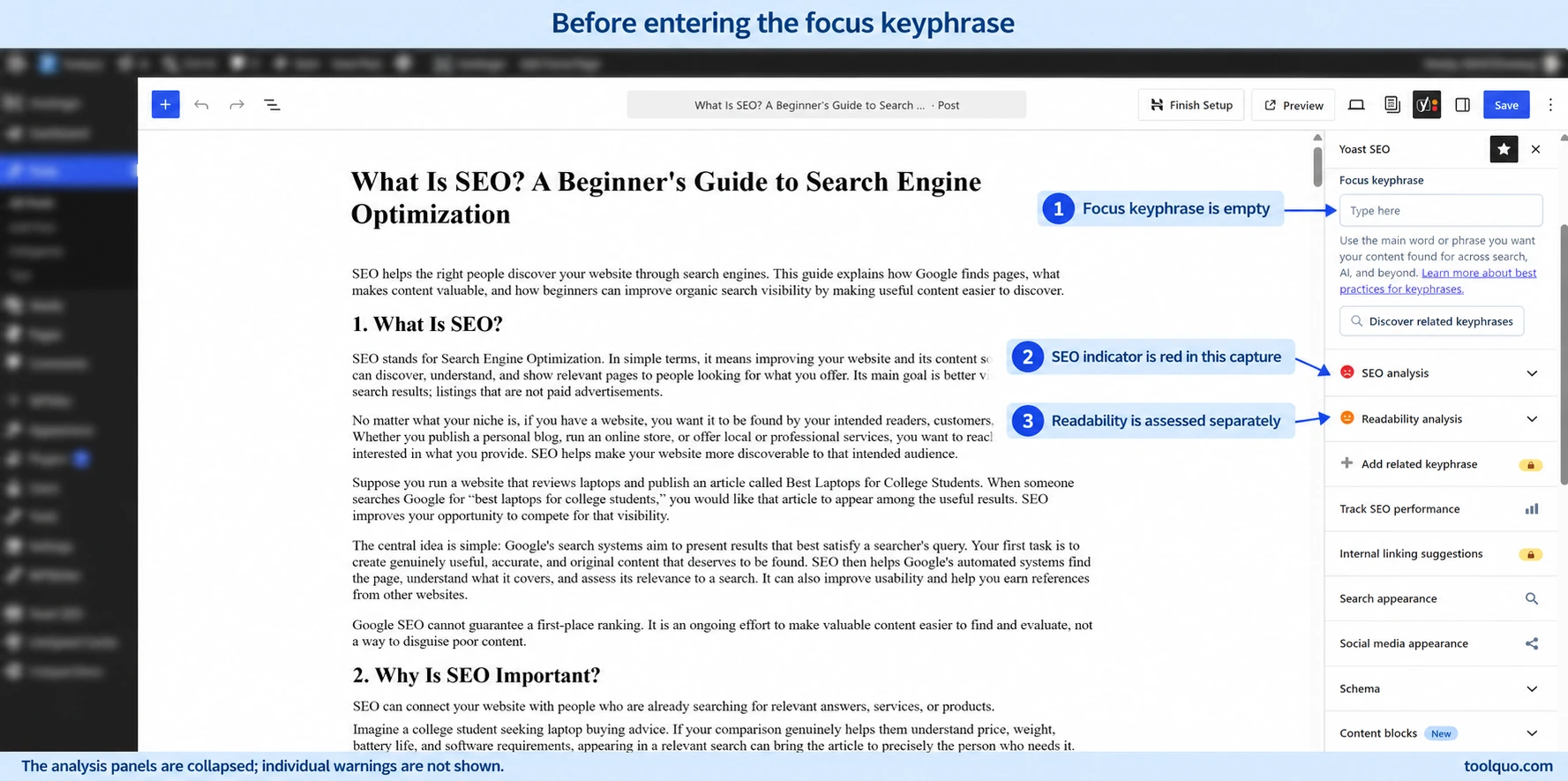
This is understandable: until we tell Yoast which search phrase we want to target, it lacks the reference needed for its keyphrase-specific checks. A page can already discuss the right topic, yet Yoast still needs the focus keyphrase field completed before it can assess that topic language against our chosen phrase.
After entering “what is seo”
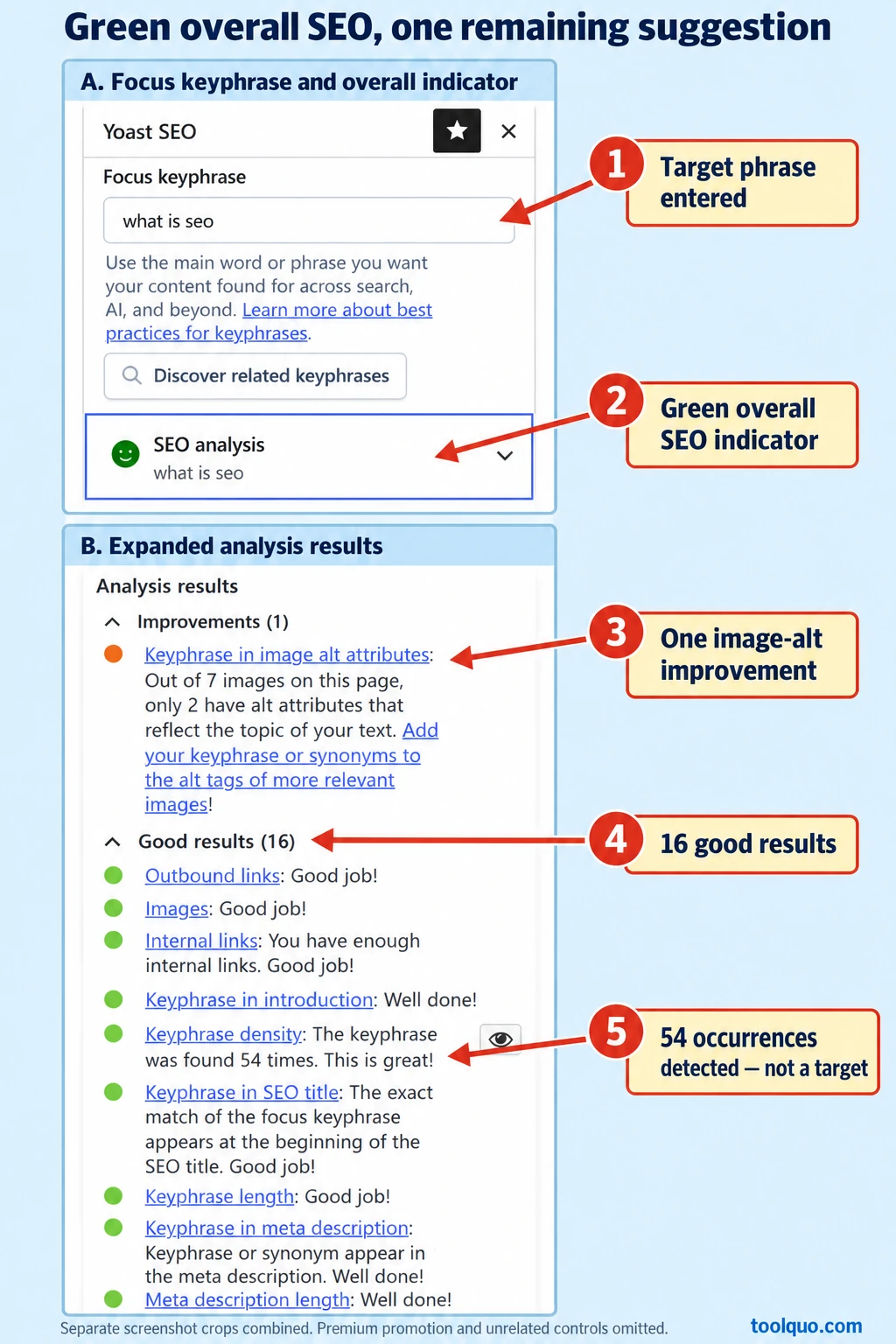
We entered “what is seo” in the focus keyphrase field. Yoast now had a defined target against which to assess the article. It recognized the phrase in the introduction, title, slug and subheadings, and reported good results for checks such as links and text length.
During this stage, Yoast detected the keyphrase 54 times in our article. That count describes this particular analysis; it is not a repetition target for other articles. Use density feedback to review whether your topic is communicated naturally, rather than adding the phrase a specified number of times.
After adding and saving the meta description
Two remaining problems concerned the keyphrase in the description and the description’s length. We supplied a suitable description and saved it. The final SEO analysis reported 16 good results and one improvement relating to image alt attributes.
These steps represent different actions. Setting a focus keyphrase supplies analysis information. Adding a description completes metadata. Rewriting an unclear explanation changes the reader’s experience. All can change a plugin’s feedback, but they are not interchangeable measures of improvement.
Our result belongs to that article, version and configuration. It is not a promise that another page will produce the same number of checks.
4. Which Yoast SEO Recommendations Should You Follow?
Start with the purpose of the page: give the intended reader a useful, accurate and trustworthy answer. Google’s guidance describes experience, expertise, authoritativeness and trustworthiness, collectively E-E-A-T, as qualities its systems seek to identify through various signals. E-E-A-T is not one standalone ranking factor or a score Yoast measures. Relevant firsthand evidence, reliable sources and clear explanations can help readers assess your credibility.
Topic language, titles and descriptions
An introduction should quickly confirm that the reader has found the right page, answer or frame the main question, and explain what the article will help them do. Avoid a long generic opening that delays the answer.
For example, a beginner’s guide to SEO could start: “SEO means search engine optimization: improving your website so search engines can understand it and people can find useful pages through unpaid search results.” It can then explain what the guide covers. This answers “what is SEO?” early while introducing the topic naturally.
Use the focus keyphrase where it sounds natural. Yoast’s keyphrase-density check considers how often the phrase appears relative to the amount of text. If Yoast reports too little or too much use, reread the article: is the topic clear, and does any wording sound repetitive? Add or remove occurrences only where doing so improves the explanation. Yoast’s recognition of synonyms and different word forms depends on the plan and supported language.
Write an accurate SEO title and a useful meta description. Treat length bars as display guidance, not a universal Google character limit. Google may choose different wording for a title link or snippet. Our on-page SEO guide explains these elements more broadly.
Headings, links and text length
Headings should divide the explanation into useful parts. Include subject language where relevant, without putting the exact keyphrase into every heading. A working sequence matters more than repeated words.
Internal links should lead to useful related explanations. External links should substantiate a claim or help the reader take a next step. Do not insert an irrelevant link merely to clear a warning.
A text-length recommendation also needs context. A detailed tutorial needs enough explanation to solve the task. A Contact page need not become a long essay. For an existing published URL, do not change a working slug solely to satisfy a keyword check; a justified URL change requires redirect planning.
How to interpret an image-alt recommendation
An image-alt warning is a useful example of why a recommendation needs interpretation before you act. The right response depends on what each image communicates, rather than whether you can insert the focus keyphrase into its description.
In our test, Yoast reported that only two of seven images had alt attributes it considered relevant to the text’s topic. The remaining orange recommendation prompted a review of those descriptions; it did not establish that five images needed the exact keyphrase added.
Alt text provides a text alternative for an image’s relevant information. A screenshot might need a description such as “Google Search Console performance chart showing clicks and impressions.” Adding “what is seo” to that description is useful only if it accurately explains the image in context.
Review images individually. Informative images need appropriate alternatives; genuinely decorative images may use empty alt attributes. Google advises descriptive alt text and warns against keyword stuffing. The correct response is to improve inaccurate or missing descriptions, not force the keyphrase into every image.
When a recommendation may reasonably be left unchanged
You can reasonably leave a recommendation unchanged when it conflicts with accurate, natural writing or does not suit the page’s purpose. First understand what the check is asking; then decide whether following it would actually help your reader.
Suppose Yoast flags consecutive sentence beginnings in a deliberate sequence: “Check the title. Check the description. Check the links.” If the repetition makes the instructions easy to follow, rewriting every opening just to clear the warning may add no value.
Similarly, keep a necessary term such as “canonical URL” and explain it, rather than replacing it with vague wording to simplify the vocabulary. Do not add an unrelated external link, force the keyphrase into a decorative image’s alt text, or pad a short Contact page simply to satisfy a check. These decisions depend on the page and its audience, not the colour alone.
5. Yoast SEO Readability Score Explained
Readability analysis aims to help readers understand your writing and find the information they need. Yoast looks for measurable patterns that can make an explanation harder to follow, then recommends passages or structural features to review. It does not test whether a reader actually understood the article.
- Sentence length: long sentences may carry too many ideas.
- Paragraphs and subheadings: flag dense blocks and long sections that are difficult to scan.
- Passive voice: prompts clearer statements about who did what.
- Transition words: help explain relationships between ideas.
- Consecutive sentences: flag repetitive openings.
These are editing prompts; none automatically establishes a writing mistake.
An article can therefore have a green SEO indicator and orange readability feedback: the keyphrase checks may be satisfactory while the writing still contains long sections or unclear sentences.
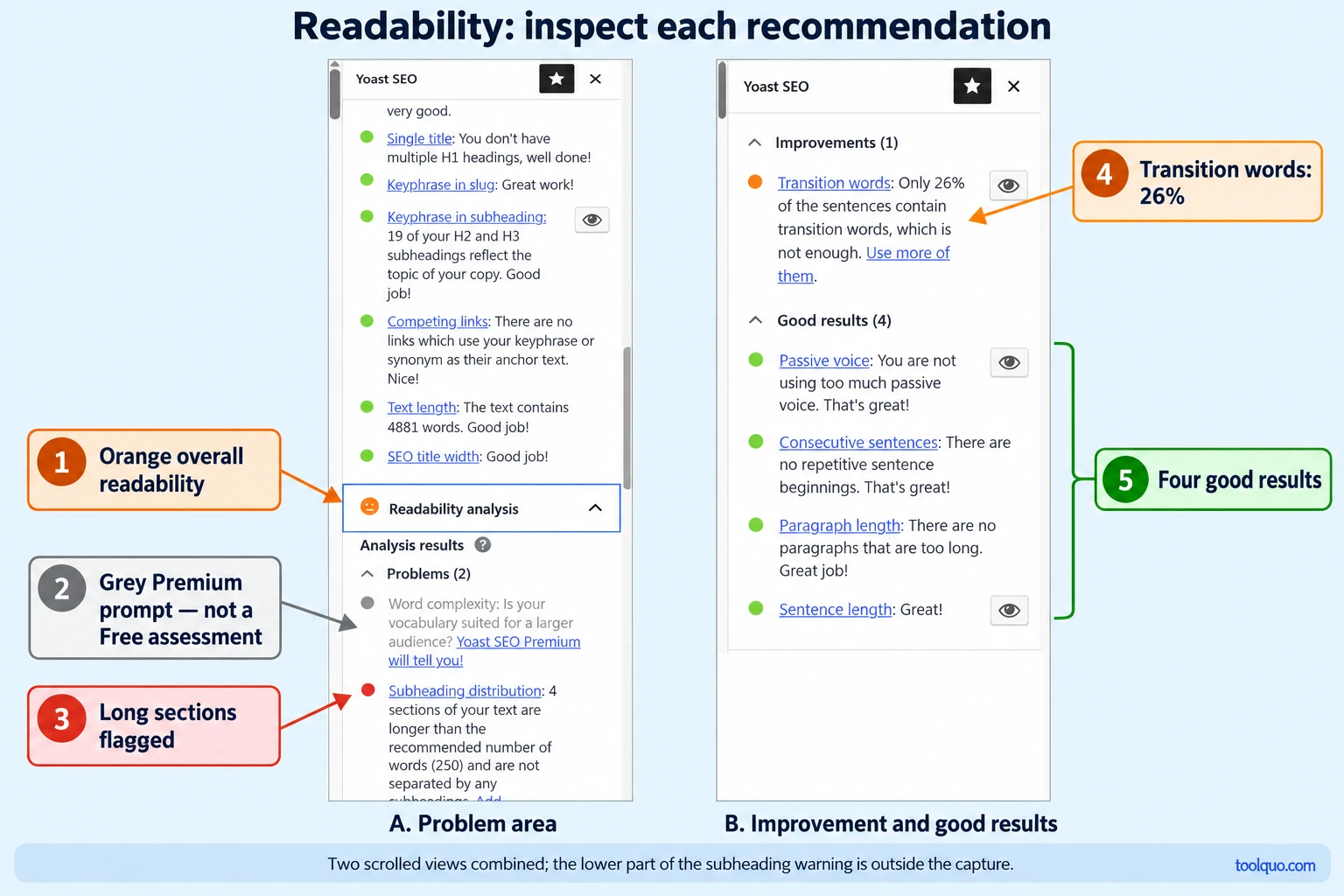
Our readability observations included a subheading-distribution problem, a transition-word improvement at approximately 26%, and good results for passive voice, consecutive sentence beginnings, paragraph length and sentence length.
Use each check as a prompt to inspect the writing. Split a sentence if it hides several ideas. Add a heading when readers need a landmark. Replace needless complexity, but keep technical terms that the audience needs and explain them.
Transition words should show a real connection between ideas. “The plugin flagged a long sentence. We split it into two” becomes clearer as “The plugin flagged a long sentence, so we split it into two.” The word “so” explains the response. Adding “however” or “therefore” where no contrast or consequence exists would make the writing worse.
What do Insights and Premium readability checks add?
Insights provides additional text statistics. In our testing it displayed a Flesch Reading Ease value of 45.8, 4,881 words and an estimated reading time of 23 minutes. Flesch estimates difficulty from sentence and word length; a higher value generally indicates easier text. This statistic is separate from the overall readability traffic light and should be interpreted for your audience.
Yoast’s Free version already includes the core checks discussed above. Premium adds readability assessments such as word complexity, which flags potentially difficult vocabulary, and text alignment, which flags presentation that may be harder to read. These additional assessments require Premium; a locked prompt in Free is not a completed assessment or proof that your writing is poor. Availability can depend on language and the relevant feature.
For this article, the practical point is simple: use the Free checks to review clarity, and distinguish paid extras from problems you can actually inspect. Our Yoast SEO review discusses the broader upgrade decision.
6. How to Improve Your Yoast SEO Score
- Start by checking whether the article answers the question behind the search. Someone searching “how to change a WordPress password” needs usable steps; an article that only explains why passwords matter would miss that need, even if its Yoast checks were green.
- Next, enter your chosen phrase in Yoast’s Focus keyphrase field and review the SEO title and Meta description fields in the same panel. This helps separate missing plugin information from passages that actually need rewriting.
- Correct meaningful gaps. Clarify a vague title, supply missing metadata, add a useful internal link or improve inaccurate alt text. Read the relevant passages when readability feedback suggests a problem.
- Assess what remains. If satisfying a recommendation would produce an awkward heading, irrelevant link or unnecessary explanation, retain the better editorial choice. Save your changes and confirm that important fields persisted.
- Do not switch to a less suitable focus keyphrase solely because it turns the light green. That changes the question the plugin is answering, not necessarily the page’s suitability for the search term you originally wanted to target.
7. Troubleshooting: What to Check When Yoast’s Result Seems Wrong
A remaining orange light is not necessarily a fault. Troubleshooting is useful when the feedback contradicts what you can see, the analysis appears empty, or saved changes are not reflected in the result.
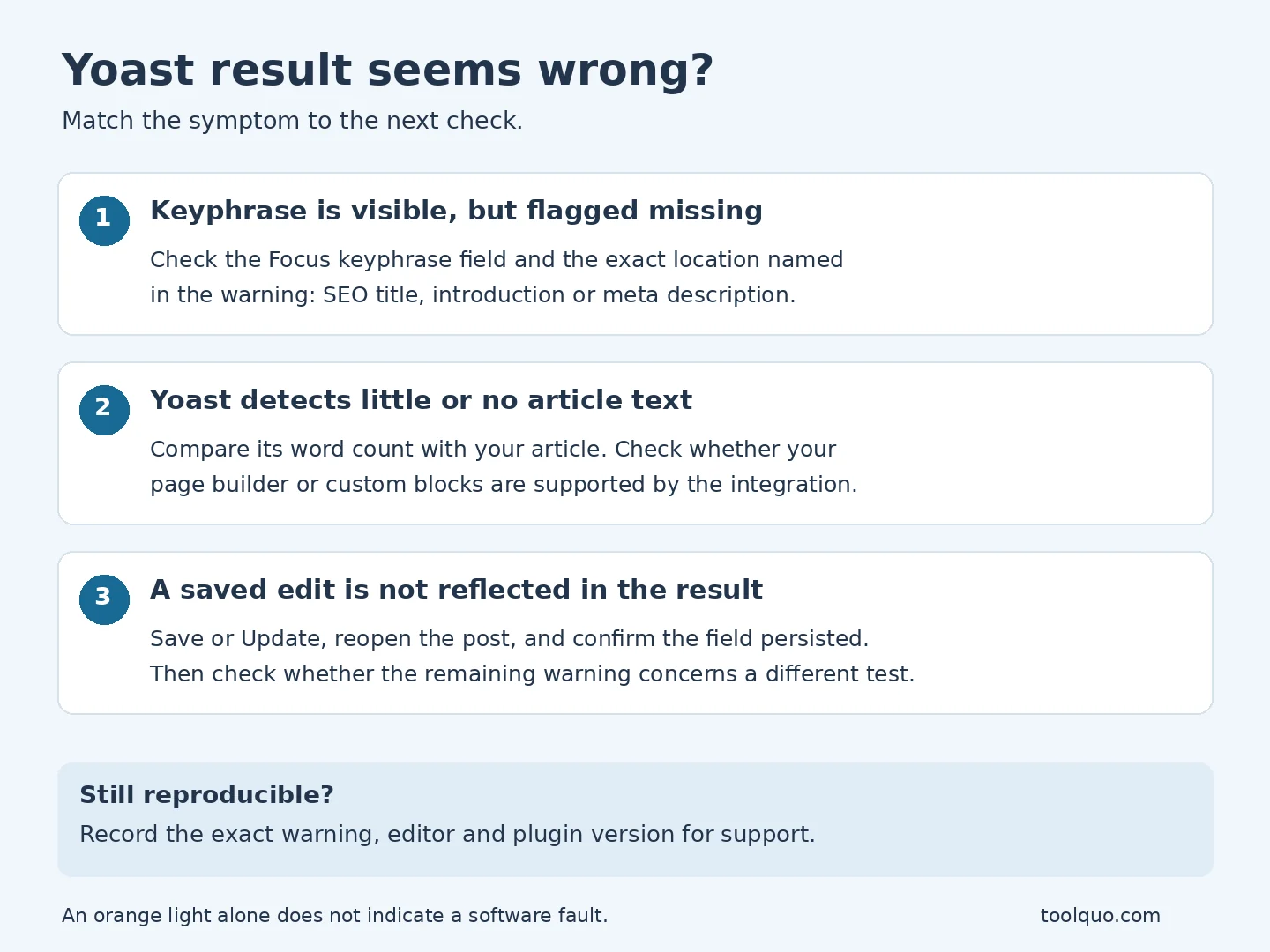
Yoast says the keyphrase is missing, but you can see it
First check Yoast’s Focus keyphrase field: have you entered the phrase you intend to target? Next, read the exact warning. If it says “keyphrase in SEO title”, having the phrase in the article body does not satisfy that check. Inspect the SEO title field itself. Apply the same reasoning to the introduction, description or headings named in other warnings.
The full article is visible, but Yoast detects little or no text
Check whether the missing text sits inside a page builder, custom block or another component Yoast may not read through your editor integration. Compare the reported text length with the content you expect it to analyze. Do not duplicate the article inside another field merely to obtain a better result. Review the compatibility guidance for your editor or builder if the mismatch persists.
You changed a field, but the warning remains
Click Save draft or Update and wait for confirmation. Reopen the article and confirm that your change is still in the relevant Yoast field. If the description has reverted, the edit did not persist; if it is saved, reread the warning to check whether it concerns the description’s length, keyphrase use or another requirement. A description can resolve one check while leaving another unchanged.
If you can reproduce feedback that still contradicts the saved content, record the exact warning, editor and plugin version and consult Yoast’s support guidance. That is more useful than repeatedly changing otherwise suitable copy.
8. Do You Need All Green Lights to Rank?
No. Yoast itself explains that every individual light need not be green. The useful question is whether a remaining warning identifies a change that would help this page.
Green does not guarantee indexing, first-page rankings, traffic or conversions. The analysis does not establish that your facts are correct, your answer satisfies search intent, or your page offers more value than competing results. Technical accessibility and other search signals still matter. Our SEO fundamentals guide explains the broader process.
Our Rank Math case study provides a parallel: the recorded score moved from 82 to 81 after editorial work, although the keyword configuration also differed. It later rose from 81 to 87 after keyword information changed without another published-content rewrite. These were not controlled ranking measurements.
Yoast is useful as an editing assistant. Its value comes from helping you notice omissions and examine writing, while you decide which changes improve the page.
9. Frequently Asked Questions
Can I publish with red or orange Yoast indicators?
Yes. The colours do not block publication. Investigate the warnings, correct genuine problems and make a reasoned decision about contextual recommendations. Publishing permission and readiness for readers are separate questions.
Does entering a focus keyphrase tell Google what to rank?
No. The field tells Yoast which phrase to use for its analysis. It is not an instruction to Google to rank the page for that query.
Does Yoast Premium automatically improve my score?
No. Premium adds analysis capabilities and tools, but payment does not automatically make the article better or guarantee green lights. Our Yoast SEO review explains when the additional features may justify upgrading.
Is an online Yoast SEO checker equivalent to the WordPress analysis?
Do not assume so. A public-page checker may have access to different content and settings from the WordPress editor, including no access to its saved focus-keyphrase configuration. Check what the tool actually evaluates before comparing its rating with the plugin.
Use the feedback to improve the page, then measure search performance separately. A more useful article is the goal; a green light is one piece of feedback.
About the author
Nikhil Bhardwaj
Founder & Editor, Toolquo
Nikhil leads Toolquo’s editorial direction, focusing on practical software research, transparent comparisons, and clear buying decisions.
View author profile →Keep exploring
Related guides
October 20, 2026
Rank Math SEO Score Explained: What Is a Good Score and How to Improve It?
Understand what your Rank Math SEO score means, which checklist recommendations matter, and how to improve…